





Cloudflare 提供的安全保护,让所有网站管理员都能享受到平等且强大的网站安全防护。在本文中,我们将探讨利用 Cloudflare WAF(Web Application Firewall)规则来保护网站和服务的几个实用方法,希望能为你带来一些启发。如果想了解更深入的实践,建议你仔细阅读 Cloudflare 的官方文档,那里有最详细且最新的信息。
更新提示
cf.threat_score 规则字段。现在,Cloudflare 已经通过自动化的安全升级来保护你的域名免受恶意流量的攻击。想要了解更多,可以阅读这篇官方博客文章:
Enhanced Security and Simplified Controls with Automated Botnet Protection
。Web 应用程序防火墙(Web Application Firewall)是一种防护网络攻击的技术,通过检查和过滤 HTTP 流量中的恶意请求和攻击,保护 Web 应用程序的安全。
Cloudflare WAF 是一种安全防护服务,能够帮助保护您的网站免受常见的网络攻击,如 SQL 注入、跨站脚本攻击、恶意文件上传等。Cloudflare 的免费计划用户可以使用基础的 WAF 功能,并且托管在 Cloudflare 上的每个域名都可以单独配置最多五个 WAF 规则。
Cloudflare WAF 的 基本策略1 有五种:Allow(允许)、Bypass(绕过)、Managed Challenge(托管质询)、JS Challenge(JavaScript 质询)和 Block(阻止),每种策略都有不同的用途和优先级条件:
Allow(允许)策略是最宽松的一种,满足条件的流量都直接通过,不进行任何检查,它是额外的「白名单」;
Bypass(绕过)策略用于绕过某些规则的检查和阻止,可以用来放行某些特定的流量;
Managed Challenge(托管质询) 策略会让访问者在访问您的网站之前需要通过一个托管的验证码来验证其身份。如果用户通过验证,则可以继续访问您的网站,否则将被阻止;
JS Challenge(JavaScript 质询)策略与 Managed Challenge 类似,不同的是它要求访问者在访问您的网站之前进行 JavaScript 质询来验证其身份。如果用户通过验证,则可以继续访问您的网站,反之则被阻止;
Block (阻止)策略会完全阻止匹配规则的请求,这种策略通常用于防御已知的攻击或威胁,对于 Block 策略,我们使用需要非常谨慎。将正常的访问者阻拦在外与我们的目的是相悖的。
各种策略的优先级并不是绝对的,我们可以手动控制 优先级 顺序,对于 Cloudflare 免费计划,我们每个域名最多只有 5 个规则,上下拖拽规则模块即可控制优先级顺序。
下图是本文设置规则的示例顺序,我们来对 WAF 的五种基本策略一一介绍
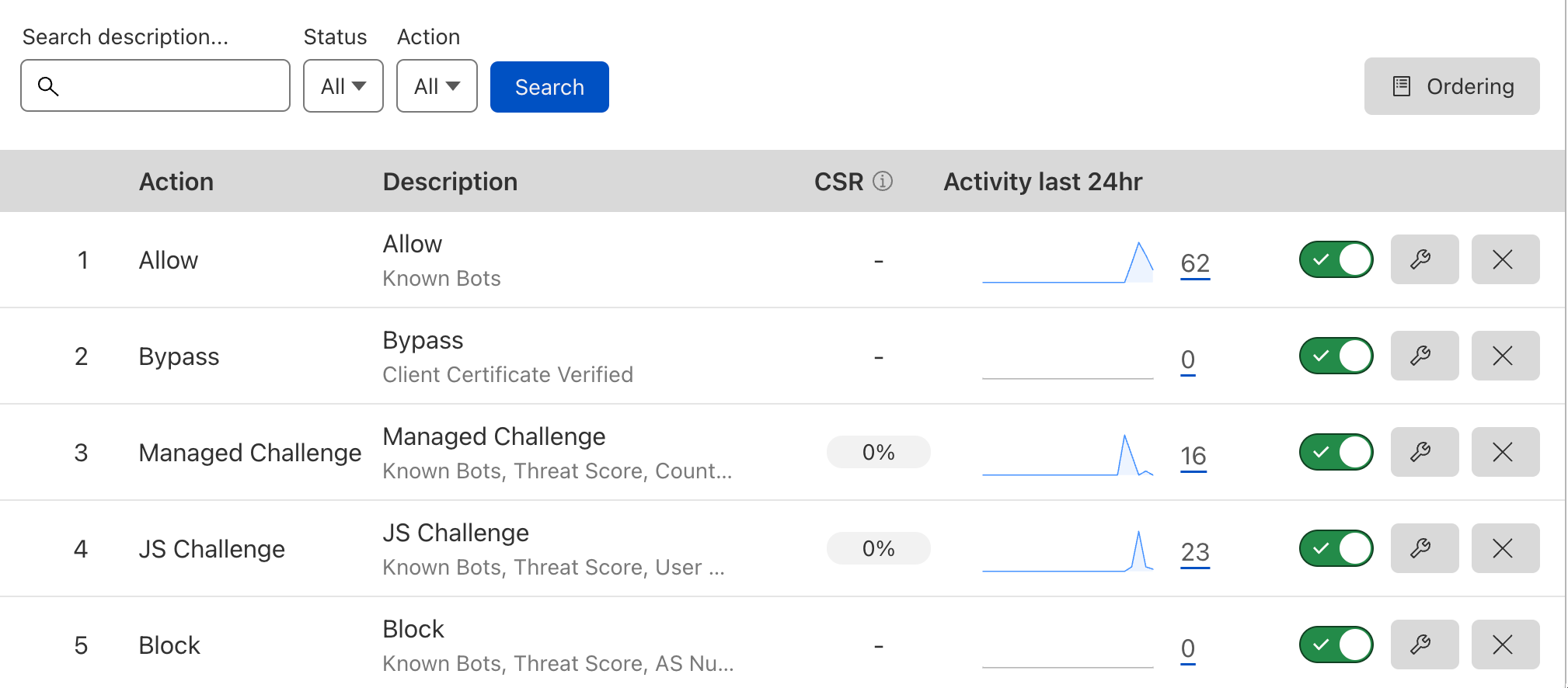
注意: 您 不一定 需要设置所有的基本策略,仅取决于您的网站的性质和实际需求。
在 Cloudflare 仪表盘上按照下列步骤创建 WAF 防火墙规则
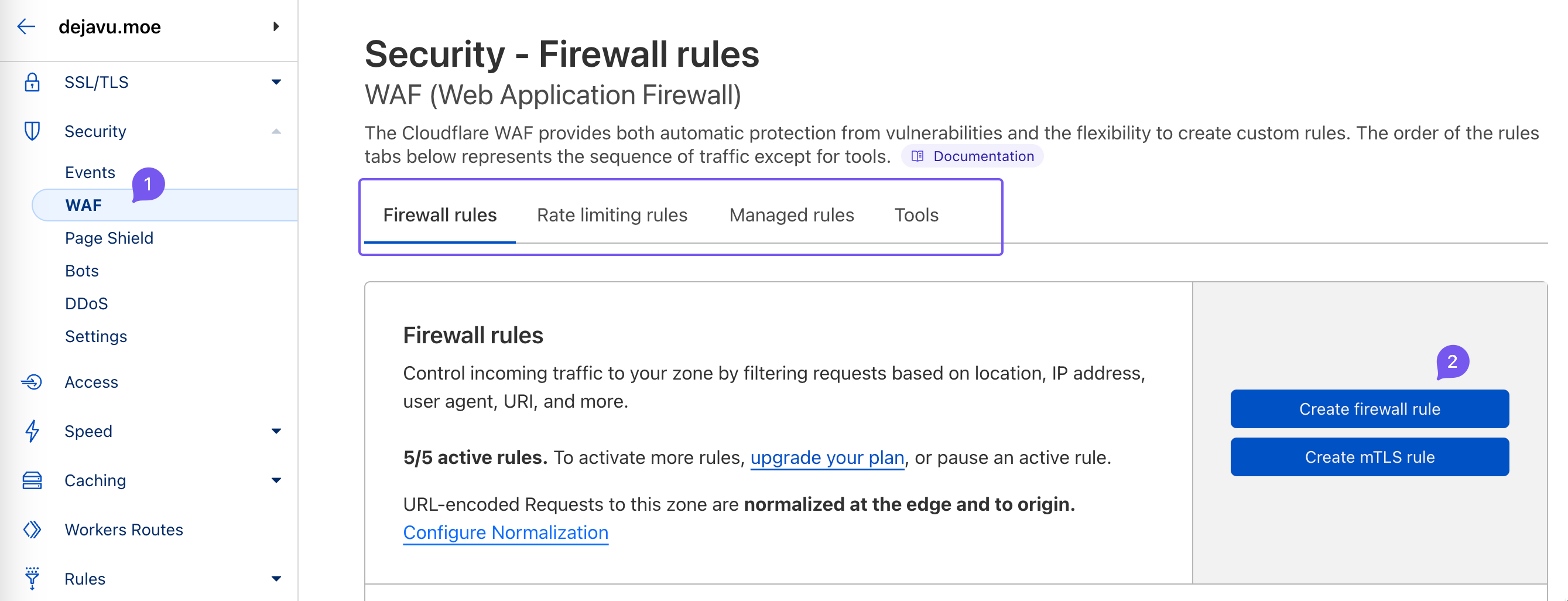
将 Allow 允许 策略放在第一个,使它拥有最高的优先级,可用于后续细粒度的放行规则。
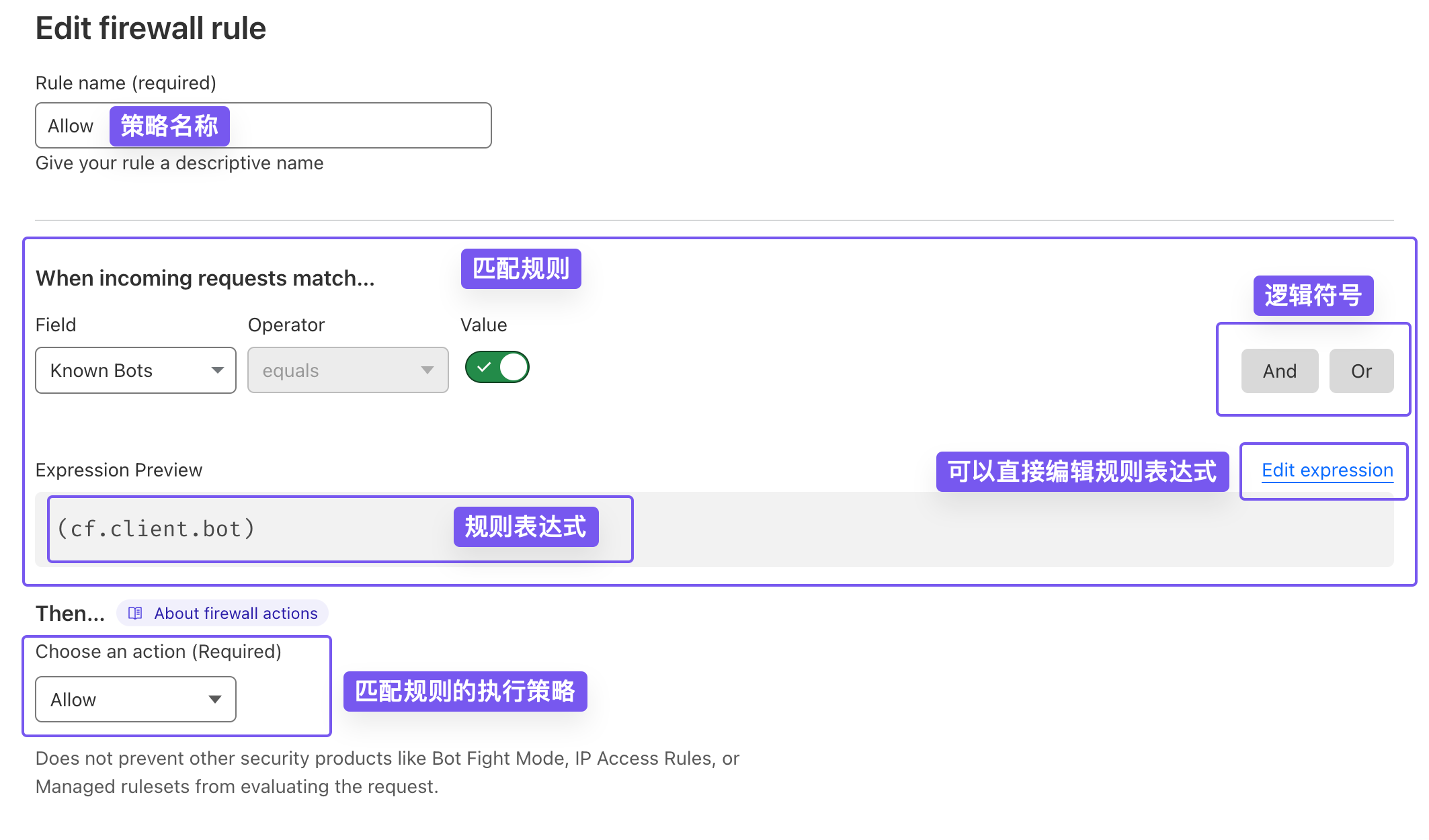
在上图的规则编辑器里编辑匹配规则,可以即时看到下面 规则表达式 的变化。规则表达式比规则编辑器更高级,使用可视化编辑器难以表现的复杂规则,能够编辑规则表达式来实现。
暂时不会写表达式没关系,现在只需要知道:配置好的规则表达式,可以复制到另一个站点的 WAF 规则里继续使用,也可以分享给别人使用。
在上面的示例中,我们选择了 Known Bots 字段,并且勾选 Value 值为真(True)。
Known Bots 是一个预定义的策略变量,用于检测请求是否来自 Cloudfare 已知的爬虫或机器人,它是一个 Boolean 值:True 或 False。
这个规则允许经过 Cloudflare 验证的爬虫机器人直接通过 WAF,它会使用 Cloudflare 自己维护的可信机器人列表。对大多数网站是一个推荐的策略,不会影响搜索引擎的正常收录。
Bypass 绕过 策略更适合做第二优先级策略
(cf.tls_client_auth.cert_verified)
下面示例表示:当 TLS 客户端证书经过验证时(一般是 Cloudflare 颁发的源服务器证书),流量直接绕过 WAF 的 部分特性,比如浏览器用户代理阻止策略、浏览器完整性检查策略、速率限制策略等等。
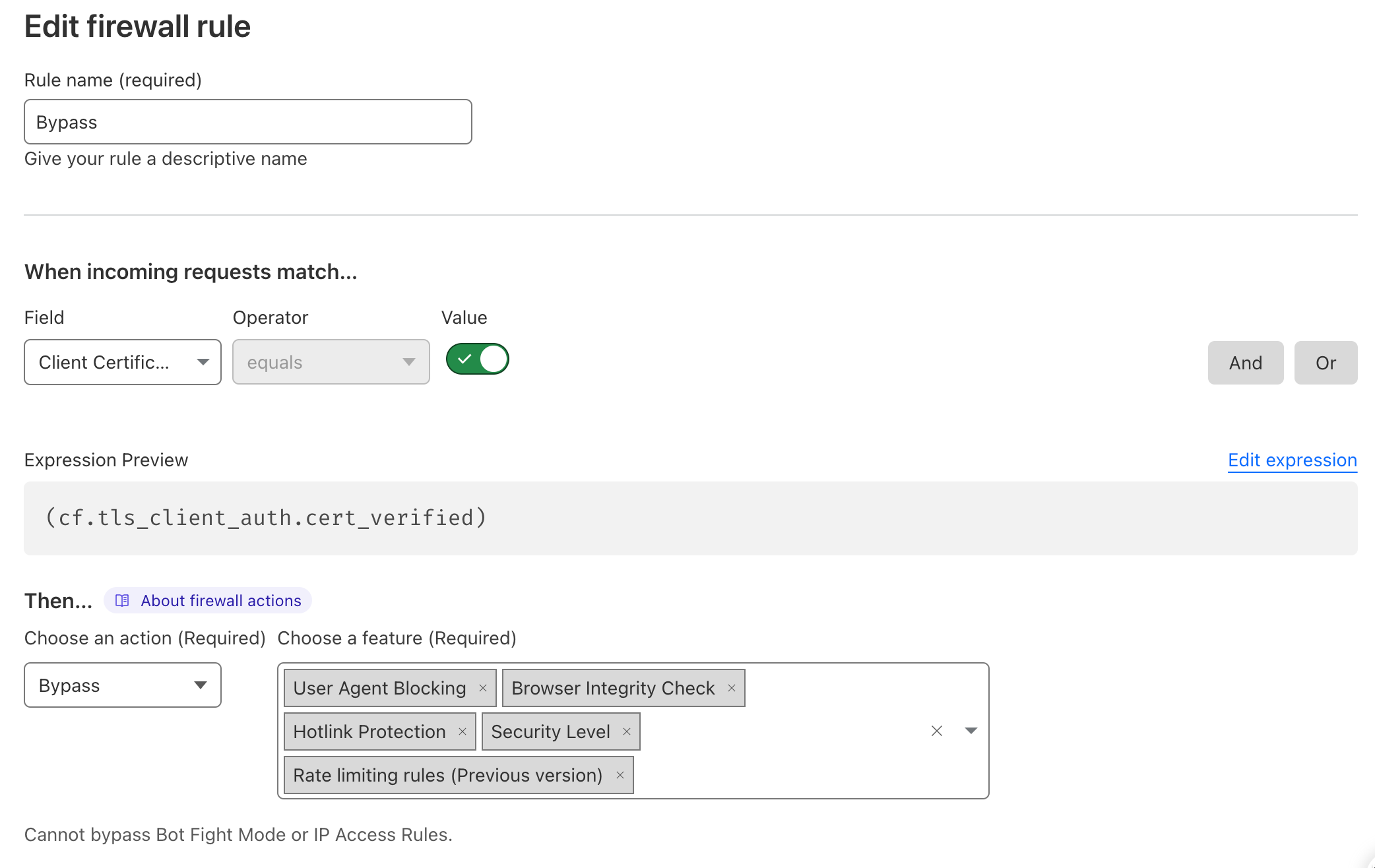
需要注意的是 Bypass 策略不能绕过 机器人挑战模式 (Bot Fight Mode) 和 IP 访问策略 ( IP Access Rules)。
Managed Challenge 托管质询 策略,是 Cloudflare 自己提供的验证页面。用户访问的时候,首先会看到一个页面询问他们是否是真人。对于正常访客(人类)来说,几乎无感,很适合阻止 潜在的恶意机器人 访问。
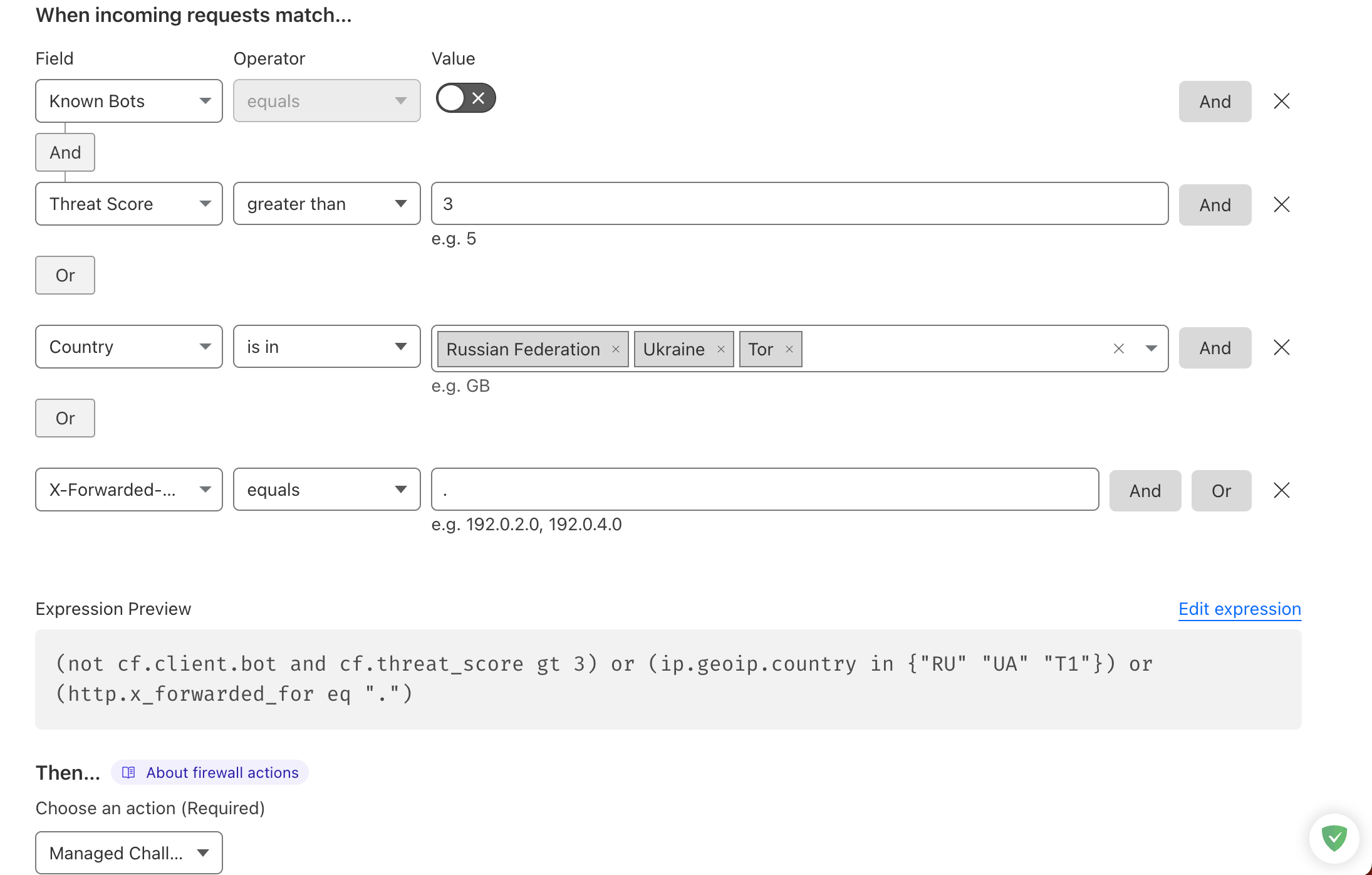
上面是一个简单的托管质询规则
(not cf.client.bot and cf.threat_score gt 3) or (ip.geoip.country in {"RU" "UA" "T1"}) or (http.x_forwarded_for eq ".")
先了解几个名词:
我们再来看下上面的匹配规则:
提问: 对于上面的策略,在俄罗斯的 Yandex 爬虫机器人会被托管质询阻止访问吗?
答案: 并不会!我们前面设置了优先级最高的 Allow 允许策略,它允许了经过 Cloudflare 验证的爬虫机器人通过 WAF 规则。
JavaScript 质询 策略比托管质询还要更严格一点(机器人表示很难受 😭),由于示例规则太长,不方便截图,您可以粘贴到您的 WAF 规则编辑器里查看
(not cf.client.bot and cf.threat_score gt 10) or (http.user_agent eq "") or (http.user_agent eq "") or (http.user_agent contains "fuck") or (http.user_agent contains "lient" and http.user_agent contains "ttp") or (http.user_agent contains "java") or (http.user_agent contains "Joomla") or (http.user_agent contains "libweb") or (http.user_agent contains "libwww") or (http.user_agent contains "PHPCrawl") or (http.user_agent contains "PyCurl") or (http.user_agent contains "python") or (http.user_agent contains "wrk") or (http.user_agent contains "hey/") or (http.user_agent contains "Acunetix") or (http.user_agent contains "apache") or (http.user_agent contains "BackDoorBot") or (http.user_agent contains "cobion") or (http.user_agent contains "masscan") or (http.user_agent contains "FHscan") or (http.user_agent contains "scanbot") or (http.user_agent contains "Gscan") or (http.user_agent contains "Researchscan") or (http.user_agent contains "WPScan") or (http.user_agent contains "ScanAlert") or (http.user_agent contains "Wprecon") or (http.user_agent contains "virusdie") or (http.user_agent contains "VoidEYE") or (http.user_agent contains "WebShag") or (http.user_agent contains "Zeus") or (http.user_agent contains "zgrab") or (http.user_agent contains "zmap") or (http.user_agent contains "nmap") or (http.user_agent contains "fimap") or (http.user_agent contains "ZmEu") or (http.user_agent contains "ZumBot") or (http.user_agent contains "Zyborg") or (http.user_agent contains "attachment") or (http.user_agent eq "undefined")
上面有个新的匹配项 UA(User-Agent),即 用户代理,它指定了发送请求的客户端应用程序或浏览器的名称和版本号。
可以看到示例规则匹配到信誉度不高的 IP 或 UA后,会进行进行 JavaScript 质询。
Block 阻止 策略放在最后的优先级,这是较为合理的,下面的截图是部分示例规则
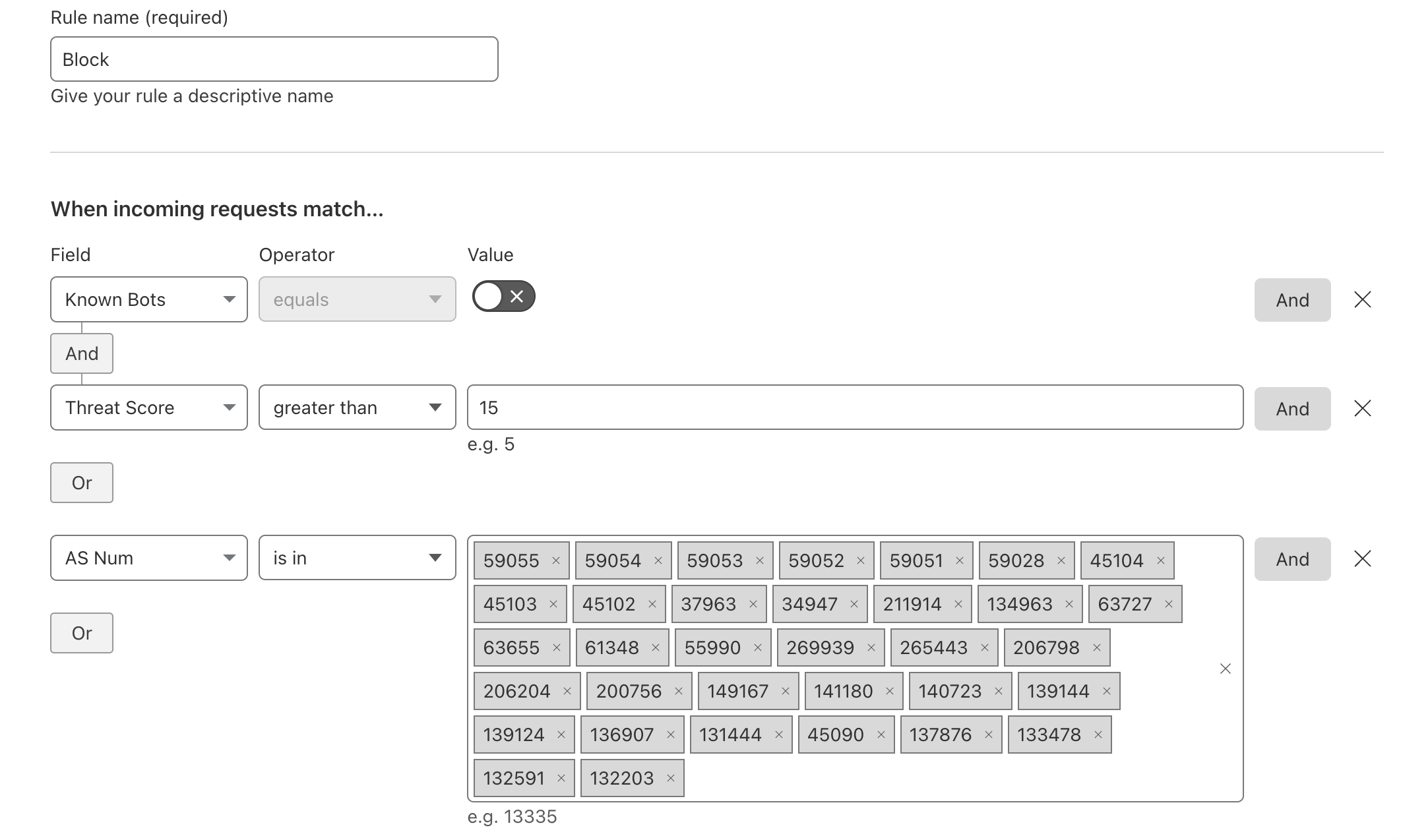
ASN:自治系统号(Autonomous System Number)的缩写,使用 32 位数字分配唯一标识的自治系统(AS),下面是完整的示例规则表达式
(not cf.client.bot and cf.threat_score gt 15) or (ip.geoip.asnum in {59055 59054 59053 59052 59051 59028 45104 45103 45102 37963 34947 211914 134963 63727 63655 61348 55990 269939 265443 206798 206204 200756 149167 141180 140723 139144 139124 136907 131444 45090 137876 133478 132591 132203}) or (http.user_agent contains "80legs") or (http.user_agent contains "Abonti") or (http.user_agent contains "admantx") or (http.user_agent contains "aipbot") or (http.user_agent contains "AllSubmitter") or (http.user_agent contains "Backlink") or (http.user_agent contains "backlink") or (http.user_agent contains "Badass") or (http.user_agent contains "Bigfoot") or (http.user_agent contains "blexbot") or (http.user_agent contains "Buddy") or (http.user_agent contains "CherryPicker") or (http.user_agent contains "cloudsystemnetwork") or (http.user_agent contains "cognitiveseo") or (http.user_agent contains "Collector") or (http.user_agent contains "cosmos") or (http.user_agent contains "CrazyWebCrawler") or (http.user_agent contains "Crescent") or (http.user_agent contains "Devil") or (http.user_agent contains "spider") or (http.user_agent contains "stat") or (http.user_agent contains "Appender") or (http.user_agent contains "Crawler") or (http.user_agent contains "DittoSpyder") or (http.user_agent contains "Konqueror") or (http.user_agent contains "Easou") or (http.user_agent contains "Yisou") or (http.user_agent contains "Etao") or (http.user_agent contains "mail" and http.user_agent contains "olf") or (http.user_agent contains "exabot.com") or (http.user_agent contains "getintent") or (http.user_agent contains "Grabber") or (http.user_agent contains "GrabNet") or (http.user_agent contains "HEADMasterSEO") or (http.user_agent contains "heritrix") or (http.user_agent contains "htmlparser") or (http.user_agent contains "hubspot") or (http.user_agent contains "Jyxobot") or (http.user_agent contains "kraken") or (http.user_agent contains "larbin") or (http.user_agent contains "ltx71") or (http.user_agent contains "leiki") or (http.user_agent contains "LinkScan") or (http.user_agent contains "Magnet") or (http.user_agent contains "Mag-Net") or (http.user_agent contains "Mechanize") or (http.user_agent contains "MegaIndex") or (http.user_agent contains "Metasearch") or (http.user_agent contains "MJ12bot") or (http.user_agent contains "moz.com") or (http.user_agent contains "Navroad") or (http.user_agent contains "Netcraft") or (http.user_agent contains "niki-bot") or (http.user_agent contains "NimbleCrawler") or (http.user_agent contains "Nimbostratus") or (http.user_agent contains "Ninja") or (http.user_agent contains "Openfind") or (http.user_agent contains "Analyzer") or (http.user_agent contains "Pixray") or (http.user_agent contains "probethenet") or (http.user_agent contains "proximic") or (http.user_agent contains "psbot") or (http.user_agent contains "RankActive") or (http.user_agent contains "RankingBot") or (http.user_agent contains "RankurBot") or (http.user_agent contains "Reaper") or (http.user_agent contains "SalesIntelligent") or (http.user_agent contains "Semrush") or (http.user_agent contains "SEOkicks") or (http.user_agent contains "spbot") or (http.user_agent contains "SEOstats") or (http.user_agent contains "Snapbot") or (http.user_agent contains "Stripper") or (http.user_agent contains "Siteimprove") or (http.user_agent contains "sitesell") or (http.user_agent contains "Siphon") or (http.user_agent contains "Sucker") or (http.user_agent contains "TenFourFox") or (http.user_agent contains "TurnitinBot") or (http.user_agent contains "trendiction") or (http.user_agent contains "twingly") or (http.user_agent contains "VidibleScraper") or (http.user_agent contains "WebLeacher") or (http.user_agent contains "WebmasterWorldForum") or (http.user_agent contains "webmeup") or (http.user_agent contains "Webster") or (http.user_agent contains "Widow") or (http.user_agent contains "Xaldon") or (http.user_agent contains "Xenu") or (http.user_agent contains "xtractor") or (http.user_agent contains "Zermelo")
将它粘贴到 WAF 规则表达式编辑器,更容易看到匹配规则:
Cloudflare WAF 针对每条规则表达式都有长度限制。这个限制取决于您的 Cloudflare WAF 套餐类型,不同套餐计划的用户的规则表达式长度限制也不同:
如果您的规则表达式超过了限制,您可能需要缩短规则或将其分解成多个规则以确保其可用性。
通过上面的一些简单示例,我们已经熟悉了 WAF 基本策略的使用。在日常维护中,我们需要常关注 WAF 防火墙日志和事件:
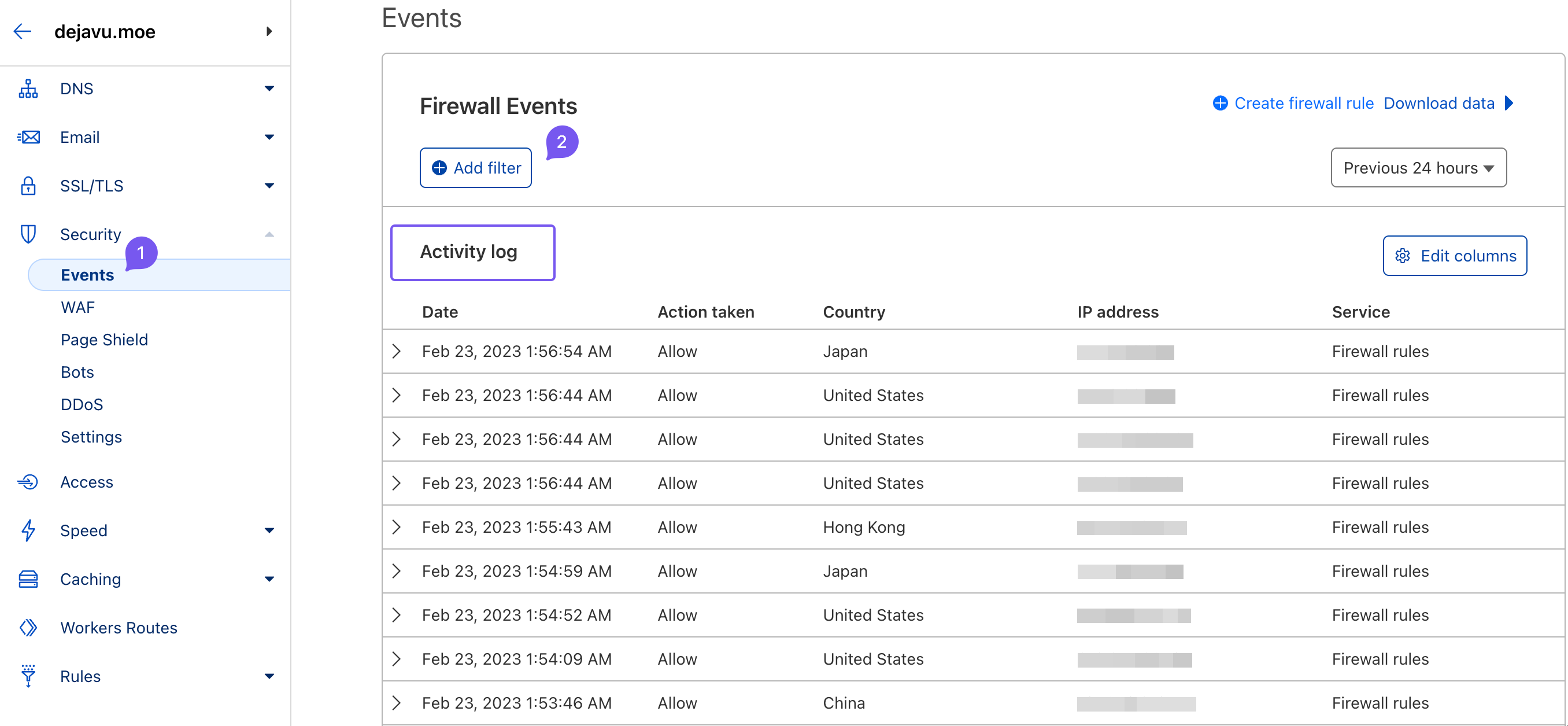
WAF 的目的是为了过滤不正常的流量,保护正常的访问,同时保证正常访问不被规则「误杀」,造成用户体验下降。举个例子,在上面的演示规则中,我就发现出现「误杀」情况了

发生什么了呢?来看看 WAF 事件日志
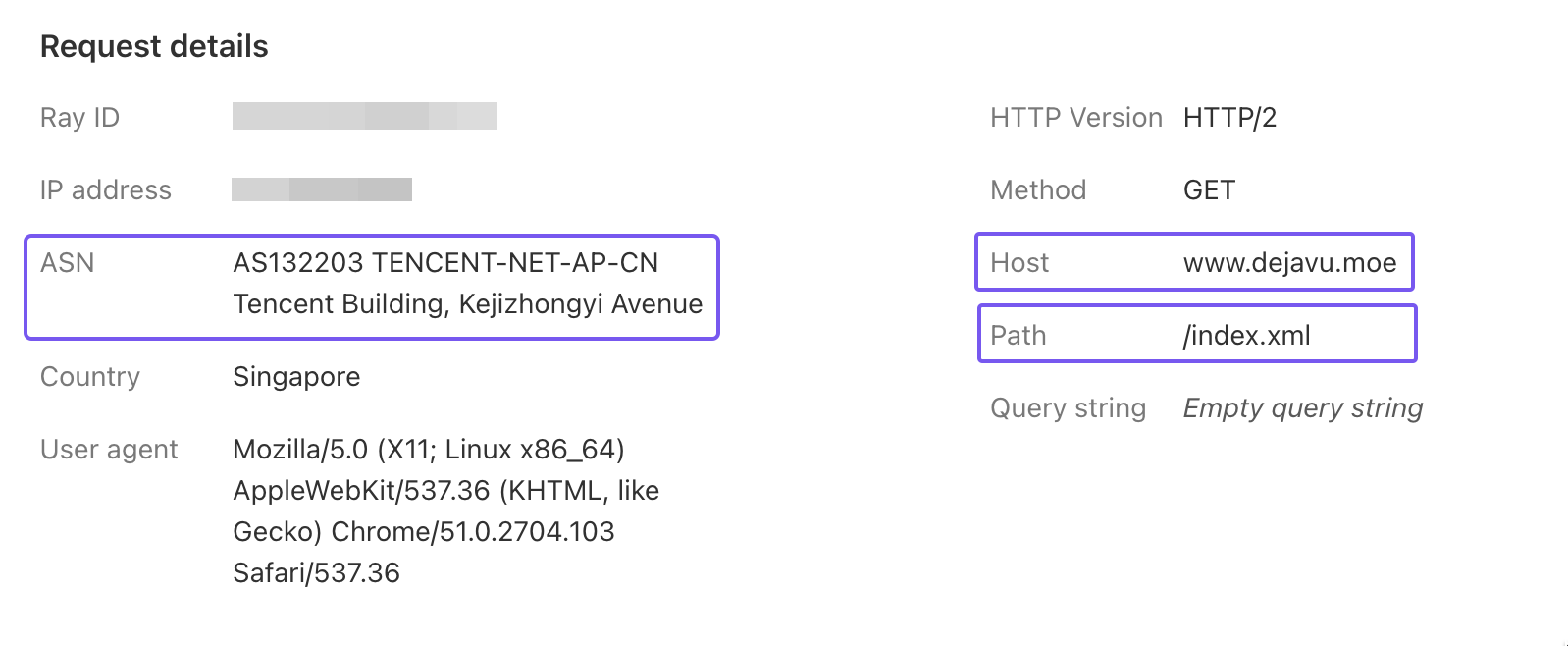
显然,这是一个运行在 XX 云(新加坡)服务器上的 RSS 订阅服务,被上面 Block 阻止规则的 ASN 匹配后封禁了。
我不打算解禁 XX 云,又希望访客能正常在他们的服务器上通过 RSS 订阅我的博客,怎么办呢?
别忘了,我们还有个设置优先级最高的 Allow 允许策略啊!再了解几个名词:
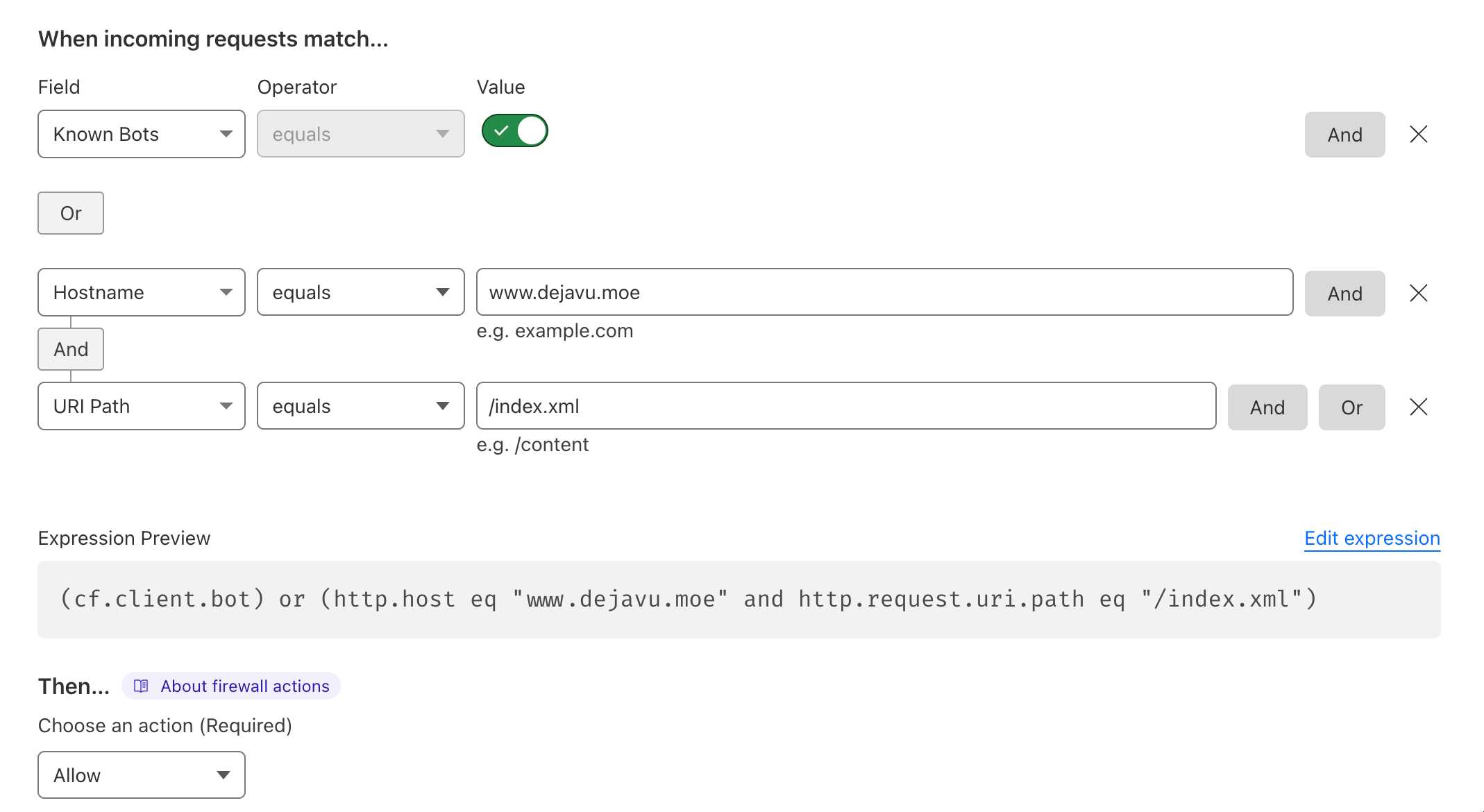
在之前的 Allow 允许策略里,我添加了一条策略
(cf.client.bot) or (http.host eq "www.dejavu.moe" and http.request.uri.path eq "/index.xml")
如果访问我博客的域名,并且访问资源路径是 /index.xml,则直接通过 WAF,由于它的优先级最高,因此不会受后面其他规则的影响。
怎么样, 现在您应该知道怎么维护规则的 健壮性 了吧。
在 WAF 规则的管理页面,我们可以注意到 CSR (Challenge Score Rate),它是一个百分比值,用于表示被Cloudflare WAF 拦截的 HTTP 请求中触发 JavaScript 质询、旧版 CAPTCHA 或托管质询的比例。
CSR 的值 越小越好,比如,CSR为 1% 表示每 100 个 HTTP 请求中有 1 个请求被 Cloudflare WAF 拦截并要求进行质询验证。此指标可帮助我们评估 WAF 规则的有效性,以及是否需要对规则的标准或操作进行调整。
为了保证正常访客的体验,我们建议保证它的值在 0%~ 3% 的范围,如果超过这个范围,一般表示规则需要进行调整。
WAF 规则菜单里还有些规则,免费计划可配置性比较有限,粗略介绍一下
Rate Limiting 速率限制规则,用于限制特定客户端在一定时间内对您网站的请求数。可以减轻您的服务器负载以应对恶意攻击。比如:
(not cf.bot_management.verified_bot and http.request.uri.path eq "/")
后面可以根据需要定制限速规则,还可以自定义响应码2、时间段、有效期等参数。
注意:限速规则也可能对合法的请求进行限制,请谨慎配置。
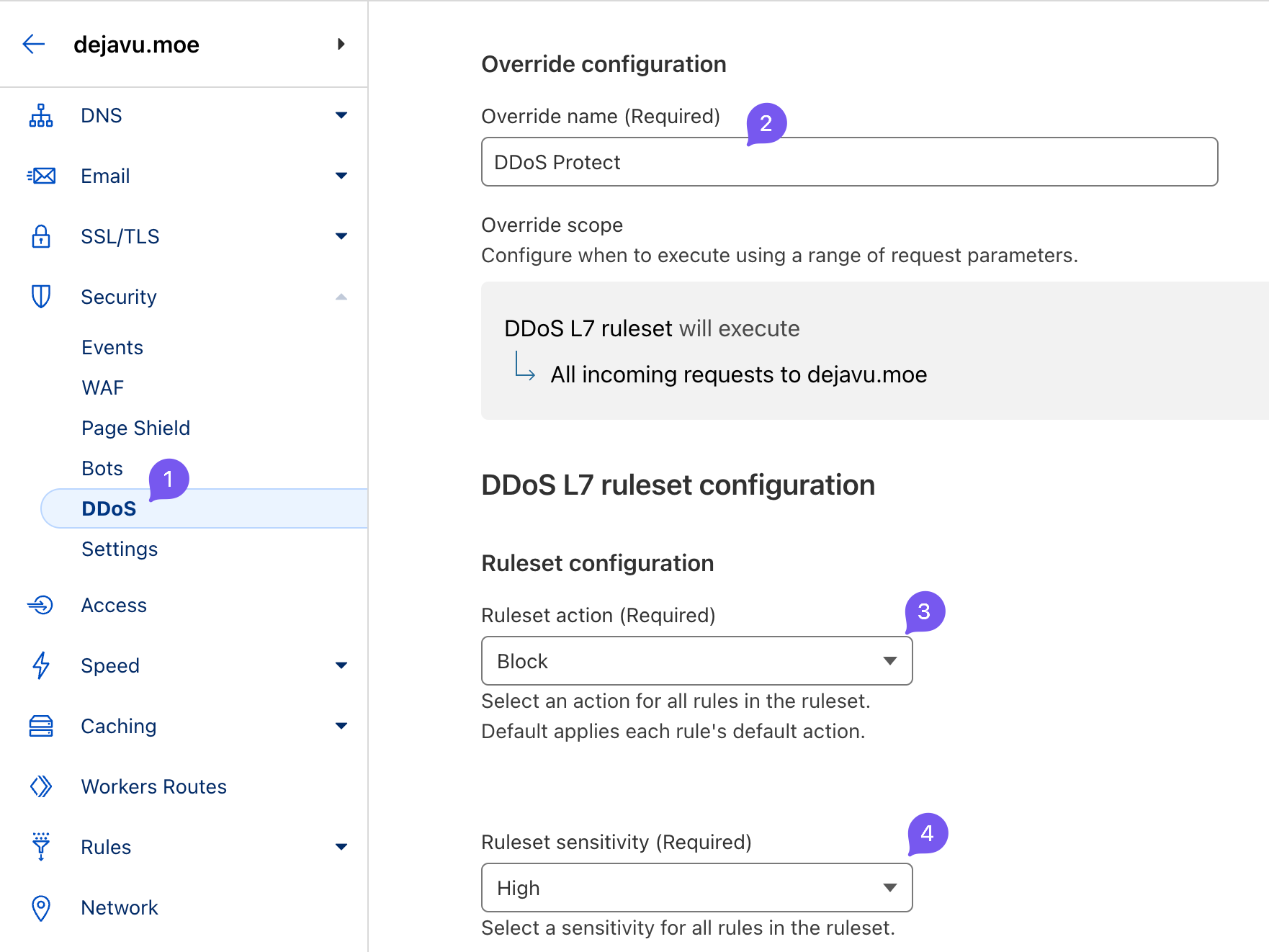
DDoS 保护策略,按照下图配置即可,Cloudflare 这个规则很精准的,基本没「误杀」情况
免费计划差不多就这样吧,请尽情享受!有钱可以支持付费版 Cloudflare,可以获得更高级、更多的 WAF 规则。
此内容由惯性聚合(RSS阅读器)自动聚合整理,仅供阅读参考。 原文来自 — 版权归原作者所有。