



惯性聚合 高效追踪和阅读你感兴趣的博客、新闻、科技资讯
阅读原文 在惯性聚合中打开

推荐订阅源

酷 壳 – CoolShell
酷 壳 – CoolShell
H
Hacker News: Front Page
P
Palo Alto Networks Blog
T
ThreatConnect
Apple Machine Learning Research
博客园_首页
T
True Tiger Recordings
P
Privacy & Cybersecurity Law Blog
B
Blog
IT之家
IT之家
Last Week in AI
Last Week in AI
F
Full Disclosure
Hacker News: Ask HN
Hacker News: Ask HN
C
Comments on: Blog
Microsoft Azure Blog
C
Cybersecurity and Infrastructure Security Agency CISA
Microsoft Security Blog
博客园 - 【当耐特】
N
News and Events Feed by Topic
NISL@THU
NISL@THU
腾讯CDC
雷峰网
雷峰网
Security Latest
Security Latest
李成银的技术随笔
M
Microsoft Research Blog - Microsoft Research
L
LangChain Blog
L
Lohrmann on Cybersecurity
cs.CL updates on arXiv.org
C
Check Point Blog
Y
Y Combinator Blog
Recent Announcements
博客园 - Franky
N
News | PayPal Newsroom
V
V2EX
A
About on SuperTechFans
The Register - Security
月光博客
月光博客
奇客Solidot–传递最新科技情报
奇客Solidot–传递最新科技情报
Google Online Security Blog
MyScale Blog
MyScale Blog
Cisco Talos Blog
Cisco Talos Blog
Vercel News
Vercel News
WordPress大学
WordPress大学
C
Cyber Attacks, Cyber Crime and Cyber Security
The Hacker News
The Hacker News
IntelliJ IDEA : IntelliJ IDEA – the Leading IDE for Professional Development in Java and Kotlin | The JetBrains Blog
爱范儿
爱范儿
A
Arctic Wolf
L
LINUX DO - 最新话题
freeCodeCamp Programming Tutorials: Python, JavaScript, Git & More

Dejavu's Blog

使用 auto-cpufreq 平衡 Linux 性能功耗 哪吒监控面板部署教程 NodeBB 论坛部署教程 Scaleway VPS 安装 Alpine Linux 甲骨文 ARM 实例部署 Gemma 4 模型 Headscale + Tailscale 组建虚拟专用网 在 Linux 上使用 Yubikey OpenPGP 应用 BuyVM VPS 块存储挂载教程 Alpine Linux 服务器配置指南 Alpine Linux 安装 Cloudflared Docker 多容器共享中心数据库 安装 Komari 服务器监控工具 Scaleway VPS 安装 Debian Linux Debian 13 下部署 AsmBB 论坛 使用 Kopia 自动化备份服务器数据 给 Docker 启用 IPv6 支持 Netcup 服务器安装自定义 ISO 镜像 在 Debian 13 上自托管 Mox 邮局 使用 Stalwart 自托管邮局服务 烽火 HG5582A 光猫开启桥接模式 Docker 自托管 Shlink 短链服务 部署 Obsidian LiveSync 实时同步服务指南 我的 2025 年不完全回顾 我的 2025 年度自托管服务报告 Linux 下 Intel 核显驱动配置与硬件加速 Fedora Linux 安装配置记录 2025 年优雅地自托管 RSS 服务 自托管部署 Pocket ID 与 Tinyauth 完全指南 Woodpecker CI 和 Gitea 实现 Hugo 自动部署 Gitea/Forgejo 集成 Woodpecker CI/CD 在 Blinko 中使用 Ollama 作为 AI 供应商 Docker 部署 Gitea/Forgejo Plausible CE 启用城市级地理位置识别 Blinko 开源 AI 知识库 Docker 部署指南 Netcup 免税账号注册及购买服务器全记录 新到手的 Linux 服务器,我这样设置 Docker 自托管 Cloudreve Pro 私有网盘服务 GiffGaff SIM 卡使用体验和注意事项 在 n8n 中使用 Ollama 的本地 LLM 模型 简体中文互联网在变得糟糕吗? 如何低成本申请 S/MIME 证书用于个人邮件服务 迁移到 NameCrane Mail 域名邮箱套件服务 香烟与咖啡 联系我 Now 近况 在 Windows 中使用 Yubikey 的 OpenPGP 应用 Windows 11 IoT LTSC 养老指南 巧用浏览器生成 HAR 文件批量下载所需网页资源 聊聊静态网站的评论系统 在 Hugo 站点中优雅地展示实况照片 使用 snac 部署一个简洁优雅的 ActivityPub 实例 当 25 岁来临的时候 断网的这两年 从 Bitwarden/Vaultwarden 到 KeePassXC 更新日志 也许是 Android 上最好的本地播放器 - 椒盐音乐 2023 半年小结 写一个好玩的 Hugo 货币汇率转换短代码 写一个 Hugo 短代码将不同类别的总字数统计转换为书名显示 海信 Touch Lite 墨水屏音乐阅读器的简单体验 从 Debian 11(bullseye) 无感升级到 Debian 12(bookworm) 使用 GitHub Actions 自动提交 URL 到 IndexNow 批量重写 Git 历史提交记录 使用 cgit 托管小小的也很可爱的 Git 服务器 在 Debian 上使用 stagit 和 Nginx 的简单 Git 服务器 托管简单 Git 服务器的一些尝试 使用 stagit 自托管纯静态 Git 存储库 使用 Docker 快速部署单人 Fediverse 实例 我是如何建立自己的个人博客的? 简单、隐私友好的谷歌分析替代品,Plausible 自托管部署指南 服务器使用 Cloudflare CDN 的最佳实践 甲骨文服务器分配并启用 IPv6 地址 Git 版本控制学习笔记(二) Cloudflare WAF 防护策略简易指南 Mastodon 服务器批量导入自定义表情 低成本自托管 Mastodon 实例简明指南 自托管服务指南──有了服务器可以做什么? 使用 Miniflux + RSSHub 打造个人 RSS 阅读器 构建支持多种 CPU 架构的 Docker 镜像 一个可自托管的静态短链接应用 别了,二〇二二! Duplicacy CLI 进阶使用指南 Duplicacy CLI 备份工具的基本使用 初探 Cloudflare 零信任 - 通过 Docker 部署 Bitwarden 密码管理器 Yubikey 转运日志及上手指南 初探 Cloudflare 零信任 — 通过 Cloudflare Tunnel 搭建 SSH 聊天室 初探 Cloudflare 零信任 - 通过 Cloudflare Tunnel 访问服务 某科学的 PGP 算号指南 版权声明 2022 年的 MacBook Air M1 使用体验及应用推荐 使用 Vercel 和 Supabase 自托管 Cusdis 评论系统 为什么你的搜索引擎不好用? 个人在 Windows 上常用软件清单 macOS 基础开发环境设置指南 在 macOS 上使用 Canokey 的 OpenPGP 应用 提取 Windows UWP 应用商店的安装包以供离线安装 Git 版本控制学习笔记(一) 使用 Notion 管理 GitHub Star 项目 使用 Vercel 免费部署 Giscus 评论系统 Canokey 签名和认证应用指南
将博客评论从 Utterances 无缝迁移到 Giscus
2022-03-20 · via Dejavu's Blog

更换评论的原因

Giscus 相比 Utterances 的优点:支持多语言、自定义主题、 高级配置 ,此外还有很多小细节选项,比如:可以选择是否将评论框放在评论上方1、开启懒加载评论2、文章反应按钮、评论排序按钮3 ……
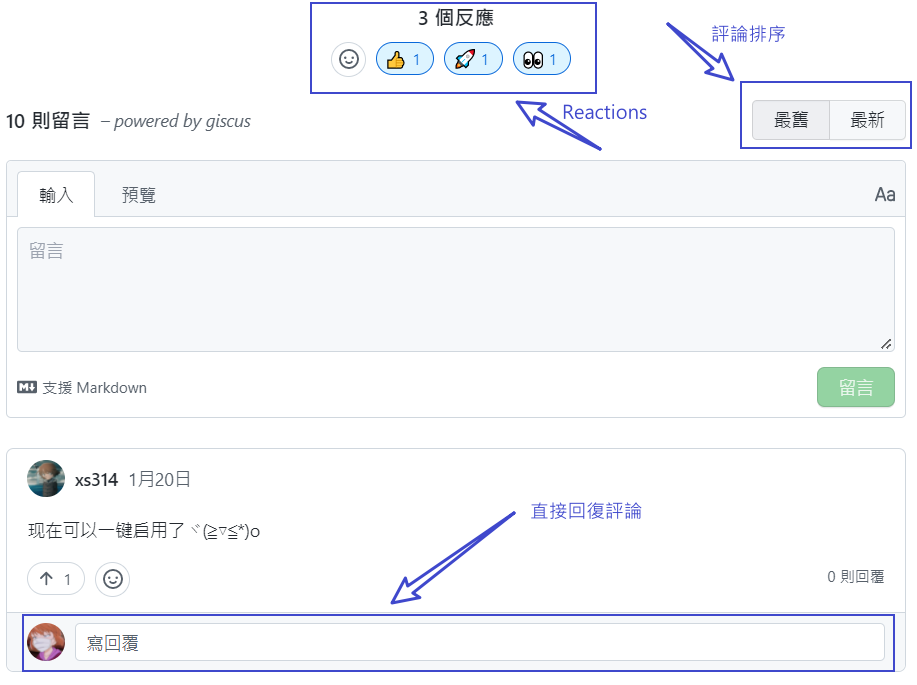
Giscus

下面开始从 Utterances 愉快地迁移到 Giscus 吧 😋

给存储库启用 Discussions

Giscus 是使用 GitHub Discussions 来支持评论的,首先切换到用来存放评论的 GitHub 存储库,并按照说明启用 Discussions 功能
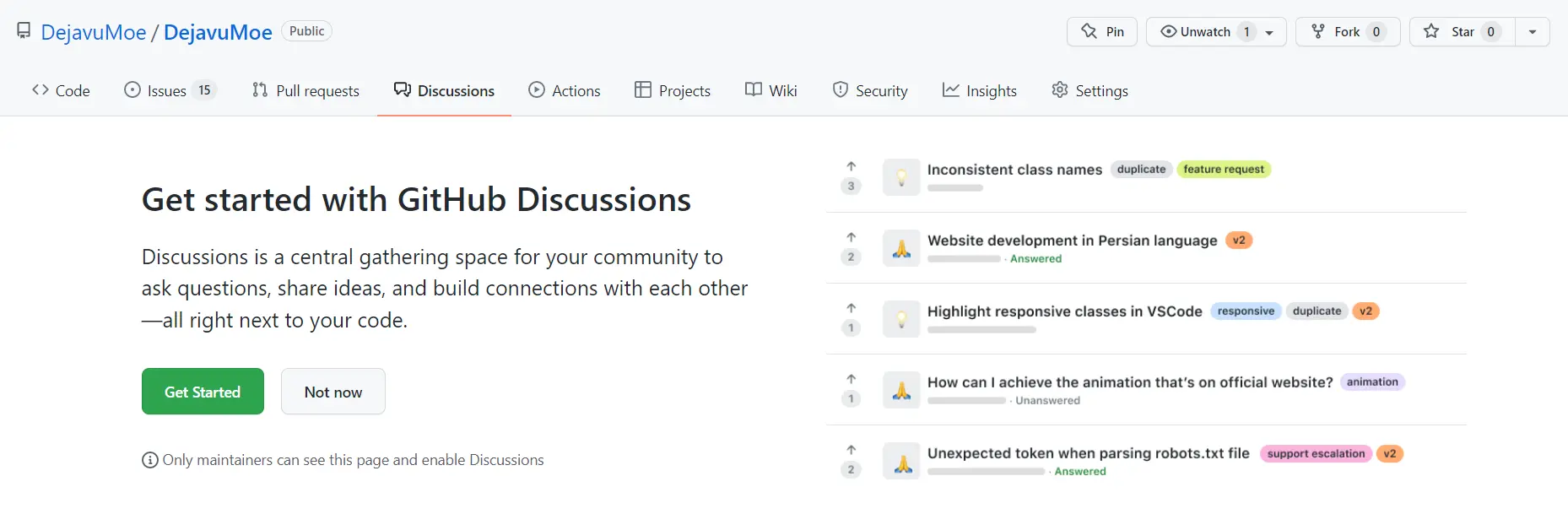
Enable Discussions

第一次创建 Discussions 会有个引导,点击 Start discussions 即可
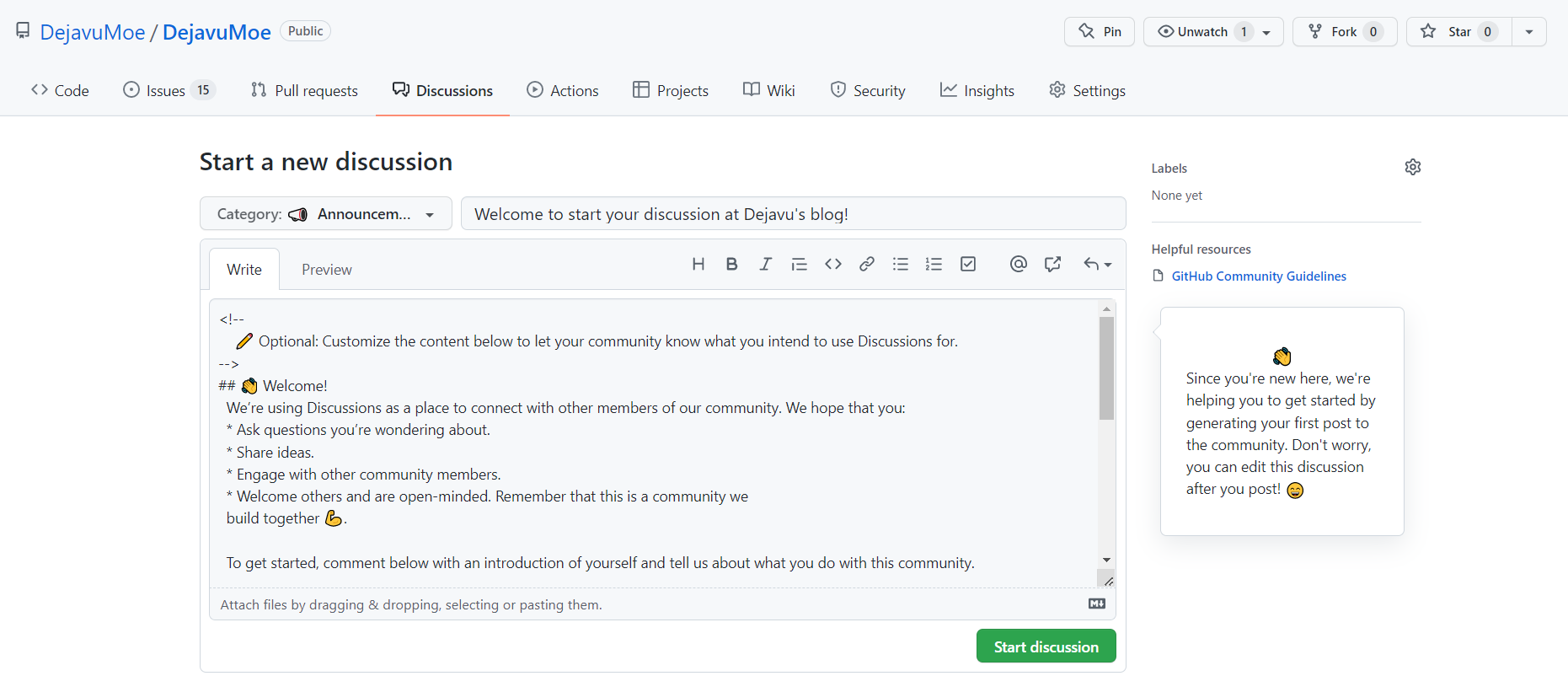
Start Discussions

若无特殊需求,用于评论的 Discussions 默认使用 📣Announcements 分类即可

迁移评论数据

迁移单个页面

若要迁移单个页面的评论,只需要进入包含 Utterances 评论的 Issues 内,在右下角找到 Convert to discussions 进行迁移
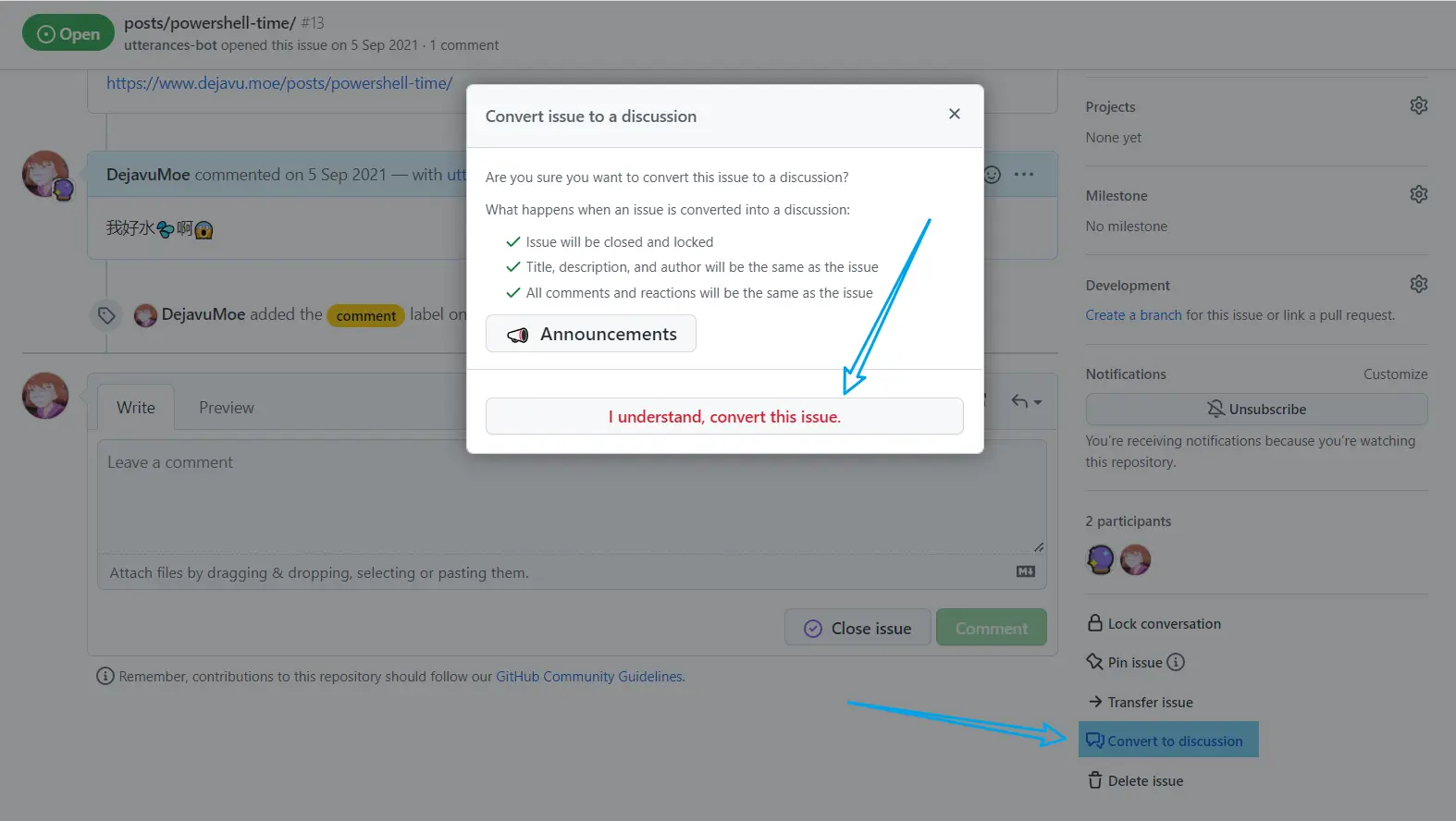
Convert Issues

迁移时间根据 Issues 内评论数量的多少可能有所差异,不过一般很快就完成了
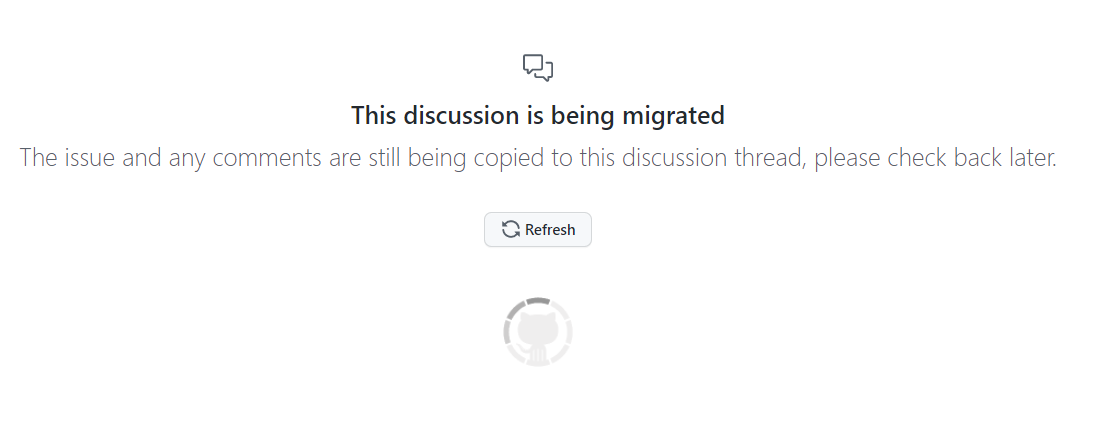
Mirated to Discussions

迁移多个页面

导航到需要迁移的 Issues 仓库下,勾选您需要迁移的 Issues,点击 Label 给他们都标记一个同样的标签(比如我设置的 Label 是 comment)
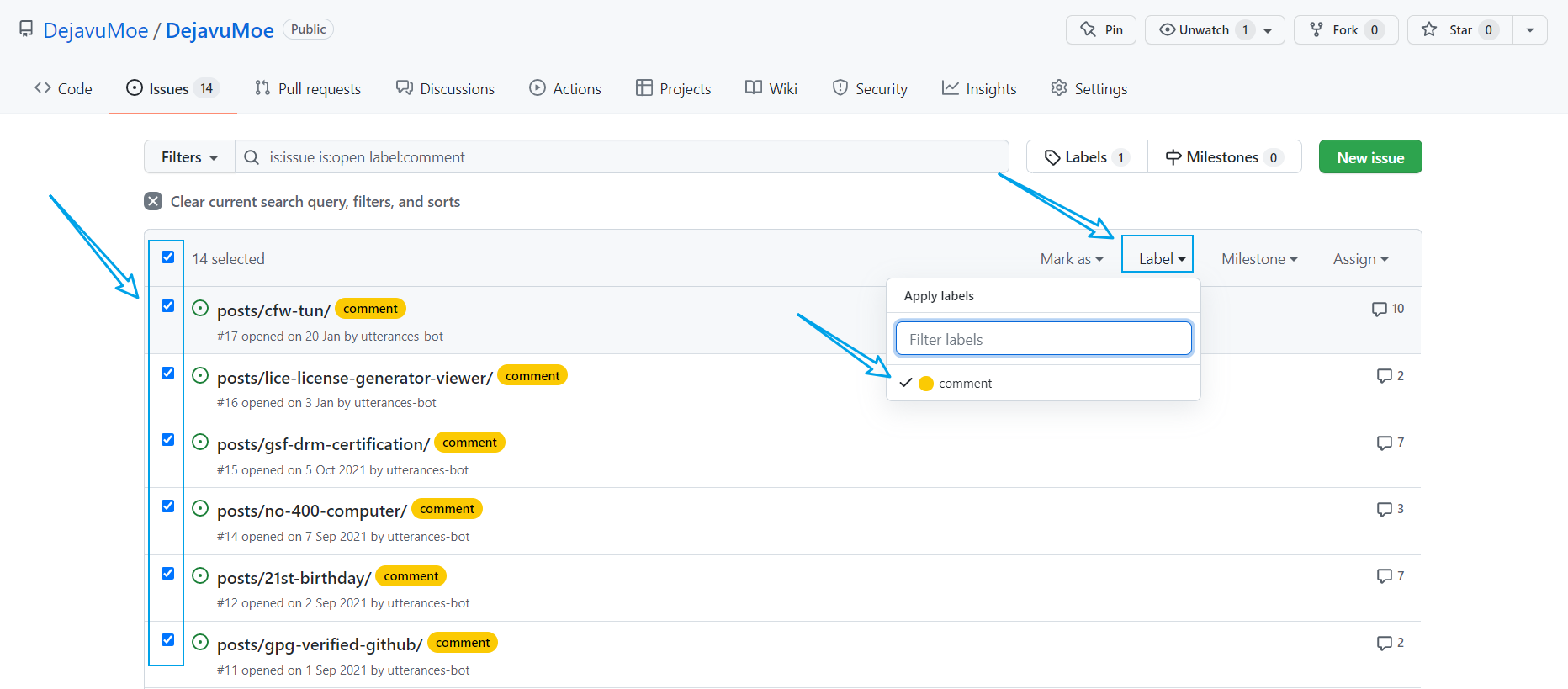
Mirated All Issues

进入 Issues 上面的 Labels 标签管理,在您刚才标记的 Issues 标签上点击 Convert issues 将您所选择的 Label 下所有 Issues 都迁移到 Discussions
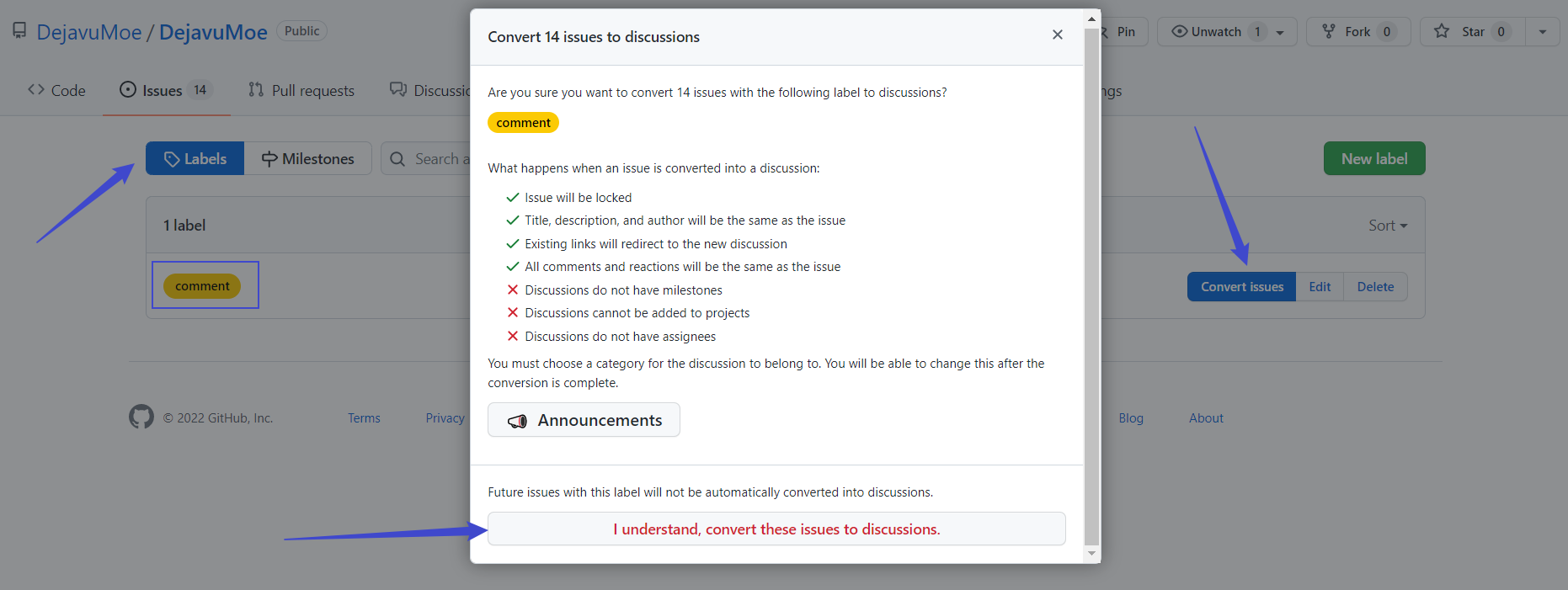
Convert All Issues

稍等片刻等待迁移完成

启用评论系统

安装 Giscus App

打开浏览器,点击 安装 Giscus App ,如果不想授权所有 GitHub 存储库,可以只选择用于评论的存储库
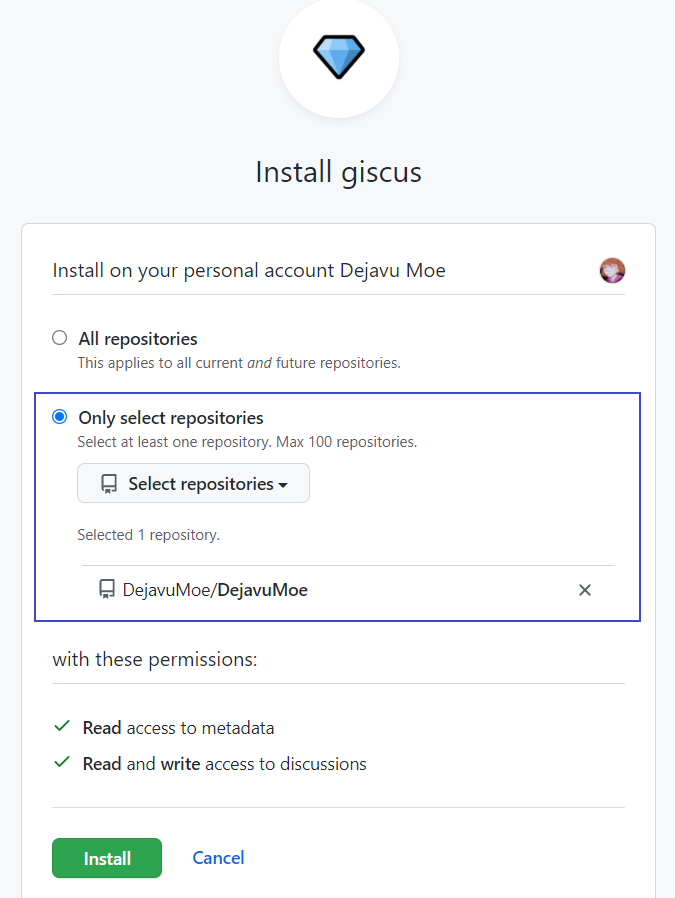
Install Giscus App

Giscus Website 设置语言、GitHub 存储库和个性化配置,建议使用和之前 Utterances 一致的 Discussions Mapping,比如 我的是 pathname
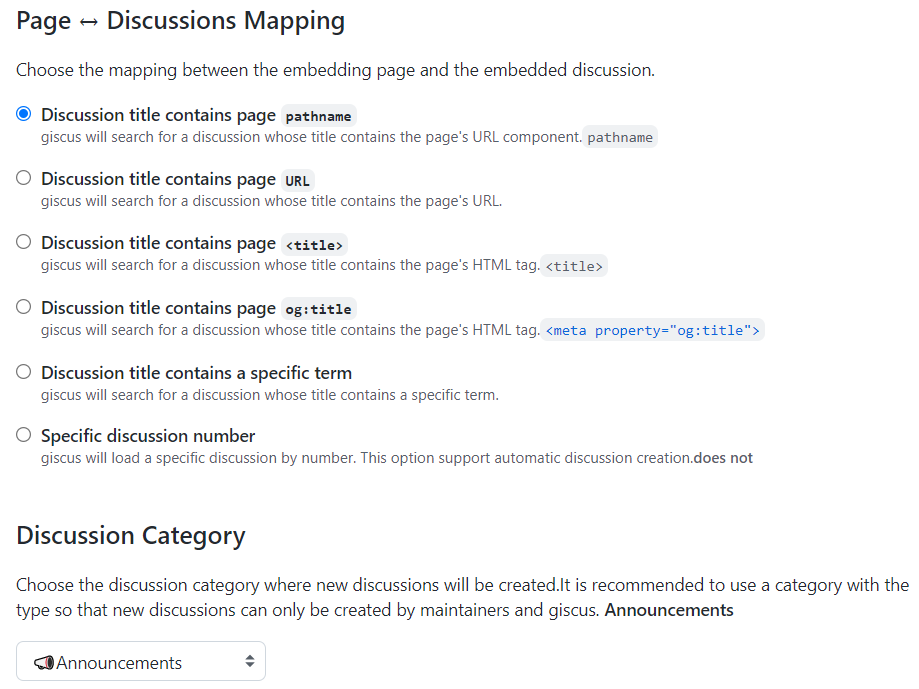
Setup Giscus

在下面可以看到启用 Giscus 的配置,比如我的就是:

<script src="https://giscus.app/client.js"
        data-repo="DejavuMoe/DejavuMoe"
        data-repo-id="zHELIzHeliSHIgithubREPOid="
        data-category="Announcements"
        data-category-id="zHEsHIfenLeIid"
        data-mapping="pathname"
        data-reactions-enabled="1"
        data-emit-metadata="0"
        data-input-position="top"
        data-theme="preferred_color_scheme"
        data-lang="zh-TW"
        data-loading="lazy"
        crossorigin="anonymous"
        async>
</script>

配置 Hugo 评论系统

对于 Hugo 的 PaperMod 主题,更换 Utterances 为 Giscus 评论系统只需要在博客根目录的 /layouts/partials/ 下新建一个 comments.html 文件,将上一步启用 Giscus 时的配置粘贴进去保存
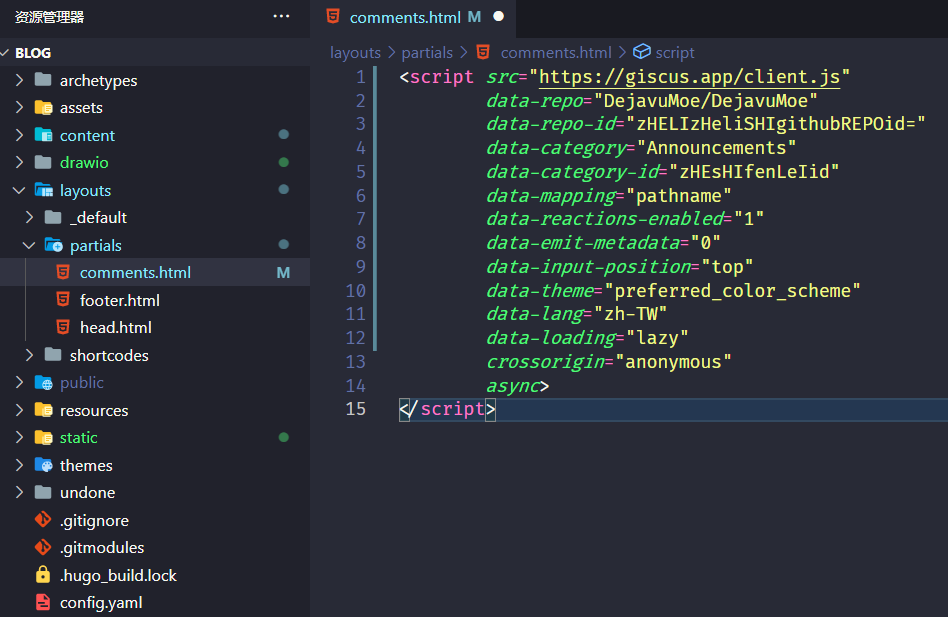
Config Hugo

高级配置 [可选]

在用于评论的 GitHub 存储库的根目录下新建一个 giscus.json 文件,格式如下,参考 Giscus 文档 - 高级配置 部分根据您自己的实际情况配置4

{
  "origins": [
    "https://giscus.app",
    "https://giscus.vercel.app"
  ],
  "originsRegex": [
    "https://giscus-git-([A-z0-9]|-)*giscus\\.vercel\\.app",
    "http://localhost:[0-9]+"
  ],
  "defaultCommentOrder": "oldest"
}

🧐 恭喜您,现在新的评论系统已经用上啦~

积分:


  1. 而 Utterances 只能翻到评论最底下才能评论,对于评论数量较多的页面非常不方便 ↩︎

  2. Giscus 评论在访客刚访问页面的时候不会加载,不影响网站的加载速度 ↩︎

  3. 根据评论时间排序 ↩︎

  4. 比如允许加载 Giscus 的域名来源 ↩︎