






Even if you follow security best practices and choose bcrypt for password hashing you can still get it wrong. How does Bun handle it in a more secure fashion? What happened with the Okta bcrypt incident? Lets dive in.
On October 30, 2024 Okta issued a security alert regarding a security incident that affected Okta’s AD/LDAP DelAuth service.
The incident involved an incorrect usage pattern of the bcrypt password hashing algorithm and overlooking some of the bcrypt algorithm’s limitations. The fall out from this Okta security incident was an authorization bypass vulnerability that could allow an attacker to authenticate as any user in the Okta AD/LDAP DelAuth service for a previous cached and authenticated users.
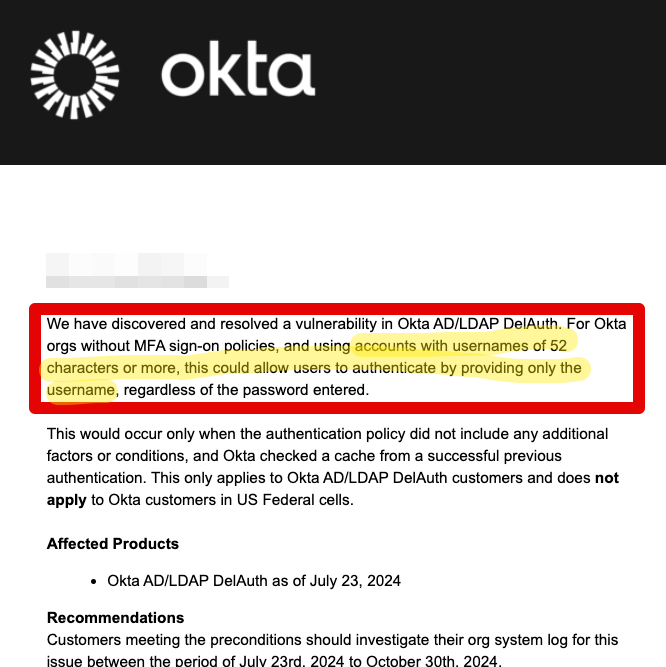
Per the security incident details as shared by Okta, they used the bcrypt algorithm to generate a cache key for a user’s session. The cache key was generated by hashing a combined string of userId + username + password.
Taking all of these three parameters into account, the length of the combined string could exceed the bcrypt algorithm’s maximum input length of 72 bytes. The bcrypt algorithm truncates the input string to 72 bytes, which could lead to the same hash being generated for different input strings. This is known as a hash collision.
However, due to that string combination with the userId prefix, Okta confirmed that it would actually require usernames to be 52 characters or longer to effectively trigger a cache key collision.
bcrypt is a password hashing function designed by Niels Provos and David Mazières, based on the Blowfish cipher. bcrypt uses the key setup algorithm in Blowfish to set up the key, and then uses the normal Blowfish algorithm to encrypt the 64-bit block of zeroes.
Some traits of the bcrypt algorithm include:
bcrypt will truncate the password to 72 bytes before hashing it. This means that if you have a password that is longer than 72 bytes, bcrypt will only hash the first 72 bytes of the password.
More about how Bun and other vendors like Dropbox handle larger length passwords in the next section.
Let’s use the native code module bcrypt in the npmjs registry to reproduce the Okta bcrypt incident. We will generate a hash for a password that is longer than 72 bytes and see if we can reproduce the hash collision.
Starting off with the basics, we generate a salt, we use the exact same hash for future password hashing too so that the hash is deterministic and we can reproduce the hash collision:
const bcrypt = require('bcrypt');
const saltRounds = 10;
let password
password = 'gibson1234'
// we keep the salt
bcrypt.genSalt(saltRounds, function(err, salt) {
bcrypt.hash(password, salt, function(err, hash) {
console.log({
password,
hash,
})
});
Now, within the same genSalt() function callback, continue to generate more bcrypt hashes:
password3 = '1111111111111111111111111111111111111111111111111111111111111111111111111'
// bcrypt.genSalt(saltRounds, function(err, salt) {
bcrypt.hash(password3, salt, function(err, hash) {
console.log({
password: password3,
hash,
})
});
// });
password4 = '111111111111111111111111111111111111111111111111111111111111111111111111111111111111111111111111111111111111111111111111111111111111111111'
// bcrypt.genSalt(saltRounds, function(err, salt) {
bcrypt.hash(password4, salt, function(err, hash) {
console.log({
password: password4,
hash,
})
});
// });
Take a look at the hash output and you’ll notice it is exactly the same for the two different passwords denoted by password3 and password4. This is the hash collision that Okta experienced in their AD/LDAP DelAuth service.
We’ve already seeing how the bcrypt algorithm is used in the former section with the Node.js implementation. Now let’s take a look at how the Bun runtime handles the bcrypt algorithm.
Let’s use Bun’s built-in password hashing API to instruct it to hash a password with bcrypt that is at the 72 bytes mark with:
let hash
let password1 = '111111111111111111111111111111111111111111111111111111111111111111111111'
hash = await Bun.password.hash(password1, {
algorithm: 'bcrypt',
cost: 10
})
console.log({
password: password1,
hash,
})
This would result in the following output:
{
password: "111111111111111111111111111111111111111111111111111111111111111111111111",
hash: "$2b$10$7OVYy.YQuoHAz8BCKa/oZuJ.peb2eI6GdPFcjmccYoP3mmkw9HiWq",
}
Your output will be different and the reason for that is that the salt is randomly generated each time the hash is generated and with the Bun password API you can’t control the salt generation.
🔥 New: Bun Security Essentials on a limited time offer for the course & book teaching you Bun security practices Bun Security Essentials
However, what happens if you pass a longer password (username, or any other text for that matter) to the Bun password API? Let’s see:
let password3 = '11111111111111111111111111111111111111111111111111111111111111111111111111111111111111111111111111111111111111111111111111'
hash = await Bun.password.hash(password3, {
algorithm: 'bcrypt',
cost: 10
})
console.log({
password: password3,
hash,
})
When the data to hash is longer than 72 bytes, Bun will first run the data through a SHA-512 hash function before passing it to the bcrypt algorithm. This is to ensure that the data is within the bcrypt algorithm’s input length limit. Why does that work? because SHA-512 is a hash function that returns a fixed length hash of 64 bytes, well within the bcrypt algorithm’s input length limit and so it doesn’t incur any data loss due to truncation.
From Bun’s own source code:
.bcrypt => |cost| {
var outbuf: [4096]u8 = undefined;
var outbuf_slice: []u8 = outbuf[0..];
var password_to_use = password;
// bcrypt silently truncates passwords longer than 72 bytes
// we use SHA512 to hash the password if it's longer than 72 bytes
if (password.len > 72) {
var sha_512 = bun.sha.SHA512.init();
defer sha_512.deinit();
sha_512.update(password);
sha_512.final(outbuf[0..bun.sha.SHA512.digest]);
password_to_use = outbuf[0..bun.sha.SHA512.digest];
outbuf_slice = outbuf[bun.sha.SHA512.digest..];
}
const hash_options = pwhash.bcrypt.HashOptions{
.params = pwhash.bcrypt.Params{ .rounds_log = cost },
.allocator = allocator,
.encoding = .crypt,
};
const out_bytes = try pwhash.bcrypt.strHash(password_to_use, hash_options, outbuf_slice);
return try allocator.dupe(u8, out_bytes);
},
So as it appears, Bun is indeed secure by design and it’s a good thing that it doesn’t truncate the data to hash before passing it to the bcrypt algorithm. This is a good example of how secure by design principles can be implemented in a runtime environment and this is a good advance of other JavaScript server-side runtime projects like Node.js and Deno.
A note on password shucking, which is a type of attack where an attacker aims to remove cryptographic layers (in our case, the bcrypt algorithm), to then focus their resources at exploiting weaker algorithms (such as MD5, SHA-256 and others).
In Bun’s case, the SHA-512 hash helps create a fixed length hash without incurring a truncation loss, however it introduces this new security concern for password shucking. In and of itself, this isn’t a security vulnerability or weakness, but is definitely a risk to be taken seriously as part of a threat model.
As a reference, Dropbox follows a similar approach when it comes to handling pre-hashing of passwords and then passing them to the bcrypt algorithm. More on password shucking on Scott Brady’s blog post.
Rule of thumb? Never roll your own crypto and better to avoid these sort of pre-hashing techniques unless you have a very good reason to do so. If you need to make a conscious decision on password hashing you might prefer the following:
Several points to consider as we learn from the Okta bcrypt incident and about the bcrypt hashing algorithm with how Bun, and Node.js handles it:
This security authentication bypass bug was introduced in the code on July 23, 2024, and was discovered on October 30, 2024. Effectively this laid dormant for over three months and I can only assume that it was discovered during a security audit or a support case investigation.
It isn’t possible to reproduce the hash collision in how Bun handles the bcrypt algorithm (regardless of the SHA-512) because it isn’t possible to control the salt generation in Bun’s password API and so every new bcrypt hash call will result in a different hash output. Perhaps this is a good thing as it makes it harder for attackers to predict the hash output and better for developers to remove pitfalls and insecure code patterns.
此内容由惯性聚合(RSS阅读器)自动聚合整理,仅供阅读参考。 原文来自 — 版权归原作者所有。