







Node.js developers building on a web framework like Express.js might be inclined to serve images via a programmatic route controller that they can build their business logic in instead of using static middleware. However, this approach can introduce security vulnerabilities to your application, and result in path traversal attacks.
In this article, I’ll show you why this concern, that was brought up as a real question on reddit is an imminent security risk, and even more alarming, how the most up-voted answer on the thread is a security vulnerability waiting to happen.
Put your seatbelt on, we’re going to explore the security risks of serving images via a route and how this approach greatly undermines the security of your Node.js application.
When building a web application, you might want to serve images via a route instead of using a programmatic approach such as static middleware which Express conveniently provides.
If you want to build on Express’s already existing static middleware, you can use the express.static method to serve static files such as images, CSS, and JavaScript files. This method takes a root directory and an options object as arguments, and returns a middleware function that serves static files from the given root directory. Here’s an example of using Express static middleware:
const express = require('express');
const app = express();
app.use(express.static('public'));
With this, all files in the public/ directory will be served as static files and requests such as GET /images/image.jpg will return the image file located at public/images/image.jpg. You do not need to manage the serving of these files yourself, URL encoding, root directory boundaries, or any other security concerns (as long as the Express code-base is kept free of vulnerabilities, at least).
However, for a number of reasons, you might actually need to apply your own business logic to the serving of images. For example, you might want to:
And the list goes on…
One of these cases, was indeed the case of the Reddit user who asked the question. They wanted to serve images via a route so they could apply access control to images based on user permissions:
he problem I’m having is I’ve written a middleware function with my API to check for an API key so if you were to try to get the image from an img tag for talking sake, even though the app itself has the API key for requests the tags request returns not authorized. The media itself should only be available to members so having the API key protection actually helps to stop people finding the static folder and grabbing everything from it.
This question was asked on May 15th, 2024.
The most upvoted answer to the question on Reddit was the following code suggestion:
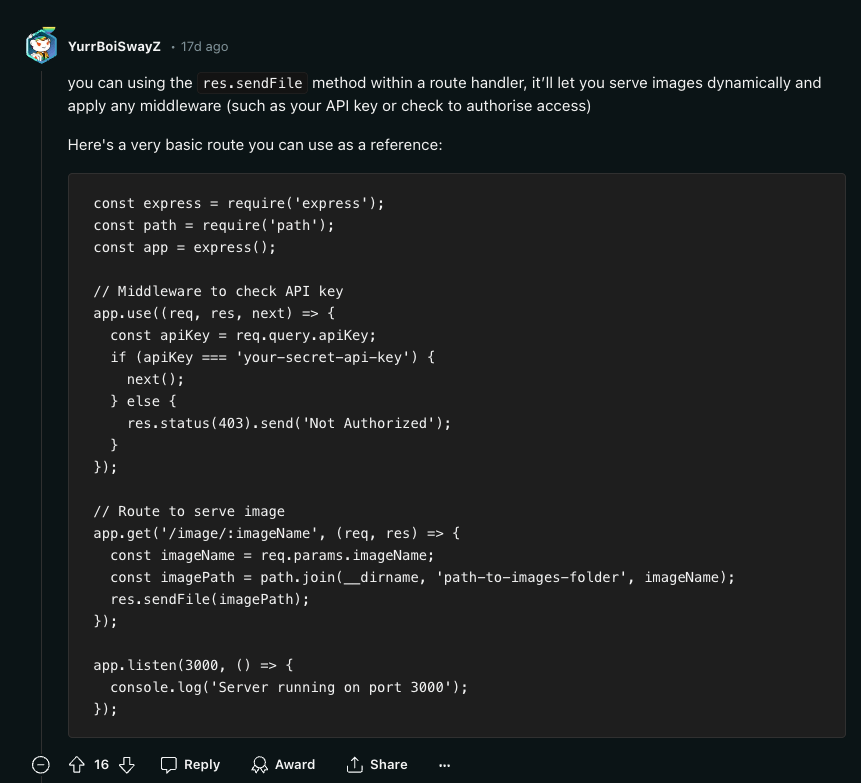
Did you spot the security vulnerability in the code snippet above?
Easily, you could scan the code and propose some potentially missed security controls such as:
However, these are very surface-level and shallow observations. What I mean by that is that maybe a rate limiter is handled in a proxy server, or an API gateway, or maybe it is handled in some prior Express middleware. Likewise, the API key hard-coded here in code is obviously just used as a simplistic example to provide the reader with a clear understanding of the code and intentionally kept simple for brevity. So I agree, these are not the issues I am going to nitpick on.
Still, there are two more severe security vulnerabilities in the code snippet that are subtle and easy to miss.
Let’s reconstruct the code example to reproduce the security vulnerabilities:
npm init -y
npm install express
Then follow-up with adding the following code to a file named index.js:
const express = require('express');
const path = require('path');
const app = express();
// Middleware to check API key
app.use((req, res, next) => {
const apiKey = req.query.apiKey;
if (apiKey === 'your-secret-api-key') {
next();
} else {
res.status(403).send('Not Authorized');
}
});
// Route to serve image
app.get('/image/:imageName', (req, res) => {
const imageName = req.params.imageName;
const imagePath = path.join(__dirname, 'static', imageName);
res.sendFile(imagePath);
});
app.listen(3000, () => {
console.log('Server running on port 3000');
});
And lastly, create a folder named static and add an image file to it and run the server:
mkdir static
touch static/image.jpg
node index.js
Now, if you hit the Express static files route at http://localhost:3000/image/image.jpg?apiKey=your-secret-api-key, you will see the image file being served.
Please, do not run this code in production. This is a security vulnerability waiting to happen. Let’s see why.
The first security vulnerability in the code snippet is the lack of input validation on the imageName parameter. This parameter is used to construct the path to the image file, and it is passed directly to a sensitive sink function, path.join, unhandled.
This is the classic case of a path traversal attack. An attacker can craft a request to the route handler that includes a path to a file outside of the static directory, and potentially access sensitive files on the server. For example, an attacker could request the image at /image/../../../../../etc/passwd and get the contents of the /etc/passwd file. Or, a more realistic case, attackers could access the .env file, your package.json package manifest file for the application, or any other sensitive file in the server’s file system.
There’s nothing inherent to the route controller here that protects it from a path traversal attack:
// ❌ Danger: Path traversal attack is imminent
// Route to serve image
app.get('/image/:imageName', (req, res) => {
const imageName = req.params.imageName;
const imagePath = path.join(__dirname, 'static', imageName);
res.sendFile(imagePath);
});
Broken access control is OWASP Top 10 security risk number 1. It occurs when a user can access functionality or data they are not authorized to access. In this case, the route handler checks for an API key in the query string, but it does not check if the user is authorized to access a specific image file. Perhaps the user that authenticated with a valid API key is not permitted to view and access an image file that belongs to another user.

Similarly to the path traversal vulnerability, the image path route has no inherent security control that protects it from unauthorized access. The route handler checks for an API key in the query string but does not include proper security controls for access control to the image files being served
// ❌ Danger: Broken access control
// Route to serve image
app.get('/image/:imageName', (req, res) => {
const imageName = req.params.imageName;
const imagePath = path.join(__dirname, 'static', imageName);
res.sendFile(imagePath);
});
Sadly, the current state of software development is that which is riddled with security vulnerabilities. One reason for that is that developers are not security experts, and it is a hard take to expect them to be, but they are the effective producers of software and the first line of defense against applicative security vulnerabilities.
If you do not have a security expert on your team, you are the security expert on your team 🤷
Perhaps one of the problems contributing to the software vulnerabilities is that product managers do not prioritize non-functional requirements such as performance, testability, and security as much as they do functional requirements. So those security related backlog items, if they exist at all, are often pushed to the bottom of the bucket time and time again.
The code snippet provided in the Reddit thread is a perfect example of how easy it is to introduce security vulnerabilities into your application, even when you are trying to do the right thing. So if I’d need to give you one last piece of advice before you go, it would be to never copy-paste code from the internet without understanding it thoroughly and properly vetting it for security vulnerabilities.
Good luck, and stay safe out there!
此内容由惯性聚合(RSS阅读器)自动聚合整理,仅供阅读参考。 原文来自 — 版权归原作者所有。