



Argument injection vulnerabilities are a serious threat all Node.js developers need to be aware of. These injection attacks allow malicious users to inject unintended options and arguments into commands run on your server.
This blog post will explore an argument injection vulnerability recently disclosed in the blamer npm package and discuss best practices for avoiding similar issues.
We discuss how simple validation and sanitation of arguments can prevent such attacks. Follow at the end of this blog post for security best practices, such as using parameters instead of concatenation, prefixing arguments with -- to prevent them from being interpreted as flags, and running commands with least privilege.
Argument injection is a type of attack related to command injection vulnerabilities. It occurs when user-supplied input is passed unchecked into commands executed by an application. Attackers can craft malicious arguments that exploit flaws in how the command parses input.
For example, consider a Node.js application that runs the Linux grep command to search log files:
const searchTerm = req.query.search;
const cmd = `grep ${searchTerm} /var/log/myapp.log`;
exec(cmd);
This code is vulnerable to argument injection. How exactly? An attacker could provide input like --help to trigger the help output for grep rather than searching. Even worse, they could specify arguments like --output=myfile.txt to write arbitrary files on the server.
Of course, the above example is a bit contrived and is vulnerable to a general case of command injection vulnerabilities, such as by providing user-supplied input such as ; touch /tmp/pwn. However, it illustrates how dangerous unvalidated arguments can be. Regardless, always be wary of passing unsanitized user input into sensitive commands.
The vulnerability discussed in this post was discovered in the blamer npm package. Blamer is a tool for displaying Git blame information and code authorship details.
According to its description:
Blamer is a tool for get information about author of code from version control system. Supports git and subversion.
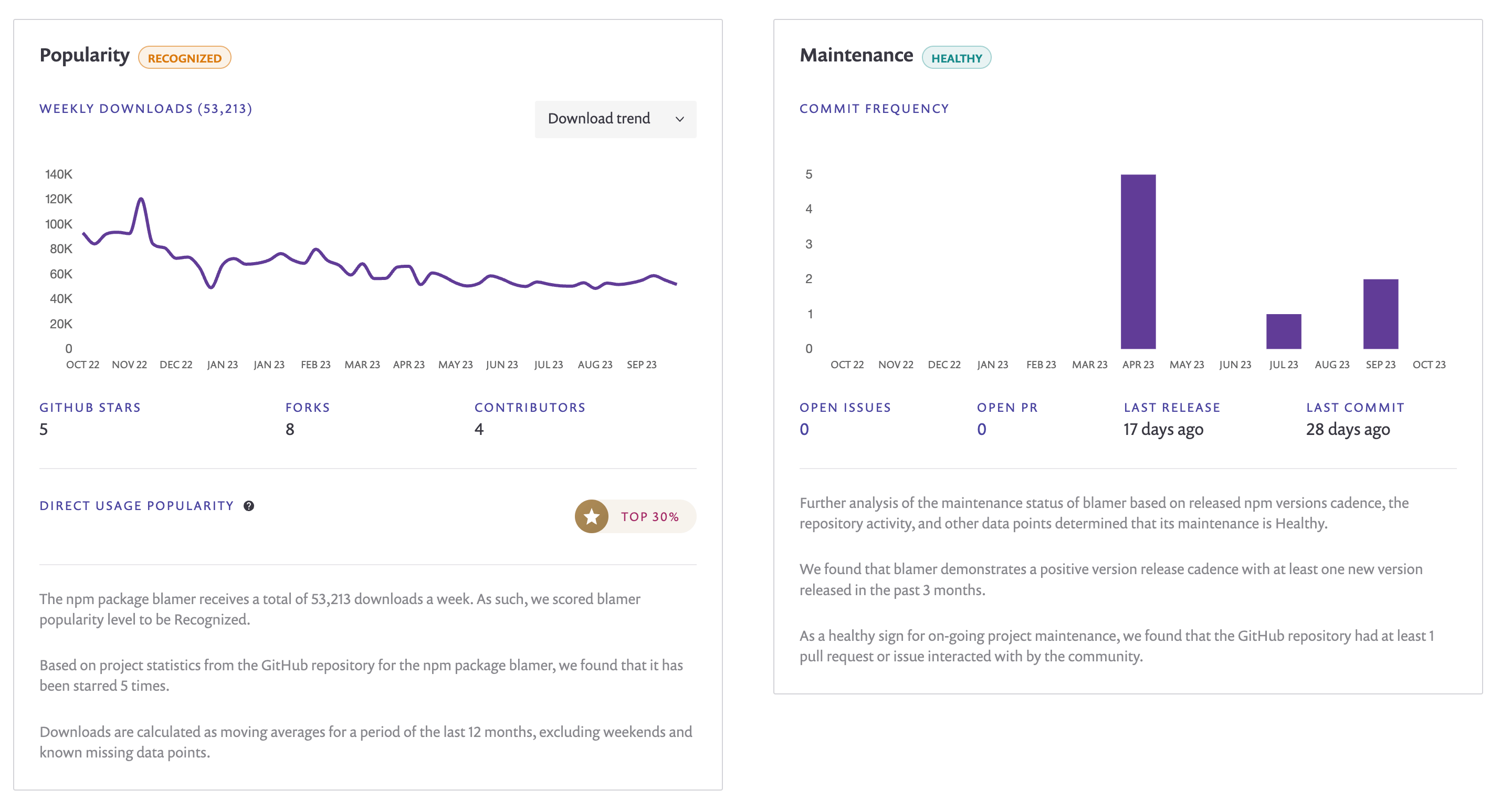
The blamer npm package is still quite popular, with over 50,000 weekly downloads at the time of writing. It serves as a useful utility for many developers using Git. Understanding the context and popularity of the affected package demonstrates how security issues in widely used tools can have broad impact across many applications and users.
This npm package provides a simple API for running git blame on a given file path and returning the blame information as structured JSON data.
For example:
const blamer = require('blamer');
const result = await blamer.blameByFile('index.js')
On June 22nd, 2023, I disclosed an argument injection flaw in the blamer npm package identified as
CVE-2023-26143.
However, this library failed to properly sanitize the file path passed to git blame. By exploiting the --output option, attackers could overwrite arbitrary files on the system.
Let’s reproduce this vulnerability locally to see how it works:
blamer npm package:git init
echo "Hello World" > index.js
blamer npm package to blame the file and write the following Node.js script:// you might need to set `type: module` in `package.json`
// if you're running this as a Node.js script initialized
// in an npm project
import Blamer from "blamer";
const blamer = new Blamer.default("git");
async function main() {
const file = "--output=/tmp/r2d2";
const result = await blamer.blameByFile(file);
console.log("Blame json: %j", result);
}
main();
/tmp/r2d2This demonstrates how dangerous unvalidated command-line arguments can be. Always be wary of passing unsanitized user input into sensitive system APIs such as Node.js core child_process module that handles system processes.
The good news is that the blamer npm package maintainer responded to the vulnerability report and released a patched version. The fix was introduced in version 1.0.4 of the blamer npm package, which is now safe to use. Thank you Andrey Kucherenko ❤️
Here are some tips for writing secure code that avoids argument injection vulnerabilities:
Validate and sanitize any user input before passing it to a command. Strip dangerous characters and whitelist allowed values.
Use parameters instead of string concatenation when building commands. Many command libraries support parameterization to avoid injection.
Pass arguments individually rather than a full command string. This helps avoid unintended parsing and gives more control.
Prefix arguments with -- to indicate the end of options. This prevents arguments from being interpreted as command flags/options.
Run commands with lowest privileges possible. Use users with restricted permissions to limit potential impact.
Upgrade dependencies promptly to get fixed versions that address known vulnerabilities.
Following security best practices like these will help write more robust code free of injection issues. Be especially careful when working with potentially dangerous commands like git, grep, ssh, and others. Preventing vulnerabilities like the one in blamer is important for building secure Node.js applications.
Want to secure your Node.js apps like a pro? Get Liran Tal’s indispensable book Node.js Secure Coding and master battle-tested techniques to lock down your code against injection attacks and other exploits. Don’t leave your apps at risk - skill up on Node.js security today.
此内容由惯性聚合(RSS阅读器)自动聚合整理,仅供阅读参考。 原文来自 — 版权归原作者所有。