




Typosquatting, malicious packages, dependency confusion attacks, compromised maintainer accounts, and more. The npm ecosystem is a minefield of security risks. How can JavaScript developers protect from these threats?
Here’s how JavaScript developers can adopt npm security best practices to protect their projects, their development environment, and their users.
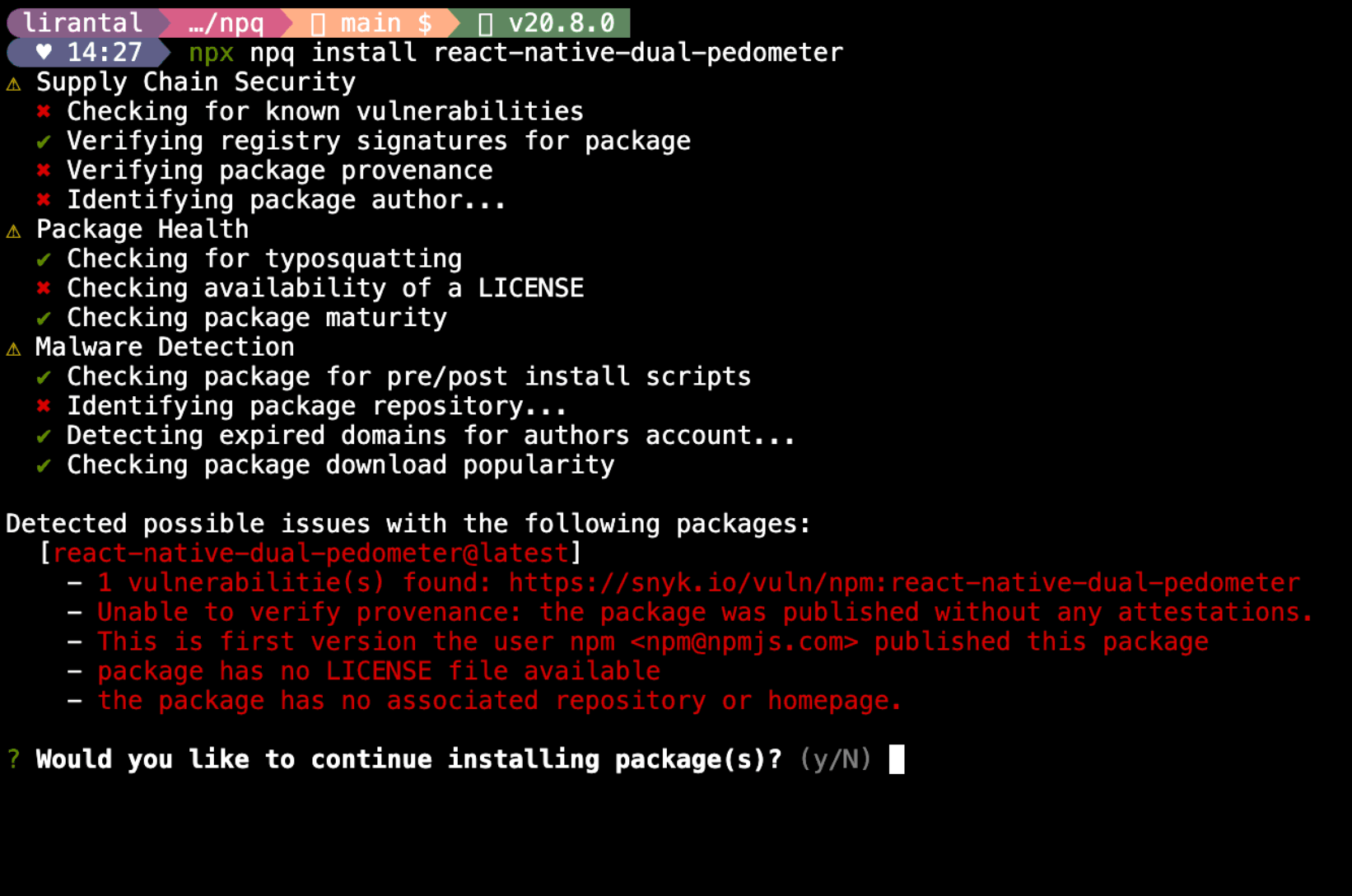
npqnpq is a command-line tool that helps you audit the health of a package before installing it, unlike the official npm package manager which firsts installs the package and then audits it to tell you it is a malicious package. Kind of too late, right?
So with npq installed, when you run npq install <package-name>, or if you alias it to npm such as alias npm=npq, then when you do npm install <package-name>, it will fetch a wide array of package metadata from difference sources and will report on aspects such as:
preinstall or postinstall scripts detected?Running these heuristics before installing a package is an effective security control and allows you to make an informed decision about whether you should actually continue with the installation or not.
Your npm account is a valuable asset. It’s the key to publishing packages, managing your open-source projects, and more. Even more so, you might be using it to also manage private packages at work, making it even a lucrative target for attackers and so it’s important to secure it properly.
Here are some account security best practices to follow which would be a great security hygiene to adopt across all your online accounts where possible:
Use a strong password: make sure it’s long, complex, and unique. If you didn’t hear about how 14% of npm modules were at one point in time compromised and leading developers had such weak passwords that allowed access to their npm packages worth then you might want to read on malicious modules
Enable 2FA: two-factor authentication is a must-have security control for your npm account. It adds an extra layer of security to your account and makes it much harder for attackers to compromise it and it follows the prior recommendation of maintaining a good account security.
Do not reuse passwords: if you’re using the same password across multiple accounts then you’re increasing the risk of a password breach on one account leading to a compromise of all your accounts. Use a password manager to generate and store unique passwords for each account. This was also a culprit leading to major npm package compromises in the past.
Limit and regularly review access to the npm account and package permissions: if you’re working in a team or have multiple people working on the same npm account then make sure to review the permissions and access levels of each user and regularly review them to ensure that only the right people have the right access. Too many users having publish access means that there’s a higher security exposure and attackers have more ways to compromise the account and gain unauthorized access to the npm package.
As a developer, you’re likely to have sensitive information in your own development environment.
Think about access you have to staging or production environments, API keys, secrets, and more that is stored in your own localhost for testing and development. It’s important to secure your development environment to avoid unauthorized access to these sensitive resources.
How can you protect your own developer account from being compromised? Here are some practical tips:
Do not want to fall victim to malicious packages that run arbitrary commands when you install them? Use the --ignore-scripts flag when installing packages to avoid running any preinstall or postinstall scripts that might be malicious. Better yet, add it to .npmrc file to make it a default behavior for all npm install commands.
Last thing you want is to run an npm install or npm update and discover that a malicious package was hidden in the project’s package-lock.json lockfile. How do you defend against this? I got you covered with a package I built called lockfile-lint
In lieu of supply chain security threats such as the prior event-stream social engineering compromise and other account take over attacks, it’s important to maintain a secure and low-trust repository access to avoid unauthorized access to source code that would end up in insecure, or backdoor’ed, npm package releases.
Here are some recommended practices to follow:
Vet contributors and drop-by commits in high-risk areas with high-scrutiny. For example, in the XZ backdoor 2024 incident the attacker was able to gain access to the repository and commit a backdoor in the xz package. These incidents are hard to detect and avoid, given the open-source community culture but it’s important to vet contributors and their commits in high-risk areas with high-scrutiny to avoid such incidents.
Enable branch protections and signed commits to ensure that only authorized users can push to the repository and that commits go through a healthy review process before being merged. For example, it requires 2 reviewers to approve a pull request before it can be merged to the main branch. Signed commits aren’t an effective measure due to Git shortcomings and don’t provide a strong security control but they can be a good indicator of the authenticity of the commit author and further help in the vetting process.
Require that code adheres first to readability principles rather than efficiency to ensure pull requests submitted to the source code repo are not obfuscating malware, backdoor, or other intentional bugs.
I highly recommend visiting OpenSSF’s Scorecard project to learn more about how to secure your open-source projects and repositories and how to maintain a healthy and secure open-source project.
These security best practices a good starting point for JavaScript developers to adopt and protect their npm projects from the myriad of security threats that exist in the npm ecosystem.
Other threat landscape includes your CI/CD infrastructure and hardening it against supply chain attacks, securing your production environment, and more.
Stay tuned for more security best practices and tools that I’m building to help JavaScript developers secure their projects and environments.
此内容由惯性聚合(RSS阅读器)自动聚合整理,仅供阅读参考。 原文来自 — 版权归原作者所有。