




We developers are well too fond of using environment variables to set application configuration and often use it to store secrets and other sensitive information.
You already use an environment variable to set the port Nuxt runs on, or the BASE_API_URL for the Fastify Node.js web API you’re building, so why not use it to store the OPENAI_API_KEY or that serverless PostgreSQL DB_PASSWORD?
We all do it, right? Right.
Why do we do it though? why do we store secrets in environment variables?
Not because it’s secure. Not because it is a best practice. We store secrets in environment variables because it is easy. Because it is easy to put that API token in an environment variable. It’s easy to put the API token in Vercel’s deployment environment variables configuration. It’s easy to put the API token in a GitHub Action’s environment variables secrets configuration. It’s easy to put the API token in a .env file.
I mean, who hasn’t seen a .env file with a bunch of API_KEY=1234567890 or DB_PASSWORD=supersecretpassword ?
It’s easy. That’s why we do it. But we need to stop.
In this write-up:
If it’s a hobby project, or some application you’re toying with, or if it’s a non-critical application, not anything you’re deploying to production-like environment that has significant security risks and implications, then sure, go ahead, use environment variables to store your secrets if that’s an easy way for you to do it.
For anything else with a real consequence such as leaking user data, financial loss, or business risks, you should never store secrets in environment variables.
In this section, I’ll list a handful of reasons and reference real-world incidents to help discourage why you should refrain from storing secrets in environment variables or any other kind of sensitive data.
To begin with, environment variables are not a secure way to store secrets, mostly and first-off, they are simply poorly managed, leading to a variety of security risks and compliance issues. Consider the following common pitfalls:
/proc/PID/environ file.In particular with meta-frameworks such as Next.js, Nuxt and others, the lines between “client-side” and “server” has gotten very blurry. This is especially true with server-side rendering (SSR) and serverless functions, where the same codebase can run on both the client and the server.
With these frameworks, there’s no clear separation of frontend and backend code for developers in the form of a separate code repository for example. On the contrary, not only the codebase is shared but rather the framework itself is designed to act as either the frontend or the backend depending on the context.
Then, what happens when you adopt such server-side APIs with said frameworks and need to provision secrets via environment variables and framework-specific configuration? Mistakes. That’s what happens.
Here is the classic Vite example:

Next.js and Nuxt had have their fair share of similar confusing configuration. For example:
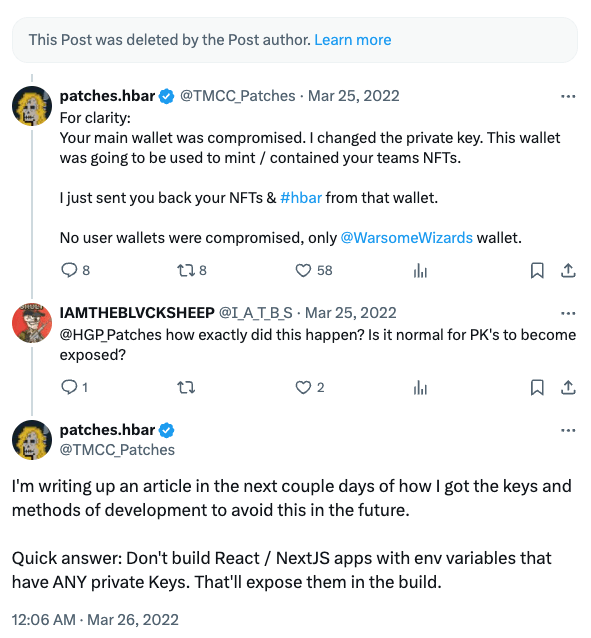
NEXT_ or NEXT_PUBLIC respectively. But what if you forget to prefix them correctly? What if you didn’t even realize that there’s a difference? (Here’s one reference, here’s another).env: {} object in your next.config.js file, it would expose all of the environment variables to the client-side bundle. This was a common mistake made by developers who were not aware of the implications of this configuration. (Here’s one reference)This truly has severe and real-world implications. Don’t take it from me. Take it from this person who accidentally leaked their credentials in a Next.js application and suffered a crypto wallet compromise:
Both Next.js and Nuxt are doing their best to alleviate this issue by providing better documentation and creating more clear separation between client-side and server-side code. But the problem still persists and it’s up to you, the developer who employs this frameworks to be aware of the risks and take the necessary precautions.
In continuation to this posts’ prelude - it is way too convenient to use a .env file to store configuration. As long as it is general configuration - while maintenance headache, at least not a security issue.
The moment you put secrets in a .env file, which is way too easy to do, you introduced two problems:
.env file convolutes the two and makes it harder to manage and maintain..env files end up committed to source control repositories, either accidentally or intentionally. This is a common mistake that can lead to secrets being exposed to unauthorized users.How are your dev skills compared to developers at New England Biolabs? because they leaked their .env file with secrets to the public:

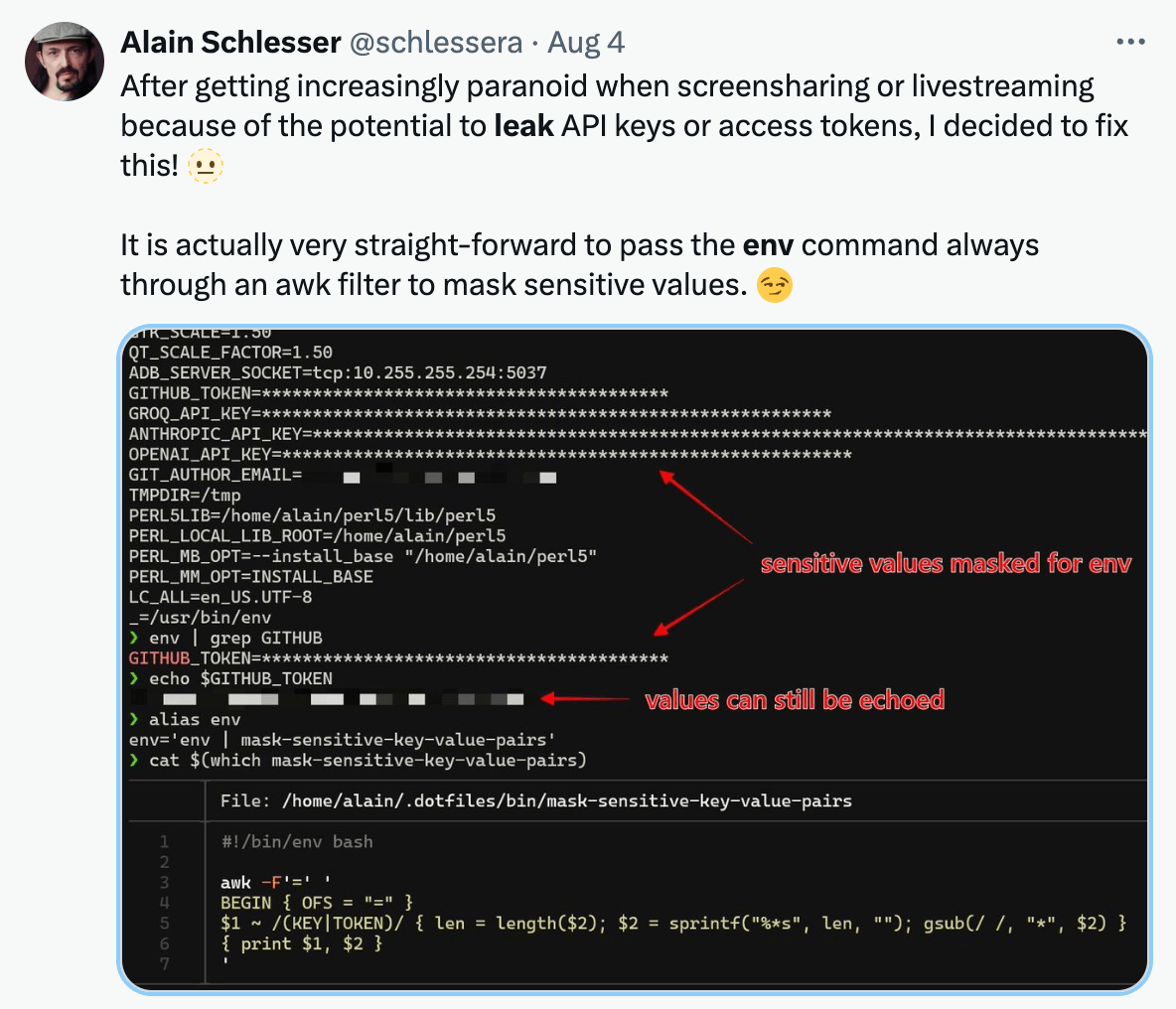
Or how about the time when developers leak secrets in environment variables when streaming?
Environment variables containing secrets are frequently exposed through logging mechanisms, often unintentionally. This data exposure can occur in unexpected error logs on the server, a rich debug output, or exception thrown crash reports, potentially revealing sensitive information to unauthorized users.
The risk here in particular is that secrets and credentials make it into logged data, whether on disk or in logging systems or services, which could then in turn be exposed through data breaches or unauthorized access. Practical example is a log entry with environment variables information pushed to a fire hydrant Slack channel and then accidentally shared with the wrong team members or exposed publicly.
The most ubiquitous example of this is the Express web application framework in Node.js. If you use Express, and you aren’t running the Node.js process with the explicit NODE_ENV=production environment variable setting, then the default behavior is that Express will produce verbose error messages in the response body, including the full stack trace.
Some other examples of how leaking secrets might come about are:
try {
// Some operation
} catch (error) {
console.error('Error occurred:', error, 'Environment:', process.env);
}
Or how about:
if (process.env.DEBUG) {
console.log('Debug info:', JSON.stringify(process.env, null, 2));
}
Or does this next one might look better?
process.on('uncaughtException', (error) => {
const report = {
error: error.stack,
env: process.env,
// Other debug info
};
fs.writeFileSync('crash_report.json', JSON.stringify(report, null, 2));
});
All of these code examples seem so naive and rudimentary, huh?
To serve as a practical reference for such security issues, I’ll refer you to CVE-2019-5483 - an information exposure vulnerability in the form of environment variables that leaked secrets, such as cloud API keys in one publicly referenced incident, that was found in the Node.js microservices toolkit called seneca.
Seneca was not as popular as Express but had a very decent user base with about 30,000 downloads a week.
Funny enough, the HackerOne bug bounty report involved Matteo Collina reporting this security vulnerability to the Node.js Security working group at that time (2019), in which I was a member of and helped coordinate the security disclosure
Here’s the patch that involved the fix:
diff --git a/lib/common.js b/lib/common.js
index ef3e398..e992cd6 100644
--- a/lib/common.js
+++ b/lib/common.js
@@ -339,10 +339,7 @@ exports.makedie = function(instance, ctxt) {
process.arch +
', platform=' +
process.platform +
- (!full ? '' : ', path=' + process.execPath) +
- ', argv=' +
- Util.inspect(process.argv).replace(/\n/g, '') +
- (!full ? '' : ', env=' + Util.inspect(process.env).replace(/\n/g, ''))
+ (!full ? '' : ', path=' + process.execPath)
var when = new Date()
When you use environment variables, the information stored in them is shared across all spawned processes. This comes with a particular risk when dealing with child processes.
In most programming languages, and true to Node.js, Bun, and Deno in particular for us JavaScript developers, the default behavior for spawned child processes is to inherit the environment variables data from their parent process. This means that any secret stored in an environment variable of the parent process becomes accessible to all of its child processes, regardless of whether they actually need that information.
Consider the following example in Node.js:
const { spawn } = require('child_process');
const ls = spawn('my-program.js', ['/usr']);
In this code snippet, the spawned process my-program.js will inherit all the environment variables from process.env of the parent process. This inheritance happens automatically, without any explicit permission or configuration.
When processes are spawned in this way, they are of clear violation of a fundamental security principle: the principle of least privilege. This principle states that every module or process should only have access to the information and resources that are strictly necessary for its legitimate purpose. When child processes automatically inherit all environment variables, they gain access to potentially sensitive information that they may not need. This unnecessary access increases the attack surface and the potential impact of a security breach.
This is also an opportunity to embrace a software architect mindset and think more broadly about the problem. Detach yourself from the concept of “web applications” and think about the impact of secrets in other settings, for example:
Would you still store secrets in environment variables in these environments?
Maybe you don’t spawn child processes now, but you might in the future.
Maybe you don’t spawn child processes in your code, but a third-party library you use does.
Here’s an example of an npm package that converts images from one format to another and applies some image manipulation:
import {readFileSync} from 'fs';
import {convert} from 'imagemagick-convert';
const imgBuffer = await convert({
srcData: readFileSync('./origin.jpg'),
srcFormat: 'JPEG',
width: 100,
height: 100,
resize: 'crop',
format: 'PNG'
});
Under the hood? Here’s the lib/convert.js source code:
const {spawn} = require('child_process');
// ...
// ...
/**
* Proceed converting
* @returns {Promise<Buffer>}
*/
proceed() {
return new Promise((resolve, reject) => {
const source = this.options.get('srcData');
if (source && (source instanceof Buffer)) {
try {
const origin = this.createOccurrence(this.options.get('srcFormat')),
result = this.createOccurrence(this.options.get('format')),
cmd = this.composeCommand(origin, result),
cp = spawn('convert', cmd),
store = [];
cp.stdout.on('data', (data) => store.push(Buffer.from(data)));
cp.stdout.on('end', () => resolve(Buffer.concat(store)));
cp.stderr.on('data', (data) => reject(data.toString()));
cp.stdin.end(source);
}
catch (e) {
reject(e);
}
}
else reject(new Error('imagemagick-convert: the field `srcData` is required and should have `Buffer` type'));
});
}
Environment variables are exposed in process lists. This exposure can lead to unintended disclosure of sensitive information to anyone with access to the system.
On most Unix-like operating systems (including Linux and macOS), it’s possible for any user on the system to view the environment variables of running processes. This means that secrets stored in environment variables are potentially visible to all users on the system, not just the owner of the process.
To illustrate this issue, let’s walk through a simple demonstration:
Open a terminal and run the following command:
$ SECRET_API_KEY=1234 node -e "console.log('hello world'); setTimeout(() => {}, 20000);"
This command sets an environment variable SECRET_IN_ENV with the value admin and then runs the sleep command for 256 seconds.
Open another terminal window and run:
On macOS, this command lists all running processes along with their full environment variables. On Linux systems, you might use ps auxwe or ps eww for similar results. In the output, search for admin. You’ll find that the secret value is visible in plain text.
Remember, we’re in the context of a web server or web application. We’re not talking about risks of multi-user systems where you have some sort of shared hosting where-in some user ssh’ed into the server and can see another user’s processes. No, I’m referring here to the web application itself getting exploited and such as, under whatever user it runs, it could expose environment variable data to the attacker. Let alone, there are likely many insecure and misconfigured container based deployments where the application runs as root anyway.
You might be raising the concern that gaining access to the system is unlikely and if a user has access to the system, they can already do a lot of damage.
I agree that the likelihood of an attacker exploiting this attack vector (viewing the process list) is relatively low. However, the potential impact of such an attack if it happens is high, especially in high-security environments. Some of the security risks would be around:
With that said, please read in detail the next section on chaining vulnerabilities.
In the information security and cybersecurity world, there’s the concept of layered security controls and the concept of defense in depth. This means that you should have multiple layers of security controls in place to protect your systems and data.
At the same time, attackers often chain multiple vulnerabilities together to exploit a system. This is known as a “vulnerability chain” or “attack chain”. One vulnerability might not be enough to compromise a system, but when combined with other vulnerabilities, it can lead to a successful attack and furthermore, to a vertical privilege escalation and lateral movement through a said system.
Here’s an example of how a path traversal vulnerability can be chained with the exposure of environment variables to leak sensitive information. Consider the following code snippet in Node.js that allows serving static file assets like CSS, JavaScript, SVG and others in the public/ directory:
const app = require('express')();
app.get('/public/*', (req, res) => {
const filePath = path.join(__dirname, req.path.replace('/public/', ''));
return res.sendFile(filePath);
});
This might not seem obvious to you but there’s a path traversal vulnerability in this code snippet.
I literally wrote over a hundred-pages long book particularly on the topic of Node.js Secure Coding and Path Traversal vulnerabilities made popular in Node.js applications and npm dependencies so you’d be shocked to know that this is a common mistake made by developers and maintainers alike.
An attacker can craft a request to access any file on the server, including sensitive files like your package.json or config.json file, but I have a more interesting revelation for you.
Did you know that process information, including environment variables are available in the /proc filesystem on Linux systems? Ahh yes, definitely so! Here’s how you can access it:
$ cat /proc/12345/environ
# Output
SECRET_API_KEY=1234SHELL=/bin/bashNUGET_XMLDOC_MODE=skipCOLORTERM=truecolorCLOUDENV_ENVIRONMENT_ID=23232-33-33-bd9e-4424323232=/usr/local/share/nvm/versions/node/v20.16.0/include/node...
Just replace the process ID 12345 with the one for the Node.js process running your application.
I hear you asking: “But how can you find the process ID of a Node.js process running on a server?”, and “how can you even access this file?”
Well, as simple as this cURL request available to anyone in the world:
$ curl http://your-website.com/public/../../../../proc/12345/environ
You don’t need to know the process ID, you can just brute force it. This isn’t some UUID or GUID with billions of possibilities, it’s a simple integer that you can iterate over and in most cases this integer is going to end up in a low range.
Actually, wait. It’s even easier than that. You don’t even need to know the process ID AT ALL.
You can just access the /proc/self/environ file to get the environment variables of the current process. Here’s how you can do it:
$ curl http://your-website.com/public/../../../../proc/self/environ
And there you go, another reason why you shouldn’t store secrets in environment variables.
Note: the
/proc/self/environtrick only works when the server itself is exposed to local file inclusion or path traversal vulnerabilities
If you’re using Docker to containerize your applications you are likely making use of Docker build arguments. Docker build arguments, often used to pass secrets or sensitive information during image construction, can inadvertently leak into the final image, exposing confidential data.
Here’s the the problem at play - when using ARG instructions in a Dockerfile and passing secrets as build arguments, these values become part of the image’s metadata. It means that these secrets are visible in the image history and can be extracted by anyone with access to the image.
You typically might do something like this to pass a secret to a Docker build:
$ docker build . --build-arg MY_SECRET=1234 -t my-app
Then, running the following Docker command will reveal the build argument MY_SECRET=1234 in the image history cache:
How bad is this? According to studies, approximately 10% of images on Docker Hub are leaking sensitive data. This widespread issue highlights the importance of secure Docker image building practices.
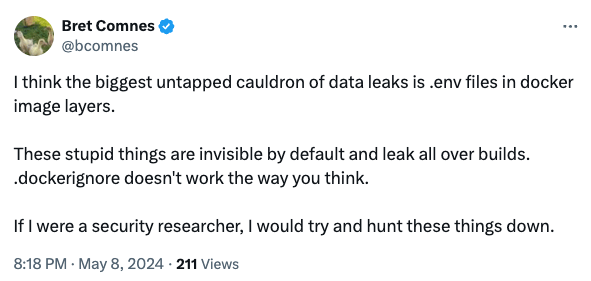
To make matters worse, Docker build arguments are just one vector for leaking secrets in Docker images. Other common vectors include storing the .env file in the built Docker image that also results in leaking credentials and secrets that are then kept in the image’s layers.
This is more common than you think, evidently, from Bret Comnes, a Senior Software Engineer at Socket.io:
There are however, more secure ways to build docker images, such as using multi-stage docker image.
To begin with, the hint lies in the title of this section: secrets management. Environment variables are hardly managed unless you explicitly use an integration or an orchestrator like Kubernetes to automatically inject environment variable configuration. For the vast majority of developers, environment variables are more of a “set and forget” practice.
I would like to propose a 3-fold principle to better secrets management:
But how do you actually follow all of this in practice?
Well, secrets management solutions come in different shapes and sizes so I will refrain from recommending a specific one, but I don’t want to leave you hanging so let me provide a guideline on an adoption approach and how they differ. The following is listed in ascending order of complexity and security:
Often times we have to face the “secret zero” problem. The “secret zero” problem is in essence the chicken and egg problem of having to provide a secret to access a secret.
This is why it is important to differentiate between storing secrets and providing secrets. If the application needs a single secret to bootstrap and then access a secret management service, you can provide the initial secret through an environment variable as long as the initial secret (often referred to as a token in many products, such as Hashicorp’s vault) is short-lived and has a limited usage count. This distinction is important because we treat the orchestration and the medium through-which the initial secret is provided as trusted sources, and once the application has bootstrapped and obtained the necessary secrets to function, the initial secret passed through the environment variable is discarded and expired. Even if leaked, it is useless.
Thus far, we described providing secrets to the application. If you however practice “secrets storage” which is storing long-lived secrets in environment variables, you’re opening yourself to the risks I outlined in this post.
A cloud service or a secrets store tool manage the secrets for you based on your .env file and they in turn integrate back with your application’s environment variables.
To call out a practical example: 1Password.
1Password is a password management service. Teams at companies use it to store and share passwords and other sensitive information through vaults. 1Password also has a CLI (called op) that reads your .env file and inject secrets to your application process.
Your .env file:
API_TOKEN="op://Onyx Team/Dev/OpenAI API Token/token"
You then start the Node.js process as follows:
When you run the 1Password CLI, it will authenticate you as it normally does (configure the fingerprint auth and you’ll enjoy a seamless experience), map the credential to the secret in the 1Password vault, and then inject the secret to the Node.js process environment. Your Node.js application can then use process.env.API_TOKEN to access it.
The down-side with this approach is:
Still, this is a better than nothing approach and a super convenient way to avoid exposing secrets in .env files.
Offloading secrets entirely out of the environment variable scope.
In the previous approach with 1Password, you still needed to maintain and map each secret or credential to an environment variable name. That’s a manual process and completely exposes you to accidental leakage of all the secrets in the .env file.
A better way is to use a secrets management service, such as Infisical, HashiCorip Vault, or cloud vendor secrets management services like Google Cloud Secret Manager (which I feel comfortable calling out because I used it personally). These services either authenticate you based on the cloud infrastructure’s identity (i.e: IAM, and applies to the cloud vendor solutions) or via a temporary token (like Infisical) passed via environment variables (or an orchestrator).
To show a quick example of how you’d using Infisical (similar to how you’d use Google Cloud Secret Manager):
import { InfisicalSDK } from '@infisical/sdk'
const client = new InfisicalSDK();
await client.auth().universalAuth.login({
clientId: "<machine-identity-client-id>",
clientSecret: "<machine-identity-client-secret>"
});
const singleSecret = await client.secrets().getSecret({
environment: "dev",
projectId: "<your-project-id>",
secretName: "DATABASE_URL",
});
This is by far the preferred approach for anything you are building that is production-grade and has substantial and likelihood of a business impact.
Yes, you do. But the difference with the clientSecret is vast compared to traditionally storing secrets in environment variables:
If you have a malicious third-party dependency in your application then it effectively doesn’t matter how environment variables are managed or how you pass secrets because the malicious dependency has access to:
Whether you store secrets in environment variables or if you use a secrets management service, the security of your application is effectively compromised and neither mechanism will protect you.
The problem here, really, lies with the fact that this question conflates two separate issues: the security of your application and the security of your secrets and there is no “silver bullet” answer to this question because we’re mixing two different things. With that said, if you just store your secrets in environment variables, a malicious dependency can easily access all of them, exfiltrate them to a remote server, and use them to compromise your application and infrastructure.
This question depends on the scope and context of the malicious dependency execution. If said malicious dependency is limited to executing during the build process, in which third-party dependencies are installed, and effectively allow install scripts to be run, and therefore execute arbitrary code, then securely managing secrets does offer some protection.
If you insecurely store your secrets in a .env file, environment variables or an arbitrary config.json file, then a malicious dependency can easily access these secrets and exfiltrate them to a remote server during the install / build process. Running npm install will allow any package in the dependency tree to execute arbitrary code, so it can just run env or cat .env and send the output to a remote server.
If however, you don’t actually store secrets as plain text on disk, and you don’t actually have any plain secrets in .env then a postinstall malicious dep hook would be useless in terms of exfiltrating secrets.
Many secrets management services provide a way to authenticate and obtain a temporary, single-use token that can be used to further fetch secrets. This is often referred to as a “machine identity” or “machine identity client” and is used to authenticate the application to the secrets management service.
Some examples to call out for existing products:
Serverless environments like AWS Lambda, or Vercel for that matter, are much more restricted and ephemeral which comes with some added benefits. However, some of the risks still apply, such as the security risk of exposing secrets in environment variables when the function crashes and the error message is logged or returned as an API response.
Another reason to consider moving away from environment variables for these serverless environments is that AWS Lambda, as one example, has a limited size for environment variables. If you have a large number of secrets or large secrets, you may run into issues with the size limit. For example: large JSON configuration payloads, large RSA keys, large JWT tokens, etc.
此内容由惯性聚合(RSS阅读器)自动聚合整理,仅供阅读参考。 原文来自 — 版权归原作者所有。