





When using AWS IoT Core, most tutorials will tell you to include device certificates in your firmware. While that does work, it means you won't be able to run over-the-air updates.
In this post, I'll show how to store AWS certificates in the NVS partition. This will make it possible to deploy a single firmware update to many devices.
Note: This blog post will be a part of a series on implementing over-the-air updates with ESP-IDF and AWS IoT Core. Stay tuned for more posts on this subject.
The problem
Let's go over the problem in more detail. By default, ESP-IDF projects use a partition table called "Single factory app, no OTA", which contains these partitions:

Your code, including AWS certificates, are stored in the factory partition. This works fine until you think about over-the-air updates. When an update needs to be applied, ESP-IDF will download your new firmware and overwrite existing software:
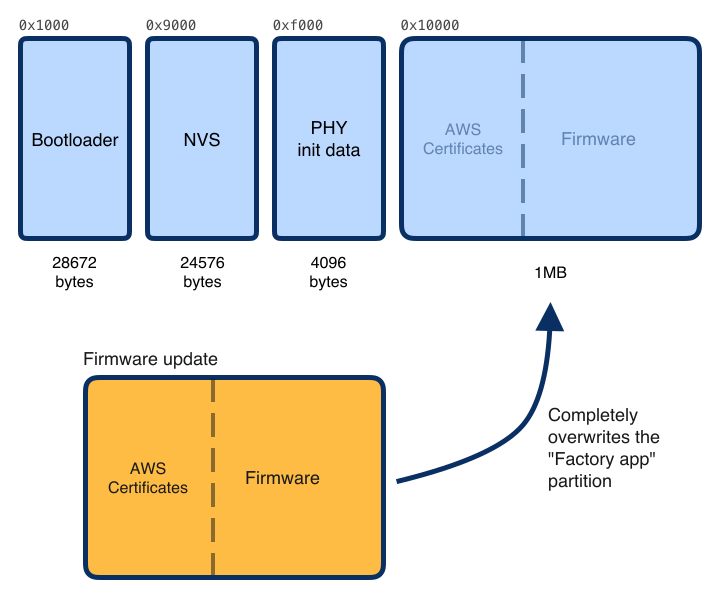
That means that your firmware update must contain the same certificates, otherwise your device won't be able to connect to AWS IoT Core. And this is problematic. It implies that you store all certificates somewhere and generate a unique firmware for each device you want to update. Not very secure and not very convenient.
Side note: this is a simplification. When implementing over-the-air updates, you want to use the "factory app, two OTA definitions" partition table. This contains a factory app (a failsafe for when updates fail) and two OTA partitions, which contain the last two firmware updates. More about this in a later post!
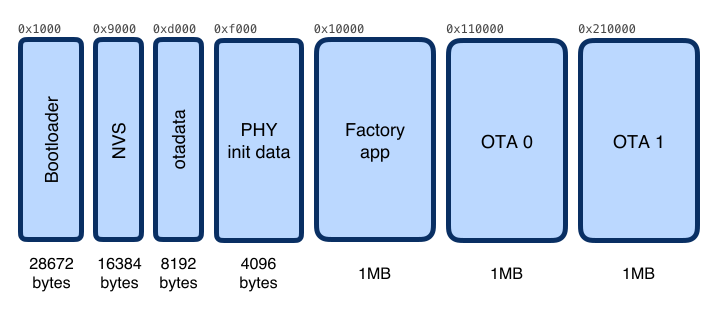 Partitions not to scale. Lol!
NVS partition to the rescue
To fix this problem, certificates must be stored separately, away from the main app. You could create a new partition for this, but I opted to use the existing NVS partition.
NVS stands for non-volatile storage. It's a key-value database stored in the flash memory. It's used by ESP-IDF to store things like Wi-Fi credentials and RF calibration data.
The default NVS partition can store 16KB of data, more than enough to store a certificate and private key. No custom partition map needed!
NVS namespaces
One more thing you need to know about the NVS is that it uses namespaces. Think of these as "folders" within the NVS partition that contain key/value items. This prevents conflicts between your app, third-party components, and ESP-IDF.
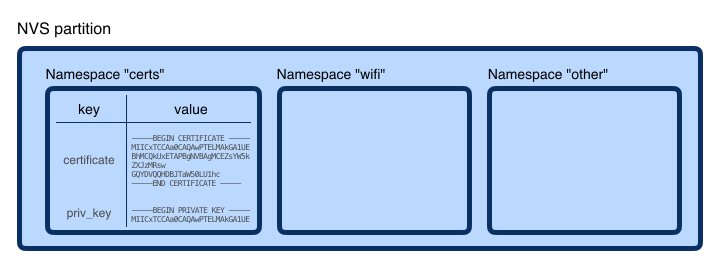
In this post, I'll store AWS certificates in a namespace called certs.
Create NVS CSV file
First, we have to create a CSV file that contains details about the data you want to store in the NVS partition. The file format is straightforward and well documented.
It starts with a header row (like any CSV file), followed by the name of the namespace in which you want to store data (in this case, certs). Then you can add your custom data. Here I'm adding certificate and priv_key, which will be encoded as strings.
key,type,encoding,value
certs,namespace,,
certificate,file,string,../main/certificates/certificate.pem.crt
priv_key,file,string,../main/certificates/private.pem.key
Here's a dissection of a line in the CSV:
certificate,file,string,../main/certificates/certificate.pem.crt
     │       │     │                     │
     │       │     │                     └── Value or path to a file
     │       │     └── How to encode the data (string, uint8, ...)
     │       └── Type (can be "file" or "data")
     └── Key
Note that I'm using the file type. This means that the NVS utility will use the file's content as the value for my key. You can also define a value directly in the CSV file by setting the second column to data. This could be useful to store a custom device ID for instance:
device_id,data,string,random-device-id-goes-here
Where to store this CSV file? That's up to you. I called mine nvs.csv and put it inside the main directory of my project. My AWS certificates are stored under main/certificates/. Here's my project structure:
.
├── CMakeLists.txt
├── build
│   └── (...)
├── components
├── main
│   ├── CMakeLists.txt
│   ├── certificates     <---- Contains AWS certificates
│   │   ├── aws-root-ca.pem
│   │   ├── certificate.pem.crt
│   │   ├── private.pem.key
│   │   └── public.pem.key
│   ├── main.c
│   └── nvs.csv          <---- CSV with NVS key/value data
└── sdkconfig
Note that in the CSV file, all paths are relative to the build directory. That's why I'm using ../main/certificates to get the certificates.
Generating NVS partition (bin file)
With the CSV file ready, you can generate a bin file for the NVS partition using nvs_partition_gen.py. It's a command-line tool made by Espressif and is included in ESP-IDF:
~/esp/esp-idf/components/nvs_flash/nvs_partition_generator/nvs_partition_gen.py generate "../main/nvs.csv" certs.bin 16384
The tool takes three parameters:
../main/nvs.csv→ The path to the CSV file we just created.certs.bin→ Path to the output file16384→ The size of the NVS partition in bytes.
Once again, these paths are relative to the build directory, so the output will be stored there.
Your project structure should look like this now:
.
├── CMakeLists.txt
├── build
│   ├── (...)
│   └── certs.bin        <---- Generated by the NVS utility
├── components
├── main
│   ├── CMakeLists.txt
│   ├── certificates     <---- Contains AWS certificates
│   │   ├── aws-root-ca.pem
│   │   ├── certificate.pem.crt
│   │   ├── private.pem.key
│   │   └── public.pem.key
│   ├── main.c
│   └── nvs.csv          <---- CSV with NVS key/value data
└── sdkconfig
Reading certificates from NVS
Before flashing this to an ESP32, let's look at how you can read data from the NVS partition.
First, the NVS partition has to be initialized:
// Initialize NVS
ESP_LOGI(TAG, "Init NVS");
esp_err_t err = nvs_flash_init();
if (err == ESP_ERR_NVS_NO_FREE_PAGES || err == ESP_ERR_NVS_NEW_VERSION_FOUND) {
    err = nvs_flash_init();
}
ESP_ERROR_CHECK(err);
Next, we open the certs namespace in read-only mode:
nvs_handle handle;
ESP_ERROR_CHECK(nvs_open("certs", NVS_READONLY, &handle) != ESP_OK));
We can now retrieve items from our NVS partition and namespace. To aid this process, I created a simple helper function that returns the value of a key (or returns NULL if it's not found). Make sure to use the same keys as defined in the CSV file.
char * nvs_load_value_if_exist(nvs_handle handle, const char* key)
{
    // Try to get the size of the item
    size_t value_size;
    if(nvs_get_str(handle, key, NULL, &value_size) != ESP_OK){
        ESP_LOGE(TAG, "Failed to get size of key: %s", key);
        return NULL;
    }

    char* value = malloc(value_size);
    if(nvs_get_str(handle, key, value, &value_size) != ESP_OK){
        ESP_LOGE(TAG, "Failed to load key: %s", key);
        return NULL;
    }

    return value;
}
Now you can load the certificate and private key easily:
ESP_LOGI(TAG, "Loading private key & certificate");
char * private_key = nvs_load_value_if_exist(handle, "priv_key");
char * certificate = nvs_load_value_if_exist(handle, "certificate");

// Check if both items have been correctly retrieved
if(private_key == NULL || certificate == NULL){
    ESP_LOGE(TAG, "Private key or cert could not be loaded");
    // TODO: handle error
}

// We're done with NVS
nvs_close(handle);
That's it! With these two values loaded, you can connect to AWS IoT Core with a library of your choice. Here's a full example:
#include "nvs.h"
#include "nvs_flash.h"
#include "nvs_sync.h"

static const char TAG[] = "NVS-Test";

// Helper function that loads a value from NVS.
// It returns NULL when the value doesn't exist.
char * nvs_load_value_if_exist(nvs_handle handle, const char* key)
{
    // Try to get the size of the item
    size_t value_size;
    if(nvs_get_str(handle, key, NULL, &value_size) != ESP_OK){
        ESP_LOGE(TAG, "Failed to get size of key: %s", key);
        return NULL;
    }

    char* value = malloc(value_size);
    if(nvs_get_str(handle, key, value, &value_size) != ESP_OK){
        ESP_LOGE(TAG, "Failed to load key: %s", key);
        return NULL;
    }

    return value;
}

void app_main(void)
{
    // Initialize NVS
    ESP_LOGI(TAG, "Init NVS");
    esp_err_t err = nvs_flash_init();
    if (err == ESP_ERR_NVS_NO_FREE_PAGES || err == ESP_ERR_NVS_NEW_VERSION_FOUND) {
        err = nvs_flash_init();
    }
    ESP_ERROR_CHECK(err);

    // Lock NVS before reading
    ESP_ERROR_CHECK(nvs_sync_create());
    if(!nvs_sync_lock(1000 / portTICK_PERIOD_MS)){
        ESP_LOGE(TAG, "Could not sync lock NVS");
        return; // You might want to handle this error better ;)
    }

    // Open the "certs" namespace in read-only mode
    nvs_handle handle;
    ESP_ERROR_CHECK(nvs_open("certs", NVS_READONLY, &handle) != ESP_OK));

    // Load the private key & certificate
    ESP_LOGI(TAG, "Loading private key & certificate");
    char * private_key = nvs_load_value_if_exist(handle, "priv_key");
    char * certificate = nvs_load_value_if_exist(handle, "certificate");

    // We're done with NVS
    nvs_close(handle);

    // Check if both items have been correctly retrieved
    if(certs.private_key == NULL || certs.certificate == NULL){
        ESP_LOGE(TAG, "Private key or cert could not be loaded");
        return; // You might want to handle this in a better way
    }

    // At this point the private_key and certificate have been loaded.
    // Use them to connect to AWS IoT using a library of your choice.
}
Flashing to the board
At this point, you have a binary file for the NVS partition and code that can read data from it. The last part is to flash them to an ESP32 with esptool.py
I took the standard flashing command and added a line to also flash the certs.binfile at offset 0x9000:
~/.espressif/python_env/idf4.3_py2.7_env/bin/python \
    ~/esp/esp-idf/components/esptool_py/esptool/esptool.py \
    -p /dev/cu.usbserial-1410 \
    -b 460800 \
    --before default_reset \
    --after hard_reset \
    --chip esp32 \
    write_flash --flash_mode dio \
    --flash_freq 40m \
    --flash_size detect \
    0x10000 YOUR-PROJECT-NAME.bin \
    0x1000 bootloader/bootloader.bin \
    0x8000 partition_table/partition-table.bin \
    0x9000 certs.bin
Automate build, flash & monitor
Having to execute two long commands to build an NVS bin file & flash your firmware seems counterproductive. So here's a simple bash script that automates the entire process:
#!/bin/bash

SERIAL_PORT="/dev/cu.usbserial-1410"

echo "--> Building regular firmware"
~/.espressif/python_env/idf4.3_py2.7_env/bin/python \
    ~/esp/esp-idf/tools/idf.py build

echo "--> Creating NVS partition bin file with AWS IoT certificates"
cd build

~/esp/esp-idf/components/nvs_flash/nvs_partition_generator/nvs_partition_gen.py generate "../main/nvs.csv" certs.bin 12288

echo "--> Flashing to board..."
~/.espressif/python_env/idf4.3_py2.7_env/bin/python \
    ~/esp/esp-idf/components/esptool_py/esptool/esptool.py \
    -p $SERIAL_PORT \
    -b 460800 \
    --before default_reset \
    --after hard_reset \
    --chip esp32 \
    write_flash --flash_mode dio \
    --flash_freq 40m \
    --flash_size detect \
    0x10000 src-firmware-cam-idf.bin \
    0x1000 bootloader/bootloader.bin \
    0x8000 partition_table/partition-table.bin \
    0x9000 certs.bin

cd ..

echo "--> Starting monitor..."
~/.espressif/python_env/idf4.3_py2.7_env/bin/python \
    ~/esp/esp-idf/tools/idf.py \
    -p $SERIAL_PORT monitor
I store this script in the root directory of my ESP-IDF project.
Conclusion
By storing device certificates in the NVS partition, your firmware becomes generic for all devices of the same type. That means you can run over-the-air updates without worrying about certificates.
I'll post a follow-up blog post with instructions on how to use AWS IoT Jobs to trigger OTA updates with ESP-IDF. Stay tuned!