


I've been working on a few IoT projects recently, and while prototyping, I need a simple but flexible data store. I just want to push data to an API and query and visualize it later on.
There are many solutions for this, but most are expensive or very limited. So I set out to build my own serverless IoT data store with 2 Lambda functions and a DynamoDB table.
Overview
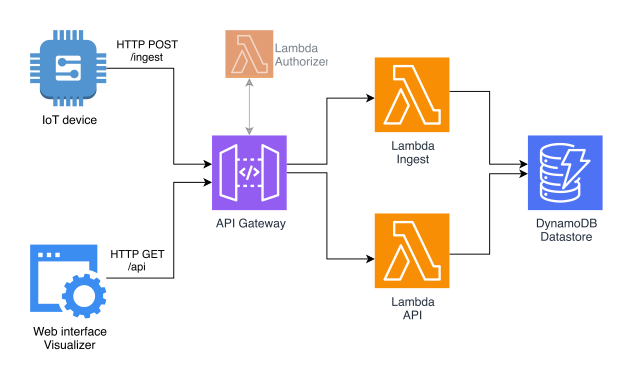
Here's the high-level overview of EZStore's architecture:
Using EZStore
EZStore has 2 APIs: one to ingest data from IoT devices and one to get it back out. They're exposed through API Gateway as a simple HTTP API.
IoT devices can add new data by posting a JSON document to the metrics endpoint:
POST /ezstore/v1/metrics/{deviceId}

{
	"temperature": 21.67,
	"humidity": 65.10,
}
The ingest Lambda function will add this data to DynamoDB and add a timestamp to it. To get it back, make a GET request to the same endpoint:
GET /ezstore/v1/metrics/{deviceId}

{
    "data": [
        {
            "temperature": 21.67,
            "humidity": 65.10,
            "timestamp": 1641286719828
        }
    ]
}
This will return all the data received in the last 7 days. You can also define your own start and end date by providing them as query string parameter:
GET /ezstore/v1/metrics/{deviceId}?start_date=2021-08-01&end_date=2021-08-31
DynamoDB table design
Let's now look at how data is stored in DynamoDB. In a nutshell: the device ID is being used as the primary key with the date as sort key. All new data points are then appended to a list:
| Primary key (deviceId) |
Sort key | Data |
|---|---|---|
| 1a8b6 | reading-2022-01-03 |
[
  {
    timestamp: 1641232913,
    temperature: 21.8,
    humidity: 64.1
  },
  {
    timestamp: 1641236513,
    temperature: 20.8,
    humidity: 75.8
  }
]
|
| reading-2022-01-04 |
[
  {
    timestamp: 1641232913,
    temperature: 21.8,
    humidity: 64.1
  },
  {
    timestamp: 1641236513,
    temperature: 20.8,
    humidity: 75.8
  }
]
|
|
| my-test-device-1 | reading-2022-01-04 | ... |
This is a very simple table design that can store up to 400KB of data per sensor per day. More than enough for my prototyping needs (usually a few data points every 10-30minutes).
This setup has a few limitations though, but I'll address those later. Let's now look at the brains of the operation: the Lambda functions.
Lambda functions: the basics
First up, there's a certain amount of code that is being shared between the ingest and api function. Things like the DynamoDB Document Client, an interface to describe the shape of items in the database and a helper function to construct the sort key:
import { DynamoDB } from "@aws-sdk/client-dynamodb";
import { DynamoDBDocument } from "@aws-sdk/lib-dynamodb";

const dynamoClient = new DynamoDB({ region: process.env.region });
export const tableName = process.env.TABLE_NAME ?? "";
export const docClient = DynamoDBDocument.from(dynamoClient);

export interface EZStoreDynamoItemMetric {
    timestamp: number;
    [key: string]: string | number | boolean;
}

export function getDateForSortKey(date: Date){
    return "reading-" + date.toISOString().substring(0, 10);
}
Lambda #1: ingest
Then we have the ingest function, which gets data from the IoT device through API Gateway. It checks if the deviceId was provided and if the body contains valid JSON. If so, it timestamps the data and writes it to DynamoDB:
import { APIGatewayEvent, APIGatewayProxyEventV2 } from "aws-lambda";
import {
    tableName,
    EZStoreDynamoItemMetric,
    getDateForSortKey,
    docClient,
    createAPIReturnObject
} from "../common";

export async function handle(event: APIGatewayProxyEventV2) {
    const deviceId = event.pathParameters?.deviceId;
    const body = event.body;

    if(deviceId === undefined || body === undefined){
        return createAPIReturnObject(400, "No deviceId or body");
    }

    // Decode the JSON body
    let bodyJson: object;
    try{
        bodyJson = JSON.parse(body);
    }catch(e){
        return createAPIReturnObject(400, "No valid JSON provided");
    }

    // Write it to DynamoDB
    const sortKey = getDateForSortKey(new Date());
    const dataEntry: EZStoreDynamoItemMetric = {
        timestamp: Date.now(),
        ...bodyJson
    };

    await docClient.update({
        TableName: tableName,
        Key: {
            pk: deviceId,
            sk: sortKey,
        },
        UpdateExpression: "SET #data = list_append(if_not_exists(#data, :empty_list), :data_entry)",
        ExpressionAttributeNames: {
            '#data': 'data',
        },
        ExpressionAttributeValues: {
            ":empty_list": [],
            ":data_entry": [dataEntry],
        },
    });

    return createAPIReturnObject(200, JSON.stringify({
        success: true,
    }));
};
Lambda #2: API
The second Lambda function exposes the stored data as a simple REST API. It makes sure that the deviceId is provided and extracts the start and end date from the query string parameters. If they're not available, it uses a default date range of 7 days.
It then queries the DynamoDB table and returns all the data as a flattened array:
import {
    APIGatewayEvent,
    APIGatewayProxyResult
} from "aws-lambda";

import {
    getDateForSortKey,
    tableName,
    docClient,
    createAPIReturnObject,
} from "../common";

export async function handle(event: APIGatewayEvent): Promise<APIGatewayProxyResult> {
    const deviceId = event.pathParameters?.deviceId;
    if(!deviceId){
        return createAPIReturnObject(400, "No deviceId provided.");
    }

    // Parse the given start_date and end_date or use default values
    //      - start_date -> 7 days ago
    //      - end_date -> now
    const startDate = parseDateOrDefault(
        event.queryStringParameters?.start_date,
        new Date(Date.now() - 7 * 24 * 60 * 60 * 1000),
    );
    const endDate = parseDateOrDefault(
        event.queryStringParameters?.end_date,
        new Date(),
    );

    // Check if startDate is before the endDate. Otherwise DynamoDB will
    // throw an error.
    if(startDate > endDate){
        return createAPIReturnObject(400, "Start date is after end date");
    }

    // Fetch from DynamoDB
    try{
        const data = await docClient.query({
            TableName: tableName,
            KeyConditionExpression: 'pk = :pk and sk BETWEEN :start AND :end',
            ExpressionAttributeValues: {
                ':pk': deviceId,
                ':start': getDateForSortKey(startDate),
                ':end': getDateForSortKey(endDate),
            },
        });

        // Flatten all messages into a single array
        const out = data.Items?.map(i => i.data).flat();
        return createAPIReturnObject(200, JSON.stringify({
            data: out,
        }));
    }catch(e){
        console.error("Error executing DynamoDB query", e);
        return createAPIReturnObject(500, "Database error");
    }
}

/**
 * Tries to parse the given input string to a Date object. If it fails,
 * it returns the provided defaultValue.
 * Note: this could return
 */
function parseDateOrDefault(input: string|undefined, defaultValue: Date): Date{
    // Input must be defined and its format must make some sense
    if(!input || /\d{4}-\d{2}-\d{2}/.test(input) === false){
        return defaultValue;
    }

    const tryParse = new Date(input);
    if(tryParse === undefined){
        return defaultValue;
    }

    return tryParse;
}
Limitations of EZStore
While EZStore is very simple, it has some limitations:
-
All data of a device for a day is grouped into a single item and that item can only be 400KB.
- This is a limitation of DynamoDB which can be overcome by adding a suffix to the sort key like so:
reading-2022-01-04-1reading-2022-01-04-2. - This limitation could also be overcome by adding compression. The JSON data coming from IoT devices is highly repetitive and compresses well.
- Another solution is to group data completely differently. For instance: create 1 item for every hour of the day. The sort key would like this:
reading-YYYY-MM-DD-HH
- This is a limitation of DynamoDB which can be overcome by adding a suffix to the sort key like so:
-
At the moment, EZStore requires IoT device to
POSTdata via HTTP. However, you could easily add a Lambda function that ingests data from other sources such as AWS IoT Core (MQTT) or even specialized IoT networks like Sigfox.
Remember: EZStore is not meant as a general purpose IoT data store. It's a very naïve data store that focuses on low-volume IoT data for personal projects and prototypes.
Open source!
Want to use EZStore yourself? Or maybe improve its shortcomings? It's available on GitHub and I'm open to pull requests and suggestions: https://github.com/Savjee/EZStore