







I spent the last week upgrading the Django application at work from version 2.2 to 3.2. The upgrade didn’t seem too challenging and I only had 84 tests to fix out of a total of 5580 when I started the process. Adam’s django-upgrade tool made some of the repetitive changes super easy. All in all, it looked like this was going to be a very straightforward upgrade.
I felt very confident when it was time to merge all the pull requests. I also didn’t expect any issues when it was time to deploy the changes to a production-like environment.
But soon after the deployment, I noticed that something was not working well. Queries that were fast before the deployment were now taking much much longer. The graph below shows how one query went from a sub-second execution time to over 1 minute:
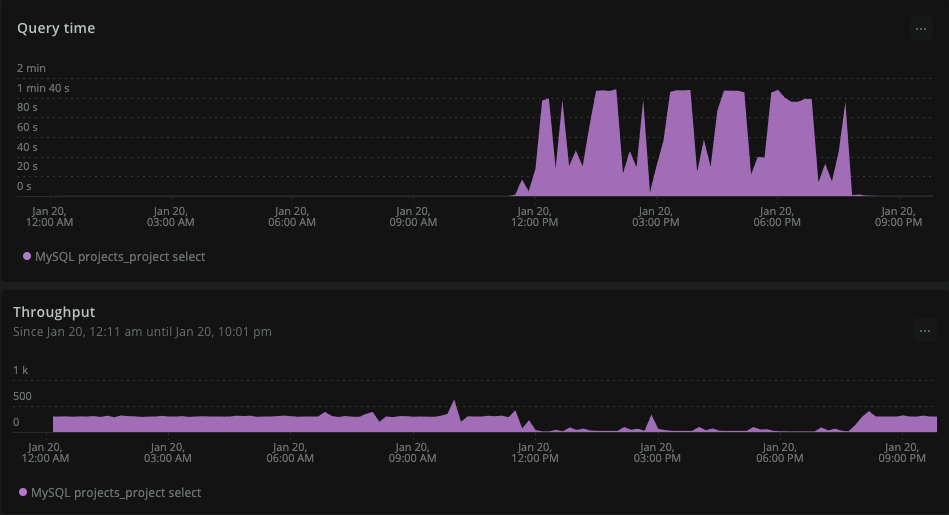
If we pushed this code to production we would be dealing with at least a partial outage if not a full-blown outage.
I noticed that the problematic query looked a bit different under Django 3.2 than it did under Django 2.2:
Django 3.2
SELECT
    `projects_project`.`id`
FROM
    `projects_project`
WHERE (NOT `projects_project`.`deleted`
    AND `projects_project`.`archived`
    AND `projects_project`.`date_due` <= '2022-01-20 15:16:41');
Django 2.2
SELECT
    `projects_project`.`id`
FROM
    `projects_project`
WHERE (`projects_project`.`deleted` = 0
    AND `projects_project`.`archived` = 1
    AND `projects_project`.`date_due` <= '2022-01-20 15:16:41');
As far as I know, this change was not documented in any of the 3.x changelogs, so it took me by surprise.
I need to mention that we are using MySQL 5.7 which does not have a native boolean column type. Because of this, Django uses a tinyint column for BooleanFields on your models.
When MySQL 5.7 sees projects_project.archived it interprets it as a range query. The range for the query goes through all possible values of the column. For tinyint these are integers from -128 to 127, excluding zero.
The problem with range queries is that after the first range lookup the database can no longer use other keys in the compositive index. In our case, we had an index on archived, deleted, and date_due, but because of the range over completed the query was not able to filter values based on the other two index keys.
We can see this by running the EXPLAIN query and compare the number of rows scanned:
rows: 26518
filtered: 8.10
Where the query with deleted = 0 and archived = 1 filtered out many more rows with the index:
rows: 1
filtered: 10.00
With help from Bery and Boxed from the Unofficial Django Discord I found a Django Bug report on this exact issue. There was even a fix for it merged a few months back! 🎉
The only problem was that the fix was merged into the main branch, and due to Django’s backporting policy won’t make it into Django 3.2 or even into 4.0.
The discussion on the bug ticket did mention a workaround. You can wrap values with models.Value() in your filter statements and Django will keep the query as-is.
Project.objects.filter(deleted=models.Value(0), archived=models.Value(1))
For me, this wasn’t a good solution because the number of different queries that I would need to update was just too big.
Luckily, applying the fix from the pull request to our codebase wasn’t that hard. We have already overwritten methods inside DatabaseOperations due to a completely unrelated problem. I just needed to copy the conditional_expression_supported_in_where_clause function from the pull request to our codebase and the problem went away!
The full solution for those curios (or facing the same problem) looks like this:
dbengine module somewhere in your application code (e.g. yourapp.dbengine) and create a base.py file with the following content:from django.db.backends.mysql import base
from django.db.models import Exists, ExpressionWrapper, Lookup
class DatabaseOperations(base.DatabaseOperations):
def conditional_expression_supported_in_where_clause(self, expression):
# MySQL ignores indexes with boolean fields unless they're compared
# directly to a boolean value.
if isinstance(expression, (Exists, Lookup)):
return True
if isinstance(expression, ExpressionWrapper) and expression.conditional:
return self.conditional_expression_supported_in_where_clause(
expression.expression
)
if getattr(expression, "conditional", False):
return False
return super().conditional_expression_supported_in_where_clause(expression)
class DatabaseWrapper(base.DatabaseWrapper):
ops_class = DatabaseOperations
DATABASE["default"]["engine"] in settings.py to be: yourapp.dbengine.And that’s it! Just don’t forget that you can remove this workaround when you upgrade to Django 4.1.
We were lucky that we caught this issue before deploying to production and we completely understand that the Django team has limited resources and can’t always patch every single issue in every version. MySQL is also a lot less used than SQLite and PostgreSQL according to the last Django survey by JetBrains.
The community around Django is amazing though and that is a major part of the reason we continue being happy with Django and don’t see ourselves switching to any other framework in the foreseeable future ❤️
此内容由惯性聚合(RSS阅读器)自动聚合整理,仅供阅读参考。 原文来自 — 版权归原作者所有。