


kubernetesgoogle-cloudcicdcloudcncf
Simplifying container-based app development on Google Kubernetes Engine (GKE) with Cloud Deploy.

Luca Cavallin
Published
⏱ 3 min read

Developing container-based applications on Google Kubernetes Engine (GKE) can be challenging when there are dozens of pipelines across multiple environments. This is where Google Cloud Deploy comes into action!
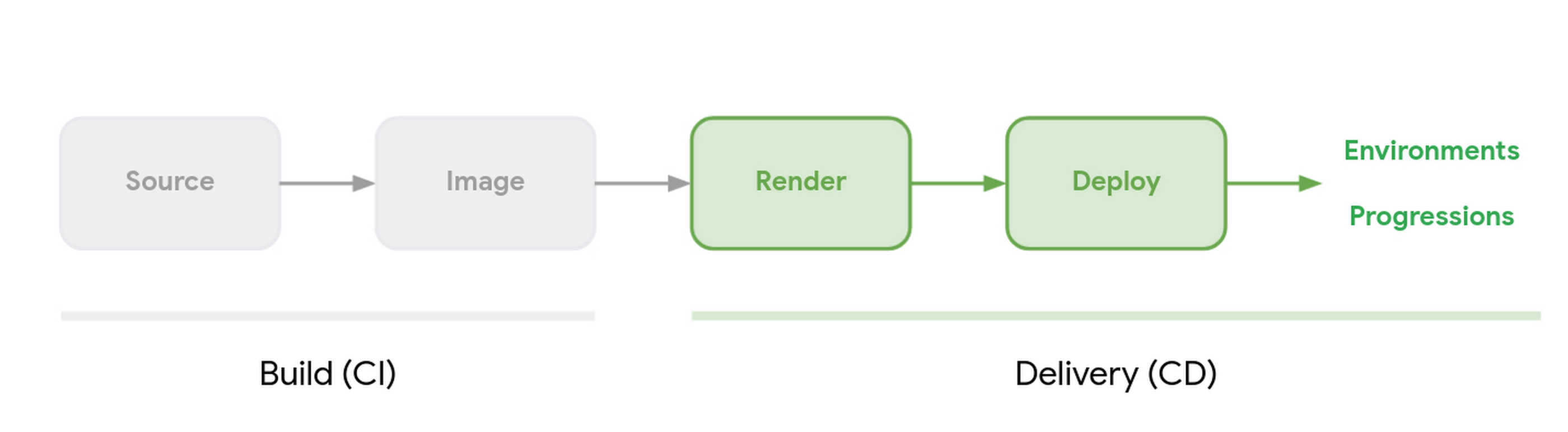
Google Cloud Deploy is a fully managed, scalable, and streamlined continuous delivery solution for GKE. It automates application delivery to multiple target environments via a defined promotion sequence. With Google Cloud Deploy, you can construct reliable CI/CD pipelines that can automate build, deploy, and render jobs. A Cloud Deploy pipeline includes information, such as name (used for referring to the pipeline), promotion sequence (used for providing the order of deployment to the targets), and targets (optional information). Moreover, it is easily integrable with popular tools, such as Gitlab CI, Jenkins, etc. It is accessible via CLI and API and also brings Skaffold (a command line tool that facilitates continuous development for Kubernetes-native applications) to your pipelines, thereby enhancing the reliability of pipelines.

Some of the main use cases of Google Cloud Deploy are as follows:
Streamlined Continuous Delivery: Cloud Deploy is highly useful to have simple and effective continuous delivery to Google Kubernetes Engine (GKE). You can create releases and advance them via environments, like test, production, and staging. In addition, its API, CLI, or web console can be used to have a one-step simple releases' rollback and promotion.
Integrated Solution: Cloud Deploy is a tightly integrated GKE deployment platform. It comes pre-integrated into Cloud Audit Logs, Cloud Logging, and IAM. This way, it is effective to attain traceability with Cloud Audit Logs, monitor release events with Cloud Logging, and lockdown release progressions via IAM.
Scalable and Fully Managed: Cloud Deploy is a fully-managed service, which implies no expensive infrastructure to set up and maintain for the GKE CD pipeline. It can scale CD processes seamlessly and ensure their management through simple declarative configuration. It also assists to have a centralized view of all the pipelines!
Let's understand how Google Cloud Deploy works by learning how to register a delivery pipeline. In order to register the delivery pipeline, you have to run gcloud beta deploy apply for every pipeline configuration file. So, the command to register the delivery pipeline with Cloud Deploy including its targets (the specific cluster and its configuration into which to deploy the application) is as follows (the --region and --project flags are optional):
shell
gcloud beta deploy apply --file=PIPELINE_CONFIG \
--region=LOCATION \
--project=PROJECT
The structure of a clouddeploy.yaml file looks like this:
yaml
   apiVersion: deploy.cloud.google.com/v1beta1
    kind: DeliveryPipeline
    metadata:
     name:
     annotations:
     labels:
    description:
    serialPipeline:
     stages:
     - targetId:
       profiles: []
     - targetId:
       profiles: []
     ---

     apiVersion: deploy.cloud.google.com/v1beta1
     kind: Target
     metadata:
      name:
      annotations:
      labels:
     description:
     requireApproval:
     gke:
      cluster: projects/[project_name]/locations/[location]/clusters/[cluster_name]

     executionConfigs:
     - privatePool:
         workerPool:
         serviceAccount:
         artifactStorage:
       usages:
       - [RENDER | DEPLOY]
     - defaultPool:
         serviceAccount:
         artifactStorage:
       usages:
       - [RENDER | DEPLOY]

     ---
To learn more about how to use Google Cloud Deploy, you can visit its official guide.
When it comes to streamlining the continuous delivery in Google Kubernetes Engine (GKE), Google Cloud Deploy presents an ideal choice for organizations. Being a fully-managed, easily scalable, and integrable solution, it makes releases and deployments an efficient and streamlined process.

Platform Engineer at Xebia working on the infrastructure beneath AI. Google Developer Expert & CNCF Ambassador. Writes here for ~10,000 readers a month.
此内容由惯性聚合(RSS阅读器)自动聚合整理,仅供阅读参考。 原文来自 — 版权归原作者所有。