惯性聚合 高效追踪和阅读你感兴趣的博客、新闻、科技资讯
阅读原文 在惯性聚合中打开

推荐订阅源

F
Full Disclosure
WordPress大学
WordPress大学
小众软件
小众软件
Cloudbric
Cloudbric
AWS News Blog
AWS News Blog
腾讯CDC
量子位
人人都是产品经理
人人都是产品经理
大猫的无限游戏
大猫的无限游戏
freeCodeCamp Programming Tutorials: Python, JavaScript, Git & More
V
Vulnerabilities – Threatpost
Scott Helme
Scott Helme
Hugging Face - Blog
Hugging Face - Blog
博客园_首页
C
CXSECURITY Database RSS Feed - CXSecurity.com
The Hacker News
The Hacker News
奇客Solidot–传递最新科技情报
奇客Solidot–传递最新科技情报
IT之家
IT之家
Jina AI
Jina AI
Attack and Defense Labs
S
SegmentFault 最新的问题
Simon Willison's Weblog
The Cloudflare Blog
阮一峰的网络日志
阮一峰的网络日志
T
Tailwind CSS Blog
Last Week in AI
Last Week in AI
博客园 - 【当耐特】
Google Online Security Blog
美团技术团队
OSCHINA 社区最新新闻
OSCHINA 社区最新新闻
V
Visual Studio Blog
罗磊的独立博客
L
LINUX DO - 最新话题
博客园 - Franky
博客园 - 叶小钗
Apple Machine Learning Research
The Last Watchdog
The Last Watchdog
J
Java Code Geeks
AI
AI
C
Cisco Blogs
酷 壳 – CoolShell
酷 壳 – CoolShell
C
Cyber Attacks, Cyber Crime and Cyber Security
Cisco Talos Blog
Cisco Talos Blog
博客园 - 三生石上(FineUI控件)
雷峰网
雷峰网
Help Net Security
Help Net Security
钛媒体:引领未来商业与生活新知
钛媒体:引领未来商业与生活新知
云风的 BLOG
云风的 BLOG
I
Intezer
S
Securelist

Luca Cavallin

AI Engineering for Developers | Blog AI Engineering for Developers Platform Engineering End-to-End | Blog Google Cloud Networking 101: The Comprehensive TLDR | Blog Google Cloud Networking 101: The Comprehensive TLDR Containers Are Not Automatically Secure | Blog Containers Are Not Automatically Secure Watery Stone Beacon | Photography Blue Iceman Suture | Photography Hidden Emerald Pool | Photography Autumn Chapel Pinnacles | Photography A Tour of eBPF in the Linux Kernel: Observability, Security and Networking | Blog A Tour of eBPF in the Linux Kernel: Observability, Security and Networking Shared Violet Pulse | Photography Kubernetes Networking from Packets to Pods | Blog An Overview of Network Protocols | Blog An Overview of Network Protocols A Quick Journey Into the Linux Kernel | Blog A Quick Journey Into the Linux Kernel OpenTelemetry: A Guide to Observability with Go | Blog I'm on the Cillers Podcast Talking About Tech and Hackathons | Blog Yet Another List of Random Opinions on Writing Readable Code and Other Rants | Blog My post about Istio is now on the Istio blog too! | Blog Tropical Jungle Escape | Photography The Istio Service Mesh for People Who Have Stuff to Do | Blog Dreamy Cartoonscape Windmill | Photography Twilight Windmill Reflections | Photography Notes I took while reading "Applied Machine Learning and AI for Engineers" and "Introducing MLOps" | Blog Things I've Learned About Terraform That I Keep Telling People About | Blog Analyzing Unsplash Photo Performance with Python | Blog Analyzing Unsplash Photo Performance with Python I am a Top Mentor on MentorCruise! 🎉 | Blog CI/CD Observability on GitHub Actions and the Role of OpenTelemetry | Blog CI/CD Observability on GitHub Actions and the Role of OpenTelemetry Silent Water Sentinel | Photography Three Early Crosses | Photography Fiery Twilight Trails | Photography Forested Folds Flowing | Photography Majestic Snowbound Spire | Photography Shrouded Winter Peaks | Photography Space Cat Pillar | Photography I am a CNCF (Cloud Native Computing Foundation) Ambassador! | Blog Curved Valley Mist | Photography Highly Independent Tree | Photography Misty Morning Plateau | Photography Sick Shadows Fading | Photography Half Moon Blossom | Photography Serene Pedestal Swinging | Photography Sunset Clouds Reeling | Photography Aerial Nose Parking | Photography How to Structure C Projects: These Best Practices Worked for Me | Blog How to Structure C Projects: These Best Practices Worked for Me I'm on the KubeFM Podcast Talking About "Linux Containers From Scratch" | Blog I am (again) a Google Developers Expert! | Blog How to Configure OIDC with Terraform for GitHub Enterprise Server | Blog How to Configure OIDC with Terraform for GitHub Enterprise Server Modern Frontend Development: A Tooling Overview for Engineers Revisiting the Field | Blog Meet verto.sh: Your Gateway to Open-Source Collaboration. | Blog Crafting a Clean, Maintainable, and Understandable Makefile for a C Project. | Blog Crafting a Clean, Maintainable, and Understandable Makefile for a C Project. barco: Linux Containers From Scratch in C. | Blog barco: Linux Containers From Scratch in C. How to Create a Release With Multiple Artifacts From a GitHub Actions Workflow Using the Matrix Strategy | Blog How to Create a Release With Multiple Artifacts From a GitHub Actions Workflow Using the Matrix Strategy How Databases Store and Retrieve Data with B-Trees | Blog How Databases Store and Retrieve Data with B-Trees Concurrency in Go: Goroutines, Channels, Mutexes, and More | Blog Concurrency in Go: Goroutines, Channels, Mutexes, and More Club Cloud 2021: Cloud Engineering Panel Discussion | Blog Club Cloud 2021: Cloud Engineering Panel Discussion How to Prepare for the Google Cloud Engineer Associate Certification Exam | Blog How to Prepare for the Google Cloud Engineer Associate Certification Exam What is Google Cloud Deploy? | Blog What is GitOps? | Blog Club Cloud Stories #2 - News from Around the Cloud | Blog Club Cloud Stories #2 - News from Around the Cloud Club Cloud Stories #1 - The First Episode with Antoni Tzavelas & Mark van Holsteijn | Blog Club Cloud Stories #1 - The First Episode with Antoni Tzavelas & Mark van Holsteijn Quiet Oak Shining | Photography How to Read Firestore Events with Cloud Functions and Golang | Blog How to Read Firestore Events with Cloud Functions and Golang Google Cloud Pub/Sub vs NATS: An Easy-to-Understand Comparison | Blog Google Cloud Pub/Sub vs NATS: An Easy-to-Understand Comparison How to Deploy a Multi-cluster Service Mesh on GKE with Anthos | Blog How to Deploy a Multi-cluster Service Mesh on GKE with Anthos How to Safely Store Secrets in Terraform Using Cloud KMS | Blog How to Safely Store Secrets in Terraform Using Cloud KMS Designing Serverless Applications on AWS - Jacco Kulman and Luca Cavallin @ End2End LIVE | Blog Designing Serverless Applications on AWS - Jacco Kulman and Luca Cavallin @ End2End LIVE How to Use Terraform Workspaces to Manage Environment-based Configuration | Blog How to Use Terraform Workspaces to Manage Environment-based Configuration Puffy Steel Spreading | Photography How to Deploy ElasticSearch on GKE using Terraform and Helm | Blog How to Deploy ElasticSearch on GKE using Terraform and Helm Summer Windmills Spinning | Photography How to Optimize PHP Performance on Google Cloud Run | Blog Foggy Boats Rusting | Photography How I Prepared for the Google Cloud Associate Cloud Engineer Exam | Blog How I Prepared for the Google Cloud Associate Cloud Engineer Exam Winter Kids Chasing | Photography
How to Optimize PHP Performance on Google Cloud Run
Luca Cavallin · 2021-03-04 · via Luca Cavallin

← all posts

performancephpgoogle-cloudserverless

Discover ways to enhance PHP performance on Google Cloud Run.

Luca Cavallin

Luca Cavallin

Published

⏱ 6 min read

How to Optimize PHP Performance on Google Cloud Run

The API uses PHP 7.4, Laravel 8.0 and MySQL on Cloud SQL (the managed database on Google Cloud). The API needs to handle at least 10,000 concurrent users. The container image we deploy to Cloud Run has nginx and PHP-FPM.

This is what I did to improve the response times. (Don't worry if not everything makes sense here, I'll explain everything).

  • Matching the number of PHP-FPM workers to the maximum concurrency setting on Cloud Run.

  • Configuring OPcache (it compiles and caches PHP scripts)

  • Improving composer auto-loading settings

  • Laravel-specific optimizations including caching routes, views, events and using API resources

Matching Concurrency and Workers

The application uses nginx and PHP-FPM, which is a process manager for PHP. PHP is single threaded, which means that one process can handle one (exactly one) request at the same time. PHP-FPM keeps a pool of PHP workers (a worker is a process) ready to serve requests and adds more if the demand increases. It's a good practice to limit the maximum size of the PHP-FPM worker pool, to make sure your resource usage (CPU and memory) is predictable.

To configure PHP-FPM for maximum performance, I first set the process manager type for PHP-FPM to static, so that the specified number of workers are running at all times and waiting to handle requests. I did this by copying a custom configuration file to the application's container and configuring the environment so that these options will be picked up by PHP-FPM (you must copy the configuration where it is expected, in my case, into /usr/local/etc/php-fpm.d/). The settings I needed are:

pm = static
pm.max_children = 10

However, if you set a limit, and more requests come to a server than the pool can handle, requests start to queue, which increases the response time of those requests:
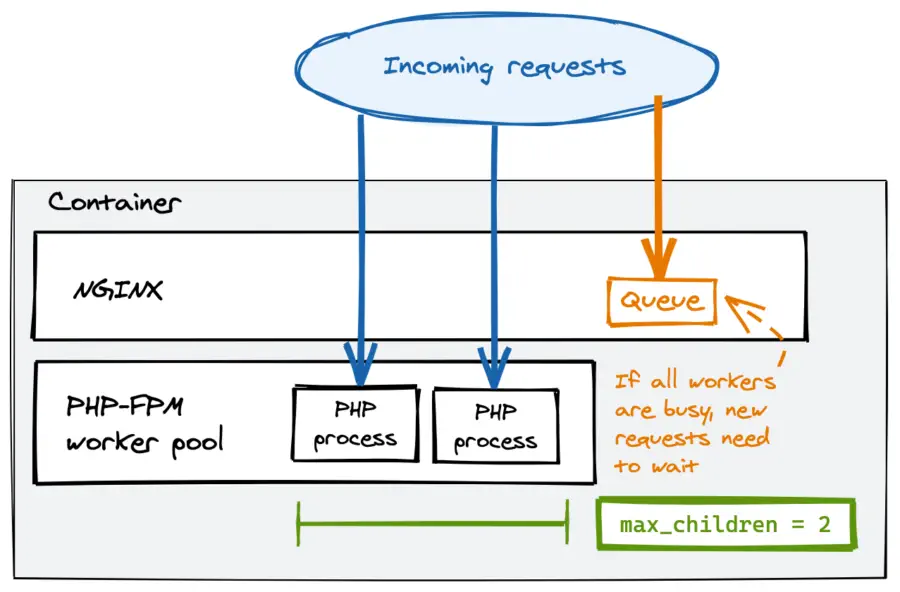
Nginx and php-fpm request model

Limiting Concurrent Requests on Cloud Run

To avoid request queuing in nginx, you'll need to limit the number of requests Cloud Run sends to your container at the same time.

Cloud Run uses request-based autoscaling. This means it limits the amount of concurrent requests it sends to a container, and adds more containers if all containers are at their limit. You can change that limit with the concurrency setting. I set it to 10, which I determined is the maximum number of concurrent requests a container with 1GB of memory and 1vCPU can take for with this application.
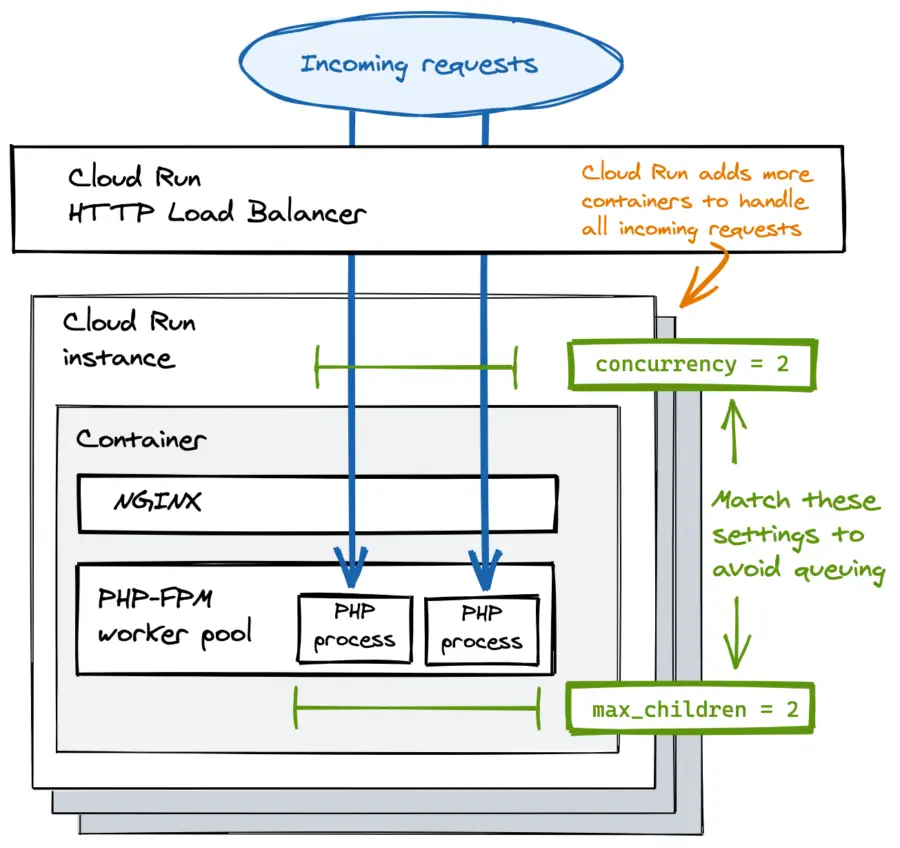
Cloud Run concurrent requests with Nginx and php-fpm

You really want to make sure Cloud Run's concurrency setting matches the maximum number of PHP-FPM workers! For example, if Cloud Run sends 100 concurrent requests to a container before adding more containers, and you configured your PHP-FPM to start only 10 workers, you will see a lot of requests queuing.

If these tweaks aren't enough to reach the desired performance, check the Cloud Run metrics to see what the actual utilization percentages are. You might have to change the amount of memory and vCPUs available to the container. The downside of this optimization is that more containers will be running due to lower concurrency, resulting in higher costs. I also noticed temporary delays when new instances are starting up, but this normalizes over time.

Configuring OPCache

OPCache is a default PHP extension that caches the compiled scripts in memory, improving response times dramatically. I enabled and tweaked OPCache settings by adding the extension's options to a custom php.ini file (in my case, I put it in the /usr/local/etc/php/conf.d/ directory). The following is a generic configuration that you can easily reuse, and you can refer to the documentation for the details about every option.

opcache.enable=1
opcache.memory_consumption=128
opcache.interned_strings_buffer=64
opcache.max_accelerated_files=32531
opcache.validate_timestamps=0
opcache.save_comments=1
opcache.fast_shutdown=0

Optimizing Composer

Composer is a dependency manager for PHP. It lets you specify the libraries your app needs, and downloads them for you to a directory. It also generates an autoload configuration file, which maps import paths to files. If you pass the --optimize-autoloader flag to composer, it will generate this file only once, and doesn't dynamically update it if you add new code. While that is convenient in development (your changes show up immediately), in production it can make your code really slow.

You can optimize Composer's autoloader passing the --optimize-autoloader flag like this:

composer install --optimize-autoloader --no-dev

Laravel-specific optimizations

The application I optimized is built with Laravel, which provides a number of tools that can help improving the performance of the API. Here's what I did on top of the other tweaks to get the response times below 100ms.

I have leveraged Laravel's built-in caching features during builds to reduce start-up times. There are no downsides to these tweaks, except that you won't be able to use closure-defined routes (they can't be cached). You can cache views, events and routes with these commands:

php artisan view:cache
php artisan event:cache
php artisan route:cache

Avoid running php artisan config:cache since Laravel ignores environment variables if you cache the configuration.

Using Laravel API Resources further improves the response times of your application. This has proven to be much faster than having the framework automatically convert single objects and collections to JSON.

Summary

In this blog, I shared with you what I learned from optimizing the performance of a PHP-based API on Cloud Run. All of the tweaks together helped cut response times to one tenth of the original result, and I think the most impact was made by matching concurrency and PHP-FPM workers (if you're in a hurry, do only this). Watching the application metrics has been fundamental throughout the performance testing phase, just as inspecting Cloud Run logs after each change.

If your application still shows poor performance after these changes, there are other tweaks you can make to improve response times, which I haven't discussed here.

  • Increase PHP memory limits if needed

  • Check MySQL for slow queries (often due to missing indexes)

  • Cache the responses with a CDN

  • Migrate to PHP 8.0 (up to 3x faster)

Luca Cavallin

Platform Engineer at Xebia working on the infrastructure beneath AI. Google Developer Expert & CNCF Ambassador. Writes here for ~10,000 readers a month.

More about Luca