


Recently, I built a rudimentary DNS server using Rust to enhance my understanding of the topic. The project, named vòdo, can be accessed here.
With each push to the main branch and on pull requests, I want to build the project and run tests to ensure no bugs are introduced. I utilize a basic Actions workflow configuration for this purpose:
yaml
name: Rust

on:
  push:
    branches: ["main"]
  pull_request:
    branches: ["main"]

env:
  CARGO_TERM_COLOR: always

jobs:
  build:
    runs-on: ubuntu-latest

    steps:
      - uses: actions/checkout@v3
      - name: Build
        run: cargo build --verbose
      - name: Run tests
        run: cargo test --verbose
This configuration works well for everyday development, but it is insufficient for creating a "production build" release once I am satisfied with the outcome. Although there are Actions from the Actions Marketplace that can be used to effortlessly generate a new release with artifacts, I want to include the vòdo executable for all major operating systems in the release, which complicates the process slightly. Moreover, the release should not be created if any of the builds fail.
GitHub Actions offers a feature known as "Matrix", which outlines a job strategy allowing you to utilize variables within a single job definition to automatically generate multiple job runs based on the variable combinations. For instance, you can employ a matrix strategy to test your code across various language versions or multiple operating systems. More details can be found in the GitHub Documentation.
This is the approach I employed to build Vodo for Linux, MacOS, and Windows in parallel. I generated a new Actions workflow configuration file specifically for releases. This workflow is activated by new tags in the repository, meaning that to create a new release, I simply need to generate a new Git tag and push it to the repository.
yaml
name: Release

on:
  push:
    tags:
      - "*"

jobs:
  release:
    strategy:
      matrix:
        include:
          - os: ubuntu-latest
            artifact_name: ${{ github.event.repository.name }}
            asset_name: ${{ github.event.repository.name }}-linux-amd64
          - os: windows-latest
            artifact_name: ${{ github.event.repository.name }}.exe
            asset_name: ${{ github.event.repository.name }}-windows-amd64.exe
          - os: macos-latest
            artifact_name: ${{ github.event.repository.name }}
            asset_name: ${{ github.event.repository.name }}-macos-amd64
    runs-on: ${{ matrix.os }}
    steps:
      - name: Checkout code
        uses: actions/checkout@v2
      - name: Set up Rust
        uses: actions-rs/toolchain@v1
        with:
          toolchain: stable
      - name: Build release
        run: >-
          cargo build --release
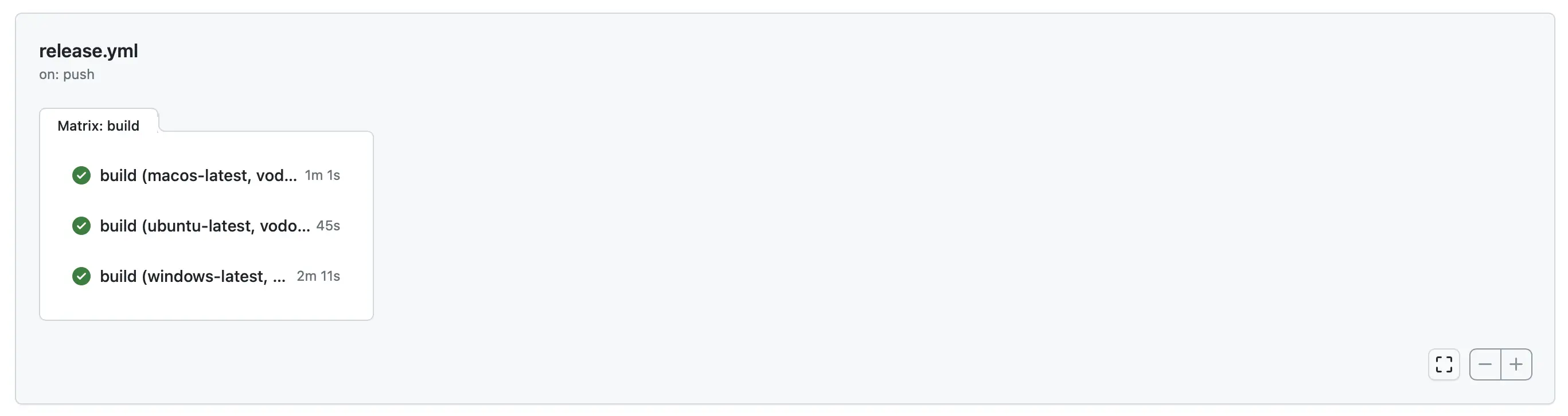
Using this configuration, Actions runs multiple jobs in parallel, one for each operating system:
The job running on ubuntu-latest creates an executable for Linux named vodo-linux-amd64
The job running on macos-latest creates an executable for MacOS named vodo-macos-amd64
The job running on windows-latest creates an executable for Windows named vodo-windows-amd64
This is the simplest approach that gets the job done: it took me a considerable amount of time to find the best way to achieve this without an overly complex workflow configuration! In the GitHub UI it looks like this:
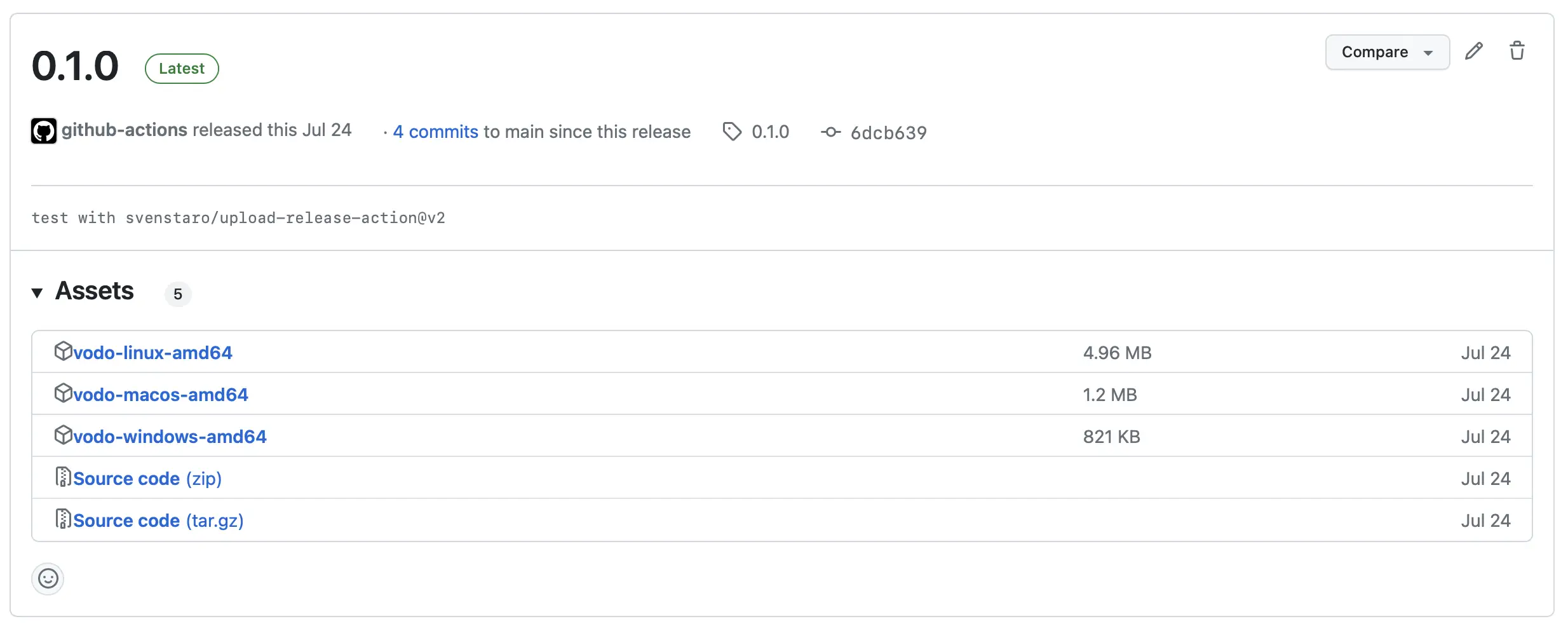
The previous steps only create the artifacts, and an additional step is required to create a release and attach the executables to it. This step uses svenstaro/upload-release-action@v2 and runs in each OS-specific build. However, the release is created only once, and if any of the builds fail, the release is removed. The necessary configuration is as follows:
yaml
- name: Upload binaries to release
  uses: svenstaro/upload-release-action@v2
  with:
    repo_token: ${{ secrets.GITHUB_TOKEN }}
    file: target/release/${{ matrix.artifact_name }}
    asset_name: ${{ matrix.asset_name }}
    tag: ${{ github.ref }}
After completing this step, the release corresponding to the tag is created and can be accessed through the GitHub user interface 🎉.
In this article, I explained how I built a rudimentary DNS server called vòdo using Rust and set up a GitHub Actions workflow to build and test the project. I discussed the use of the Matrix job strategy to create production builds for multiple operating systems and how to create a release with attached executables using svenstaro/upload-release-action. The result is an efficient and automated release process for the project using an easy-to-understand workflow configuration file.
此内容由惯性聚合(RSS阅读器)自动聚合整理,仅供阅读参考。 原文来自 — 版权归原作者所有。