








INFO
Advice given in this article is especially relevant to applications with hundreds of Flyway migration files.
In Spring Boot & Flyway - clear database between integration tests I described how to ensure that each integration test starts with clean state - wipe out content from the database, and all database migrations applied from scratch. Such approach simplifies writing tests but comes with one significant drawback - running database migration takes time. The more migration files, the longer it takes. I still believe this is a solution worth considering for small services, but for large applications with hundreds or thousands of migrations, time needed to run migrations may become a biggest factor contributing to slow integration tests.
In this article I'll explore how reusable containers can significantly speed up integration tests during development phase and how to configure Flyway to use them efficiently.
Containers started through Testcontainers typically are stopped either at the end of running a test class, or when all tests are finished at JVM shutdown. With database containers it means that before the actual test code runs it first waits for containers to start, then application context goes up - database migrations are executed, then the actual test runs. This process is repeated each time test is started from IDE, mvn test or gradle test is executed and as nobody likes waiting - it can significantly impact developer experience and productivity.


To address the waiting time for container to go up during development, Testcontainers team introduced a concept of reusable containers. When container is started in reusable mode, it does not get stopped when JVM shuts down unless it has been explicitly stopped.
This feature is relevant only for development time, not when running tests on CI:
Reusable containers are not suited for CI usage and as an experimental feature not all Testcontainers features are fully working (e.g., resource cleanup or networking). https://java.testcontainers.org/features/reuse/
While the main purpose of reusable containers is to remove the "Testcontainers start" phase for any subsequent test, it comes with an interesting side-effect for database containers and migrations - migrations are executed during first test run, for the second run the database is already up and migrations have been already executed - which removes also the "Flyway migrations" phase.


So far so good, the problem appears during development of a new database migration.
When Spring Boot starts, it calls Flyway#migrate method, that checks Flyway metadata table if all migrations have been already applied and if not, applies new ones. To ensure that the migrations code is exactly the one that has been executed on the database in previous run, it also validates migration files checksums. If checksums don't match, on Spring Boot startup you'll get an error like this:
console
org.flywaydb.core.api.exception.FlywayValidateException: Validate failed: Migrations have failed validation
Migration checksum mismatch for migration version 1.0
-> Applied to database : 1108600995
-> Resolved locally    : -1900419011
Either revert the changes to the migration, or run repair to update the schema history.
If something like this happens during production deployment it's a sign of a problem - existing migration file that has already been applied to the database has been modified - which should (almost) never happen. But it is very likely to happen during the development. Typical workflow for developing a change that includes changing the database structure is similar to:
FlywayValidateExceptionOne way to handle is connecting to the running database and deleting all its content. Not very convenient. A better way is to configure Spring Boot to do it for us only when migration fails with validation error.
Flyway configuration changes we are going to make must be applied only to integration tests. Make sure to set them in application.properties or test profile specific like application-test.properties placed in src/test/resources.
By default, Flyway will prevent us from cleaning database with Flyway#clean method. Accidental use in production of such method would have disastrous effect. But it may be perfectly fine to use it during development or in tests. To enable a possibility to call Flyway#clean we must set spring.flyway.clean-disabled property to false.
application.propertiesapplication.yml
properties
spring.flyway.clean-disabled=falseyml
spring:
  flyway:
clean-disabled: falseIn the next step we instruct Flyway to run Flyway#clean on application startup only when existing migration file has been modified and validation errors occur - by setting spring.flyway.clean-on-validation-error to true:
application.propertiesapplication.yml
properties
spring.flyway.clean-on-validation-error=trueyml
spring:
  flyway:
clean-on-validation-error: trueWith reusable containers and Flyway configuration updated in place, the timeline looks like this:
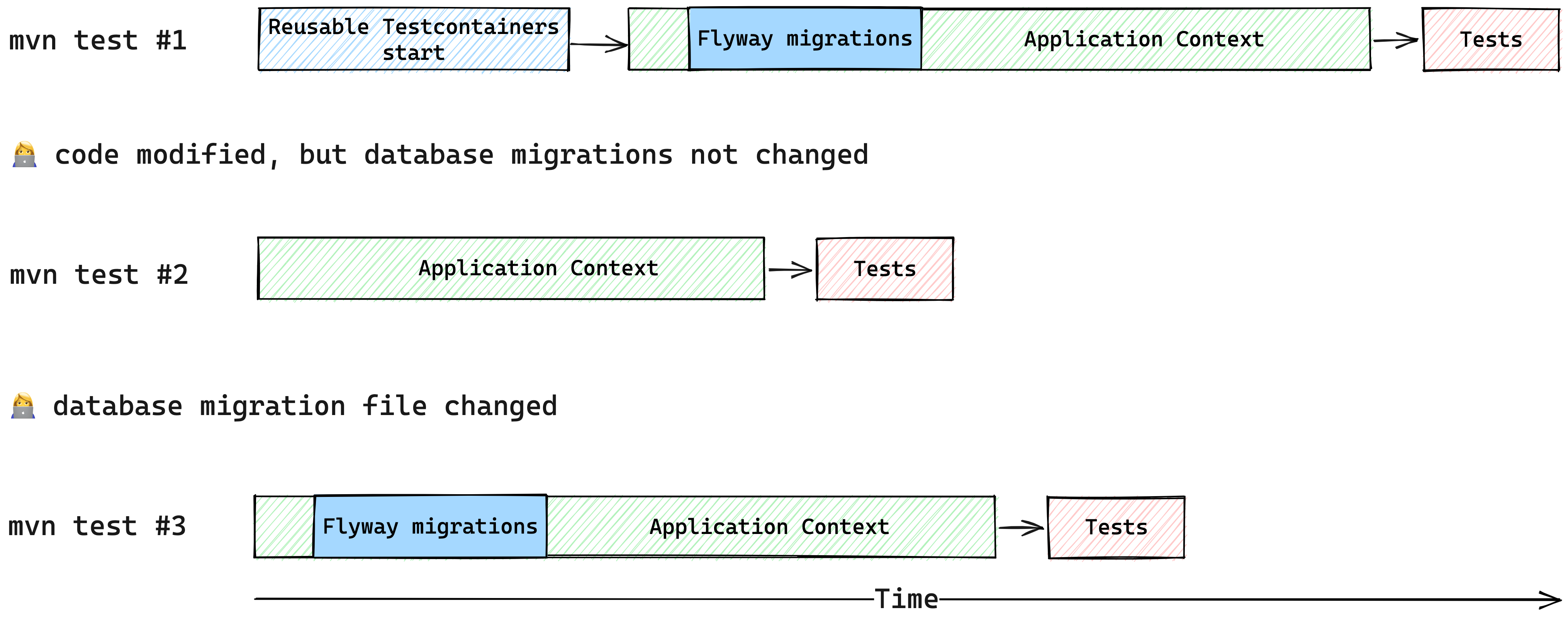
On the first run we pay the price of containers going up and database migrations, but later in the future, migrations are not executed when not needed. This may not look like a big difference, but in some project it can translate into saving 1 minute or more for each test run. The shorter time to run tests, the more developers feel encouraged to write integration tests, not mentioning things like TDD workflow.
I hope you found this article useful. If you managed to shave off some seconds or minutes from executing your tests, or perhaps encountered some problems with this approach, drop a comment - I am curious to learn from your experiences!
Let's stay in touch and follow me on Twitter: @maciejwalkowiak
Subscribe to RSS feed 
此内容由惯性聚合(RSS阅读器)自动聚合整理,仅供阅读参考。 原文来自 — 版权归原作者所有。