





当你读到这篇文章的时候,我想你已经折腾过 wine 微信一段时间了。从 N 年前使用 Linux 工作生活以来,腾讯公司的相关产品一直缺乏对 Linux 的友好支持。等到大家不怎么用 QQ 的时候,它开始支持了。之前用官方和 UOS 合作的 deb 包微信,简单聊天还是可以的,功能过于简单,捉襟见肘,几年过去了,也没见更新。
在当前这种状况,如果你需要在 Linux 下使用新版微信,几乎只有 wine 一条路,虚拟机的方式太笨重了。
本文介绍 2 种方式 wine 安装微信,一种适合新手操作较简单的; 一种复杂一些,解决特定桌面环境下的一些问题。坦白讲,为了测试这 2 种方式,解决一些相关问题,非常费时耗力,部分内容,应该是中文互联网世界第一次出现(反正我是没有搜到有人记录),考虑到用户群体庞大,只能用爱心负重前行,希望终有一天,人们不需要这么倒腾(这的确有点浪费时间)。
题外话不多说,开始操作。
先看效果图:

这种方式是官方推荐的, wine 官方提供多种 os 的安装包,还是很不错的。

参考文档,以 Ubuntu 为例,其它发行版类似。
1sudo dpkg --add-architecture i386
1sudo mkdir -pm755 /etc/apt/keyrings
2sudo wget -O /etc/apt/keyrings/winehq-archive.key https://dl.winehq.org/wine-builds/winehq.key
写这个文章的时候,用的 Ubuntu 23.10
1sudo wget -NP /etc/apt/sources.list.d/ https://dl.winehq.org/wine-builds/ubuntu/dists/mantic/winehq-mantic.sources
当前没有 stable,安装 staging 版本也还行。
1sudo apt install --install-recommends winehq-staging
官方文档让安装的是winehq-stable,实际上我写这个文章的时候,官方还没有打包,会提示找不到(直接去仓库网页里面查找,的确没有!)。如果怕不稳定,等官方出 stable 的时候再操作一边也很简单。
1➜  images git:(main) ✗ sudo apt install --install-recommends winehq-stable
2[sudo] password for mephisto:
3Reading package lists... Done
4Building dependency tree... Done
5Reading state information... Done
6E: Unable to locate package winehq-stable
经过前面 4 个步骤,wine 就安装好了。接着使用 wine 安装最新版本微信。

建议选 32 位,我安装 64 位的时候遇到的问题多一些

网上很多教程弄得花里胡哨的,其实默认的就好,WeChatSetup_x86.exe 就是 32 位的版本。
1wine WeChatSetup_x86.exe
这样,简单安装的方式就大功告成了!
安装完成后,会自动给创建一个启动器文件,用启动器或者其它方式找到启动就好(简单说,其它软件怎么运行启动,你就怎么操作)
1➜  ~ cat ~/Desktop/WeChat.desktop
2[Desktop Entry]
3Name=WeChat
4Exec=env WINEPREFIX="/home/mephisto/.wine" wine C:\\\\users\\\\Public\\\\Desktop\\\\WeChat.lnk
5Type=Application
6StartupNotify=true
7Path=/home/mephisto/.wine/dosdevices/c:/Program Files/Tencent/WeChat
8Icon=E282_WeChat.0
9StartupWMClass=wechat.exe
有兴趣的可以看看这个启动文件,Name、 Exec 、Icon 是较为关键的元素。
如果你遇到字体方框的问题,大概率是缺少字体, 把 Windows 中的 simsun.ttc 复制到 ~/.wine/drive_c/windows/Fonts/,可以解决宋体显示问题。
1cp fake_simsun.ttc ~/.wine/drive_c/windows/Fonts
字体网上很多链接可以下载的,因版权问题,我不提供链接。
arch wiki 的解决方式,软链接字体到目标目录
1cd ${WINEPREFIX:-~/.wine}/drive_c/windows/Fonts && for i in /usr/share/fonts/**/*.{ttf,otf}; do ln -s "$i" ; done
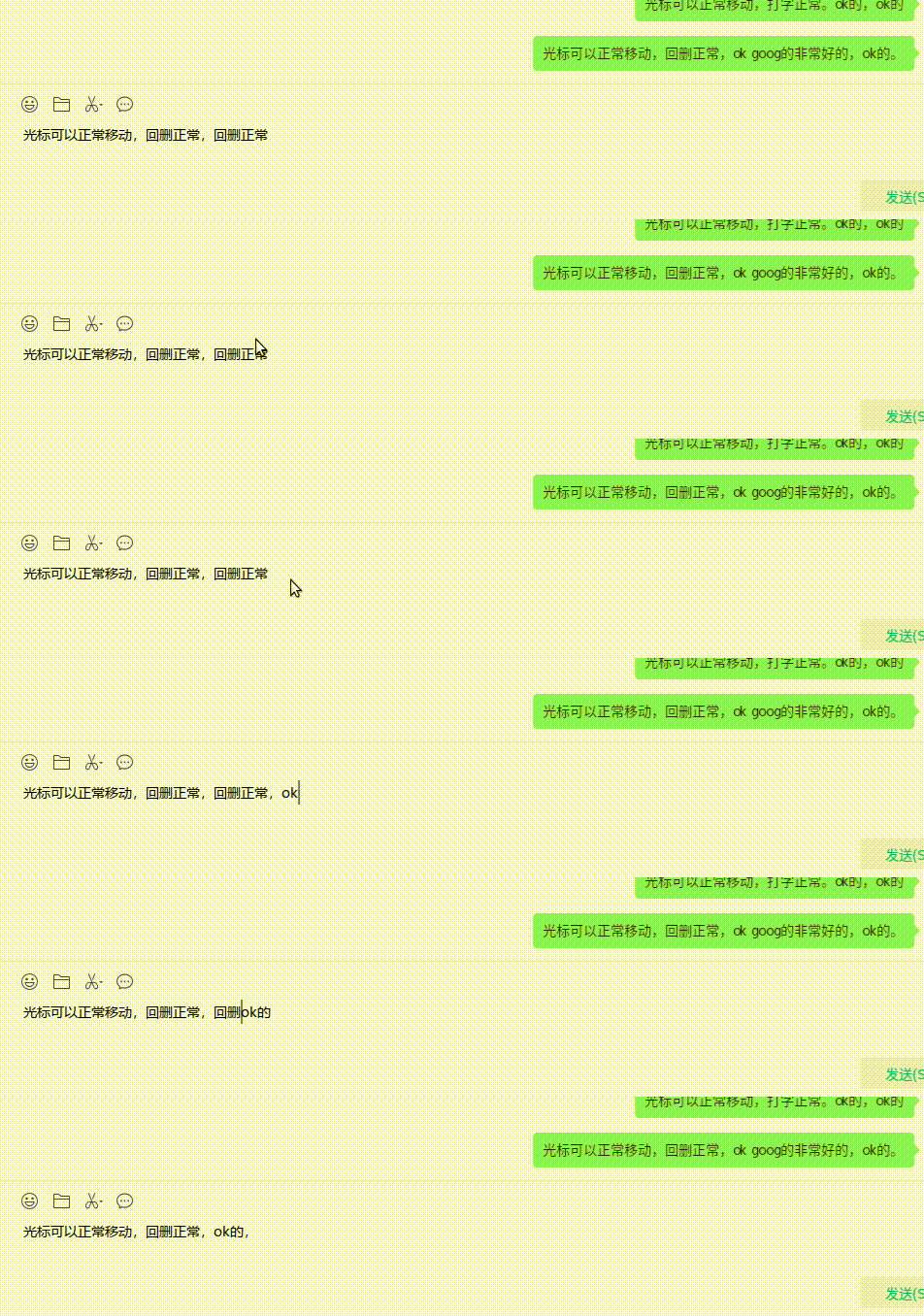
输入框光标不能正常定位(表相为无法将光标移动到目标位置,修正输入错误时非常恼人)的问题,解决办法如下:
1sudo apt install winetricks
1winetricks gdiplus riched20 riched30
安装 riched20 的时候,会提示下载 InstMsiW.exe 超时或者 404,真的是苦不堪言。

读者需要自行去网上搜索下载地址(或者关注我的个人公众号“两亩六分地”,留言"芝麻开门"获得下载地址,地址会不定期更换,小破站带宽有限不用网盘请原谅,网上的各种网盘地址也是经常失效的)

下载地址获取示例:

下载文件放到.cache下的正确位置,再执行上面的命名安装。
 1  ~ cd .cache/winetricks/
 2➜  winetricks pwd
 3/home/mephisto/.cache/winetricks
 4➜  winetricks tree
 5.
 6├── cmd
 7├── corefonts
 8├── msls31
 9│   └── InstMsiW.exe
10├── riched30
11│   └── InstMsiA.exe
12├── sourcehansans
13│   └── SourceHanSans.ttc.zip
14├── track_usage
15├── win2ksp4
16│   └── W2KSP4_EN.EXE
17└── win7sp1
18    └── windows6.1-KB976932-X86.exe
19
208 directories, 6 files
测试光标定位正常,如动图所示。
有兴趣的同学建议先阅读官方文档,我就是地铁上手机横屏看的。
老实说,对绝大部分用户,我建议使用上面简单无痛的方式 wine 安装微信。
但是,不是所有用户都用 Gnome 和 KDE 等主流桌面环境,也不是每个人安装的时候都平坦顺利。
由于笔者使用 labwc 自己搭建的环境,方式一安装的 wechat 在启动时候,是个大黑屏,sway 环境也是相同遭遇。就好像一个大黑布罩住了微信界面一样,什么都看不了,此时光标移动到不同区块还是有反应的,盲人摸象。
黑框长这样,外面一个黑圈,里面一个黑框。

为了解决这个问题,耽误了好长时间,直到搜到这个文章。
解决方式就是直接修改 wine 的源码,重新编译。重新编译真的非常耗时(i5 4 核心电脑太差,感觉差不多 40 分钟,因为不知道哪些模块不需要,默认参数)。编译一次差不多一个小时,前后为了测试不同版本(32bit 和 64bit),不同依赖库的影响,大概变编译了 4 次!
当然这样折腾也是有好处的,解决了黑屏的问题,可以学到一点用处不大的知识,能帮助到读者,没错,就是你 😅。
源码应该都能找到,找你认为合适的版本,我一般用最新的。
1wget https://dl.winehq.org/wine/source/8.x/wine-8.19.tar.xz
1➜  wine-8.19 ls
2aclocal.m4  AUTHORS     config.status  configure.ac  dlls           fonts    libs     LICENSE.OLD  MAINTAINERS  nls  programs  server  VERSION
3ANNOUNCE    config.log  configure      COPYING.LIB   documentation  include  LICENSE  loader       Makefile     po   README    tools   wine
4➜  wine-8.19 pwd
5/home/mephisto/Downloads/wine-8.19
图片解释:

代码片段:
1    if (exStyle == 0x080800a0 && style != 0x80000000 ) // WeChat/WxWork shadow hwnd ; fix can not open chat info
2    {
3        FIXME("hack %x\n", cs.dwExStyle);
4        return NULL;
5    }
vscode 截图:

实在是懒得整理了,看下面的操作记录,
 1➜  ~ history |grep install |grep :i386
 2 9809  sudo apt install libx11-dev:i386
 3 9810  sudo apt install libfreetype6-dev:i386 libfreetype6-dev
 4 9812  sudo apt install libxrender-dev:i386 libgnults-dev:i386
 5 9814  sudo apt install libxrender-dev:i386
 6 9816  sudo apt install libgl-dev:i386
 7 9818  sudo apt install libasound2-dev:i386
 8 9860  sudo apt install libxcursor-dev:i386
 9 9861  sudo apt install libfreetype-dev:i386
10 9862  sudo apt install libfontconfig-dev:i386
11 9863  sudo apt install libgnutls28-dev:i386
基础依赖装好后,运行./configure 没有看到 warning 就表明依赖库装的差不多了。
提示缺什么就根据官方文档补什么。
独家内容: 强烈建议 libfreetype-dev 和 libfontconfig-dev一定要安装,不然微信安装界面中文都是方块(不会提示 warning,我就是漏了这 2 个,重新编译又是 1 个小时!)。
当然如果你是高手,清楚哪些是有用,哪些没有用,直接忽略就好。
 1➜  wine-8.19 ./configure
 2checking build system type... x86_64-pc-linux-gnu
 3checking host system type... x86_64-pc-linux-gnu
 4checking whether make sets $(MAKE)... yes
 5#####此处省略一万行#####
 6config.status: executing include/stamp-h commands
 7config.status: executing tools/makedep commands
 8config.status: executing Makefile commands
 9
10configure: libxi 32-bit development files not found, the Xinput extension won't be supported.
11configure: XShm 32-bit development files not found, X Shared Memory won't be supported.
12configure: XShape 32-bit development files not found, XShape won't be supported.
13configure: libXxf86vm 32-bit development files not found, XFree86 Vidmode won't be supported.
14configure: libxrandr 32-bit development files not found, XRandr won't be supported.
15configure: libxinerama 32-bit development files not found, multi-monitor setups won't be supported.
16configure: libxcomposite 32-bit development files not found, Xcomposite won't be supported.
17configure: libOSMesa 32-bit development files not found (or too old), OpenGL rendering in bitmaps won't be supported.
18configure: Wayland 32-bit development files not found, the Wayland driver won't be supported.
19configure: OpenCL 32-bit development files not found, OpenCL won't be supported.
20configure: pcap 32-bit development files not found, wpcap won't be supported.
21configure: libpcsclite not found, smart cards won't be supported.
22configure: libdbus 32-bit development files not found, no dynamic device support.
23configure: libsane 32-bit development files not found, scanners won't be supported.
24configure: libusb-1.0 32-bit development files not found (or too old), USB devices won't be supported.
25configure: libv4l2 32-bit development files not found.
26configure: libgphoto2 32-bit development files not found, digital cameras won't be supported.
27configure: libgphoto2_port 32-bit development files not found, digital cameras won't be auto-detected.
28configure: libpulse 32-bit development files not found or too old, Pulse won't be supported.
29configure: gstreamer-1.0 base plugins 32-bit development files not found, GStreamer won't be supported.
30configure: OSS sound system found but too old (OSSv4 needed), OSS won't be supported.
31configure: libudev 32-bit development files not found, plug and play won't be supported.
32configure: libSDL2 32-bit development files not found, SDL2 won't be supported.
33configure: libcapi20 32-bit development files not found, ISDN won't be supported.
34configure: libcups 32-bit development files not found, CUPS won't be supported.
35configure: libkrb5 32-bit development files not found (or too old), Kerberos won't be supported.
36configure: libnetapi not found, Samba NetAPI won't be supported.
37configure: libvulkan and libMoltenVK 32-bit development files not found, Vulkan won't be supported.
38
39configure: Finished.  Do 'make' to compile Wine.
1make -j `nproc`
2make install
默认安装到/usr/local/bin/下
 1➜  ~ ls -al /usr/local/bin/wine*
 2-rwxr-xr-x 1 root root   22668 Nov  7 13:45 /usr/local/bin/wine
 3-rwxr-xr-x 1 root root   25528 Nov  6 17:37 /usr/local/bin/wine64
 4-rwxr-xr-x 1 root root   49760 Nov  6 17:37 /usr/local/bin/wine64-preloader
 5-rwxr-xr-x 1 root root    1973 Nov  7 13:45 /usr/local/bin/wineboot
 6-rwxr-xr-x 1 root root  761180 Nov  7 13:46 /usr/local/bin/winebuild
 7-rwxr-xr-x 1 root root    1973 Nov  7 13:45 /usr/local/bin/winecfg
 8-rwxr-xr-x 1 root root    1973 Nov  7 13:45 /usr/local/bin/wineconsole
 9lrwxrwxrwx 1 root root       7 Nov  7 13:46 /usr/local/bin/winecpp -> winegcc
10-rwxr-xr-x 1 root root    1973 Nov  7 13:45 /usr/local/bin/winedbg
11-rwxr-xr-x 1 root root 1070420 Nov  7 13:46 /usr/local/bin/winedump
12-rwxr-xr-x 1 root root    1973 Nov  7 13:45 /usr/local/bin/winefile
13lrwxrwxrwx 1 root root       7 Nov  7 13:46 /usr/local/bin/wineg++ -> winegcc
14-rwxr-xr-x 1 root root  242128 Nov  7 13:46 /usr/local/bin/winegcc
15-rwxr-xr-x 1 root root   95127 Nov  7 13:46 /usr/local/bin/winemaker
16-rwxr-xr-x 1 root root    1973 Nov  7 13:45 /usr/local/bin/winemine
17-rwxr-xr-x 1 root root    1973 Nov  7 13:45 /usr/local/bin/winepath
18-rwxr-xr-x 1 root root   45452 Nov  7 13:45 /usr/local/bin/wine-preloader
19-rwxr-xr-x 1 root root 3560536 Nov  7 13:45 /usr/local/bin/wineserver
这 2 步没什么好说的,懂的都懂。
这里和方式一的不同点是使用的 wine 不同(/usr/bin/wine和/usr/local/bin/wine)。
操作之前建议备份下 ~/.wine 目录, 我设置.wine是当前使用的,.wine_32、.wine_64分别是 32 位和 64 为备份,有备无患!
1➜  ~ ls .wine*
2.wine:
3dosdevices  drive_c  system.reg  userdef.reg  user.reg  winetricks.log  wrapper.cfg
4
5.wine_32:
6dosdevices  drive_c  system.reg  userdef.reg  user.reg  wrapper.cfg
7
8.wine_64:
9dosdevices  drive_c  system.reg  userdef.reg  user.reg
安装,这一步和之前一样。
1/usr/local/bin/wine WeChatSetup_x86.exe
其它如字体缺失,处理方式相同,不再赘述。
关闭时候进程退出不干净,直接全杀了,一般都不怎么关。
wine system tray,waybar 下目前无解,貌似要等 wine 合并代码,影响不大。
部分功能无法使用,搜一搜、视频号,无关紧要不看也罢。
使用自己编译的方式很繁琐,在某些情况下不得不为之。也感慨 wine 项目的强大,现在使用的就是自己编译的 wine,感觉良好!电脑配置高的,编译时间估计能缩减很多。
至此,钉钉、飞书、微信都可以正常在 Linux 下顺畅使用了。如果读者有疑问,可以搜索本站相关教程。
此内容由惯性聚合(RSS阅读器)自动聚合整理,仅供阅读参考。 原文来自 — 版权归原作者所有。