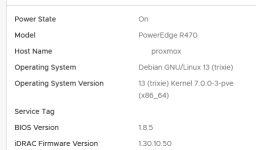
There are already some threads on the topic. None directly targeted towards Debian Bookworm. All tinkering with repositories and dependencies.
While searching for information I came hence to the conclusion, there should be a more straightforward way. I'd herewith like to point out what can be done to get Dell iDrac Linux tools set up. That is racadm and iSM - the user space iDrac Admin tool and the service providers for BS menu entries in iDrac web interface.
This is not intended to be a step by step howto. So let's fast forward to necessary steps and hints.
Also please take note there is not only forum threads here but some blogs, too, e.g. williamdes or privex.
racadm
find Dell iDRAC Tools for Linux in a recent version. I used v11.3.0.0 like so: Dell driver download
download to some location and un-tar
find UBUNTU22 folder in the hierarchy and 3 deb archives inside
srvadmin-hapi_11.3.0.0_amd64.deb
srvadmin-idracadm7_11.3.0.0_all.deb
srvadmin-idracadm8_11.3.0.0_amd64.deb
install libcrypto++8and build-essential
use dpkg --install and install all 3 deb archives which should just work on a Bookworm system
if you want create a symlink to the binary ln -s /opt/dell/srvadmin/bin/idracadm7 /usr/local/bin/racadm
test with racadm getsysinfo
iSM
find and download iSM packages which support your server / idrac generation. For me it is 13th gen right now. Hence I resort to iSM/5300/bullseye/pool/main/dhere: dcism
you will need both, dcism and dcism-osc - again 2 deb archives - download to some location of your choice
un-tar, ./config && make && make test && make install and run ldconfig -v
be aware: in a production system you wouldn't want an openssl 1.1.1 version to be globally linkable in the system, but if this was a production system you would not use 13th gen or likely have professional Dell support anyways
now install both deb archives and validate the dcism service starts correctly (which will be depending on a supported openssl 1.1.1 version)
enable and see data popping up in iDrac web interface timely
Overall not much tinkering, just some archive download, no repository experiments and scripting or pinning of old versions.
Works in my lab environment. YMMV
Let me know if these hints were of any help. I appreciate it.
For anyone worried if this survives an in-place upgrade pve8to9 - it does. I upgraded from 8 / Bookworm to 9 / Trixie recently without any need to do anything special beyond following the standard upgrade doc and script.
I didn't need to install or compile openssl as per above with this method. Hope this helps anyone who comes across this.
Thank you @complexplaster27 for this update. It does in fact work to update to dcism-osc_8.1 - you definitely then want to make sure a compatible dcism version is installed, too, like 6.1 mentioned in your post.
Keep in mind though, you wouldn't normally want to mix Debian and Ubuntu repositories and packages. But not to worry, the Debian version can be installed. Which would be: dcism_6.1.0.0-4104.debian11_amd64.deb
Thank you @complexplaster27 for this update. It does in fact work to update to dcism-osc_8.1 - you definitely then want to make sure a compatible dcism version is installed, too, like 6.1 mentioned in your post.
Keep in mind though, you wouldn't normally want to mix Debian and Ubuntu repositories and packages. But not to worry, the Debian version can be installed. Which would be: dcism_6.1.0.0-4104.debian11_amd64.deb
I found out extremely quickly why the Ubuntu24 package is not the right way:
I ended up trying the updated install script (https://github.com/satorisage/dell-ism-proxmox-9.1-patch) after digging through it and comparing it with the stock script from Dell. There really aren't very many changes with the exception of the new section at the end which handles the usbnic issue. As was implied before, use at your own risk.
I did also try the dcism_6.1.0.0-4104.debian11_amd64.deb mentioned earlier but this does not install properly on Debian 13 as there is a libcrypto dependency problem.
In the end, the updated install script worked great on my 9.2.3 system using the 6.1.0.0-4104 dcism. Boot times were quick as usual and now the iDRAC correctly shows the guest OS information.