惯性聚合 高效追踪和阅读你感兴趣的博客、新闻、科技资讯
阅读原文 在惯性聚合中打开

推荐订阅源

WordPress大学
WordPress大学
Jina AI
Jina AI
小众软件
小众软件
GbyAI
GbyAI
钛媒体:引领未来商业与生活新知
钛媒体:引领未来商业与生活新知
博客园 - 【当耐特】
D
DataBreaches.Net
腾讯CDC
V
Visual Studio Blog
博客园 - 叶小钗
B
Blog
Apple Machine Learning Research
T
The Blog of Author Tim Ferriss
S
SegmentFault 最新的问题
OSCHINA 社区最新新闻
OSCHINA 社区最新新闻
V
V2EX
博客园 - 三生石上(FineUI控件)
云风的 BLOG
云风的 BLOG
The Cloudflare Blog
MongoDB | Blog
MongoDB | Blog
有赞技术团队
有赞技术团队
U
Unit 42
博客园 - 司徒正美
博客园 - 聂微东

Proxmox Support Forum

[SOLVED] - Github Auth for Mirrors-Kernel Repo? [Automation] Mass migration tool for MS Win11/Server Proxmox GUI hang - not response is it possible to reject or quarantine spam based on conditions I set ? The PVENode task list in PVE9 is partially obscured due to the terminal font being too large. About 100% error reporting due to pveproxy.service hooks Kubernetes overlay networking breaks when upgrading from PVE 9.1 to PVE 9.2.3 Zentraler Speicher No space left on device Combine datastore and direct file archival to tape Kernel panic VFS: Unable to mount root fs on unknown-block (0,0) sobald ein 7.x Kernel verwendet wird. How to migrate disk of a VM from one ZFS to another Windows Server 2025 fails to boot after PVE 9.2 / Linux 7.0 Kernel upgrade Cannot Install Proxmox on T610 Poweredge with H700 PERC card sdn Config. gateway not reachable How to safely change domain/FQDN? Welche Filterquote erreicht ihr? NFS Share status unknown on 2 of 5 nodes Can't connect to PVE9 consoles [solved] Can't connect to PVE9 consoles [solved] [SOLVED] - Use secondary network for PVE commands Created cluster, one node storage gone BUG: proxmox mail gateway FROM = null bypass spam filtering Moving existing PBS from VMWare workstation to PVE cluster Does eBGP SDN fabric support external peering? Bug: PDM 1.1 not recognizing valid license status Proxmox GUI hang - not response PVE crashes unexpectedly Proxmox Backup Server 4.2 released! Advice
All VM can't accessible after kernel UPdate of the nodes?
invalid@exam · 2026-06-02 · via Proxmox Support Forum

Good morning,
My VM said are start but i cannot access them through ssh, gui, services......>_Console.
Please can you helping me?

UdoB

Distinguished Member

You did not give many details about your system. By far too few.

So you get only a very sparse reply: check your NIC names and verify the network settings.

Sorry, i was in a big stress^^
seems it because of the new kernel 6.8.12-29-pve, on PVE 8.4.19
I revert to 6.8.12-28-pve and it appear to be ok the VM are now accessibles, I cross fingers

Last edited:

Hello,
I confirm with the old kernel 6.8.12-28-pve all VM's Worked (during day and 18 hours the VM's are ok)
So there is a problem with the new 6.8.12-29-pve kernel on proxmox 8.4.19 VE?

these are still too little facts. how does your setup look like? what do you mean exactly with 'aren't accessible' (not reachable via network?, don't start?) ?
the logs from the two boots would be interesting but the most important part was already mentioned by @UdoB :

check your NIC names and verify the network settings.

Hello,
Thx for replies.

how does your setup look like?

I have an 3 nodes architectures and a SAN to hosts VM's attached in ISCSI.
The PVE is in 8.4.19 version on the 3 nodes.

what do you mean exactly with 'aren't accessible' (not reachable via network?, don't start?) ?

The VM are for the essentials Debian web servers, if i start the PVE on the new kernel the vm are shown as started in the PVE GUI but i cannot acces them neither via web, ssh or via the VNC console in the pve gui.

check your NIC names and verify the network settings.

The NIC names in the PVE are eno1, eno 2...vmbr0 for the bridge. for example
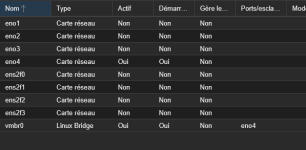
1780640856373.png
I was surprise that with the kernel 6.8.12-29-pve the troubleshoot occurs despite with the kernel 6.8.12-28-pve all is working?

Regards,

can you post the journal/dmesg from both the working and the non working state?

Here are the boot log of working kernel, i cannot find the not working log ?!?

  • dmesg.txt

    135.3 KB · Views: 1

  • journal.txt

    344 KB · Views: 1

Here are the boot log of working kernel, i cannot find the not working log ?!?

you have to boot the server with the not working kernel and run the commands again

you have to boot the server with the not working kernel and run the commands again

That's what I was afraid of^^
I can't do it right now, because the PvE servers are hosting functional servers.
