I have (had) a pc (NAS) with Promox 8.3.0. I used the shell to upgrade but I did it wrong. It was stuck in 8.3.0 telling me that there were 181 for update but apt update would not update anything. A little more research indicated to change the repos from bookworm to Trixie. I did but that make it worst. At some point it the screen indicated the following:
ou are attempting to remove the meta-package 'proxmox-ve'!
I followed the directions because they indicated that I could install promox-ve again with apt install.
I erased it and updated but there were errors. It indicated that I did not have the right repository - it said bookworm was still in use. I checked all the files which had repo information and made it trixie but nothing.
So I think I have to backup some directories and use a USB drive to install promox 9x and then copy back those directories so I do not loose my VMs which include my truenas with all my media.
Any help will be appreciated. Do I do that? backup the config folders and install again? or is there something I can do? It tells me there repo entry is wrong with either bookworm or trixie.
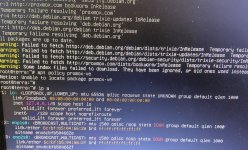
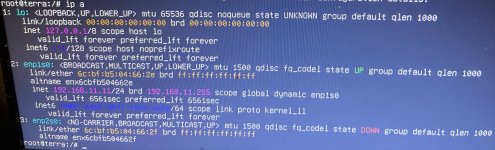
I had the machine off. I turned it on and no ssh access. I put a monitor and keyboard and i ran: ip a
and it shows no ip address
apt update shows errors indicating it cannot resolve deb.debian.org
apt policy promox-ve results in: it cannot locate the proxmox-ve package
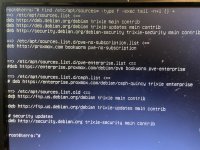
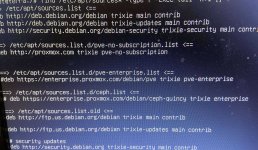
and also the find command results in:
trixie main contrilb
trixi-updates main contrib
trixie-security main controb
it does show no subscription as disabled (#) but it is bookworm
old list also shows trixie.
I had to take pics since it seems I cannot longer ssh to it.
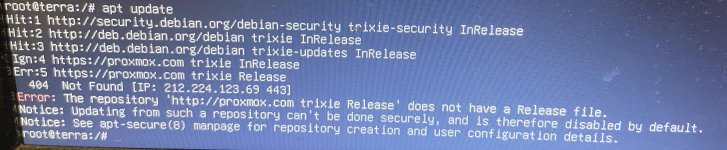
Thank you. I was able to get on lin with the first command and get an IP address. I was then able to run apt update and I attached pictures of results of: "ip a" and "apt update"
Delete the enterprise list and that error should be gone, then try apt update && apt full-upgrade. If that works try apt install proxmox-ve to get PVE back.
Hello. I just got back to the NAS and I ssh into it. I do run the apt update command and I get the error:
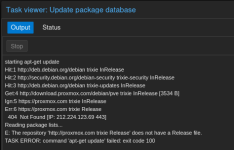
Error: The repository 'http://proxmox.com trixie Release' does not have a Release file.
Notice: Updating from such a repository can't be done securely, and is therefore disabled by default.
Notice: See apt-secure(8) manpage for repository creation and user configuration details.
Sorry, I missed that it's supposed to be download.proxmox.com and not just proxmox.com.
The bad repo is configured here. Remove what you added, alter this file and then try again
Hello. Sorry I just got your message now. About a half hour ago I was able to get the distribution updated and I installed prxmox-ve and I got the GUI again. I still get the error - same as before - but at least I can now properly backup my machines in case I finally decide to wipe this box clean and start fresh.
I am attaching a picture of the error from the GUI.
So I still have to work on this.
I want to say thanks again and is there any way I can repay you in some way, at least something. Please let me know - and if you have any thoughts on how to correct this current problem, I am all ears but I will keep reading
You still have the bogus http://proxmox.com repo configured in your files somewhere. Use the find/tail command from earlier again to locate it.
Alternatively you can try searching directly for http://proxmox.com like this
Bash:
grep -sR "http://proxmox.com" /etc/apt/sources*
node > Updates > Repositories in the GUI might also show it.
A re-install should not be necessary