惯性聚合 高效追踪和阅读你感兴趣的博客、新闻、科技资讯
阅读原文 在惯性聚合中打开

推荐订阅源

人人都是产品经理
人人都是产品经理
MyScale Blog
MyScale Blog
Y
Y Combinator Blog
罗磊的独立博客
奇客Solidot–传递最新科技情报
奇客Solidot–传递最新科技情报
P
Proofpoint News Feed
Google DeepMind News
V
Vulnerabilities – Threatpost
T
The Blog of Author Tim Ferriss
云风的 BLOG
云风的 BLOG
Recorded Future
Recorded Future
N
News and Events Feed by Topic
B
Blog RSS Feed
阮一峰的网络日志
阮一峰的网络日志
博客园_首页
C
CXSECURITY Database RSS Feed - CXSecurity.com
博客园 - 【当耐特】
N
Netflix TechBlog - Medium
博客园 - 叶小钗
B
Blog
Vercel News
Vercel News
T
Tenable Blog
T
The Exploit Database - CXSecurity.com
Spread Privacy
Spread Privacy
T
Threat Research - Cisco Blogs
Cyber Security Advisories - MS-ISAC
Last Week in AI
Last Week in AI
F
Fortinet All Blogs
cs.CL updates on arXiv.org
Microsoft Security Blog
S
Securelist
Microsoft Azure Blog
钛媒体:引领未来商业与生活新知
钛媒体:引领未来商业与生活新知
P
Palo Alto Networks Blog
让小产品的独立变现更简单 - ezindie.com
D
DataBreaches.Net
Cyberwarzone
Cyberwarzone
Engineering at Meta
Engineering at Meta
Martin Fowler
Martin Fowler
G
GRAHAM CLULEY
Project Zero
Project Zero
Cisco Talos Blog
Cisco Talos Blog
A
Arctic Wolf
C
CERT Recently Published Vulnerability Notes
L
LangChain Blog
cs.AI updates on arXiv.org
C
Check Point Blog
A
About on SuperTechFans
W
WeLiveSecurity
The GitHub Blog
The GitHub Blog

Proxmox Support Forum

[SOLVED] - Github Auth for Mirrors-Kernel Repo? [Automation] Mass migration tool for MS Win11/Server Proxmox GUI hang - not response is it possible to reject or quarantine spam based on conditions I set ? The PVENode task list in PVE9 is partially obscured due to the terminal font being too large. About 100% error reporting due to pveproxy.service hooks Kubernetes overlay networking breaks when upgrading from PVE 9.1 to PVE 9.2.3 Zentraler Speicher No space left on device Combine datastore and direct file archival to tape Kernel panic VFS: Unable to mount root fs on unknown-block (0,0) sobald ein 7.x Kernel verwendet wird. How to migrate disk of a VM from one ZFS to another Windows Server 2025 fails to boot after PVE 9.2 / Linux 7.0 Kernel upgrade Cannot Install Proxmox on T610 Poweredge with H700 PERC card sdn Config. gateway not reachable How to safely change domain/FQDN? Welche Filterquote erreicht ihr? NFS Share status unknown on 2 of 5 nodes Can't connect to PVE9 consoles [solved] Can't connect to PVE9 consoles [solved] [SOLVED] - Use secondary network for PVE commands Created cluster, one node storage gone BUG: proxmox mail gateway FROM = null bypass spam filtering Moving existing PBS from VMWare workstation to PVE cluster Does eBGP SDN fabric support external peering? Bug: PDM 1.1 not recognizing valid license status Proxmox GUI hang - not response PVE crashes unexpectedly Proxmox Backup Server 4.2 released! Advice ceph-osd crashes with kernel 6.17.2-1-pve on Dell system [META] Links on Proxmox Forum Website Hardwarer oder Software RAID Joining a cluster with already created guests VM PDM missing backup jobs from PVE / Log retention Remove VM.Monitor from all users/roles, PVE 9.2 Proxmox Freezing (new instalation) 9.2.2 - Intel 12700T No Web gui and random connection reset by peer [SOLVED] - i40e module for X710 Intel NIC Dutch Proxmox Day 2026 How pools use the space Corosync initiiert Reboot trotz Verfügbarkeit der Systeme Opt-in Linux 7.0 Kernel for Proxmox VE 9 available After PVE 8to9 upgrade, unable to check guest fs freeze status Problem with MegaRAID SAS3508 controller proxmox-kernel-7.0.2-6-pve failing network service Auto sync guest time after rollback of VM snapshot with RAM/state Broadcom BCM57504 (100G) bnxt_en TX timeout and NIC reset on Proxmox 8.1.5 — while BCM57414 (25G) works fine on same host QEMU 11.0 available on pve-test and pve-no-subscription as of now 350 MPM Solventless Lamination Machine for High-Speed Flexible Packaging Making sense of NVMe zfs and SMART errors [SOLVED] - PVE loses network connection after kernel upgrade to proxmox-kernel-7.0.0-3-pve [SOLVED] - Remove or reset cluster configuration. Proxmox 8.4.1 Fresh Install BCM57416 10G Ethernet Adapter Not Recognized PDM 1.1.1 unable to add AD realm with anonymous search [TUTORIAL] - Developer Workstation (Proxmox-VE 9) with cinnamon (LMDE7) SDN zone shows "pending" on peer nodes after node reboot (9.2.x) Cluster not quorate - extending auth key lifetime! Proxmox not rebooting properly (SOLVED) Proxmox 9 Stuck on loading initial ramdisk With new HA-Disarm Feature is there a Documentation for NUT Setup on Clusters? Proxmox 8.3 Installation Issue on ProLiant DL380 Gen9 Cluster networking setup LXC System images unavailable [SOLVED] - Fix: NVIDIA Drivers Failing after upgrade to Proxmox 9.2.2 (Kernel 7.0.2-6-pve) / NovaCore Conflict Install NUT directly on Proxmox VE and control guests from here driver usb for windows 7 System startup error and no network: Failed to start ifupdown2-pre.service - Helper to synchronize boot up for ifupdown. PBS backup space grow up constantly Proxmox Datacenter Manager 1.1 released! IPv4 not available in newly created VM Recommended Setup for Offsite Proxmox Backups? Hetzner Storage Box & Remote PBS Challenges duplicate, please delete this passthrought an USB device "by ID" to CT PDM Installer Freezes at 66% Tried PDM for the first time (version 1.1) - had issues PDM 1.1 automated install Suche Server-Provider für Proxmox connecting sdn to edge firewall SDN, IPAM & DHCP Migrating from read-only file system Ubuntu 26.04 installation fails for unknown reason Status Unbekannt nach Cluster Join Installing Proxmox Backup Server on Mac Mini (Late 2012) kernel 7.0 performance issue with zfs pools PVE becomes unreachable via ethernet but OS is running [SOLVED] - New 9.2 install - can't find 7.0.2-6-pve , not all the time [SOLVED] - Backup and dedupe a VM with LUKS Gibt es mit PVE 2.x ggf. Änderungen bei der RAM-Nutzung, bzw. deren Anzeige bei VMs? I need help for setting up backup solution Way more NAGware, very little functionality, bugs galore Root squashing virtiofsd with --uid-map Intel ixgbe Driver Update Fail Passkey Login (not 2FA) Roblox VM detection - can be overcome? [TUTORIAL] - ZFS-Autosnaptshot inkl. Rollback und Daten direkt recovern (Windows/Linux) How to stop PVE Kernel upgrade [SOLVED] - very long waiting to log in to lxc debian 11 ssh [TUTORIAL] - Configuring Fusion-Io (SanDisk) ioDrive, ioDrive2, ioScale and ioScale2 cards with Proxmox Increase maximum USB devices in vm.conf
[SOLVED] - Are SSD NVMe issues resurfacing with the latest PVE kernel upgrade?
invalid@exam · 2026-06-12 · via Proxmox Support Forum

YAGA

Renowned Member

Hi Team,

At the end of 2023, several users reported issues with unexplained loss of access to NVMe SSDs, particularly Samsung 990 Pro NVMe SSDs, which I have. One or more NVMe SSDs suddenly disconnected and were no longer detected by Linux.

The server had to be powered off and then powered back on to detect the NVMe SSD; a simple reboot was insufficient.

The solution was to add `nvme_core.default_ps_max_latency_us=0` in GRUB as follows:

GRUB_CMDLINE_LINUX_DEFAULT="quiet nvme_core.default_ps_max_latency_us=0"

Then, update GRUB with `update-grub` before rebooting.

Subsequently, regular Linux kernel updates in 2024 completely resolved the issue, with no defects reported for a year.

However, in early 2025, the problem suddenly reappeared, likely due to the latest updates of PVE Community Edition.

This is not a hardware failure, as the issue occurs randomly on different servers with various NVMe SSDs. The more the NVMe SSDs are used (e.g., for backups), the more frequently the failure occurs.

I verified that the GRUB parameter was still in effect:

cat /sys/module/nvme_core/parameters/default_ps_max_latency_us
0

Here is the kernel version used:

Linux mars 6.8.12-8-pve #1 SMP PREEMPT_DYNAMIC PMX 6.8.12-8 (2025-01-24T12:32Z) x86_64 GNU/Linux

All these NVMe SSDs are configured as OSD BlueStore (Ceph). When a fault occurs, Ceph reports that 'daemons have recently crashed' I believe this is a consequence rather than the cause.

The first fault occurred at the end of February few days after kernel update.

Am I the only one experiencing this issue again?

Although I'm not entirely sure it's solely a kernel issue, what would be the most prudent method to roll back the kernel?

Which kernel version would be the most reliable?

Any suggestions are welcome.

Kind regards,

I've had nothing but trouble with certain datacenter-class NVMe u.2 drives (drop out usually within 24 hours):

  • Intel P4600 6.4TB
  • Micron 9200 MAX 6.4TB

Both of them work great under ESXi, but randomly drop out in Proxmox. Kernel revs during the trouble were floating around 6.8.12-0-6.8.12-3 (I think). I tried everything I could find. Two posts in this semi-related thread here, around October, 2024 (maybe one of the threads you already found):

Hi!

I have an issue where one of my two NVMe Drives "disappears" some time after boot.
I have two Samsung 990 PRO 4TB in a ZFS Mirror for my VM Storage, one of which seems to have this issue, the other one is perfectly fine.

It doesn't seem to be a temperature issue, like in other threads I found by googling, since both drives sit at around 34-38°C most of the time.

dmesg suggests "Try "nvme_core.default_ps_max_latency_us=0 pcie_aspm=off" and report a bug", on other threads I have found people setting it to values like 5500 instead of 0, does this make a big difference, as I'm not...

It's very, very annoying since I have these wonderful drives just sitting a drawer waiting to find evidence that I can use them again.

Now, what I am currently running with great success *ARE* Samsung 990 Pro drives (1 x 2TB and 1x 4TB). Not a lick of trouble with them. Uptime in excess of 30 days... I rarely will run longer than that for various reasons, mostly other hardware changes as I am still building the system.

Last edited:

I am using arch Linux and i had drive disappearing after waking up from sleep. Previously i fixed it with settings `nvme_core.default_ps_max_latency_us=0` But after updating to latest kernel it started to occur again. it seems like `nvme_core.default_ps_max_latency_us` doesn't work any more.

YAGA

Renowned Member

I've had nothing but trouble with certain datacenter-class NVMe u.2 drives (drop out usually within 24 hours):

  • Intel P4600 6.4TB
  • Micron 9200 MAX 6.4TB

Both of them work great under ESXi, but randomly drop out in Proxmox. Kernel revs during the trouble were floating around 6.8.12-0-6.8.12-3 (I think). I tried everything I could find. Two posts in this semi-related thread here, around October, 2024 (maybe one of the threads you already found):

I agree, the bug appeared at some point in kernel version 6.8.12-x and it is still present in version 6.8.12-8.

I wonder if it is better to downgrade the kernel before 6.8.12-x, such as kernel-6.8.8-2, or upgrade to kernel 6.11.11-1 which is currently being tested.

Hi!

I have an issue where one of my two NVMe Drives "disappears" some time after boot.
I have two Samsung 990 PRO 4TB in a ZFS Mirror for my VM Storage, one of which seems to have this issue, the other one is perfectly fine.

It doesn't seem to be a temperature issue, like in other threads I found by googling, since both drives sit at around 34-38°C most of the time.

dmesg suggests "Try "nvme_core.default_ps_max_latency_us=0 pcie_aspm=off" and report a bug", on other threads I have found people setting it to values like 5500 instead of 0, does this make a big difference, as I'm not...

Yes, thank you, I had also contributed to this post.

It's very, very annoying since I have these wonderful drives just sitting a drawer waiting to find evidence that I can use them again.

Now, what I am currently running with great success *ARE* Samsung 990 Pro drives (1 x 2TB and 1x 4TB). Not a lick of trouble with them. Uptime in excess of 30 days... I rarely will run longer than that for various reasons, mostly other hardware changes as I am still building the system.

According to user feedback, the problem is more frequent with Samsung 990 Pro drives. It's a very strange bug if for you it's the opposite.

YAGA

Renowned Member

I am using arch Linux and i had drive disappearing after waking up from sleep. Previously i fixed it with settings `nvme_core.default_ps_max_latency_us=0` But after updating to latest kernel it started to occur again. it seems like `nvme_core.default_ps_max_latency_us` doesn't work any more.

It does indeed seem like the parameter nvme_core.default_ps_max_latency_us=0 is not being taken into account with the new version of grub, yet after booting we do have 0.

cat /sys/module/nvme_core/parameters/default_ps_max_latency_us

returns the value 0.

Maybe default_ps_max_latency_us is no longer properly managed by the kernel.

I want to test kernel 6.11.11-1 because I saw that there are improvements in the management of NVME SSDs, particularly in the handling of interrupts starting from kernel 6.10 https://kernelnewbies.org/Linux_6.10.

Last edited:

Not a single problem with 970 evo plus
Kernel 6.11.0-1-pve 128 days of uptime
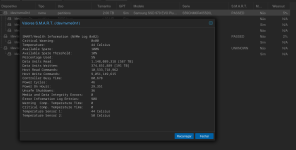
Captura de tela de 2025-03-12 17-39-58.png

Last edited:

YAGA

Renowned Member

As discussed, I have updated the kernel to version 6.11.11-1-pve on each node.

So far, everything is working.

I will keep you informed after a few days if this kernel version no longer causes bugs with the NVMe SSDs.

As discussed, I have updated the kernel to version 6.11.11-1-pve on each node.

So far, everything is working.

I will keep you informed after a few days if this kernel version no longer causes bugs with the NVMe SSDs.

6.11 is gold my friend

YAGA

Renowned Member

@marcio79

I still have the issue of NVME SSDs disappearing after a few days of operation. This happens during intensive use such as backup.

I also updated the BIOS to the latest version including AGESA 1.2.0.C. I get the same errors.

I'm stuck, I don't know what else to try.

Any advice is welcome

I still have the issue of NVME SSDs disappearing after a few days of operation. This happens during intensive use such as backup.

I don't know how you have those NVMEs connected to the system, but I would try a different controller/slot/connection/bus/solution with these drives.
If the problem still persists, I would try changing the drives themselves.

YAGA

Renowned Member

They are inserted into M.2 slots on the MOBO. I'll try to test with a PCIe <-> M.2 adapter inside a PCIe slot.

Last edited:

YAGA

Renowned Member

Hi Team,

Before connecting the SSDs with an M.2 adapter in a PCIe slot, I noticed that the disconnection of the SSDs occurs only under very specific conditions.

My configuration is based on 4 nodes and 1 qdevice with the latest PVE community updates including Ceph Squid 19.2 :

  • 1 SSD on each node for PVE
  • 2 SSDs on each node for CephRBD
  • 3 HDDs on each node for CephFS
  • All VMs use High Availability (HA)
  • 1 PBS server or 1 NFS server or CephFS for backups
  • The VM disks are located on CephRBD

I have never had SSD disconnections during operation when the VMs are running.

I have not noticed any SSD disconnections when the VMs are stopped before the backup.

I notice frequent and random SSD disconnections when the VMs are running during the backup (snapshot).

Could the random SSD disconnections be related to HA, Ceph, or the backup process itself when the VMs are running?

Regards

I also want to add that I’ve been having problems with 6.8.12-9 and even 6.11.11-2. When I was using 6.8.12-4 it was somewhat ok. For reference my disks are Intel D4502 7.68TB U.2 NVMe. Other NVMe drives are fine however. Maybe I’ll revert to older versions such as 6.8.8 and give it a try.

YAGA

Renowned Member

I also want to add that I’ve been having problems with 6.8.12-9 and even 6.11.11-2. When I was using 6.8.12-4 it was somewhat ok. For reference my disks are Intel D4502 7.68TB U.2 NVMe. Other NVMe drives are fine however. Maybe I’ll revert to older versions such as 6.8.8 and give it a try.

Hello,

Please could give us more details regarding your setup: #nodes, #ssd per node, HA?, CEPH? and when the failure occurs ?

Regards,

Hello,

Please could give us more details regarding your setup: #nodes, #ssd per node, HA?, CEPH? and when the failure occurs ?

Regards,

Happy to give some background and thx for offering to give your thoughts…

Nodes: 3
Drive details per node: 1&2) 1x Samsung PM1733a 15.36TB, 1x Optane 905P 380GB as db; 3) 2x Intel D4502 7.68TB (dual link running on single link), 2x Optane P1600X 118GB as db
Ceph setup: replication 3 with 2 min
Proxmox kernel boot commands: PCIE_ASPM=off, nvme idle = 0
Proxmox versions tried: 6.8.12-7, 6.8.12-9, 6.11.11-2
Failure happens: when I have heavy load (running plex and tdarr LXCs using ceph pool storage processing unRAID shared NFS files) usually after 12-24hr. Only the Intel drives drop, and the Samsungs are fine. Cooling is all ok as all drives are around 40-50C. Strange thing was that when I had Plex and tdarr running in a Windows VM (with storage in a ceph pool), it was stable. When I was using the Intel drives on ESXi 6.7u3, they were rock solid.

YAGA

Renowned Member

Happy to give some background and thx for offering to give your thoughts…

Nodes: 3
Drive details per node: 1&2) 1x Samsung PM1733a 15.36TB, 1x Optane 905P 380GB as db; 3) 2x Intel D4502 7.68TB (dual link running on single link), 2x Optane P1600X 118GB as db
Ceph setup: replication 3 with 2 min
Proxmox kernel boot commands: PCIE_ASPM=off, nvme idle = 0
Proxmox versions tried: 6.8.12-7, 6.8.12-9, 6.11.11-2
Failure happens: when I have heavy load (running plex and tdarr LXCs using ceph pool storage processing unRAID shared NFS files) usually after 12-24hr. Only the Intel drives drop, and the Samsungs are fine. Cooling is all ok as all drives are around 40-50C. Strange thing was that when I had Plex and tdarr running in a Windows VM (with storage in a ceph pool), it was stable. When I was using the Intel drives on ESXi 6.7u3, they were rock solid.

We have many points in common:

  • The hardware worked well in a previous software configuration
  • Ceph is used for SSDs, is it a CephRBD volume?
  • Several SSDs and several nodes are affected
  • The failure is random but the more the system is loaded, the faster the failure occurs

I noticed that the problem was more frequent when the VMs were running with HA enabled during backups (snapshots).

I noticed each time an error message "1 daemons have recently crashed" and 1 or more OSDs disappeared from 1 or more nodes. It is necessary to shut down the affected nodes and then restart them to bring the OSDs back online.

I have just made today the latest updates from the community repo including Ceph 19.2.1.

From now, I have a new warning message: [WRN] BLUESTORE_SLOW_OP_ALERT: 4 OSD(s) experiencing slow operations in BlueStore

This problem seems to be known with Ceph 19.2.1 https://github.com/rook/rook/discussions/15403

I'll keep you informed,
Regards

hi,

i added 2x micron 7400 (m.2) as zfs special device in kernel 6.8.x
and had random one of the drives drop/offline after 1-2 days.
i think this fixed it for me:
/etc/kernel/cmdline
pcie_aspm=off pcie_port_pm=off

now with 6 days of uptime on kernel 6.14.0-1-pve and still nothing dropped, i would say 6.14 works fine.

(hp microserver gen10, opteron X3216)
regards

edit to be precise:
kernel 6.8.x and 6.14.x are stable with the parameters: pcie_aspm=off pcie_port_pm=off
without both kernels drop the nvme disks after 1-3 days

Last edited:

AFAIK that doesn't have any m.2 native controller/connection. You must be using some PCI-riser card as a controller - or some other shenanigans through something else. (A waste of that m.2 Gen 4 drive!). But my point being - I'm not sure you are justified in commenting on kernel stability with drives, when in your case, it is probably down to the interfacing you are doing, and not the drives themselves vs the kernel.

What are you running on that dual-core calculator?