惯性聚合 高效追踪和阅读你感兴趣的博客、新闻、科技资讯
阅读原文 在惯性聚合中打开

推荐订阅源

Security Archives - TechRepublic
T
The Exploit Database - CXSecurity.com
P
Proofpoint News Feed
Scott Helme
Scott Helme
NISL@THU
NISL@THU
Cisco Talos Blog
Cisco Talos Blog
C
Cybersecurity and Infrastructure Security Agency CISA
AWS News Blog
AWS News Blog
V
Vulnerabilities – Threatpost
J
Java Code Geeks
U
Unit 42
The GitHub Blog
The GitHub Blog
H
Help Net Security
T
Tenable Blog
aimingoo的专栏
aimingoo的专栏
Jina AI
Jina AI
Spread Privacy
Spread Privacy
Apple Machine Learning Research
人人都是产品经理
人人都是产品经理
L
Lohrmann on Cybersecurity
T
Threatpost
让小产品的独立变现更简单 - ezindie.com
Engineering at Meta
Engineering at Meta
A
About on SuperTechFans
I
InfoQ
Microsoft Azure Blog
B
Blog
L
LINUX DO - 最新话题
K
Kaspersky official blog
cs.CV updates on arXiv.org
T
Threat Research - Cisco Blogs
C
Check Point Blog
T
The Blog of Author Tim Ferriss
有赞技术团队
有赞技术团队
宝玉的分享
宝玉的分享
Help Net Security
Help Net Security
Google DeepMind News
A
Arctic Wolf
Y
Y Combinator Blog
N
News | PayPal Newsroom
M
MIT News - Artificial intelligence
Latest news
Latest news
H
Hacker News: Front Page
Blog — PlanetScale
Blog — PlanetScale
腾讯CDC
I
Intezer
爱范儿
爱范儿
F
Fortinet All Blogs
P
Palo Alto Networks Blog
C
CERT Recently Published Vulnerability Notes

Proxmox Support Forum

[SOLVED] - Github Auth for Mirrors-Kernel Repo? [Automation] Mass migration tool for MS Win11/Server Proxmox GUI hang - not response is it possible to reject or quarantine spam based on conditions I set ? The PVENode task list in PVE9 is partially obscured due to the terminal font being too large. About 100% error reporting due to pveproxy.service hooks Kubernetes overlay networking breaks when upgrading from PVE 9.1 to PVE 9.2.3 Zentraler Speicher No space left on device Combine datastore and direct file archival to tape Kernel panic VFS: Unable to mount root fs on unknown-block (0,0) sobald ein 7.x Kernel verwendet wird. How to migrate disk of a VM from one ZFS to another Windows Server 2025 fails to boot after PVE 9.2 / Linux 7.0 Kernel upgrade Cannot Install Proxmox on T610 Poweredge with H700 PERC card sdn Config. gateway not reachable How to safely change domain/FQDN? Welche Filterquote erreicht ihr? NFS Share status unknown on 2 of 5 nodes Can't connect to PVE9 consoles [solved] Can't connect to PVE9 consoles [solved] [SOLVED] - Use secondary network for PVE commands Created cluster, one node storage gone BUG: proxmox mail gateway FROM = null bypass spam filtering Moving existing PBS from VMWare workstation to PVE cluster Does eBGP SDN fabric support external peering? Bug: PDM 1.1 not recognizing valid license status Proxmox GUI hang - not response PVE crashes unexpectedly Proxmox Backup Server 4.2 released! Advice ceph-osd crashes with kernel 6.17.2-1-pve on Dell system [META] Links on Proxmox Forum Website Hardwarer oder Software RAID Joining a cluster with already created guests VM PDM missing backup jobs from PVE / Log retention Remove VM.Monitor from all users/roles, PVE 9.2 Proxmox Freezing (new instalation) 9.2.2 - Intel 12700T No Web gui and random connection reset by peer [SOLVED] - i40e module for X710 Intel NIC Dutch Proxmox Day 2026 How pools use the space Corosync initiiert Reboot trotz Verfügbarkeit der Systeme Opt-in Linux 7.0 Kernel for Proxmox VE 9 available After PVE 8to9 upgrade, unable to check guest fs freeze status Problem with MegaRAID SAS3508 controller proxmox-kernel-7.0.2-6-pve failing network service Auto sync guest time after rollback of VM snapshot with RAM/state Broadcom BCM57504 (100G) bnxt_en TX timeout and NIC reset on Proxmox 8.1.5 — while BCM57414 (25G) works fine on same host QEMU 11.0 available on pve-test and pve-no-subscription as of now 350 MPM Solventless Lamination Machine for High-Speed Flexible Packaging Making sense of NVMe zfs and SMART errors [SOLVED] - PVE loses network connection after kernel upgrade to proxmox-kernel-7.0.0-3-pve [SOLVED] - Remove or reset cluster configuration. Proxmox 8.4.1 Fresh Install BCM57416 10G Ethernet Adapter Not Recognized PDM 1.1.1 unable to add AD realm with anonymous search [TUTORIAL] - Developer Workstation (Proxmox-VE 9) with cinnamon (LMDE7) SDN zone shows "pending" on peer nodes after node reboot (9.2.x) Cluster not quorate - extending auth key lifetime! Proxmox not rebooting properly (SOLVED) Proxmox 9 Stuck on loading initial ramdisk With new HA-Disarm Feature is there a Documentation for NUT Setup on Clusters? Proxmox 8.3 Installation Issue on ProLiant DL380 Gen9 Cluster networking setup LXC System images unavailable [SOLVED] - Fix: NVIDIA Drivers Failing after upgrade to Proxmox 9.2.2 (Kernel 7.0.2-6-pve) / NovaCore Conflict Install NUT directly on Proxmox VE and control guests from here driver usb for windows 7 System startup error and no network: Failed to start ifupdown2-pre.service - Helper to synchronize boot up for ifupdown. PBS backup space grow up constantly Proxmox Datacenter Manager 1.1 released! IPv4 not available in newly created VM Recommended Setup for Offsite Proxmox Backups? Hetzner Storage Box & Remote PBS Challenges duplicate, please delete this passthrought an USB device "by ID" to CT PDM Installer Freezes at 66% Tried PDM for the first time (version 1.1) - had issues PDM 1.1 automated install Suche Server-Provider für Proxmox connecting sdn to edge firewall SDN, IPAM & DHCP Migrating from read-only file system Ubuntu 26.04 installation fails for unknown reason Status Unbekannt nach Cluster Join Installing Proxmox Backup Server on Mac Mini (Late 2012) kernel 7.0 performance issue with zfs pools PVE becomes unreachable via ethernet but OS is running [SOLVED] - New 9.2 install - can't find 7.0.2-6-pve , not all the time [SOLVED] - Backup and dedupe a VM with LUKS Gibt es mit PVE 2.x ggf. Änderungen bei der RAM-Nutzung, bzw. deren Anzeige bei VMs? I need help for setting up backup solution Way more NAGware, very little functionality, bugs galore Root squashing virtiofsd with --uid-map Intel ixgbe Driver Update Fail Passkey Login (not 2FA) Roblox VM detection - can be overcome? [TUTORIAL] - ZFS-Autosnaptshot inkl. Rollback und Daten direkt recovern (Windows/Linux) How to stop PVE Kernel upgrade [SOLVED] - very long waiting to log in to lxc debian 11 ssh [TUTORIAL] - Configuring Fusion-Io (SanDisk) ioDrive, ioDrive2, ioScale and ioScale2 cards with Proxmox Increase maximum USB devices in vm.conf
High VM-EXIT and Host CPU usage on idle with Windows Server 2025
invalid@exam · 2025-03-13 · via Proxmox Support Forum

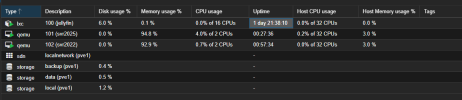
Good evening, I have been pouring over an interesting problem and it seems like I need some deep insight. Windows Server 2025 Core has much more than expected overhead.

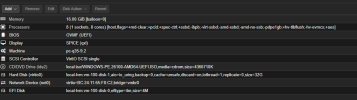
I am testing Windows Server 2025 Core (and Desktop) on Proxmox 8.3, with all paravirtualized features enabled and the agent installed.

On the VM all virt-io drivers have been installed and VBS has been explicitly disabled. The OS is newly installed, is completely idle, with no software installed, and running idle for quite some time, so no background or startup tasks.

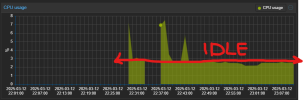
I have tested various combinations of cpu flags, and kvm arguments, both with and without HPET, on two seperate hosts, both proxmox production and test, both Kernel 6.8 and Kernel 6.11. However, try as I might, over the course of three days, with various combinations of settings, the windows VM is consuming a lot of the hosts resources, a scenario not expected when comparing host cpu consumption on Hyper-V or VMware. All the while the VM performs very, very well, snappy with very very good IO performance, but the host efficiency is clearly not as expected.
1741835463912.png

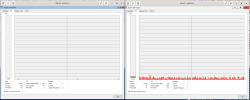
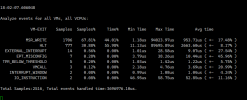
When analyzing perf, kvm does have a notable amount of VM exits, its difficult to assess the scale of the consumption versus the host resources and the allocated resources.
1741834937042.png

What am I doing wrong here, I have tried everything under the sun, but idle resource consumption is far greater than expected.

I will test all ideas good and bad, i'm committed to making this efficient at any cost to my own personal time investments. I start a new role as IT Manager of a robotics company in a few weeks. Proxmox is what I want to use as my primary solution for all containers and VM across the enterprise, both windows and linux, I expect to scale, but this level efficiency causes problems with virtualization density.

Thank you all, I appreciate your time.
So your problem is? Windows Task-Manager shows 0% and PVE shows around 3%? Well consider that PVE includes Network and Disk-Usage in the CPU-Usage-Monitor. Also there is some overhead to keep a VM running. So from my side this looks expected.... Also counting on Windows-Task-Manager for CPU-Load was always "garbage"... The are working on an improvement in Win11 which might come for Server 2025 also. (1)

1: https://www.igorslab.de/en/windows-11-microsoft-improves-cpu-display-in-task-manager-at-last/

I appreciate the feedback and your assertion is valid, thank you. While I am still learning exactly how to meter the performance differences between Server 2022 and Server 2025 on Proxmox, I think there is still something to uncover. Without more evidence its difficult to say much about whats occuring here, but my suspicion is that the hypercalls on Server 2025, potentially Windows 11 are not as well supported with KVM enlightenments as the older versions.

If anyone has feedback on how I can collect and share the kvm performance statistics in a meaningful way, Im happy to oblige.

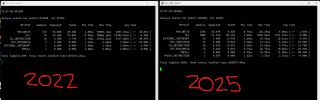
The screenshot below shows Windows Server 2025 is running with more overhead on Proxmox.

1741917511237.png

This screenshot compares VM Exits between Server 2022 and Server 2025, which begins to show some differences in how the os is operating on KVM/Proxmox. Both are server core operating systems provisioned using the same servicing scripts to integrate VirtIO drivers and automate the installation of the Guest Agent. Both have explicitly been configured not to use VBS.

1741918163566.png

Server 2025

Code:

agent: 1
balloon: 0
bios: ovmf
boot: order=virtio0
cores: 2
cpu: host,flags=-md-clear;+pcid;-spec-ctrl;-ssbd;-ibpb;-virt-ssbd;-amd-ssbd;-amd-no-ssb;+pdpe1gb;+hv-tlbflush;-hv-evmcs;+aes
efidisk0: data:vm-101-disk-0,efitype=4m,pre-enrolled-keys=1,size=1M
hotplug: 0
machine: pc-q35-9.2
memory: 16384
meta: creation-qemu=9.2.0,ctime=1740872013
name: svr2025
net0: virtio=BC:24:11:AF:45:58,bridge=vmbr0
numa: 1
ostype: win11
scsihw: virtio-scsi-single
smbios1: uuid=057c4e97-4b43-4dfe-88d7-bbe9c6b456a5
sockets: 1
tablet: 0
vga: qxl
virtio0: data:vm-101-disk-2,backup=0,cache=unsafe,discard=on,iothread=1,replicate=0,size=128G
vmgenid: c2aec63c-436e-43ac-9b7a-4f0b3a36cf45

Server 2022

Code:

gent: 1
balloon: 0
bios: ovmf
boot: order=virtio0;net0
cores: 1
cpu: host,flags=-md-clear;+pcid;-spec-ctrl;-ssbd;-ibpb;-virt-ssbd;-amd-ssbd;-amd-no-ssb;+pdpe1gb;+hv-tlbflush;-hv-evmcs;+aes
efidisk0: data:vm-102-disk-0,efitype=4m,size=1M
hotplug: 0
machine: pc-q35-9.2
memory: 16384
meta: creation-qemu=9.2.0,ctime=1741910037
name: svr2022
net0: virtio=BC:24:11:6C:29:CE,bridge=vmbr0
numa: 1
ostype: win11
scsihw: virtio-scsi-single
smbios1: uuid=7ac22493-c5b2-45c4-90a6-4c4ebf9c1c2c
sockets: 2
tablet: 0
vga: qxl
virtio0: data:vm-102-disk-1,backup=0,cache=unsafe,discard=on,iothread=1,replicate=0,size=32G
vmgenid: be456a47-5e0f-4d81-bd47-26949d468d7f

Hmm, after continuing to dig deeper, I made further optimizations to virtual machines in an attempt to flush out the inefficiency. Clearly from these results, Windows Server 2025 is causing excessive interrupts when running under kvm \ proxmox, I suspect that the hv elightments for Windows Server 2025 is not fully mature.

I modified the virtual machine configuration (pve-q35-4.0.cfg) to remove all USB controllers.
I modified the virtual machine configuration (pve-q35-4.0.cfg) to remove all ICH9 PCI-E Root ports.
On the guests I disabled all unused devices.
On the guests I disabled all unused services.
On the guests I disabled all unused features.
On the guests, I have test various power profiles, and power settings.
On the guests, I have disabled Virtualization Based Security.
On the guests, I have installed all Virtual-IO-0.1.248 drivers, all devices are virtio.
Both guest operating systems are in exactly the same configuration state.

Windows Server Core, 2022 vs 2025
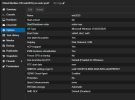
1742169535128.png

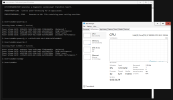
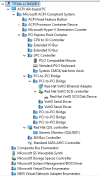
The full device tree can be seen here as read in a full desktop instance of Server 2025
1742169981858.png

I'm not crazy right!? Something is wrong here, any feedback is welcome.

Not to make your job harder but have you determined this is not the case outside of VE? (i.e. physical)

It is a new Microsoft OS, it is going to be hot garbage until SP2. You’re running on a 8th gen Intel consumer CPU as well, the CPU flags you’re setting such as spec-ctrl aren’t on your CPU so they’re emulated. The remediations for speculative control are not enabled by default on 2022, but are on 2025. That’s just one of the many things that could be causing it. Disable (or enable) speculative mitigations on both sides.

you can try a newer release of the virtio drivers. windows server 2025 and windows 11 24H2 were not released when virtio 0.1.248 was released so the drivers have not been tested for newer windows os

https://pve.proxmox.com/wiki/Windows_VirtIO_Drivers

We had good experience with .266in 2025-Server....

I thought the same thing, both Server 2025 and 2022 are using v.266.

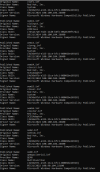
1742261249204.png

We are seeing much of the same behavior on one of our Hypervisors, 4-5% (of 8 CPUs) for a Windows Server 2025, that is idle, but we do see a much lower CPU-usage on another hypervisors. All is running with virtio .266-drivers.

Try:

Code:

sysctl kernel.numa_balancing=0

The host is using 2 x Intel Xeon Gold 6134, so it's a skylake generation. I observed the same issues on another pve test box with is a i7-8809G a Kaby Lake.

I went ahead and configured the host and the Server 2025 Guest VM as suggested. However, it does not appear to have changed the resource consumption of the guest.

The proxmox host has been configured as such:

#/etc/sysctl.d/local.conf
kernel.numa_balancing = 0

#/etc/kernel/cmdline
root=ZFS=rpool/ROOT/pve-1 boot=zfs text video=1024x768@60 audit=0 debug=off intel_pstate=enable no_turbo=0 kvm.ignore_msrs=1 kvm.report_ignored_msrs=0 split_lock_detect=off mitigations=off l1tf=off mds=off

The guest has been configured to disable all cpu mitigations which include speculation control.

[HKEY_LOCAL_MACHINE\SYSTEM\CurrentControlSet\Control\Session Manager\Memory Management]
"FeatureSettings"=dword:00000000
"FeatureSettingsOverride"=dword:00000003
"FeatureSettingsOverrideMask"=dword:00000003

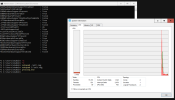
1742517837507.png

Last edited:

Hi

I also noticed degraded performance going from server 2022 to 2025.

If you instead of cpu model host use x86-64-v3 or something similar performance will be much better.
You can also disable nested virtualization and continue to use host as cpu model and performance is good again.

To disable nested virtualization on the host:
add kvm-intel.conf to /etc/modprobe.d/ containing

Code:

options kvm-intel nested=N

Don't forget to reboot after.

On the guests, I have disabled Virtualization Based Security.

Have you checked with msinfo32.exe ?

If you instead of cpu model host use x86-64-v3 or something similar performance will be much better.
You can also disable nested virtualization and continue to use host as cpu model and performance is good again.

I can confirm that using x86-64-v2 on our lab-setup (old hardware) made the suspicious idle-usage dropping by 50%

I cannot turn off nested virtualization, so someone else have to confirm that this is a factor. Is not possible to disable something on the guest to prevent the VM in question to use nestet virtualization in any shape or form?