







Hi, I am having an issue with my proxmox installation. My version is PVE 8.2.2.
I cloned my disk with Proxmox installation which is a 250GB SSD to a 1TB SSD using Clonezilla. When I tried booting Proxmox on the 1TB, the local-lvm volume is at 0%. The VM and CT cannot find their respective disks as well. However I can still see the disks under "VM Disks" and "CT Volumes".
I can't figure out what is going on and I need help so Proxmox can find the disk while booting.
Below is my pvs, vgs, lvs and lsblk output.
Code:
root@pve:~# pvs
  PV         VG  Fmt  Attr PSize    PFree
  /dev/sda3  pve lvm2 a--  <222.57g 16.00g
Code:
root@pve:~# vgs
  VG  #PV #LV #SN Attr   VSize    VFree
  pve   1   9   0 wz--n- <222.57g 16.00g
Code:
root@pve:~# lvs
  LV            VG  Attr       LSize    Pool Origin Data%  Meta%  Move Log Cpy%Sync Convert
  data          pve twi-aotz-- <130.27g             0.00   1.22
  root          pve -wi-ao----   65.64g
  swap          pve -wi-ao----    8.00g
  vm-100-disk-0 pve Vwi-a-tz--   64.00g data        0.00
  vm-101-disk-0 pve Vwi-a-tz--   16.00g data        0.00
  vm-102-disk-0 pve Vwi-a-tz--    6.00g data        0.00
  vm-103-disk-1 pve Vwi-a-tz--   32.00g data        0.00
  vm-104-disk-0 pve Vwi-a-tz--   32.00g data        0.00
  vm-105-disk-0 pve Vwi-a-tz--    4.00g data        0.00
Code:
root@pve:~# lsblk
NAME                         MAJ:MIN RM   SIZE RO TYPE MOUNTPOINTS
sda                            8:0    0 223.6G  0 disk
├─sda1                         8:1    0  1007K  0 part
├─sda2                         8:2    0     1G  0 part /boot/efi
└─sda3                         8:3    0 222.6G  0 part
  ├─pve-swap                 252:0    0     8G  0 lvm  [SWAP]
  ├─pve-root                 252:1    0  65.6G  0 lvm  /
  ├─pve-data_tmeta           252:2    0   1.3G  0 lvm
  │ └─pve-data-tpool         252:4    0 130.3G  0 lvm
  │   ├─pve-data             252:5    0 130.3G  1 lvm
  │   ├─pve-vm--100--disk--0 252:6    0    64G  0 lvm
  │   ├─pve-vm--101--disk--0 252:7    0    16G  0 lvm
  │   ├─pve-vm--102--disk--0 252:8    0     6G  0 lvm
  │   ├─pve-vm--103--disk--1 252:9    0    32G  0 lvm
  │   ├─pve-vm--104--disk--0 252:10   0    32G  0 lvm
  │   └─pve-vm--105--disk--0 252:11   0     4G  0 lvm
  └─pve-data_tdata           252:3    0 130.3G  0 lvm
    └─pve-data-tpool         252:4    0 130.3G  0 lvm
      ├─pve-data             252:5    0 130.3G  1 lvm
      ├─pve-vm--100--disk--0 252:6    0    64G  0 lvm
      ├─pve-vm--101--disk--0 252:7    0    16G  0 lvm
      ├─pve-vm--102--disk--0 252:8    0     6G  0 lvm
      ├─pve-vm--103--disk--1 252:9    0    32G  0 lvm
      ├─pve-vm--104--disk--0 252:10   0    32G  0 lvm
      └─pve-vm--105--disk--0 252:11   0     4G  0 lvm
sdb                            8:16   0   3.6T  0 disk
└─sdb1                         8:17   0   3.6T  0 part
sdc                            8:32   0   3.6T  0 disk
└─sdc1                         8:33   0   3.6T  0 part
sdd                            8:48   0   3.6T  0 disk
├─sdd1                         8:49   0     2G  0 part
└─sdd2                         8:50   0   3.6T  0 part
sde                            8:64   0   3.6T  0 disk
└─sde1                         8:65   0   3.6T  0 part
sdf                            8:80   0   3.6T  0 disk
└─sdf1                         8:81   0   3.6T  0 part
I can see CT volumes

LVM

LVM thin is 1% when it is closer to 90%+

VM can't find the boot disk
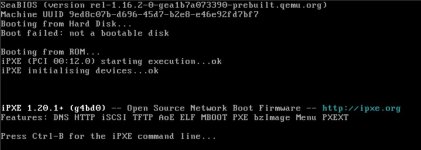
Please send help.
Last edited: