




i take 0 responsibility on any unexpected problem with your systems. do this at your own risk, it works for me, i've done 3 times already. Happy hacking 
----------------------------+
the pdf attached has some screenshots along with the commands in blue
-----------------------------------------------------
Download the latest version of SystemRescue.
Create a USB bootable from the downloaded iso. On Microsoft Windows, one could use Rufus. Or, the cross-platform free USB flash tool for Microsoft Windows, macOS, and Linux, balenaEtcher.
Insert the sd card inside the DL360 server SD Card Slot. Ensure that SD Card is empty.
Before starting SystemRescue from the USB drive, make sure to delete all the RAID configurations on the controller by pressing F8 at boot time. This is mandatory! And, make sure to make a backup of everything for obvious reasons, otherwise, your data will be wiped!
Once everything has been deleted, this page should now displayed
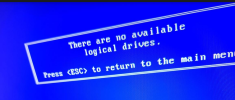
Insert the USB that has the systemrescue
Reboot the server and then do F11 for Boot menu and then 3 One time boot to USB DriveKey
In the system rescue menu, select SystemRescue using default options.
after booting SystemRescue you could type startx in order to start a neat and clean Xfce session.
Format the sd card
open the terminal, and run command:
fsdisk -l
wipefs -a /dev/sdj replace the j with the letter the system assigned to the sd card
open the terminal, and run command: sudo pacman -Syu to update packman
command: Pacman -Sy
command: sudo pacman -S --needed base-devel git wget yajl
command: nano /etc/passwd
change nobody:x:65534:65534:KernelOverflowser:/:/usr/bin/nologin to nobody:x:65534:65534:Kernel Overflow User:/:/bin/bash then save
commands below:
cd /var/tmp
su nobody -c 'git clone https://aur.archlinux.org/ssacli.git'
cd ssacli
su nobody -c 'makepkg -si'
cp -vr pkg/ssacli/opt /
cp -vr pkg/ssacli/usr/share /usr/
cp -vr pkg/ssacli/usr/bin/* /usr/bin/
hash -r
Finally, it’s time to enable the HBA mode (pass-through)
ssacli controller slot=0 modify hbamode=on
you can re-enable hardware RAID and disable HBA mode at any time by starting over from step 1 and only set hbamode=off instead of hbamode=on.
Confirm the HBA mode has been enabled:
ssacli controller slot=0 show | grep -i hba
ssacli controller slot=0 show
We’re done! Poweroff the server:
Remove systemrescue USB
Insert the proxmox bootable USB drive in the server USB Ports
Poweron the server
install proxmox in my case I installed it as ZFS Raid1 but uncheck the flag "automatically reboot successful after installation".
When the installation is done, instead of clicking reboot, hold CTRL+ALT+F3
fsdisk -a my sd card was sdj
gdisk /dev/sdj
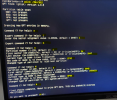
lsblk command show a new partition name sdj1 and sdj2
Now mount rpool to /mnt with zpool import rpool -R /mnt
- mount -t proc proc /mnt/proc
- mount -t sysfs sys /mnt/sys
- mount -o bind /dev /mnt/dev
- mount -o bind /run /mnt/run
chroot /mnt
if encounter error about “
contains a file systems vfat” when running boot tool command ,try command: fdisk /dev/sdj then take the GPT option, then type quit to exit. Then below again
proxmox-boot-tool format /dev/sdj2 --force and proxmox-boot-tool init /dev/ sdj2
Now check if the UUID of /dev/sdj2 from blkid /dev/sdj2 is inside /etc/kernel/proxmox-boot-uuids, if not try to run proxmox-boot-tool refresh
zpool export rpool, not needed
- ctrl+alt+f4
- now click reboot
- remove proxmox usb installer
credits to :
https://www.babaei.net/blog/disable...hrough-perform-freebsd-root-zfs-installation/
https://forum.proxmox.com/threads/move-boot-partition-zfs-usb.137870/
https://www.reddit.com/r/homelab/comments/ap9usf/proxmoxzfs_installed_on_hp_dl360p/
https://bbs.archlinux.org/viewtopic.php?id=198066
https://unix.stackexchange.com/ques...b-flash-installed-on-two-nvme-d/662861#662861
https://www.linuxquestions.org/ques...not-exist-~-trying-to-mount-a-nas-4175685417/
https://forum.proxmox.com/threads/booting-proxmox-from-internal-sd-card-only-boot-partition.94957/