I've just literally started using ProxMox as an alternative to VmWare ESXi for testing purposes.
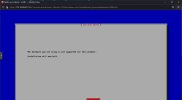
My issue as of now is that I cannot build a Cisco call manager (a.k.a., "CUCM") inside of proxmox (see attachment).
I've no doubt the issue is my not fully grasping proxmox in addition to not finding any information regarding running a cisco call manager in a proxmox environment.
Is there anyone here who has any experience running cisco appliances on a proxmox hypervisor?
I've just literally started using ProxMox as an alternative to VmWare ESXi for testing purposes.
My issue as of now is that I cannot build a Cisco call manager (a.k.a., "CUCM") inside of proxmox (see attachment).
I've no doubt the issue is my not fully grasping proxmox in addition to not finding any information regarding running a cisco call manager in a proxmox environment.
Is there anyone here who has any experience running cisco appliances on a proxmox hypervisor?
I'm trying the same with CUCM 15 on Proxmox 8.2, with no luck so far either.
Cisco currently only supports ESXi and I think it checks some parameters during bootup of the installation media. So, if Proxmox wants to be a full replacement of ESXi, it needs to have a compatibility mode where the hypervisor of Proxmox mimics the ESXi hypervisor.
For example these settings (dmidecod):
Code:
BIOS Information
        Vendor: SeaBIOS
        Version: rel-1.16.2-0-gea1b7a073390-prebuilt.qemu.org
        Release Date: 04/01/2014
        Address: 0xE8000
        Runtime Size: 96 kB
        ROM Size: 64 kB
        Characteristics:
                BIOS characteristics not supported
                Targeted content distribution is supported
        BIOS Revision: 0.0

Handle 0x0100, DMI type 1, 27 bytes
System Information
        Manufacturer: QEMU
        Product Name: Standard PC (Q35 + ICH9, 2009)
        Version: pc-q35-8.1
        Serial Number: Not Specified
        UUID: 4434a6d8-9bab-4fa8-926f-de84ef79a9ea
        Wake-up Type: Power Switch
        SKU Number: Not Specified
        Family: Not Specified

Handle 0x0300, DMI type 3, 22 bytes
Chassis Information
        Manufacturer: QEMU
        Type: Other
        Lock: Not Present
        Version: pc-q35-8.1
        Serial Number: Not Specified
        Asset Tag: Not Specified
        Boot-up State: Safe
        Power Supply State: Safe
        Thermal State: Safe
        Security Status: Unknown
        OEM Information: 0x00000000
        Height: Unspecified
        Number Of Power Cords: Unspecified
        Contained Elements: 0
        SKU Number: Not Specified
When a vendor of appliances is checking the plattform, it is easy to detect that this is not ESXi, but something different.
Furthermore I assume that the Cisco UC installer is more strict than CUCM itself after installation. So, it may work when installing on ESXi and migrating the installed disk image afterwards. Sadly, I have no ESXi at hand to try this.
Cisco currently only supports ESXi and I think it checks some parameters during bootup of the installation media. So, if Proxmox wants to be a full replacement of ESXi, it needs to have a compatibility mode where the hypervisor of Proxmox mimics the ESXi hypervisor.
Or you could, you know, ask the vendor of the expensive software you want to use to support the environment you want to use. Why is it always on the open source community to get proprietary things to work? Seems to me that if you are paying big bucks for something you ought to get more than abuse and being ignored.
ETA: If Cisco has instructions for "KVM based hypervisors" or similar, that should be helpful for running in Proxmox.
Or you could, you know, ask the vendor of the expensive software you want to use to support the environment you want to use. Why is it always on the open source community to get proprietary things to work? Seems to me that if you are paying big bucks for something you ought to get more than abuse and being ignored.
ETA: If Cisco has instructions for "KVM based hypervisors" or similar, that should be helpful for running in Proxmox.
It is as it is. On-Prem products do have a difficult stand within Cisco anyway as Cisco is heavily promoting Cloud services.
And when looking into the installer (see the previous Github link), you can see that there are other hypervisors as well, including KVM/QEMU. The Github link deals with that in a way that it modifies the install scripts to use KVM instead of ESXi.
However, when the installation would be successful, it is (state of now) a totally unsupported platform.
But I agree: the customers should urge Cisco to support other virtualization platforms like Proxmox, especially when considering the Broadcom change in licensing. Nonetheless there won't be a quick change in Ciscos policy.
I followed the same https://github.com/david8862/create-cucm-kvm-iso with a CUCM 14 installation disk as well and ran into an issue that was due to the naming of the disk. I found a solution in form of an additional line for the script, I documented this in the issues section. I just received my final proxmox hardware today and I am in the process of installing a CUCM right now, after that I will try Unity Connection. The beauty of the script is that it also adds the boot loader, so all you need is an upgrade image
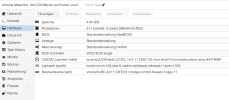
these are my settings:
This is the complete shell script to convert the iso:
Bash:
#! /bin/bash
# Filename: create_cucm_kvm_iso.sh
#
# Copyright (C) 2017  Xiaobin Zhang (david8862@gmail.com)
#
#
# This program is free software: you can redistribute it and/or modify
# it under the terms of the GNU Lesser General Public License as published by
# the Free Software Foundation; either version 2.1 of the License, or
# (at your option) any later version.
#
# This program is distributed in the hope that it will be useful,
# but WITHOUT ANY WARRANTY; without even the implied warranty of
# MERCHANTABILITY or FITNESS FOR A PARTICULAR PURPOSE.  See the
# GNU Lesser General Public License for more details.
#
# You should have received a copy of the GNU Lesser General Public License
# along with this program.  If not, see <http://www.gnu.org/licenses/>.
#

#
# main()
#
if [ $# -ne 2 ] ; then
    echo Usage: "`basename $0` SOURCE_ISO DEST_ISO"
    echo "SOURCE_ISO  origin iso image get from Cisco webpage"
    echo "DEST_ISO    output iso image supporting KVM installation"
    exit 1
fi

SOURCE_ISO=$1
DEST_ISO=$2
CURR_PATH=$(pwd)


if [ $(id -un) != "root" ]; then
    echo "Please use root account."
    exit 1
fi

if [ ! -f "$SOURCE_ISO" ]; then
    echo "origin iso un-exists. Please check again."
    exit 1
fi

umount /tmp/iso
umount /tmp/CUCM
rm -rf /tmp/iso
rm -rf /tmp/CUCM
mkdir /tmp/iso
mkdir /tmp/CUCM

mount -o loop $SOURCE_ISO /tmp/iso/
echo "Now syncing ISO to new path, please wait..."
rsync -a /tmp/iso/ /tmp/CUCM/
echo "Syncing finished."

#Remove not used server implementation
pushd /tmp/CUCM/Cisco/hssi/server_implementation/
shopt -s extglob
rm -rf !(KVM|README.TXT|shared|TRANS.TBL)
pushd KVM/
rm -rf !(QEMU|shared|TRANS.TBL)
shopt -u extglob
popd
popd


#Add server hardware detecting error check
sed -i '/HSSI_API $impl returned $isFound and errors/i\            echo "HSSI_API $impl returned $isFound and errors=$validation_errors " >&2' /tmp/CUCM/Cisco/hssi/shared/bin/hssi_api.sh

sed -i '/case "$isFound" in/G' /tmp/CUCM/Cisco/hssi/shared/bin/hssi_api.sh
sed -i '/case "$isFound" in/a\                ;;' /tmp/CUCM/Cisco/hssi/shared/bin/hssi_api.sh
sed -i '/case "$isFound" in/a\                ((validated_count++))' /tmp/CUCM/Cisco/hssi/shared/bin/hssi_api.sh
sed -i '/case "$isFound" in/a\                hw_model="$($impl HWModel)"' /tmp/CUCM/Cisco/hssi/shared/bin/hssi_api.sh
sed -i '/case "$isFound" in/a\                append_inDataFile_forKey_value $hssi_api_state_file "hardware_implementation_paths" $impl' /tmp/CUCM/Cisco/hssi/shared/bin/hssi_api.sh
sed -i '/case "$isFound" in/a\                echo "$($impl HWModel): passed detection validation" >&2' /tmp/CUCM/Cisco/hssi/shared/bin/hssi_api.sh
sed -i '/case "$isFound" in/a\                "2")' /tmp/CUCM/Cisco/hssi/shared/bin/hssi_api.sh

#Snmp
sed -i '/local method="hasHwSnmpMonitoring"/{n;d}' /tmp/CUCM/Cisco/base_scripts/ihardware.sh
sed -i 's/local method="hasHwSnmpMonitoring"/return 1/g' /tmp/CUCM/Cisco/base_scripts/ihardware.sh

#Remove eth HWADDR check
mv /tmp/CUCM/Cisco/hssi/server_implementation/KVM/QEMU/shared/bin/api_implementation.sh.proposed /tmp/CUCM/Cisco/hssi/server_implementation/KVM/QEMU/shared/bin/api_implementation.sh


sed -i '/_runtime $@/i\function postBootHardwareSetup()' /tmp/CUCM/Cisco/hssi/server_implementation/KVM/QEMU/shared/bin/api_implementation.sh
sed -i '/_runtime $@/i\{' /tmp/CUCM/Cisco/hssi/server_implementation/KVM/QEMU/shared/bin/api_implementation.sh
sed -i '/_runtime $@/i\    local rc=$HSSI_TRUE' /tmp/CUCM/Cisco/hssi/server_implementation/KVM/QEMU/shared/bin/api_implementation.sh
sed -i '/_runtime $@/i\\' /tmp/CUCM/Cisco/hssi/server_implementation/KVM/QEMU/shared/bin/api_implementation.sh
sed -i '/_runtime $@/i\    (super postBootHardwareSetup $*)' /tmp/CUCM/Cisco/hssi/server_implementation/KVM/QEMU/shared/bin/api_implementation.sh
sed -i '/_runtime $@/i\    local src=$?' /tmp/CUCM/Cisco/hssi/server_implementation/KVM/QEMU/shared/bin/api_implementation.sh
sed -i '/_runtime $@/i\    # Abort if there is a critical failure' /tmp/CUCM/Cisco/hssi/server_implementation/KVM/QEMU/shared/bin/api_implementation.sh
sed -i '/_runtime $@/i\    if [ $src -eq 1 ]; then' /tmp/CUCM/Cisco/hssi/server_implementation/KVM/QEMU/shared/bin/api_implementation.sh
sed -i '/_runtime $@/i\        return $src' /tmp/CUCM/Cisco/hssi/server_implementation/KVM/QEMU/shared/bin/api_implementation.sh
sed -i '/_runtime $@/i\    fi' /tmp/CUCM/Cisco/hssi/server_implementation/KVM/QEMU/shared/bin/api_implementation.sh
sed -i '/_runtime $@/i\    rm -f /etc/udev/rules.d/70-persistent-net.rules 2> /dev/null' /tmp/CUCM/Cisco/hssi/server_implementation/KVM/QEMU/shared/bin/api_implementation.sh
sed -i '/_runtime $@/i\\' /tmp/CUCM/Cisco/hssi/server_implementation/KVM/QEMU/shared/bin/api_implementation.sh
sed -i '/_runtime $@/i\    #' /tmp/CUCM/Cisco/hssi/server_implementation/KVM/QEMU/shared/bin/api_implementation.sh
sed -i '/_runtime $@/i\    # remove hwaddr field from config in case mac address changed.' /tmp/CUCM/Cisco/hssi/server_implementation/KVM/QEMU/shared/bin/api_implementation.sh
sed -i '/_runtime $@/i\    #' /tmp/CUCM/Cisco/hssi/server_implementation/KVM/QEMU/shared/bin/api_implementation.sh
sed -i "/_runtime \$\@/i\    sed -i 's/^HWADDR.*//' /etc/sysconfig/network-scripts/ifcfg-eth* 2> /dev/null" /tmp/CUCM/Cisco/hssi/server_implementation/KVM/QEMU/shared/bin/api_implementation.sh
sed -i "/_runtime \$\@/i\    sed -i 's/^NM_CON.*/NM_CONTROLLED="no"/' /etc/sysconfig/network-scripts/ifcfg-eth* 2> /dev/null" /tmp/CUCM/Cisco/hssi/server_implementation/KVM/QEMU/shared/bin/api_implementation.sh
sed -i "/_runtime \$\@/i\    sed -i 's/^ONBOOT.*/ONBOOT="yes"/' /etc/sysconfig/network-scripts/ifcfg-eth* 2> /dev/null" /tmp/CUCM/Cisco/hssi/server_implementation/KVM/QEMU/shared/bin/api_implementation.sh
sed -i "/_runtime \$\@/i\    return \$rc" /tmp/CUCM/Cisco/hssi/server_implementation/KVM/QEMU/shared/bin/api_implementation.sh
sed -i '/_runtime $@/i\}' /tmp/CUCM/Cisco/hssi/server_implementation/KVM/QEMU/shared/bin/api_implementation.sh
sed -i '/_runtime $@/i\\' /tmp/CUCM/Cisco/hssi/server_implementation/KVM/QEMU/shared/bin/api_implementation.sh


sed -i '/_runtime $@/i\function postBootHardwareSetup()' /tmp/CUCM/Cisco/hssi/server_implementation/KVM/shared/bin/shared_implementation.sh
sed -i '/_runtime $@/i\{' /tmp/CUCM/Cisco/hssi/server_implementation/KVM/shared/bin/shared_implementation.sh
sed -i '/_runtime $@/i\    local rc=$HSSI_TRUE' /tmp/CUCM/Cisco/hssi/server_implementation/KVM/shared/bin/shared_implementation.sh
sed -i '/_runtime $@/i\\' /tmp/CUCM/Cisco/hssi/server_implementation/KVM/shared/bin/shared_implementation.sh
sed -i '/_runtime $@/i\    (super postBootHardwareSetup $*)' /tmp/CUCM/Cisco/hssi/server_implementation/KVM/shared/bin/shared_implementation.sh
sed -i '/_runtime $@/i\    local src=$?' /tmp/CUCM/Cisco/hssi/server_implementation/KVM/shared/bin/shared_implementation.sh
sed -i '/_runtime $@/i\    # Abort if there is a critical failure' /tmp/CUCM/Cisco/hssi/server_implementation/KVM/shared/bin/shared_implementation.sh
sed -i '/_runtime $@/i\    if [ $src -eq 1 ]; then' /tmp/CUCM/Cisco/hssi/server_implementation/KVM/shared/bin/shared_implementation.sh
sed -i '/_runtime $@/i\        return $src' /tmp/CUCM/Cisco/hssi/server_implementation/KVM/shared/bin/shared_implementation.sh
sed -i '/_runtime $@/i\    fi' /tmp/CUCM/Cisco/hssi/server_implementation/KVM/shared/bin/shared_implementation.sh
sed -i '/_runtime $@/i\    rm -f /etc/udev/rules.d/70-persistent-net.rules 2> /dev/null' /tmp/CUCM/Cisco/hssi/server_implementation/KVM/shared/bin/shared_implementation.sh
sed -i '/_runtime $@/i\\' /tmp/CUCM/Cisco/hssi/server_implementation/KVM/shared/bin/shared_implementation.sh
sed -i '/_runtime $@/i\    #' /tmp/CUCM/Cisco/hssi/server_implementation/KVM/shared/bin/shared_implementation.sh
sed -i '/_runtime $@/i\    # remove hwaddr field from config in case mac address changed.' /tmp/CUCM/Cisco/hssi/server_implementation/KVM/shared/bin/shared_implementation.sh
sed -i '/_runtime $@/i\    #' /tmp/CUCM/Cisco/hssi/server_implementation/KVM/shared/bin/shared_implementation.sh
sed -i "/_runtime \$\@/i\    sed -i 's/^HWADDR.*//' /etc/sysconfig/network-scripts/ifcfg-eth* 2> /dev/null" /tmp/CUCM/Cisco/hssi/server_implementation/KVM/shared/bin/shared_implementation.sh
sed -i "/_runtime \$\@/i\    sed -i 's/^NM_CON.*/NM_CONTROLLED="no"/' /etc/sysconfig/network-scripts/ifcfg-eth* 2> /dev/null" /tmp/CUCM/Cisco/hssi/server_implementation/KVM/shared/bin/shared_implementation.sh
sed -i "/_runtime \$\@/i\    sed -i 's/^ONBOOT.*/ONBOOT="yes"/' /etc/sysconfig/network-scripts/ifcfg-eth* 2> /dev/null" /tmp/CUCM/Cisco/hssi/server_implementation/KVM/shared/bin/shared_implementation.sh
sed -i "/_runtime \$\@/i\    return \$rc" /tmp/CUCM/Cisco/hssi/server_implementation/KVM/shared/bin/shared_implementation.sh
sed -i '/_runtime $@/i\}' /tmp/CUCM/Cisco/hssi/server_implementation/KVM/shared/bin/shared_implementation.sh
sed -i '/_runtime $@/i\\' /tmp/CUCM/Cisco/hssi/server_implementation/KVM/shared/bin/shared_implementation.sh

sed -i 's/VDX_PATTERN="vd"/VDX_PATTERN="sd"/g' /tmp/CUCM/Cisco/hssi/server_implementation/KVM/QEMU/shared/bin/api_implementation.sh


pushd /tmp/CUCM/
genisoimage -o $CURR_PATH/$DEST_ISO -b isolinux/isolinux.bin -c isolinux/boot.cat -no-emul-boot -boot-load-size 4 -boot-info-table -J -R .
popd

umount /tmp/iso
umount /tmp/CUCM
rm -rf /tmp/iso
rm -rf /tmp/CUCM
echo "KVM ISO is created at $CURR_PATH/$DEST_ISO"
I followed the same https://github.com/david8862/create-cucm-kvm-iso with a CUCM 14 installation disk as well and ran into an issue that was due to the naming of the disk. I found a solution in form of an additional line for the script, I documented this in the issues section. I just received my final proxmox hardware today and I am in the process of installing a CUCM right now, after that I will try Unity Connection. The beauty of the script is that it also adds the boot loader, so all you need is an upgrade image
these are my settings:
This is the complete shell script to convert the iso:
Ah, thanks for the update!
EDIT:
Ah, apparently to less space on /tmp. Corrected that and then the scripts runs without issues.
OLD:
Unfortunately the scripts seems to have some issues, at least for me:
Bash:
# ./create_cucm_kvm_iso.sh Bootable_UCSInstall_UCOS.iso Bootable_UCSInstall_UCOS-kvm.iso
umount: /tmp/iso: not mounted.
umount: /tmp/CUCM: not mounted.
mount: /tmp/iso: WARNING: source write-protected, mounted read-only.
Now syncing ISO to new path, please wait...
rsync: [receiver] write failed on "/tmp/CUCM/images/install.img": No space left on device (28)
rsync error: error in file IO (code 11) at receiver.c(380) [receiver=3.2.7]
rsync: [sender] write error: Broken pipe (32)
Syncing finished.
/tmp/CUCM/Cisco/hssi/server_implementation ~
/tmp/CUCM/Cisco/hssi/server_implementation/KVM /tmp/CUCM/Cisco/hssi/server_implementation ~
/tmp/CUCM/Cisco/hssi/server_implementation ~
~
/tmp/CUCM ~
I: -input-charset not specified, using utf-8 (detected in locale settings)
Using CHECK000.;1 for  /checksum_file_sha512 (checksum_file)
Using SYSTE000.RPM;1 for  ./Alma/RPMS/systemd-udev-239-58.el8.x86_64.rpm (systemd-pam-239-58.el8.x86_64.rpm)
Using SYSTE001.RPM;1 for  ./Alma/RPMS/systemd-pam-239-58.el8.x86_64.rpm (systemd-libs-239-58.el8.x86_64.rpm)
Using SYSTE002.RPM;1 for  ./Alma/RPMS/systemd-libs-239-58.el8.x86_64.rpm (systemd-239-58.el8.x86_64.rpm)
[...]
Using PLATF000.;1 for  ./Cisco/ucplatform_post/scripts/platform_services_migrate (platform_certs_migrate)
Using PLATF001.;1 for  ./Cisco/ucplatform_post/scripts/platform_certs_migrate (platform_admin_acct_final)
genisoimage: Uh oh, I cant find the boot image 'isolinux/isolinux.bin' !
~
umount: /tmp/CUCM: not mounted.
KVM ISO is created at /root/Bootable_UCSInstall_UCOS-kvm.iso
You need to run it on a different storage, the one you are using is full, hence the small image as a result of the script.
Meanwhile I can confirm that it runs for Unity Connection as well, I am in the last stage of the installation. One more thing: The current dialog for creating a VM uses an IDE drive even when the standard SCSI controller has been selected. Delete the IDE drive and create an SCSI drive.
Edit: The installation of Unity Connection just finished successfully.
You need to run it on a different storage, the one you are using is full, hence the small image as a result of the script.
Yeah, spotted that already and edited the post accordingly
Meanwhile I can confirm that it runs for Unity Connection as well, I am in the last stage of the installation. One more thing: The current dialog for creating a VM uses an IDE drive even when the standard SCSI controller has been selected. Delete the IDE drive and create an SCSI drive.
Edit: The installation of Unity Connection just finished successfully.
For CUCM 15 there seems to be another issue. HW validation passes, as the install script states, but then the installation is halted:
So in fact the last version of CUCM that seems to be working is 14.0SU1, beginning with 14.0SU2 I am getting the same error as above, and I only get that far if I remove the -R in the genisoimage statement in the script, without that I can not even create the image. I found different, easier instructions here: https://www.eve-ng.net/index.php/documentation/howtos/cisco-cucm/
I get a different error message saying that the hardware is not supported for this product. So it looks like the instructions above (that mess around a lot less with the iso) seem to work slightly better - but not good enough.
Well, maybe it's one idea to make it work with KVM/QEMU scripts within the ISO image, maybe it's another idea to patch the VMware scripts to just accepts that it's ok to run on KVM/QEMU?
HW/machine validation is for sure a nice thing to have when you want to ensure that you run only on a supported platform, but running CUCM on Proxmox will give you an unsupported platform anyway, so bypassing all the checks would be an option as well and proceed with just the installation.
I am currently migrating from ESXi and I have already tried to import the CUCM publisher, it failed. Therefore I doubt that it is easy to install the ISO with just modification on the hardware check. My plan b is to have a virtualized ESXi in Proxmox for the Cisco UC products.
I followed the same https://github.com/david8862/create-cucm-kvm-iso with a CUCM 14 installation disk as well and ran into an issue that was due to the naming of the disk. I found a solution in form of an additional line for the script, I documented this in the issues section. I just received my final proxmox hardware today and I am in the process of installing a CUCM right now, after that I will try Unity Connection. The beauty of the script is that it also adds the boot loader, so all you need is an upgrade image
This is the complete shell script to convert the iso:
Bash:
#! /bin/bash
# Filename: create_cucm_kvm_iso.sh
#
# Copyright (C) 2017  Xiaobin Zhang (david8862@gmail.com)
#
#
# This program is free software: you can redistribute it and/or modify
# it under the terms of the GNU Lesser General Public License as published by
# the Free Software Foundation; either version 2.1 of the License, or
# (at your option) any later version.
#
# This program is distributed in the hope that it will be useful,
# but WITHOUT ANY WARRANTY; without even the implied warranty of
# MERCHANTABILITY or FITNESS FOR A PARTICULAR PURPOSE.  See the
# GNU Lesser General Public License for more details.
#
# You should have received a copy of the GNU Lesser General Public License
# along with this program.  If not, see <http://www.gnu.org/licenses/>.
#

#
# main()
#
if [ $# -ne 2 ] ; then
    echo Usage: "`basename $0` SOURCE_ISO DEST_ISO"
    echo "SOURCE_ISO  origin iso image get from Cisco webpage"
    echo "DEST_ISO    output iso image supporting KVM installation"
    exit 1
fi

SOURCE_ISO=$1
DEST_ISO=$2
CURR_PATH=$(pwd)


if [ $(id -un) != "root" ]; then
    echo "Please use root account."
    exit 1
fi

if [ ! -f "$SOURCE_ISO" ]; then
    echo "origin iso un-exists. Please check again."
    exit 1
fi

umount /tmp/iso
umount /tmp/CUCM
rm -rf /tmp/iso
rm -rf /tmp/CUCM
mkdir /tmp/iso
mkdir /tmp/CUCM

mount -o loop $SOURCE_ISO /tmp/iso/
echo "Now syncing ISO to new path, please wait..."
rsync -a /tmp/iso/ /tmp/CUCM/
echo "Syncing finished."

#Remove not used server implementation
pushd /tmp/CUCM/Cisco/hssi/server_implementation/
shopt -s extglob
rm -rf !(KVM|README.TXT|shared|TRANS.TBL)
pushd KVM/
rm -rf !(QEMU|shared|TRANS.TBL)
shopt -u extglob
popd
popd


#Add server hardware detecting error check
sed -i '/HSSI_API $impl returned $isFound and errors/i\            echo "HSSI_API $impl returned $isFound and errors=$validation_errors " >&2' /tmp/CUCM/Cisco/hssi/shared/bin/hssi_api.sh

sed -i '/case "$isFound" in/G' /tmp/CUCM/Cisco/hssi/shared/bin/hssi_api.sh
sed -i '/case "$isFound" in/a\                ;;' /tmp/CUCM/Cisco/hssi/shared/bin/hssi_api.sh
sed -i '/case "$isFound" in/a\                ((validated_count++))' /tmp/CUCM/Cisco/hssi/shared/bin/hssi_api.sh
sed -i '/case "$isFound" in/a\                hw_model="$($impl HWModel)"' /tmp/CUCM/Cisco/hssi/shared/bin/hssi_api.sh
sed -i '/case "$isFound" in/a\                append_inDataFile_forKey_value $hssi_api_state_file "hardware_implementation_paths" $impl' /tmp/CUCM/Cisco/hssi/shared/bin/hssi_api.sh
sed -i '/case "$isFound" in/a\                echo "$($impl HWModel): passed detection validation" >&2' /tmp/CUCM/Cisco/hssi/shared/bin/hssi_api.sh
sed -i '/case "$isFound" in/a\                "2")' /tmp/CUCM/Cisco/hssi/shared/bin/hssi_api.sh

#Snmp
sed -i '/local method="hasHwSnmpMonitoring"/{n;d}' /tmp/CUCM/Cisco/base_scripts/ihardware.sh
sed -i 's/local method="hasHwSnmpMonitoring"/return 1/g' /tmp/CUCM/Cisco/base_scripts/ihardware.sh

#Remove eth HWADDR check
mv /tmp/CUCM/Cisco/hssi/server_implementation/KVM/QEMU/shared/bin/api_implementation.sh.proposed /tmp/CUCM/Cisco/hssi/server_implementation/KVM/QEMU/shared/bin/api_implementation.sh


sed -i '/_runtime $@/i\function postBootHardwareSetup()' /tmp/CUCM/Cisco/hssi/server_implementation/KVM/QEMU/shared/bin/api_implementation.sh
sed -i '/_runtime $@/i\{' /tmp/CUCM/Cisco/hssi/server_implementation/KVM/QEMU/shared/bin/api_implementation.sh
sed -i '/_runtime $@/i\    local rc=$HSSI_TRUE' /tmp/CUCM/Cisco/hssi/server_implementation/KVM/QEMU/shared/bin/api_implementation.sh
sed -i '/_runtime $@/i\\' /tmp/CUCM/Cisco/hssi/server_implementation/KVM/QEMU/shared/bin/api_implementation.sh
sed -i '/_runtime $@/i\    (super postBootHardwareSetup $*)' /tmp/CUCM/Cisco/hssi/server_implementation/KVM/QEMU/shared/bin/api_implementation.sh
sed -i '/_runtime $@/i\    local src=$?' /tmp/CUCM/Cisco/hssi/server_implementation/KVM/QEMU/shared/bin/api_implementation.sh
sed -i '/_runtime $@/i\    # Abort if there is a critical failure' /tmp/CUCM/Cisco/hssi/server_implementation/KVM/QEMU/shared/bin/api_implementation.sh
sed -i '/_runtime $@/i\    if [ $src -eq 1 ]; then' /tmp/CUCM/Cisco/hssi/server_implementation/KVM/QEMU/shared/bin/api_implementation.sh
sed -i '/_runtime $@/i\        return $src' /tmp/CUCM/Cisco/hssi/server_implementation/KVM/QEMU/shared/bin/api_implementation.sh
sed -i '/_runtime $@/i\    fi' /tmp/CUCM/Cisco/hssi/server_implementation/KVM/QEMU/shared/bin/api_implementation.sh
sed -i '/_runtime $@/i\    rm -f /etc/udev/rules.d/70-persistent-net.rules 2> /dev/null' /tmp/CUCM/Cisco/hssi/server_implementation/KVM/QEMU/shared/bin/api_implementation.sh
sed -i '/_runtime $@/i\\' /tmp/CUCM/Cisco/hssi/server_implementation/KVM/QEMU/shared/bin/api_implementation.sh
sed -i '/_runtime $@/i\    #' /tmp/CUCM/Cisco/hssi/server_implementation/KVM/QEMU/shared/bin/api_implementation.sh
sed -i '/_runtime $@/i\    # remove hwaddr field from config in case mac address changed.' /tmp/CUCM/Cisco/hssi/server_implementation/KVM/QEMU/shared/bin/api_implementation.sh
sed -i '/_runtime $@/i\    #' /tmp/CUCM/Cisco/hssi/server_implementation/KVM/QEMU/shared/bin/api_implementation.sh
sed -i "/_runtime \$\@/i\    sed -i 's/^HWADDR.*//' /etc/sysconfig/network-scripts/ifcfg-eth* 2> /dev/null" /tmp/CUCM/Cisco/hssi/server_implementation/KVM/QEMU/shared/bin/api_implementation.sh
sed -i "/_runtime \$\@/i\    sed -i 's/^NM_CON.*/NM_CONTROLLED="no"/' /etc/sysconfig/network-scripts/ifcfg-eth* 2> /dev/null" /tmp/CUCM/Cisco/hssi/server_implementation/KVM/QEMU/shared/bin/api_implementation.sh
sed -i "/_runtime \$\@/i\    sed -i 's/^ONBOOT.*/ONBOOT="yes"/' /etc/sysconfig/network-scripts/ifcfg-eth* 2> /dev/null" /tmp/CUCM/Cisco/hssi/server_implementation/KVM/QEMU/shared/bin/api_implementation.sh
sed -i "/_runtime \$\@/i\    return \$rc" /tmp/CUCM/Cisco/hssi/server_implementation/KVM/QEMU/shared/bin/api_implementation.sh
sed -i '/_runtime $@/i\}' /tmp/CUCM/Cisco/hssi/server_implementation/KVM/QEMU/shared/bin/api_implementation.sh
sed -i '/_runtime $@/i\\' /tmp/CUCM/Cisco/hssi/server_implementation/KVM/QEMU/shared/bin/api_implementation.sh


sed -i '/_runtime $@/i\function postBootHardwareSetup()' /tmp/CUCM/Cisco/hssi/server_implementation/KVM/shared/bin/shared_implementation.sh
sed -i '/_runtime $@/i\{' /tmp/CUCM/Cisco/hssi/server_implementation/KVM/shared/bin/shared_implementation.sh
sed -i '/_runtime $@/i\    local rc=$HSSI_TRUE' /tmp/CUCM/Cisco/hssi/server_implementation/KVM/shared/bin/shared_implementation.sh
sed -i '/_runtime $@/i\\' /tmp/CUCM/Cisco/hssi/server_implementation/KVM/shared/bin/shared_implementation.sh
sed -i '/_runtime $@/i\    (super postBootHardwareSetup $*)' /tmp/CUCM/Cisco/hssi/server_implementation/KVM/shared/bin/shared_implementation.sh
sed -i '/_runtime $@/i\    local src=$?' /tmp/CUCM/Cisco/hssi/server_implementation/KVM/shared/bin/shared_implementation.sh
sed -i '/_runtime $@/i\    # Abort if there is a critical failure' /tmp/CUCM/Cisco/hssi/server_implementation/KVM/shared/bin/shared_implementation.sh
sed -i '/_runtime $@/i\    if [ $src -eq 1 ]; then' /tmp/CUCM/Cisco/hssi/server_implementation/KVM/shared/bin/shared_implementation.sh
sed -i '/_runtime $@/i\        return $src' /tmp/CUCM/Cisco/hssi/server_implementation/KVM/shared/bin/shared_implementation.sh
sed -i '/_runtime $@/i\    fi' /tmp/CUCM/Cisco/hssi/server_implementation/KVM/shared/bin/shared_implementation.sh
sed -i '/_runtime $@/i\    rm -f /etc/udev/rules.d/70-persistent-net.rules 2> /dev/null' /tmp/CUCM/Cisco/hssi/server_implementation/KVM/shared/bin/shared_implementation.sh
sed -i '/_runtime $@/i\\' /tmp/CUCM/Cisco/hssi/server_implementation/KVM/shared/bin/shared_implementation.sh
sed -i '/_runtime $@/i\    #' /tmp/CUCM/Cisco/hssi/server_implementation/KVM/shared/bin/shared_implementation.sh
sed -i '/_runtime $@/i\    # remove hwaddr field from config in case mac address changed.' /tmp/CUCM/Cisco/hssi/server_implementation/KVM/shared/bin/shared_implementation.sh
sed -i '/_runtime $@/i\    #' /tmp/CUCM/Cisco/hssi/server_implementation/KVM/shared/bin/shared_implementation.sh
sed -i "/_runtime \$\@/i\    sed -i 's/^HWADDR.*//' /etc/sysconfig/network-scripts/ifcfg-eth* 2> /dev/null" /tmp/CUCM/Cisco/hssi/server_implementation/KVM/shared/bin/shared_implementation.sh
sed -i "/_runtime \$\@/i\    sed -i 's/^NM_CON.*/NM_CONTROLLED="no"/' /etc/sysconfig/network-scripts/ifcfg-eth* 2> /dev/null" /tmp/CUCM/Cisco/hssi/server_implementation/KVM/shared/bin/shared_implementation.sh
sed -i "/_runtime \$\@/i\    sed -i 's/^ONBOOT.*/ONBOOT="yes"/' /etc/sysconfig/network-scripts/ifcfg-eth* 2> /dev/null" /tmp/CUCM/Cisco/hssi/server_implementation/KVM/shared/bin/shared_implementation.sh
sed -i "/_runtime \$\@/i\    return \$rc" /tmp/CUCM/Cisco/hssi/server_implementation/KVM/shared/bin/shared_implementation.sh
sed -i '/_runtime $@/i\}' /tmp/CUCM/Cisco/hssi/server_implementation/KVM/shared/bin/shared_implementation.sh
sed -i '/_runtime $@/i\\' /tmp/CUCM/Cisco/hssi/server_implementation/KVM/shared/bin/shared_implementation.sh

sed -i 's/VDX_PATTERN="vd"/VDX_PATTERN="sd"/g' /tmp/CUCM/Cisco/hssi/server_implementation/KVM/QEMU/shared/bin/api_implementation.sh


pushd /tmp/CUCM/
genisoimage -o $CURR_PATH/$DEST_ISO -b isolinux/isolinux.bin -c isolinux/boot.cat -no-emul-boot -boot-load-size 4 -boot-info-table -J -R .
popd

umount /tmp/iso
umount /tmp/CUCM
rm -rf /tmp/iso
rm -rf /tmp/CUCM
echo "KVM ISO is created at $CURR_PATH/$DEST_ISO"
I just wanted to give you a massive shoutout for this. This worked for me on CUCM 12.5 and saved me a huge headache moving from ESXi to proxmox. Thank you!
I just wanted to give you a massive shoutout for this. This worked for me on CUCM 12.5 and saved me a huge headache moving from ESXi to proxmox. Thank you!
I'd be cautious with productive systems. The problem might hit when trying to upgrade to a newer version. And you are now running an unsupported system.
The best way would be to also contact your Cisco contacts and demand support for KVM/QEMU based virtualization platforms. I doubt that every CUCM customer will be switching to Nutanix. In most cases Cisco prodcuts will just be one of many apps that need to virtualized and migrated away from VMware.
However, the information within the thread is important information and we should continue to make CUCM & Co work in Proxmox - and give feedback to Cisco how we achieved this.