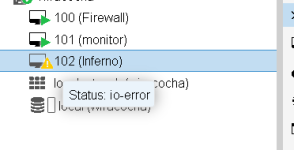
I'm having problems with only one virtual machine. After several days, it displays the error: Status: io-error. I've checked the disk and there's no problem there. It only happens with this machine. After shutting it down and turning it back on, it continues to function normally.
No errors were observed with journalctl or dmesg.
I also don't see any errors with the commands you sent me, unless I don't know how to interpret them; I've attached a file with the output of each command.
sd 0:0:0:0: [sda] Write cache: enabled, read cache: enabled, doesn't support DPO or FUA
sd 1:0:0:0: [sdb] Write cache: enabled, read cache: enabled, doesn't support DPO or FUA
FUA is Force Unit Access = write blocks directly on the storage.
qcow2 (used by your VM) relies heavily on metadata updates and requires reliable flush operations to keep the filesystem consistent.
If the underlying storage does not support FUA, flush requests may be acknowledged before data is actually written to disk.
This creates a mismatch where the VM assumes data is safely stored, while it may still reside in volatile cache.
Under load or failure conditions, this can lead to data corruption or I/O errors, potentially crashing the VM.
This creates a mismatch where the VM assumes data is safely stored, while it may still reside in volatile cache. Under load or failure conditions, this can lead to data corruption or I/O errors, potentially crashing the VM.
How would it lead to data corruption or I/O errors under load? When data is requested to be read again, if it's in the cache (and hasn't YET been written to disk), then the cached data would be given back to the requestor.
Where you run into issues is if there's a crash and cached data can't be flushed to disk
sd 0:0:0:0: [sda] Write cache: enabled, read cache: enabled, doesn't support DPO or FUA
sd 1:0:0:0: [sdb] Write cache: enabled, read cache: enabled, doesn't support DPO or FUA
FUA is Force Unit Access = write blocks directly on the storage.
qcow2 (used by your VM) relies heavily on metadata updates and requires reliable flush operations to keep the filesystem consistent.
If the underlying storage does not support FUA, flush requests may be acknowledged before data is actually written to disk.
This creates a mismatch where the VM assumes data is safely stored, while it may still reside in volatile cache.
Under load or failure conditions, this can lead to data corruption or I/O errors, potentially crashing the VM.
Hello,
I have other servers with Proxmox, and I ran the same command, it shows the same thing, but I don't have this problem of a virtual machine freezing and having to turn it off and on.
The IO error is not indicated by account_failed/ account_invalid (those are just accounting flags), but by failed_*_operations together with qmpstatus: io-error
I have other servers with Proxmox, and I ran the same command, it shows the same thing, but I don't have this problem of a virtual machine freezing and having to turn it off and on.
Thanks.
Hi uzisuicida,
I am having the same problems with "io-errors" with two of my VMs - no logs from the kernel or anything else.
Hi @nils-the-oldone1980,
is there enough free space? Can you share the excerpt from the system logs/journal from around the time the issue happened as well as the output of pveversion -v and the VM configuration qm config ID with the numerical ID.
Hi @nils-the-oldone1980,
is there enough free space? Can you share the excerpt from the system logs/journal from around the time the issue happened as well as the output of pveversion -v and the VM configuration qm config ID with the numerical ID.
Hi fiona,
please see attached output. I've already tried all available "Async IO" mechanisms, disabling "IO thread" at all and/or using "VirtIO SCSI" instead of "VirtIO SCSI single". Even tried without KSM. No success - still locks up with "io error" eventually - cannot force it; it just happens.
edit: VM 999 locked up at around 05:08 today - cannot say for sure because I am using Nagios for out-of-work-time monitoring. Nagios has a delay of two minutes before reporting not-reachable guest agents.
Question: whenever one of the VMs should lock up again, which commands/outputs can I execute/provide to investigate further?
Please share the full journal, not just warnings. Are you using CommVault or Naviko as a backup solution? In the log it can be seen that something creates NBD block devices and maybe the issue is related to that.
Please share the full journal, not just warnings. Are you using CommVault or Naviko as a backup solution? In the log it can be seen that something creates NBD block devices and maybe the issue is related to that. [...]
Yes, we are using NAKIVO. But your mentioning of looking at the full journal and not just warnings gave me the solution, i think.
Yesterday, the VM 999 locked up again at around 09:49 CEST. Here are the relevant journal entries:
Code:
May 27 09:49:52 proxkon01 zed[2586197]: eid=43733 class=dio_verify_wr pool='datastore' size=131072 offset=2737142026240 priority=1 err=5 flags=0x200080 bookmark=54:6784:0:984520
May 27 09:49:59 proxkon01 pvedaemon[2574504]: VM 999 qga command failed - VM 999 qga command 'guest-ping' failed - got timeout
Looking up the failure "dio_verify_wr" in combination with "err=5" led me to another thread:
Hi everyone,
We’ve been deploying several new Proxmox 9 nodes using ZFS as the primary storage, and we’re encountering issues where virtual machines become I/O locked.
When it happens, the VMs are paused with an I/O error. We’re aware this can occur when a host runs out of disk space, but in our case there is plenty of free storage available.
We’ve seen this behavior across multiple hosts, different clusters, and different hardware platforms.
Furthermore, we’ve been running ZFS on Proxmox 8 without any issues, but since these problems started with our Proxmox 9 installations, we’re...
I have disabled Direct I/O on our ZFS storages now using "zfs set direct=disabled datastore" and am very sure that this was the cause. Will let you know the outcome in a day or two.