
惯性聚合 高效追踪和阅读你感兴趣的博客、新闻、科技资讯
阅读原文 在惯性聚合中打开

推荐订阅源

大猫的无限游戏
大猫的无限游戏
阮一峰的网络日志
阮一峰的网络日志
让小产品的独立变现更简单 - ezindie.com
WordPress大学
WordPress大学
博客园 - 叶小钗
Hugging Face - Blog
Hugging Face - Blog
博客园 - 司徒正美
Last Week in AI
Last Week in AI
罗磊的独立博客
量子位
Jina AI
Jina AI
T
Tailwind CSS Blog
Apple Machine Learning Research
IT之家
IT之家
美团技术团队
雷峰网
雷峰网
爱范儿
爱范儿
S
SegmentFault 最新的问题
小众软件
小众软件
月光博客
月光博客
酷 壳 – CoolShell
酷 壳 – CoolShell
人人都是产品经理
人人都是产品经理
The Cloudflare Blog
奇客Solidot–传递最新科技情报
奇客Solidot–传递最新科技情报

Proxmox Support Forum

[SOLVED] - Github Auth for Mirrors-Kernel Repo? [Automation] Mass migration tool for MS Win11/Server Proxmox GUI hang - not response is it possible to reject or quarantine spam based on conditions I set ? The PVENode task list in PVE9 is partially obscured due to the terminal font being too large. About 100% error reporting due to pveproxy.service hooks Kubernetes overlay networking breaks when upgrading from PVE 9.1 to PVE 9.2.3 Zentraler Speicher No space left on device Combine datastore and direct file archival to tape Kernel panic VFS: Unable to mount root fs on unknown-block (0,0) sobald ein 7.x Kernel verwendet wird. How to migrate disk of a VM from one ZFS to another Windows Server 2025 fails to boot after PVE 9.2 / Linux 7.0 Kernel upgrade Cannot Install Proxmox on T610 Poweredge with H700 PERC card sdn Config. gateway not reachable How to safely change domain/FQDN? Welche Filterquote erreicht ihr? NFS Share status unknown on 2 of 5 nodes Can't connect to PVE9 consoles [solved] Can't connect to PVE9 consoles [solved] [SOLVED] - Use secondary network for PVE commands Created cluster, one node storage gone BUG: proxmox mail gateway FROM = null bypass spam filtering Moving existing PBS from VMWare workstation to PVE cluster Does eBGP SDN fabric support external peering? Bug: PDM 1.1 not recognizing valid license status Proxmox GUI hang - not response PVE crashes unexpectedly Proxmox Backup Server 4.2 released! Advice
[SOLVED] - Connection failed (Code: 1006) w/ Xterm Console
invalid@exam · 2026-06-20 · via Proxmox Support Forum

I'm new to Proxmox and networking so apologize if I'm not using correct vernacular and if this is the wrong forum. Tinkering with all of this to teach myself something new.

I tried to install nginx and did some other cleanup of my PVE and found that I can no longer use the default (xterm.js?) console with my LXCs from the PVE web GUI. However, using NoVNC does work (see first image - shows Connection failed for default console and NoVNC working in a separate window).
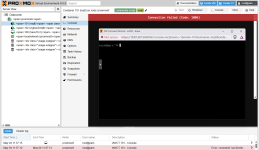
PMOX lxc Console w VNC.png

The default console command fails with this message:

client connection: 127.0.0.1:45966
authentication request failed
TASK ERROR: command '/usr/bin/termproxy 5901 --path /vms/101 --perm VM.Console --vncticket-endpoint --verify-port --ticket-fd 6 -- /usr/bin/dtach -A /var/run/dtach/vzctlconsole101 -r winch -z lxc-console -n 101 -e -1' failed: exit code 1

Clearly an authentication error accessing the console but I don't understand the difference between using xterm and NoVNC well enough to understand why those would behave differently.

I also noticed the inclusion of white space characters in the left hand side menu (e.g. <span>) when this started.

Before this started, I had created a LXC for nginx via Proxmox Community Scripts but I had not yet configured the service. I think this script did an update of PVE as a part of installing nginx in a lxc. I previously setup https for my Home Assistant VM via the Let's Encrypt add-on for Home Assistant.

I also edited Hosts to update it to use the current local network address for PVE, changing the IP address used for {nodename}.local {nodename} (to: 10.87.30.154 {nodename}.local {nodename}) and potentially removed or edited something else. I don't recall specifically and unfortunately I do not have a backup of the original content of the Hosts file before I modified it.

I attempted to update/renew the default certificates for proxmox (i.e. those in the Certificates area) as well as the SSH certificates.
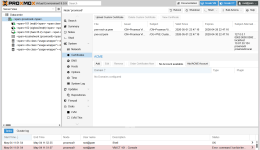
PMOX Cert Page.png

I'm not running a cluster and I no longer have nginx installed. Let's Encrypt is still running in the Home Assistant VM as I haven't been able to figure out how to back that change out yet without breaking access to home assistant via the home assistant app. I can revert to a back-up of the HA VM if needed but would like to avoid that option if possible.

Appreciate any guidance on what to look at next. I've reached the limit of what I've been able to surface via google.

In case someone else finds this, I was able to fix the issue by reinstalling some PVE packages from my node's shell.

apt update
apt install --reinstall pve-manager proxmox-widget-toolkit libpve-http-server-perl

Then refreshed browser and everything was working again.

In case someone else finds this, I was able to fix the issue by reinstalling some PVE packages from my node's shell.

apt update
apt install --reinstall pve-manager proxmox-widget-toolkit libpve-http-server-perl

Then refreshed browser and everything was working again.

Hey, i just made an account here just to say a big THANK YOU for not only asking the exact question about the problem that i just ran into, but to also take the time to post a solution that you did find, which also worked for me now. More people should be like that. Thanks! <3