
惯性聚合 高效追踪和阅读你感兴趣的博客、新闻、科技资讯
阅读原文 在惯性聚合中打开

推荐订阅源

云风的 BLOG
云风的 BLOG
WordPress大学
WordPress大学
IT之家
IT之家
C
Check Point Blog
S
Securelist
宝玉的分享
宝玉的分享
Apple Machine Learning Research
博客园 - 叶小钗
S
Schneier on Security
A
Arctic Wolf
The Cloudflare Blog
T
Threatpost
The Register - Security
AWS News Blog
AWS News Blog
B
Blog RSS Feed
Last Week in AI
Last Week in AI
T
The Exploit Database - CXSecurity.com
Vercel News
Vercel News
Recorded Future
Recorded Future
NISL@THU
NISL@THU
博客园 - 聂微东
奇客Solidot–传递最新科技情报
奇客Solidot–传递最新科技情报
A
About on SuperTechFans
T
Threat Research - Cisco Blogs
Simon Willison's Weblog
The Hacker News
The Hacker News
Cyberwarzone
Cyberwarzone
S
SegmentFault 最新的问题
C
Cybersecurity and Infrastructure Security Agency CISA
Google DeepMind News
Security Latest
Security Latest
Jina AI
Jina AI
让小产品的独立变现更简单 - ezindie.com
N
Netflix TechBlog - Medium
K
KPMG report finds enterprise disconnect between AI and its ROI | CIO
H
Hackread – Cybersecurity News, Data Breaches, AI and More
K
Kaspersky official blog
T
Tor Project blog
Know Your Adversary
Know Your Adversary
V
Vulnerabilities – Threatpost
C
Cyber Attacks, Cyber Crime and Cyber Security
P
Palo Alto Networks Blog
C
CXSECURITY Database RSS Feed - CXSecurity.com
cs.CL updates on arXiv.org
MongoDB | Blog
MongoDB | Blog
C
Cisco Blogs
腾讯CDC
Threat Intelligence Blog | Flashpoint
The GitHub Blog
The GitHub Blog
Spread Privacy
Spread Privacy

Proxmox Support Forum

[SOLVED] - Github Auth for Mirrors-Kernel Repo? [Automation] Mass migration tool for MS Win11/Server Proxmox GUI hang - not response is it possible to reject or quarantine spam based on conditions I set ? The PVENode task list in PVE9 is partially obscured due to the terminal font being too large. About 100% error reporting due to pveproxy.service hooks Kubernetes overlay networking breaks when upgrading from PVE 9.1 to PVE 9.2.3 Zentraler Speicher No space left on device Combine datastore and direct file archival to tape Kernel panic VFS: Unable to mount root fs on unknown-block (0,0) sobald ein 7.x Kernel verwendet wird. How to migrate disk of a VM from one ZFS to another Windows Server 2025 fails to boot after PVE 9.2 / Linux 7.0 Kernel upgrade Cannot Install Proxmox on T610 Poweredge with H700 PERC card sdn Config. gateway not reachable How to safely change domain/FQDN? Welche Filterquote erreicht ihr? NFS Share status unknown on 2 of 5 nodes Can't connect to PVE9 consoles [solved] Can't connect to PVE9 consoles [solved] [SOLVED] - Use secondary network for PVE commands Created cluster, one node storage gone BUG: proxmox mail gateway FROM = null bypass spam filtering Moving existing PBS from VMWare workstation to PVE cluster Does eBGP SDN fabric support external peering? Bug: PDM 1.1 not recognizing valid license status Proxmox GUI hang - not response PVE crashes unexpectedly Proxmox Backup Server 4.2 released! Advice ceph-osd crashes with kernel 6.17.2-1-pve on Dell system [META] Links on Proxmox Forum Website Hardwarer oder Software RAID Joining a cluster with already created guests VM PDM missing backup jobs from PVE / Log retention Remove VM.Monitor from all users/roles, PVE 9.2 Proxmox Freezing (new instalation) 9.2.2 - Intel 12700T No Web gui and random connection reset by peer [SOLVED] - i40e module for X710 Intel NIC Dutch Proxmox Day 2026 How pools use the space Corosync initiiert Reboot trotz Verfügbarkeit der Systeme Opt-in Linux 7.0 Kernel for Proxmox VE 9 available After PVE 8to9 upgrade, unable to check guest fs freeze status Problem with MegaRAID SAS3508 controller proxmox-kernel-7.0.2-6-pve failing network service Auto sync guest time after rollback of VM snapshot with RAM/state Broadcom BCM57504 (100G) bnxt_en TX timeout and NIC reset on Proxmox 8.1.5 — while BCM57414 (25G) works fine on same host QEMU 11.0 available on pve-test and pve-no-subscription as of now 350 MPM Solventless Lamination Machine for High-Speed Flexible Packaging Making sense of NVMe zfs and SMART errors [SOLVED] - PVE loses network connection after kernel upgrade to proxmox-kernel-7.0.0-3-pve [SOLVED] - Remove or reset cluster configuration. Proxmox 8.4.1 Fresh Install BCM57416 10G Ethernet Adapter Not Recognized PDM 1.1.1 unable to add AD realm with anonymous search [TUTORIAL] - Developer Workstation (Proxmox-VE 9) with cinnamon (LMDE7) SDN zone shows "pending" on peer nodes after node reboot (9.2.x) Cluster not quorate - extending auth key lifetime! Proxmox not rebooting properly (SOLVED) Proxmox 9 Stuck on loading initial ramdisk With new HA-Disarm Feature is there a Documentation for NUT Setup on Clusters? Proxmox 8.3 Installation Issue on ProLiant DL380 Gen9 Cluster networking setup LXC System images unavailable [SOLVED] - Fix: NVIDIA Drivers Failing after upgrade to Proxmox 9.2.2 (Kernel 7.0.2-6-pve) / NovaCore Conflict Install NUT directly on Proxmox VE and control guests from here driver usb for windows 7 System startup error and no network: Failed to start ifupdown2-pre.service - Helper to synchronize boot up for ifupdown. PBS backup space grow up constantly Proxmox Datacenter Manager 1.1 released! IPv4 not available in newly created VM Recommended Setup for Offsite Proxmox Backups? Hetzner Storage Box & Remote PBS Challenges duplicate, please delete this passthrought an USB device "by ID" to CT PDM Installer Freezes at 66% Tried PDM for the first time (version 1.1) - had issues PDM 1.1 automated install Suche Server-Provider für Proxmox connecting sdn to edge firewall SDN, IPAM & DHCP Migrating from read-only file system Ubuntu 26.04 installation fails for unknown reason Status Unbekannt nach Cluster Join Installing Proxmox Backup Server on Mac Mini (Late 2012) kernel 7.0 performance issue with zfs pools PVE becomes unreachable via ethernet but OS is running [SOLVED] - New 9.2 install - can't find 7.0.2-6-pve , not all the time [SOLVED] - Backup and dedupe a VM with LUKS Gibt es mit PVE 2.x ggf. Änderungen bei der RAM-Nutzung, bzw. deren Anzeige bei VMs? I need help for setting up backup solution Way more NAGware, very little functionality, bugs galore Root squashing virtiofsd with --uid-map Intel ixgbe Driver Update Fail Passkey Login (not 2FA) Roblox VM detection - can be overcome? [TUTORIAL] - ZFS-Autosnaptshot inkl. Rollback und Daten direkt recovern (Windows/Linux) How to stop PVE Kernel upgrade [SOLVED] - very long waiting to log in to lxc debian 11 ssh [TUTORIAL] - Configuring Fusion-Io (SanDisk) ioDrive, ioDrive2, ioScale and ioScale2 cards with Proxmox Increase maximum USB devices in vm.conf
GMKTEC K12 | Ryzen 7 H 255 | Problem with IGPU
invalid@exam · 2026-06-15 · via Proxmox Support Forum

Hi,
I'm struggling with transferring a graphics card (IGPU) to a Windows VM.

The situation is that the machine works fine, it detects the graphics card, but at random moments the whole host crashes, as if something was wrong with IOMMU.

I figured this out because I also have a GMKTEC M5 PRO on which everything works.
I copied the settings 1:1, everything worked fine the first time, I made my vbios, I'm playing a game and suddenly boom, green screen, I say oh, what's that. At first I say I'll ignore it, but then bam, the same thing happens again.

I completely removed the Windows VM and I see that everything works, so there is definitely something wrong with this VM.

But first, enable everything you can in the BIOS.

Then:
root@node2:~# dmesg | grep -e DMAR -e IOMMU
[ 0.634321] pci 0000:00:00.2: AMD-Vi: IOMMU performance counters supported
[ 0.636820] perf/amd_iommu: Detected AMD IOMMU #0 (2 banks, 4 counters/bank).

root@node2:~# dmesg | grep 'remapping'
[ 0.107932] x2apic: IRQ remapping doesn't support X2APIC mode
[ 0.635689] AMD-Vi: Interrupt remapping enabled

root@node2:~# cat /etc/modprobe.d/iommu_unsafe_interrupts.conf
options vfio_iommu_type1 allow_unsafe_interrupts=1

Here is the blacklist
root@node2:~# cat /etc/modprobe.d/blacklist.conf
blacklist amdgpu
blacklist radeon
blacklist nouveau
blacklist nvidia
blacklist i915

Here is a screenshot of the VM configuration.
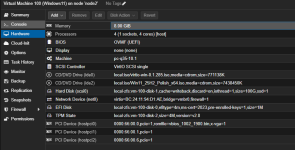
1764979818694.png

I also tested other versions of the AMD driver, but unfortunately nothing helps.
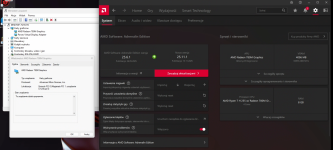
1764979891629.png

Does anyone have any problems with what I'm doing wrong?
Maybe there's no ROM for the sound card? But I have no idea how to do it, the guides from ISC30 github or others are too difficult for me, I would need something st

I'll leave that too.
And this is what the IOMMU groups look like for me
root@node2:~# pvesh get /nodes/node2/hardware/pci --pci-class-blacklist ""
┌──────────┬────────┬──────────────┬────────────┬────────┬───────────────────────────────────────────────────────────┬──────┬──────────────────┬──────────────│ class │ device │ id │ iommugroup │ vendor │ device_name │ mdev │ subsystem_device │ subsystem_dev╞══════════╪════════╪══════════════╪════════════╪════════╪═══════════════════════════════════════════════════════════╪══════╪══════════════════╪══════════════│ 0x010802 │ 0xa804 │ 0000:01:00.0 │ 15 │ 0x144d │ NVMe SSD Controller SM961/PM961/SM963 │ │ 0xa801 │ SM963 2.5" NV├──────────┼────────┼──────────────┼────────────┼────────┼───────────────────────────────────────────────────────────┼──────┼──────────────────┼──────────────│ 0x010802 │ 0xa804 │ 0000:05:00.0 │ 19 │ 0x144d │ NVMe SSD Controller SM961/PM961/SM963 │ │ 0xa801 │ SM963 2.5" NV├──────────┼────────┼──────────────┼────────────┼────────┼───────────────────────────────────────────────────────────┼──────┼──────────────────┼──────────────│ 0x020000 │ 0x8125 │ 0000:02:00.0 │ 16 │ 0x10ec │ RTL8125 2.5GbE Controller │ │ 0x8125 │
├──────────┼────────┼──────────────┼────────────┼────────┼───────────────────────────────────────────────────────────┼──────┼──────────────────┼──────────────│ 0x020000 │ 0x8125 │ 0000:04:00.0 │ 18 │ 0x10ec │ RTL8125 2.5GbE Controller │ │ 0x8125 │
├──────────┼────────┼──────────────┼────────────┼────────┼───────────────────────────────────────────────────────────┼──────┼──────────────────┼──────────────│ 0x028000 │ 0x0616 │ 0000:03:00.0 │ 17 │ 0x14c3 │ MT7922 802.11ax PCI Express Wireless Network Adapter │ │ 0x0616 │
├──────────┼────────┼──────────────┼────────────┼────────┼───────────────────────────────────────────────────────────┼──────┼──────────────────┼──────────────│ 0x030000 │ 0x1900 │ 0000:66:00.0 │ 20 │ 0x1002 │ Phoenix3 │ │ 0x1900 │
├──────────┼────────┼──────────────┼────────────┼────────┼───────────────────────────────────────────────────────────┼──────┼──────────────────┼──────────────│ 0x040300 │ 0x1640 │ 0000:66:00.1 │ 21 │ 0x1002 │ Radeon High Definition Audio Controller [Rembrandt/Strix] │ │ 0x1640 │
├──────────┼────────┼──────────────┼────────────┼────────┼───────────────────────────────────────────────────────────┼──────┼──────────────────┼──────────────│ 0x040300 │ 0x15e3 │ 0000:66:00.6 │ 25 │ 0x1022 │ Family 17h/19h/1ah HD Audio Controller │ │ 0xd997 │
├──────────┼────────┼──────────────┼────────────┼────────┼───────────────────────────────────────────────────────────┼──────┼──────────────────┼──────────────│ 0x060000 │ 0x14e8 │ 0000:00:00.0 │ -1 │ 0x1022 │ Phoenix Root Complex │ │ 0x14e8 │
├──────────┼────────┼──────────────┼────────────┼────────┼───────────────────────────────────────────────────────────┼──────┼──────────────────┼──────────────│ 0x060000 │ 0x14ea │ 0000:00:01.0 │ 0 │ 0x1022 │ Phoenix Dummy Host Bridge │ │ 0x0000 │
├──────────┼────────┼──────────────┼────────────┼────────┼───────────────────────────────────────────────────────────┼──────┼──────────────────┼──────────────│ 0x060000 │ 0x14ea │ 0000:00:02.0 │ 2 │ 0x1022 │ Phoenix Dummy Host Bridge │ │ 0x0000 │
├──────────┼────────┼──────────────┼────────────┼────────┼───────────────────────────────────────────────────────────┼──────┼──────────────────┼──────────────│ 0x060000 │ 0x14ea │ 0000:00:03.0 │ 7 │ 0x1022 │ Phoenix Dummy Host Bridge │ │ 0x0000 │
├──────────┼────────┼──────────────┼────────────┼────────┼───────────────────────────────────────────────────────────┼──────┼──────────────────┼──────────────│ 0x060000 │ 0x14ea │ 0000:00:04.0 │ 8 │ 0x1022 │ Phoenix Dummy Host Bridge │ │ 0x0000 │
├──────────┼────────┼──────────────┼────────────┼────────┼───────────────────────────────────────────────────────────┼──────┼──────────────────┼──────────────│ 0x060000 │ 0x14ea │ 0000:00:08.0 │ 9 │ 0x1022 │ Phoenix Dummy Host Bridge │ │ 0x0000 │
├──────────┼────────┼──────────────┼────────────┼────────┼───────────────────────────────────────────────────────────┼──────┼──────────────────┼──────────────│ 0x060000 │ 0x14f0 │ 0000:00:18.0 │ 14 │ 0x1022 │ Phoenix Data Fabric; Function 0 │ │ 0x0000 │
├──────────┼────────┼──────────────┼────────────┼────────┼───────────────────────────────────────────────────────────┼──────┼──────────────────┼──────────────│ 0x060000 │ 0x14f1 │ 0000:00:18.1 │ 14 │ 0x1022 │ Phoenix Data Fabric; Function 1 │ │ 0x0000 │
├──────────┼────────┼──────────────┼────────────┼────────┼───────────────────────────────────────────────────────────┼──────┼──────────────────┼──────────────│ 0x060000 │ 0x14f2 │ 0000:00:18.2 │ 14 │ 0x1022 │ Phoenix Data Fabric; Function 2 │ │ 0x0000 │
├──────────┼────────┼──────────────┼────────────┼────────┼───────────────────────────────────────────────────────────┼──────┼──────────────────┼──────────────│ 0x060000 │ 0x14f3 │ 0000:00:18.3 │ 14 │ 0x1022 │ Phoenix Data Fabric; Function 3 │ │ 0x0000 │
├──────────┼────────┼──────────────┼────────────┼────────┼───────────────────────────────────────────────────────────┼──────┼──────────────────┼──────────────│ 0x060000 │ 0x14f4 │ 0000:00:18.4 │ 14 │ 0x1022 │ Phoenix Data Fabric; Function 4 │ │ 0x0000 │
├──────────┼────────┼──────────────┼────────────┼────────┼───────────────────────────────────────────────────────────┼──────┼──────────────────┼──────────────│ 0x060000 │ 0x14f5 │ 0000:00:18.5 │ 14 │ 0x1022 │ Phoenix Data Fabric; Function 5 │ │ 0x0000 │
├──────────┼────────┼──────────────┼────────────┼────────┼───────────────────────────────────────────────────────────┼──────┼──────────────────┼──────────────│ 0x060000 │ 0x14f6 │ 0000:00:18.6 │ 14 │ 0x1022 │ Phoenix Data Fabric; Function 6 │ │ 0x0000 │
├──────────┼────────┼──────────────┼────────────┼────────┼───────────────────────────────────────────────────────────┼──────┼──────────────────┼──────────────│ 0x060000 │ 0x14f7 │ 0000:00:18.7 │ 14 │ 0x1022 │ Phoenix Data Fabric; Function 7 │ │ 0x0000 │
├──────────┼────────┼──────────────┼────────────┼────────┼───────────────────────────────────────────────────────────┼──────┼──────────────────┼──────────────│ 0x060100 │ 0x790e │ 0000:00:14.3 │ 13 │ 0x1022 │ FCH LPC Bridge │ │ 0x790e │
├──────────┼────────┼──────────────┼────────────┼────────┼───────────────────────────────────────────────────────────┼──────┼──────────────────┼──────────────│ 0x060400 │ 0x14ed │ 0000:00:01.2 │ 1 │ 0x1022 │ Phoenix GPP Bridge │ │ 0x1453 │
├──────────┼────────┼──────────────┼────────────┼────────┼───────────────────────────────────────────────────────────┼──────┼──────────────────┼──────────────│ 0x060400 │ 0x14ee │ 0000:00:02.1 │ 3 │ 0x1022 │ Phoenix GPP Bridge │ │ 0x1453 │
├──────────┼────────┼──────────────┼────────────┼────────┼───────────────────────────────────────────────────────────┼──────┼──────────────────┼──────────────│ 0x060400 │ 0x14ee │ 0000:00:02.2 │ 4 │ 0x1022 │ Phoenix GPP Bridge │ │ 0x1453 │
├──────────┼────────┼──────────────┼────────────┼────────┼───────────────────────────────────────────────────────────┼──────┼──────────────────┼──────────────│ 0x060400 │ 0x14ee │ 0000:00:02.3 │ 5 │ 0x1022 │ Phoenix GPP Bridge │ │ 0x1453 │
├──────────┼────────┼──────────────┼────────────┼────────┼───────────────────────────────────────────────────────────┼──────┼──────────────────┼──────────────│ 0x060400 │ 0x14ee │ 0000:00:02.5 │ 6 │ 0x1022 │ Phoenix GPP Bridge │ │ 0x1453 │
├──────────┼────────┼──────────────┼────────────┼────────┼───────────────────────────────────────────────────────────┼──────┼──────────────────┼──────────────│ 0x060400 │ 0x14ef │ 0000:00:04.1 │ 8 │ 0x1022 │ Family 19h USB4/Thunderbolt PCIe tunnel │ │ 0x1453 │
├──────────┼────────┼──────────────┼────────────┼────────┼───────────────────────────────────────────────────────────┼──────┼──────────────────┼──────────────│ 0x060400 │ 0x14eb │ 0000:00:08.1 │ 10 │ 0x1022 │ Phoenix Internal GPP Bridge to Bus [C:A] │ │ 0x14eb │
├──────────┼────────┼──────────────┼────────────┼────────┼───────────────────────────────────────────────────────────┼──────┼──────────────────┼──────────────│ 0x060400 │ 0x14eb │ 0000:00:08.2 │ 11 │ 0x1022 │ Phoenix Internal GPP Bridge to Bus [C:A] │ │ 0x14eb │
├──────────┼────────┼──────────────┼────────────┼────────┼───────────────────────────────────────────────────────────┼──────┼──────────────────┼──────────────│ 0x060400 │ 0x14eb │ 0000:00:08.3 │ 12 │ 0x1022 │ Phoenix Internal GPP Bridge to Bus [C:A] │ │ 0x14eb │
├──────────┼────────┼──────────────┼────────────┼────────┼───────────────────────────────────────────────────────────┼──────┼──────────────────┼──────────────│ 0x080600 │ 0x14e9 │ 0000:00:00.2 │ -1 │ 0x1022 │ Phoenix IOMMU │ │ 0x14e9 │
├──────────┼────────┼──────────────┼────────────┼────────┼───────────────────────────────────────────────────────────┼──────┼──────────────────┼──────────────│ 0x0c0330 │ 0x15b9 │ 0000:66:00.3 │ 23 │ 0x1022 │ │ │ 0x15b9 │
├──────────┼────────┼──────────────┼────────────┼────────┼───────────────────────────────────────────────────────────┼──────┼──────────────────┼──────────────│ 0x0c0330 │ 0x15ba │ 0000:66:00.4 │ 24 │ 0x1022 │ │ │ 0x15b9 │
├──────────┼────────┼──────────────┼────────────┼────────┼───────────────────────────────────────────────────────────┼──────┼──────────────────┼──────────────│ 0x0c0330 │ 0x15c0 │ 0000:68:00.3 │ 28 │ 0x1022 │ │ │ 0x15c0 │
├──────────┼────────┼──────────────┼────────────┼────────┼───────────────────────────────────────────────────────────┼──────┼──────────────────┼──────────────│ 0x0c0330 │ 0x15c1 │ 0000:68:00.4 │ 29 │ 0x1022 │ │ │ 0x15c1 │
├──────────┼────────┼──────────────┼────────────┼────────┼───────────────────────────────────────────────────────────┼──────┼──────────────────┼──────────────│ 0x0c0340 │ 0x1669 │ 0000:68:00.6 │ 30 │ 0x1022 │ Pink Sardine USB4/Thunderbolt NHI controller #2 │ │ 0x1669 │
├──────────┼────────┼──────────────┼────────────┼────────┼───────────────────────────────────────────────────────────┼──────┼──────────────────┼──────────────│ 0x0c0500 │ 0x790b │ 0000:00:14.0 │ 13 │ 0x1022 │ FCH SMBus Controller │ │ 0x790b │
├──────────┼────────┼──────────────┼────────────┼────────┼───────────────────────────────────────────────────────────┼──────┼──────────────────┼──────────────│ 0x108000 │ 0x15c7 │ 0000:66:00.2 │ 22 │ 0x1022 │ Phoenix CCP/PSP 3.0 Device │ │ 0x15c7 │
├──────────┼────────┼──────────────┼────────────┼────────┼───────────────────────────────────────────────────────────┼──────┼──────────────────┼──────────────│ 0x130000 │ 0x14ec │ 0000:67:00.0 │ 26 │ 0x1022 │ Phoenix Dummy Function │ │ 0x14ec │
├──────────┼────────┼──────────────┼────────────┼────────┼───────────────────────────────────────────────────────────┼──────┼──────────────────┼──────────────│ 0x130000 │ 0x14ec │ 0000:68:00.0 │ 27 │ 0x1022 │ Phoenix Dummy Function │ │ 0x14ec │
└──────────┴────────┴──────────────┴────────────┴────────┴───────────────────────────────────────────────────────────┴──────┴──────────────────┴──────────────

I don’t think the problem is specific to Proxmox or even to the Windows virtual machine, because I’m running the same device directly with Windows 11 as operating system (for my home office) and have a similar, possibly the same problem: a crash without any clues in System logs — green screen over HDMI (but not a Windows green screen), black screen on the secondary USB-C display, fan keeps runing.

I’m a bit puzzled. The device is from Ali — sold as a barebone. I suspected the issue might be with the RAM or the iGPU. My 32 GB DDR5 memory comes from another system where it worked perfectly. Memory checks (including memtest_vulcan) run without any issues. Various AMD graphics driver versions — including those from the manufacturer’s (GMKTEC) driver package and the ones from Windows Update — make no difference.

I have exactly the same GMKTEC K12 from AliExpress, and I’m experiencing the same issue. I’ve tried around 20 different DDR5 RAM sticks — 4800 MHz and 5600 MHz, in 16 GB, 32 GB, and 64 GB configurations, both single and dual channel — and the problem still persists. I’ve also tested the GPU, and my electrician friend checked the entire hardware setup — everything seems perfectly fine.

What’s even more interesting is that the issue doesn’t happen on Ubuntu, which detects and uses the same integrated GPU without problems. A clean Windows installation shows exactly the same behavior.

I also discovered something else: the Windows VM doesn’t crash as long as I keep Parsec running. For example, I had my system up for two days straight on Proxmox 9.1.2, and everything worked fine until I closed Parsec — then the crash happened almost immediately. Another trigger I noticed is backups. When my automatic backup starts around 3 a.m., it reaches about 1% and the crash occurs if the Windows VM is running.

It really feels like there’s some issue related to IOMMU or VFIO reset — like the GPU doesn’t properly reinitialize or return the display back to the host after certain operations. I’m not 100% sure, but that’s what it looks like.

I am trying everything, getting stuck on code 43 radeon 780 drivers exclamation mark in device manager, K12 with 32gb sk hynix 5600 ram.

everything seems stable otherwise, also linux gpu passthu seemed to work,

So far, i dumped vbios,
GNU nano 8.4 /etc/pve/qemu-server/110.conf
agent: 1
args: -cpu 'host,-hypervisor,kvm=off'
bios: ovmf
boot: order=ide0;scsi0
cores: 8
cpu: host,hidden=1
efidisk0: local-lvm:vm-110-disk-0,efitype=4m,ms-cert=2023,pre-enrolled-keys=1,size=4M
hostpci0: 0000:65:00,pcie=1,rombar=0,romfile=vbios_780M.bin,x-vga=1
hostpci1: 0000:65:00.1,pcie=1,romfile=AMDGopDriver.rom
ide0: local:iso/virtio-win.iso,media=cdrom,size=771138K
machine: pc-q35-10.1
memory: 16384
meta: creation-qemu=10.1.2,ctime=1764892001
name: win11-gpu
net0: virtio=xxxxxbridge=vmbr0
ostype: win11
scsi0: local-lvm:vm-110-disk-1,discard=on,size=75G,ssd=1
scsihw: virtio-scsi-single
smbios1: uuid=xxxxx
tpmstate0: local-lvm:vm-110-disk-2,size=4M,version=v2.0
vga: none
vmgenid: xxxx

I bought a Mini PC with a Ryzen 7640HS two months ago and sold it a month later because iGPU passthrough to a Windows VM with HDMI output didn’t work. I tried everything from the guide below, including extracting the GOP with UBU, but nothing worked.

https://github.com/isc30/ryzen-gpu-passthrough-proxmox

I am trying everything, getting stuck on code 43 radeon 780 drivers exclamation mark in device manager, K12 with 32gb sk hynix 5600 ram.

everything seems stable otherwise, also linux gpu passthu seemed to work,

So far, i dumped vbios,
GNU nano 8.4 /etc/pve/qemu-server/110.conf
agent: 1
args: -cpu 'host,-hypervisor,kvm=off'
bios: ovmf
boot: order=ide0;scsi0
cores: 8
cpu: host,hidden=1
efidisk0: local-lvm:vm-110-disk-0,efitype=4m,ms-cert=2023,pre-enrolled-keys=1,size=4M
hostpci0: 0000:65:00,pcie=1,rombar=0,romfile=vbios_780M.bin,x-vga=1
hostpci1: 0000:65:00.1,pcie=1,romfile=AMDGopDriver.rom
ide0: local:iso/virtio-win.iso,media=cdrom,size=771138K
machine: pc-q35-10.1
memory: 16384
meta: creation-qemu=10.1.2,ctime=1764892001
name: win11-gpu
net0: virtio=xxxxxbridge=vmbr0
ostype: win11
scsi0: local-lvm:vm-110-disk-1,discard=on,size=75G,ssd=1
scsihw: virtio-scsi-single
smbios1: uuid=xxxxx
tpmstate0: local-lvm:vm-110-disk-2,size=4M,version=v2.0
vga: none
vmgenid: xxxx

You would have to show the entire configuration, what exactly you changed and what you added.
Generally, Windows itself will work without any problems, the only issue is with restarting.
The question is also why you are using AMDGopDriver.rom instead of AMDGopDriver_8845hs.rom, and it would be best if you created your own ROM.

Show me the ID of your graphics card because I think you have a mistake here:
hostpci0: 0000:65:00,pcie=1,rombar=0,romfile=vbios_780M.bin,x-vga=1
hostpci1: 0000:65:00.1,pcie=1,romfile=AMDGopDriver.rom

Use it and send it to me:
lspci -nn | grep -e 'AMD/ATI'

You can write to me on Discord:
- Glupikocz

1765834314962.png
We'll work together via AnyDesk.

I should add that my English is poor because I'm from Poland.

Last edited:

Ok, So the exclamation mark is gone.
I followed this reddit post ,

https://www.reddit.com/r/MiniPCs/comments/1pl8h29/gmktec_k12_780m_igpu_and_proxmox_9_passthru/

here is my conf

agent: 1
args: -cpu 'host,-hypervisor,kvm=off'
bios: ovmf
boot: order=ide0;scsi0
cores: 8
cpu: host
efidisk0: local-lvm:vm-110-disk-0,efitype=4m,ms-cert=2023,pre-enrolled-keys=1,size=4M
hostpci0: 0000:65:00.0,pcie=1,romfile=vbios_7xxx.bin
hostpci1: 0000:65:00.1,pcie=1,romfile=AMDGopDriver_7840hs.rom
ide0: local:iso/virtio-win.iso,media=cdrom,size=771138K
machine: pc-q35-10.1
memory: 16384
meta: creation-qemu=10.1.2,ctime=1764892001
name: win11-gpu
net0: virtio=*******,bridge=vmbr0
ostype: win11
scsi0: local-lvm:vm-110-disk-1,discard=on,size=75G,ssd=1
scsihw: virtio-scsi-single
smbios1: uuid=***********
tpmstate0: local-lvm:vm-110-disk-2,size=4M,version=v2.0
vga: none
vmgenid: *******************

Ok, So the exclamation mark is gone.
I followed this reddit post ,

https://www.reddit.com/r/MiniPCs/comments/1pl8h29/gmktec_k12_780m_igpu_and_proxmox_9_passthru/

here is my conf

agent: 1
args: -cpu 'host,-hypervisor,kvm=off'
bios: ovmf
boot: order=ide0;scsi0
cores: 8
cpu: host
efidisk0: local-lvm:vm-110-disk-0,efitype=4m,ms-cert=2023,pre-enrolled-keys=1,size=4M
hostpci0: 0000:65:00.0,pcie=1,romfile=vbios_7xxx.bin
hostpci1: 0000:65:00.1,pcie=1,romfile=AMDGopDriver_7840hs.rom
ide0: local:iso/virtio-win.iso,media=cdrom,size=771138K
machine: pc-q35-10.1
memory: 16384
meta: creation-qemu=10.1.2,ctime=1764892001
name: win11-gpu
net0: virtio=*******,bridge=vmbr0
ostype: win11
scsi0: local-lvm:vm-110-disk-1,discard=on,size=75G,ssd=1
scsihw: virtio-scsi-single
smbios1: uuid=***********
tpmstate0: local-lvm:vm-110-disk-2,size=4M,version=v2.0
vga: none
vmgenid: *******************

Does your VM experience a performance decrease when using args: -cpu 'host,-hypervisor,kvm=off' compared to when they are not used?

the guy who helped you in that reddit post is actually me.
i only got it to work with these args.
i tried other things, but after getting nowhere for a few days i settled on this.
i still dont have any hdmi/dp output, but i dont care about that.
i need gpu acceleration inside the vm for android emulators or other software that wants to use a real GPU.

for that it works. quite well actually.
if i lose a few percent of performance because of it i can live with that for my scenario.

here is my geekbench 6 cpu results

https://browser.geekbench.com/v6/cpu/compare/15610159?baseline=15609827

Seems their is a difference, but then the gpu resets or disables and reenables in device manager

Try this to see if the performance comes back: args: -cpu 'host,-hypervisor,kvm=off,+invtsc'

Also try this if you have WSL2, Hyper-V, or VBS enabled in your Windows VM:

Code:

args: -cpu 'host,+hv-emsr-bitmap,+hv-frequencies,+hv-reenlightenment,+hv-tlbflush-direct,hv_ipi,hv_relaxed,hv_reset,hv_runtime,hv_spinlocks=0x1fff,hv_stimer,hv_synic,hv_time,hv_vapic,hv_vendor_id=intel,hv_vpindex,-hypervisor,+invtsc,kvm=off,+kvm_pv_eoi,+kvm_pv_unhalt,host-phys-bits=true'

Last edited:

Try this to see if the performance comes back: args: -cpu 'host,-hypervisor,kvm=off,+invtsc'

Also try this if you have WSL2, Hyper-V, or VBS enabled in your Windows VM:

Code:

args: -cpu 'host,+hv-emsr-bitmap,+hv-frequencies,+hv-reenlightenment,+hv-tlbflush-direct,hv_ipi,hv_relaxed,hv_reset,hv_runtime,hv_spinlocks=0x1fff,hv_stimer,hv_synic,hv_time,hv_vapic,hv_vendor_id=intel,hv_vpindex,-hypervisor,+invtsc,kvm=off,+kvm_pv_eoi,+kvm_pv_unhalt,host-phys-bits=true'

I will give this a go and provide some feedback thanks

Last edited:

It behaves like my Windows VM: hiding the VM with -hypervisor,kvm=off causes performance drop, but the performance comes back if +invtsc is added.

However, using +invtsc alone will block live migration and snapshot with RAM. Need to add another flag, tsc-frequency=2000000000
to allow live migration and snapshot with RAM.

btw i got the display to work somewhat. when the vm boots i see the boot process up until the windows login on the display and then it craps out and shows garbage on the screen.

to get that far i needed to extract the specific rom file for the H255 using the tools here: https://github.com/isc30/ryzen-gpu-passthrough-proxmox/tree/main/Tools in combination with the bios file i downloaded from https://drive.google.com/drive/fold...TqgAMwJ3Xp?spm=..page_2054333.page_detail_1.1 (this is their bios repository for all machines and they have the 1.07 bios which my device came loaded with).

basically you copy the bios into the correct folder and rename it to bios.bin, start the batch file and follow the instruction give in the github.
it gives you the vbios and an efi file.

the efi file you convert to a rom with the instructions given on the github.

the rom you can then upload to your node and use it as the rom for the .1 pcie device

now it all looks awesome until the loginscreen. i need to find out what garbles the output once i arrives there.

the vm stays completely functional otherwise, just doesnt see the hdmi display after bootup.

btw i got the display to work somewhat. when the vm boots i see the boot process up until the windows login on the display and then it craps out and shows garbage on the screen.

to get that far i needed to extract the specific rom file for the H255 using the tools here: https://github.com/isc30/ryzen-gpu-passthrough-proxmox/tree/main/Tools in combination with the bios file i downloaded from https://drive.google.com/drive/fold...TqgAMwJ3Xp?spm=..page_2054333.page_detail_1.1 (this is their bios repository for all machines and they have the 1.07 bios which my device came loaded with).

basically you copy the bios into the correct folder and rename it to bios.bin, start the batch file and follow the instruction give in the github.
it gives you the vbios and an efi file.

the efi file you convert to a rom with the instructions given on the github.

the rom you can then upload to your node and use it as the rom for the .1 pcie device

now it all looks awesome until the loginscreen. i need to find out what garbles the output once i arrives there.

the vm stays completely functional otherwise, just doesnt see the hdmi display after bootup.

Please try unplug and then reconnect the HDMI cable to see if it works.

does nothing. same garbled display.

windows sees only the amd virtual display in device manager (which is normal if you run a headless machine).
i need to figure out what in windows turns off the hdmi display.
the vbios and rom are obviously correct, otherwise i wouldnt get the whole boot process on the display, so it must be something on windows.

i already have an idea what it might be. i will check if im correct.

btw i got the display to work somewhat. when the vm boots i see the boot process up until the windows login on the display and then it craps out and shows garbage on the screen.

to get that far i needed to extract the specific rom file for the H255 using the tools here: https://github.com/isc30/ryzen-gpu-passthrough-proxmox/tree/main/Tools in combination with the bios file i downloaded from https://drive.google.com/drive/fold...TqgAMwJ3Xp?spm=..page_2054333.page_detail_1.1 (this is their bios repository for all machines and they have the 1.07 bios which my device came loaded with).

basically you copy the bios into the correct folder and rename it to bios.bin, start the batch file and follow the instruction give in the github.
it gives you the vbios and an efi file.

the efi file you convert to a rom with the instructions given on the github.

the rom you can then upload to your node and use it as the rom for the .1 pcie device

now it all looks awesome until the loginscreen. i need to find out what garbles the output once i arrives there.

the vm stays completely functional otherwise, just doesnt see the hdmi display after bootup.

Could you send me the ROM for the graphics card and sound card?
Unfortunately, I don't know if I can do it myself, but then I would have it ready and could help you test what the problem might be :)

ok, this is interesting. if i disable the radeon 780m in device manager the display shows output. if i enable the device, the output returns to garbage.