











Hi,
I just upgraded to PVE 9.2 and the Linux 7.0 Kernel (7.0.6-2-pve) and all my Windows Server 2025 VMs fail to boot (0xc0000001 An unexpected error has occurred). It happens across 3 different physical hosts. Pinning / reverting back to the previous used Kernel 6.17.13-13-pve immediately let the VM boot fine, so I suspect it must be a Kernel problem.
Some notes:
The VMs are using SeaBIOS (so not UEFI).
The boot disk is a classic MBR disk attached via VirtIO SCSI single.
When booting in Windows Recovery Environment (and adding the SCSI drivers) the disk is there and everything looks normal.
Switching between QEMU 10.x and 11.0 changes nothing.
I've attached a screenshot of the error, here is the qm config output of one VM (all others are pretty much identical):
Code:
agent: 1
boot: order=scsi0
cores: 2
cpu: x86-64-v2-AES
machine: pc-q35-11.0
memory: 4096
meta: creation-qemu=8.0.2,ctime=1699176768
name: vm-dc2
net0: virtio=6A:79:B6:87:FA:A8,bridge=vmbr0
numa: 0
onboot: 1
ostype: win11
scsi0: ssd-raid1:128/vm-128-disk-0.qcow2,discard=on,iothread=1,size=40G,ssd=1
scsi1: ssd-standalone:128/vm-128-disk-0.qcow2,backup=0,discard=on,iothread=1,size=20G,ssd=1
scsihw: virtio-scsi-single
smbios1: uuid=99de4990-5382-472e-bd6e-0f3172e6ac31
sockets: 1
startup: order=10,up=60
tablet: 0
vmgenid: 68864228-4c38-4134-b57c-e1ac79c3c889
Has anyone experienced something similar or any more ideas on that?
For now it's fine for me to stay with the 6.17.x Kernel, so it's not that critical. If any more information would be useful, just let me know.
Thanks,
Bernd
EDIT: Adding some more information:
Switching the SCSI Controller to VirtIO SCSI (instead of VirtIO SCSI single) or disabling IO thread also changes nothing.
Windows VirtIO Driver version used: 0.1.285-1
Regarding the Windows error on boot it seems to be storage related, however the underlying storage is definitely fine, since everything else works and the same VMs boot fine when using the older Kernel 6.17.13-13-pve, while not changing anything else.
Hardware information storage/CPU:
Storage is different across the 3 hosts - hardware RAID, software RAID (mdraid) as well as standalone disks (all using ext4).
Used CPUs models are all Intel (don't wonder, it's just a home environment ): Pentium Gold G5600, N100, Celeron N5095
pveversion -v output:
Code:
proxmox-ve: 9.2.0 (running kernel: 6.17.13-13-pve)
pve-manager: 9.2.3 (running version: 9.2.3/d0fde103346cf89a)
proxmox-kernel-helper: 9.2.0
proxmox-kernel-7.0: 7.0.6-2
proxmox-kernel-7.0.6-2-pve-signed: 7.0.6-2
proxmox-kernel-6.17: 6.17.13-13
proxmox-kernel-6.17.13-13-pve-signed: 6.17.13-13
proxmox-kernel-6.17.13-3-pve-signed: 6.17.13-3
proxmox-kernel-6.14: 6.14.11-9
proxmox-kernel-6.14.11-9-pve-signed: 6.14.11-9
ceph-fuse: 19.2.3-pve1
corosync: 3.1.10-pve2
criu: 4.1.1-1
frr-pythontools: 10.6.1-1+pve2
ifupdown: residual config
ifupdown2: 3.3.0-1+pmx12
intel-microcode: 3.20251111.1~deb13u1
libjs-extjs: 7.0.0-5
libproxmox-acme-perl: 1.7.1
libproxmox-backup-qemu0: 2.0.2
libproxmox-rs-perl: 0.4.1
libpve-access-control: 9.1.1
libpve-apiclient-perl: 3.4.2
libpve-cluster-api-perl: 9.1.6
libpve-cluster-perl: 9.1.6
libpve-common-perl: 9.1.13
libpve-guest-common-perl: 6.0.3
libpve-http-server-perl: 6.0.5
libpve-network-perl: 1.6.6
libpve-notify-perl: 9.1.6
libpve-rs-perl: 0.15.3
libpve-storage-perl: 9.1.5
libspice-server1: 0.15.2-1+b1
lvm2: 2.03.31-2+pmx1
lxc-pve: 7.0.0-2
lxcfs: 7.0.0-pve1
novnc-pve: 1.7.0-1
proxmox-backup-client: 4.2.1-1
proxmox-backup-file-restore: 4.2.1-1
proxmox-backup-restore-image: 1.0.0
proxmox-firewall: 1.2.3
proxmox-kernel-helper: 9.2.0
proxmox-mail-forward: 1.0.3
proxmox-mini-journalreader: 1.6
proxmox-offline-mirror-helper: 0.7.4
proxmox-widget-toolkit: 5.2.3
pve-cluster: 9.1.6
pve-container: 6.1.10
pve-docs: 9.2.2
pve-edk2-firmware: not correctly installed
pve-esxi-import-tools: 1.0.1
pve-firewall: 6.0.4
pve-firmware: 3.18-4
pve-ha-manager: 5.2.4
pve-i18n: 3.7.5
pve-qemu-kvm: 11.0.0-4
pve-xtermjs: 6.0.0-1
qemu-server: 9.1.16
smartmontools: 7.5-pve2
spiceterm: 3.4.2
swtpm: 0.8.0+pve3
vncterm: 1.9.2
zfsutils-linux: 2.4.2-pve1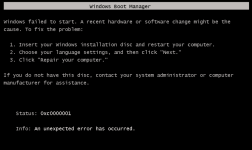
Last edited: