I was searching for days in order to get my WIndows 10 Pro Desktop VM back online again (while keeping the host cpu) after enabling Core Isolation (aka Virtualization-based Security) without doing a snapshot in advance. And then I luckily found this link. It turned out that getting the nested Hyper-V and WSL running on my Intel i7-13700T Proxmox VE 8.1 host was just a matter of adding
in the VM config file.
Afterwards the VM instantly booted again but still felt a bit slow and caused its assigned vcpus to constantly run at high load. After carefully reading the QEMU documentation for Hyper-V Enlightenments for the hv_* flags, I enabled everything that promised some performance gain:

From this I would recommend to use somthing like the following custom arguments for the VM config for such a processor:
Code:
args: -cpu host,level=30,hv_relaxed,hv_reset,hv_runtime,hv_time,hv_spinlocks=0x1fff,hv_vapic,hv_vpindex,hv_ipi,hv_synic,hv_stimer,hv_apicv,hv_xmm_input,hv_stimer_direct,hv_frequencies,hv_reenlightenment,hv_evmcs,hv_emsr_bitmap,hv_tlbflush,hv_tlbflush_ext,hv_tlbflush_direct
Please note that the hv_evmcs flag is Intel-only and some of the others might only be supported on AlderLake/RaptorLake processors and newer.
But using passthrough also seems to work fine and is much simpler and less error prone:
Code:
args: -cpu host,hv_passthrough,level=30
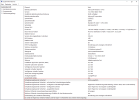
Guess this would also allow to use Credential Guard with WIndows 10 Enterprise or Windows 11 (sorry for the German screenshots):
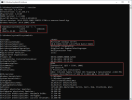
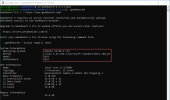
Windows Subsystem for Linux (WSL) also works without any issues:

To get Windows 11 Pro started, it was necessary to add the -waitpkg flag (same link as above) and use the following arguments:
Code:
args: -cpu host,hv_passthrough,level=30,-waitpkg
It was also essential that MSRs are ignored according to the nested docs. Without the two adjustments, the test machine did not boot or ended up with a BSOD.
For some reason, Windows 11 works much faster than Windows 10 and gives close to bare metal results (also in WSL) with Hyper-V and VBS enabled:

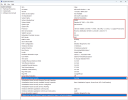
For the benchmarks I was only using 6 P-cores (x2) while the other 2 P-cores were dedicated to the PVE host.
All 8 E-cores have been used exclusively for 6 background VMs (nextcloud, omv, dc, ...) that were more or less idling during the tests.
Thanks to @brewdamaster and @fakezeta for this thread for search inspirations!
Hope this is helpful.













