惯性聚合 高效追踪和阅读你感兴趣的博客、新闻、科技资讯
阅读原文 在惯性聚合中打开

推荐订阅源

C
Cisco Blogs
Cyberwarzone
Cyberwarzone
Exploit-DB.com RSS Feed
SecWiki News
SecWiki News
Martin Fowler
Martin Fowler
T
Tor Project blog
N
Netflix TechBlog - Medium
C
Cybersecurity and Infrastructure Security Agency CISA
V
Vulnerabilities – Threatpost
V
Visual Studio Blog
GbyAI
GbyAI
PCI Perspectives
PCI Perspectives
D
DataBreaches.Net
Jina AI
Jina AI
H
Heimdal Security Blog
云风的 BLOG
云风的 BLOG
P
Privacy International News Feed
A
About on SuperTechFans
J
Java Code Geeks
美团技术团队
H
Hackread – Cybersecurity News, Data Breaches, AI and More
N
News | PayPal Newsroom
有赞技术团队
有赞技术团队
MyScale Blog
MyScale Blog
博客园 - 司徒正美
C
Check Point Blog
T
Threat Research - Cisco Blogs
Attack and Defense Labs
宝玉的分享
宝玉的分享
AI
AI
Simon Willison's Weblog
C
Cyber Attacks, Cyber Crime and Cyber Security
I
Intezer
P
Proofpoint News Feed
Blog — PlanetScale
Blog — PlanetScale
Apple Machine Learning Research
Hugging Face - Blog
Hugging Face - Blog
The Last Watchdog
The Last Watchdog
freeCodeCamp Programming Tutorials: Python, JavaScript, Git & More
Vercel News
Vercel News
I
InfoQ
阮一峰的网络日志
阮一峰的网络日志
Cisco Talos Blog
Cisco Talos Blog
W
WeLiveSecurity
Hacker News: Ask HN
Hacker News: Ask HN
Recent Commits to openclaw:main
奇客Solidot–传递最新科技情报
奇客Solidot–传递最新科技情报
D
Docker
博客园 - Franky
Security Archives - TechRepublic

Proxmox Support Forum

[SOLVED] - Github Auth for Mirrors-Kernel Repo? [Automation] Mass migration tool for MS Win11/Server Proxmox GUI hang - not response is it possible to reject or quarantine spam based on conditions I set ? The PVENode task list in PVE9 is partially obscured due to the terminal font being too large. About 100% error reporting due to pveproxy.service hooks Kubernetes overlay networking breaks when upgrading from PVE 9.1 to PVE 9.2.3 Zentraler Speicher No space left on device Combine datastore and direct file archival to tape Kernel panic VFS: Unable to mount root fs on unknown-block (0,0) sobald ein 7.x Kernel verwendet wird. How to migrate disk of a VM from one ZFS to another Windows Server 2025 fails to boot after PVE 9.2 / Linux 7.0 Kernel upgrade Cannot Install Proxmox on T610 Poweredge with H700 PERC card sdn Config. gateway not reachable How to safely change domain/FQDN? Welche Filterquote erreicht ihr? NFS Share status unknown on 2 of 5 nodes Can't connect to PVE9 consoles [solved] Can't connect to PVE9 consoles [solved] [SOLVED] - Use secondary network for PVE commands Created cluster, one node storage gone BUG: proxmox mail gateway FROM = null bypass spam filtering Moving existing PBS from VMWare workstation to PVE cluster Does eBGP SDN fabric support external peering? Bug: PDM 1.1 not recognizing valid license status Proxmox GUI hang - not response PVE crashes unexpectedly Proxmox Backup Server 4.2 released! Advice ceph-osd crashes with kernel 6.17.2-1-pve on Dell system [META] Links on Proxmox Forum Website Hardwarer oder Software RAID Joining a cluster with already created guests VM PDM missing backup jobs from PVE / Log retention Remove VM.Monitor from all users/roles, PVE 9.2 Proxmox Freezing (new instalation) 9.2.2 - Intel 12700T No Web gui and random connection reset by peer [SOLVED] - i40e module for X710 Intel NIC Dutch Proxmox Day 2026 How pools use the space Corosync initiiert Reboot trotz Verfügbarkeit der Systeme Opt-in Linux 7.0 Kernel for Proxmox VE 9 available After PVE 8to9 upgrade, unable to check guest fs freeze status Problem with MegaRAID SAS3508 controller proxmox-kernel-7.0.2-6-pve failing network service Auto sync guest time after rollback of VM snapshot with RAM/state Broadcom BCM57504 (100G) bnxt_en TX timeout and NIC reset on Proxmox 8.1.5 — while BCM57414 (25G) works fine on same host QEMU 11.0 available on pve-test and pve-no-subscription as of now 350 MPM Solventless Lamination Machine for High-Speed Flexible Packaging Making sense of NVMe zfs and SMART errors [SOLVED] - PVE loses network connection after kernel upgrade to proxmox-kernel-7.0.0-3-pve [SOLVED] - Remove or reset cluster configuration. Proxmox 8.4.1 Fresh Install BCM57416 10G Ethernet Adapter Not Recognized PDM 1.1.1 unable to add AD realm with anonymous search [TUTORIAL] - Developer Workstation (Proxmox-VE 9) with cinnamon (LMDE7) SDN zone shows "pending" on peer nodes after node reboot (9.2.x) Cluster not quorate - extending auth key lifetime! Proxmox not rebooting properly (SOLVED) Proxmox 9 Stuck on loading initial ramdisk With new HA-Disarm Feature is there a Documentation for NUT Setup on Clusters? Proxmox 8.3 Installation Issue on ProLiant DL380 Gen9 Cluster networking setup LXC System images unavailable [SOLVED] - Fix: NVIDIA Drivers Failing after upgrade to Proxmox 9.2.2 (Kernel 7.0.2-6-pve) / NovaCore Conflict Install NUT directly on Proxmox VE and control guests from here driver usb for windows 7 System startup error and no network: Failed to start ifupdown2-pre.service - Helper to synchronize boot up for ifupdown. PBS backup space grow up constantly Proxmox Datacenter Manager 1.1 released! IPv4 not available in newly created VM Recommended Setup for Offsite Proxmox Backups? Hetzner Storage Box & Remote PBS Challenges duplicate, please delete this passthrought an USB device "by ID" to CT PDM Installer Freezes at 66% Tried PDM for the first time (version 1.1) - had issues PDM 1.1 automated install Suche Server-Provider für Proxmox connecting sdn to edge firewall SDN, IPAM & DHCP Migrating from read-only file system Ubuntu 26.04 installation fails for unknown reason Status Unbekannt nach Cluster Join Installing Proxmox Backup Server on Mac Mini (Late 2012) kernel 7.0 performance issue with zfs pools PVE becomes unreachable via ethernet but OS is running [SOLVED] - New 9.2 install - can't find 7.0.2-6-pve , not all the time [SOLVED] - Backup and dedupe a VM with LUKS Gibt es mit PVE 2.x ggf. Änderungen bei der RAM-Nutzung, bzw. deren Anzeige bei VMs? I need help for setting up backup solution Way more NAGware, very little functionality, bugs galore Root squashing virtiofsd with --uid-map Intel ixgbe Driver Update Fail Passkey Login (not 2FA) Roblox VM detection - can be overcome? [TUTORIAL] - ZFS-Autosnaptshot inkl. Rollback und Daten direkt recovern (Windows/Linux) How to stop PVE Kernel upgrade [SOLVED] - very long waiting to log in to lxc debian 11 ssh [TUTORIAL] - Configuring Fusion-Io (SanDisk) ioDrive, ioDrive2, ioScale and ioScale2 cards with Proxmox Increase maximum USB devices in vm.conf
[SOLVED] - PVE 9 - GRUB stops the machine immediately
invalid@exam · 2026-06-21 · via Proxmox Support Forum

Hello,

I performed the upgrade from PVE 8.4.9 to 9.0.3 yesterday without any error during the Debian 12 > 13 upgrade by following the documentation.

However, since I rebooted, I'm stuck in the "Welcome grub" step during around 0.5 seconds and then the machine reboots immediately and goes in BIOS setting itself. I can't even reach the list of kernels I can boot from.

I booted using systemrescuecd ISO and chroot inside my system, I find nothing weird or broken, I tried :

All commands work without any error, grub is correctly installed (2.12-9+pmx2 version). I can't figure out what is going on...

I'm on EFI system and the BIOS settings did not change since the upgrade of yesterday (obviously).

PS: My CPU is an Intel Core i5 7400 and my BIOS / MB is American Megatrends version 2.18.1263

Is someone able to help me ?

Thank you.

Last edited:

did you mount all the required file systems before chrooting (including the ESP and things like /dev /sys /proc ?)?

could you post the full output of the following commands, running inside the chroot:

Code:

apt update
apt full-upgrade
apt policy
pveversion -v
proxmox-boot-tool status
grub-install --target x86_64-efi --no-floppy --bootloader-id proxmox /dev/sdX
grub-install --target x86_64-efi --no-floppy --bootloader-id proxmox --removable /dev/sdX
efibootmgr -v
update-grub

did you mount all the required file systems before chrooting (including the ESP and things like /dev /sys /proc ?)?

Yes, I mounted /, /boot, /boot/efi and also :

Code:

mount --bind /dev /mnt/dev
mount --bind /sys /mnt/sys
mount --bind /proc /mnt/proc

Then :

Then, I had to do this (inside the chroot) :

Code:

mount -t efivarfs efivarfs /sys/firmware/efi/efivars

Unfortunately, I can't send you the output of commands you asked now (I have no access to the server right now).

The only thing I'm sure because I already did it is :

  • apt update -> No error, no package to upgrade
  • apt full-upgrade -> No error, everything is up to date
  • pveversion -v -> 9.0.3
  • grub-install /dev/sdX -> No error + correctly installed
  • efibootmgr -v -> I have several boot "slots", the first one in the order is Debian system (00008)

I will be able to show you more information later.

I did these 3 commands :

Code:

proxmox-boot-tool status
grub-install --target x86_64-efi --no-floppy --bootloader-id proxmox /dev/sdX
grub-install --target x86_64-efi --no-floppy --bootloader-id proxmox --removable /dev/sdX

The first one showed :
E: /etc/kernel/proxmox-boot-uuids does not exist.

The 2 last commands for grub-install ran successfully. I rebooted the machine, now I'm able to access to GRUB and list kernels !

However, the initramfs shell appears instead of the system. I tried in addition :

But same issue.

Last edited:

Problem solved :

I had to rebuild the initramfs of all kernels :

Code:

update-initramfs -u -k all

I still don’t know what happened during the initial upgrade, as everything appeared to be fine. I have 3 others Proxmox machines in a cluster, I hope it will not be the same behavior.

Last edited:

the efibootmgr output would be interesting - I suspect you were booting from the removable boot loader entry and that got out of sync with the rest of the ESP.

could you run "proxmox-boot-tool refresh" and post the output here?

Code:

root@proxmox:~# proxmox-boot-tool refresh
Running hook script 'proxmox-auto-removal'..
Running hook script 'zz-proxmox-boot'..
Re-executing '/etc/kernel/postinst.d/zz-proxmox-boot' in new private mount namespace..
No /etc/kernel/proxmox-boot-uuids found, skipping ESP sync.
root@proxmox:~#

The efibootmgr -v command output before the correction showed "debian" efi file instead of "proxmox" I got thanks to:

Code:

grub-install --target x86_64-efi --no-floppy --bootloader-id proxmox /dev/sdX

Now, I have :

Code:

root@proxmox:~# efibootmgr -v
BootCurrent: 0000
Timeout: 2 seconds
BootOrder: 0000,0001,0004,0008,000A,0009
Boot0000* proxmox    HD(1,GPT,8a89e9f3-5db5-4036-8a11-2f21995b9f4e,0x800,0x17800)/File(\EFI\PROXMOX\SHIMX64.EFI)
      dp: 04 01 2a 00 01 00 00 00 00 08 00 00 00 00 00 00 00 78 01 00 00 00 00 00 f3 e9 89 8a b5 5d 36 40 8a 11 2f 21 99 5b 9f 4e 02 02 / 04 04 36 00 5c 00 45 00 46 00 49 00 5c 00 50 00 52 00 4f 00 58 00 4d 00 4f 00 58 00 5c 00 53 00 48 00 49 00 4d 00 58 00 36 00 34 00 2e 00 45 00 46 00 49 00 00 00 / 7f ff 04 00

Hello,

may I hijack the thread?
I also have this issue:

However, since I rebooted, I'm stuck in the "Welcome grub" step during around 0.5 seconds and then the machine reboots immediately and goes in BIOS setting itself. I can't even reach the list of kernels I can boot from.

In BIOS I have a proxmox boot option, but it doesn't seem to work.
I can use the ISO and perform a rescue boot.
Maybe I shouldn't have used the grub options from the maintainer, but I usually keep everything as much as possible at stock level.

Here is the output of some commands:

Bash:

root@pve:~# proxmox-boot-tool status
Re-executing '/usr/sbin/proxmox-boot-tool' in new private mount namespace..
E: /etc/kernel/proxmox-boot-uuids does not exist.

Bash:

root@pve:~# proxmox-boot-tool refresh
Running hook script 'proxmox-auto-removal'..
Running hook script 'zz-proxmox-boot'..
Re-executing '/etc/kernel/postinst.d/zz-proxmox-boot' in new private mount namespace..
No /etc/kernel/proxmox-boot-uuids found, skipping ESP sync.

Bash:

root@pve:~# efibootmgr -v
BootCurrent: 0003
Timeout: 2 seconds
BootOrder: 0002,0000,0001,0003
Boot0000  Windows Boot Manager  VenHw(99e275e7-75a0-4b37-a2e6-c5385e6c00cb)57494e444f5753000100000088000000780000004200430044004f0042004a004500430054003d007b00390064006500610038003600320063002d0035006300640064002d0034006500370030002d0061006300630031002d006600330032006200330034003400640034003700390035007d00000062000100000010000000040000007fff0400
      dp: 01 04 14 00 e7 75 e2 99 a0 75 37 4b a2 e6 c5 38 5e 6c 00 cb / 7f ff 04 00
    data: 57 49 4e 44 4f 57 53 00 01 00 00 00 88 00 00 00 78 00 00 00 42 00 43 00 44 00 4f 00 42 00 4a 00 45 00 43 00 54 00 3d 00 7b 00 39 00 64 00 65 00 61 00 38 00 36 00 32 00 63 00 2d 00 35 00 63 00 64 00 64 00 2d 00 34 00 65 00 37 00 30 00 2d 00 61 00 63 00 63 00 31 00 2d 00 66 00 33 00 32 00 62 00 33 00 34 00 34 00 64 00 34 00 37 00 39 00 35 00 7d 00 00 00 62 00 01 00 00 00 10 00 00 00 04 00 00 00 7f ff 04 00
Boot0001  UEFI: SAMSUNG MZVLB512HBJQ-000L7      HD(2,GPT,f11e1393-0c02-4b7c-ba93-b679748becd8,0x800,0x200000)/File(EFI\boot\bootx64.efi)0000424f
      dp: 04 01 2a 00 02 00 00 00 00 08 00 00 00 00 00 00 00 00 20 00 00 00 00 00 93 13 1e f1 02 0c 7c 4b ba 93 b6 79 74 8b ec d8 02 02 / 04 04 2e 00 45 00 46 00 49 00 5c 00 62 00 6f 00 6f 00 74 00 5c 00 62 00 6f 00 6f 00 74 00 78 00 36 00 34 00 2e 00 65 00 66 00 69 00 00 00 / 7f ff 04 00
    data: 00 00 42 4f
Boot0002* proxmox       HD(2,GPT,f11e1393-0c02-4b7c-ba93-b679748becd8,0x800,0x200000)/File(\EFI\proxmox\shimx64.efi)
      dp: 04 01 2a 00 02 00 00 00 00 08 00 00 00 00 00 00 00 00 20 00 00 00 00 00 93 13 1e f1 02 0c 7c 4b ba 93 b6 79 74 8b ec d8 02 02 / 04 04 36 00 5c 00 45 00 46 00 49 00 5c 00 70 00 72 00 6f 00 78 00 6d 00 6f 00 78 00 5c 00 73 00 68 00 69 00 6d 00 78 00 36 00 34 00 2e 00 65 00 66 00 69 00 00 00 / 7f ff 04 00
Boot0003* UEFI: SanDisk Extreme 0001    PciRoot(0x0)/Pci(0x14,0x0)/USB(16,0)/HD(2,GPT,63fdf814-a086-4c64-aa69-61b539e868c4,0x7730a88,0x10000)0000424f
      dp: 02 01 0c 00 d0 41 03 0a 00 00 00 00 / 01 01 06 00 00 14 / 03 05 06 00 10 00 / 04 01 2a 00 02 00 00 00 88 0a 73 07 00 00 00 00 00 00 01 00 00 00 00 00 14 f8 fd 63 86 a0 64 4c aa 69 61 b5 39 e8 68 c4 02 02 / 7f ff 04 00
    data: 00 00 42 4f

-> I disabled everything except "proxmox" in BIOS. Maybe I need to remove these entries in OS?

I consider this a bug. I still don’t know exactly what happened — I was confused because the upgrade from Proxmox 8 to Proxmox 9 completed successfully without any errors. The previous update on Proxmox 8 also worked fine, but then overnight I was no longer able to boot.

Did you try the same recovery steps I used to restore the boot?

Did you try the same recovery steps I used to restore the boot?

Nope, not yet.
I didn't dare to install anything as I already have the "proxmox" entry instead of a plain "debian".

And, honestly, I have no idea about bootloaders and it is a PIA to mess around with it.
I couldn't answer questions about what I'm currently using.
How can I look up the current configuration?

I found this but I don't know how to take advantage of this information:

1756597174012.png

Last edited:

please post the output of "pve8to9" and "pveversion -v"

please post the output of "pve8to9" and "pveversion -v"

Thank you for your assistance. :)

root@pve:~# pve8to9
= CHECKING VERSION INFORMATION FOR PVE PACKAGES =

Checking for package updates..
PASS: all packages up-to-date

Checking proxmox-ve package version..
PASS: already upgraded to Proxmox VE 9

Checking running kernel version..
PASS: running new kernel '6.14.8-2-pve' after upgrade.

= CHECKING CLUSTER HEALTH/SETTINGS =

SKIP: standalone node.

= CHECKING HYPER-CONVERGED CEPH STATUS =

SKIP: no hyper-converged ceph setup detected!

= CHECKING CONFIGURED STORAGES =

PASS: storage 'NAS' enabled and active.
PASS: storage 'local' enabled and active.
PASS: storage 'local-lvm' enabled and active.
PASS: storage 'ssd' enabled and active.
INFO: Checking storage content type configuration..
PASS: no storage content problems found
PASS: no storage re-uses a directory for multiple content types.
INFO: Check for usage of native GlusterFS storage plugin...
PASS: No GlusterFS storage found.
INFO: Checking whether all external RBD storages have the 'keyring' option configured
SKIP: No RBD storage configured.

= VIRTUAL GUEST CHECKS =

SKIP: Skipping check for running guests - already upgraded.
INFO: Checking if LXCFS is running with FUSE3 library, if already upgraded..
PASS: systems seems to be upgraded and LXCFS is running with FUSE 3 library
INFO: Checking for VirtIO devices that would change their MTU...
PASS: All guest config descriptions fit in the new limit of 8 KiB
INFO: Checking container configs for deprecated lxc.cgroup entries
PASS: No legacy 'lxc.cgroup' keys found.
INFO: Checking VM configurations for outdated machine versions
PASS: All VM machine versions are recent enough

= MISCELLANEOUS CHECKS =

INFO: Checking common daemon services..
PASS: systemd unit 'pveproxy.service' is in state 'active'
PASS: systemd unit 'pvedaemon.service' is in state 'active'
PASS: systemd unit 'pvescheduler.service' is in state 'active'
PASS: systemd unit 'pvestatd.service' is in state 'active'
INFO: Checking for supported & active NTP service..
PASS: Detected active time synchronisation unit 'chrony.service'
INFO: Checking if the local node's hostname 'pve' is resolvable..
INFO: Checking if resolved IP is configured on local node..
PASS: Resolved node IP '192.168.2.6' configured and active on single interface.
INFO: Check node certificate's RSA key size
PASS: Certificate 'pve-root-ca.pem' passed Debian Busters (and newer) security level for TLS connections (4096 >= 2048)
PASS: Certificate 'pve-ssl.pem' passed Debian Busters (and newer) security level for TLS connections (2048 >= 2048)
INFO: Checking backup retention settings..
PASS: no backup retention problems found.
INFO: checking CIFS credential location..
PASS: no CIFS credentials at outdated location found.
INFO: Checking permission system changes..
INFO: Checking custom role IDs
PASS: no custom roles defined
INFO: Checking node and guest description/note length..
PASS: All node config descriptions fit in the new limit of 64 KiB
INFO: Checking if the suite for the Debian security repository is correct..
PASS: found no suite mismatch
INFO: Checking for existence of NVIDIA vGPU Manager..
PASS: No NVIDIA vGPU Service found.
INFO: Checking bootloader configuration...
PASS: bootloader packages installed correctly
INFO: Check for dkms modules...
SKIP: could not get dkms status
INFO: Check for legacy 'filter' or 'group' sections in /etc/pve/notifications.cfg...
INFO: Check for legacy 'notification-policy' or 'notification-target' options in /etc/pve/jobs.cfg...
PASS: No legacy 'notification-policy' or 'notification-target' options found!
INFO: Check for LVM autoactivation settings on LVM and LVM-thin storages...
PASS: all guest volumes on storage 'local-lvm' have autoactivation disabled
PASS: No problematic volumes found.
INFO: Checking lvm config for thin_check_options...
PASS: Check for correct thin_check_options passed
INFO: Check post RRD metrics data format migration situation...
PASS: No old RRD metric files found, normally this means all have been migrated.
INFO: Checking for IPAM DB files that have not yet been migrated.
PASS: No legacy IPAM DB found.
PASS: No legacy MAC DB found.
INFO: Checking if the legacy sysctl file '/etc/sysctl.conf' needs to be migrated to new '/etc/sysctl.d/' path.
PASS: Legacy file '/etc/sysctl.conf' is not present.
INFO: Checking if matching CPU microcode package is installed.
PASS: Found matching CPU microcode package 'intel-microcode' installed.
SKIP: NOTE: Expensive checks, like CT cgroupv2 compat, not performed without '--full' parameter

= SUMMARY =

TOTAL: 44
PASSED: 38
SKIPPED: 6
WARNINGS: 0
FAILURES: 0
root@pve:~#


root@pve:~# pveversion -v
proxmox-ve: 9.0.0 (running kernel: 6.14.8-2-pve)
pve-manager: 9.0.6 (running version: 9.0.6/49c767b70aeb6648)
proxmox-kernel-helper: 9.0.4
proxmox-kernel-6.14.11-1-pve-signed: 6.14.11-1
proxmox-kernel-6.14: 6.14.11-1
proxmox-kernel-6.14.8-2-pve-signed: 6.14.8-2
proxmox-kernel-6.8.12-13-pve-signed: 6.8.12-13
proxmox-kernel-6.8: 6.8.12-13
proxmox-kernel-6.8.12-9-pve-signed: 6.8.12-9
ceph-fuse: 19.2.3-pve1
corosync: 3.1.9-pve2
criu: 4.1.1-1
frr-pythontools: 10.3.1-1+pve4
ifupdown2: 3.3.0-1+pmx10
intel-microcode: 3.20250512.1
ksm-control-daemon: 1.5-1
libjs-extjs: 7.0.0-5
libproxmox-acme-perl: 1.7.0
libproxmox-backup-qemu0: 2.0.1
libproxmox-rs-perl: 0.4.1
libpve-access-control: 9.0.3
libpve-apiclient-perl: 3.4.0
libpve-cluster-api-perl: 9.0.6
libpve-cluster-perl: 9.0.6
libpve-common-perl: 9.0.9
libpve-guest-common-perl: 6.0.2
libpve-http-server-perl: 6.0.4
libpve-network-perl: 1.1.6
libpve-rs-perl: 0.10.10
libpve-storage-perl: 9.0.13
libspice-server1: 0.15.2-1+b1
lvm2: 2.03.31-2+pmx1
lxc-pve: 6.0.4-2
lxcfs: 6.0.4-pve1
novnc-pve: 1.6.0-3
proxmox-backup-client: 4.0.14-1
proxmox-backup-file-restore: 4.0.14-1
proxmox-backup-restore-image: 1.0.0
proxmox-firewall: 1.1.2
proxmox-kernel-helper: 9.0.4
proxmox-mail-forward: 1.0.2
proxmox-mini-journalreader: 1.6
proxmox-offline-mirror-helper: 0.7.1
proxmox-widget-toolkit: 5.0.5
pve-cluster: 9.0.6
pve-container: 6.0.9
pve-docs: 9.0.8
pve-edk2-firmware: 4.2025.02-4
pve-esxi-import-tools: 1.0.1
pve-firewall: 6.0.3
pve-firmware: 3.16-4
pve-ha-manager: 5.0.4
pve-i18n: 3.5.2
pve-qemu-kvm: 10.0.2-4
pve-xtermjs: 5.5.0-2
qemu-server: 9.0.19
smartmontools: 7.4-pve1
spiceterm: 3.4.0
swtpm: 0.8.0+pve2
vncterm: 1.9.0
zfsutils-linux: 2.3.4-pve1
root@pve:~#

okay. could you please also do "find /boot/efi" and post the result here in code tags or as attachment?

okay. could you please also do "find /boot/efi" and post the result here in code tags or as attachment?


Bash:

root@pve:~# find /boot/efi
/boot/efi

The directory is empty.

Last edited:

root@pve:~# proxmox-boot-tool status

I'd probably try this post I posted. Also follow up the subsequent posts in that thread.

Good luck.

Bash:

root@pve:~# find /boot/efi
/boot/efi

The directory is empty.

that is very unexpected. please ensure your ESP is mounted there, if you are not using proxmox-boot-tool (as per your posted output higher up in this thread).

that is very unexpected. please ensure your ESP is mounted there, if you are not using proxmox-boot-tool (as per your posted output higher up in this thread).

What does ESP mean?
I never ever changed anything. I installed version 8 and now upgraded to version 9.
Of course I used the rescue option and booted from USB to be able to access pve at all.

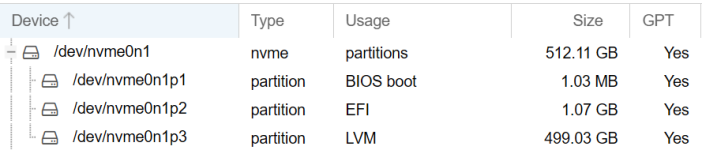
According to my screenshot /dev/nvme0n1p2 is an EFI partition.

When I mount this to /mnt/test I see that it contains an directory named "EFI".
This is the content:

Bash:

root@pve:~# ls -l /mnt/test/EFI/
total 8
drwxr-xr-x 2 root root 4096 Apr 10 12:37 BOOT
drwxr-xr-x 2 root root 4096 Apr 10 12:37 proxmox
root@pve:~# ls -l /mnt/test/EFI/BOOT/
total 5964
-rwxr-xr-x 1 root root  952384 Apr 10 12:37 BOOTx64.efi
-rwxr-xr-x 1 root root   88568 Apr 10 12:37 fbx64.efi
-rwxr-xr-x 1 root root 4209256 Apr 10 12:37 grubx64.efi
-rwxr-xr-x 1 root root  851368 Apr 10 12:37 mmx64.efi
root@pve:~# ls -l /mnt/test/EFI/proxmox/
total 5972
-rwxr-xr-x 1 root root     112 Apr 10 12:37 BOOTX64.CSV
-rwxr-xr-x 1 root root   88568 Apr 10 12:37 fbx64.efi
-rwxr-xr-x 1 root root     201 Apr 10 12:37 grub.cfg
-rwxr-xr-x 1 root root 4209256 Apr 10 12:37 grubx64.efi
-rwxr-xr-x 1 root root  851368 Apr 10 12:37 mmx64.efi
-rwxr-xr-x 1 root root  952384 Apr 10 12:37 shimx64.efi

Is this what we are looking for?

please post the contents of /etc/fstab ..

Bash:

root@pve:~# cat /etc/fstab
# <file system> <mount point> <type> <options> <dump> <pass>
/dev/pve/root / ext4 errors=remount-ro 0 1
/dev/pve/swap none swap sw 0 0
proc /proc proc defaults 0 0
root@pve:~#