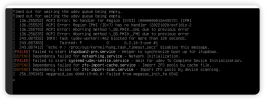
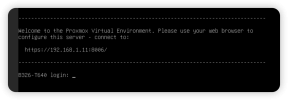
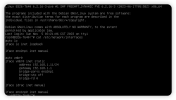
I tried to install the latest pve8 on my Dell T640 server. There were some errors during the boot of the installation image, but I still managed to enter the installation program successfully. After the installation was completed, there was a very long waiting time before entering the system, and finally, the following error message was output:
But still able to enter the system.
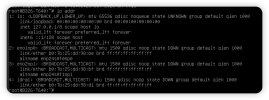
But can't connect to the network, even though I have configured the IP address.
It's strange that there is no virtual bridge (usually vmbr1 is setup by the installer) that gets the IP address. Can you show the output of cat /etc/network/interfaces?
EDIT: I don't know what's wrong here. I have not seen this before.
It's strange that there is no virtual bridge (usually vmbr1 is setup by the installer) that gets the IP address. Can you show the output of cat /etc/network/interfaces?
Thank you for your reply. In fact, following the suggestion of chatgpt4, I tried adding kernel boot parameters acpi=off, then updated GRUB and restarted. However, now I have been stuck at this point for about ten minutes (previously it was stuck for about two to three minutes). I will wait for a while and then try entering GRUB to remove acpi=off in order to provide you with details of the interfaces file in the system.
It's strange that there is no virtual bridge (usually vmbr1 is setup by the installer) that gets the IP address. Can you show the output of cat /etc/network/interfaces?
My network configuration file is as follows. I have not manually configured it, but only entered the management address of the network card selected during installation.
If you can help me solve the problem, I would be extremely grateful. ESXi cannot install the system on its own created software RAID, which is what I need. This is also why I chose PVE.
I tried to reinstall pve8. This time the installation and boot speed were very fast, without encountering previous errors. However, after entering the system, I still couldn't connect to the network, even when pinging the gateway.
Thank you for everyone's help. After a series of troubleshooting suggestions from chatgpt4, I had to change my network cable interface (the server has two network ports) and modify the relevant configurations. After restarting the network, I saw that PVE successfully connected to my router (it would also connect before, but it would disappear after a few seconds, and I was not sure what the problem was), and I could ping the gateway and everything is normal.
I have the exact same case here.
Noticed that if I do `systemctl restart networking.service` from the console after boot, the vmbr0 shows up and gets its IP configuration.
Everything works after that, but it's puzzling that this needs to be done at all.
What is the cause for the initial failure of `ifupdown2-pre.service`? - a slow/malfunctioning `udev` subsystem.
I now need to figure out what causes that...
I have the exact same case here.
Noticed that if I do `systemctl restart networking.service` from the console after boot, the vmbr0 shows up and gets its IP configuration.
Everything works after that, but it's puzzling that this needs to be done at all.
What is the cause for the initial failure of `ifupdown2-pre.service`? - a slow/malfunctioning `udev` subsystem.
I now need to figure out what causes that...
I'm seeing this exact behavior. I did a fresh install of 8.3.0 onto a 2019 MacBook Pro to start to learn to use Proxmox. ifupdown2-pre.service fails during boot, and it doesn't bring up the network. If I log into the console and run systemctl restart networking, it comes up and things are fine.
I'm using a thunderbolt to ethernet adapter. I thought it might be driver issues, but since it works after systemctl restart networking, I don't think that's the issue.
In the interest of getting on with actually learning how to use proxmox, I ended up doing a really ugly hack and using a cron job with the time set to @reboot to kick networking every boot and that's solved it. I'd dig deeper if I was running into this on a production server, but it's just a repurposed MacBook Pro in my homelab. #!/bin/bash LOG_F=${LOG_F:-'/root/networking-bullshit.log'} function kick-networking() { # Check if the vmbr interface is present if [[ $(ip link show | grep -c vmbr) != 0 ]]; then echo "ip link show = $(ip link show)" | tee -a $LOG_F echo "Networking is up" | tee -a $LOG_F else echo "Networking was down after boot, restarting" | tee -a $LOG_F echo "Restarting networking after failed to start during boot at $(date)" | tee -a $LOG_F time systemctl restart networking | tee -a $LOG_F echo "ip link show = $(ip link show)" | tee -a $LOG_F fi } kick-networking