Thanks for the link!
I found this event ( ID 129 ) on one of my Windows VM that randomly hangs right after (during?) backup to PBS
Hope that PVE devs will take a look at this issue

if that happens, then your backupserver or your connection to backupserver may be too slow and your IO inside VM too high during backup window. VM is getting throttled when there is too much IO during backup. please check backup throughput and VM io throughput. please open your own thread for this, i think it's not related here.
if that happens, then your backupserver or your connection to backupserver may be too slow and your IO inside VM too high during backup window. VM is getting throttled when there is too much IO during backup. please check backup throughput and VM io throughput. please open your own thread for this, i think it's not related here.
But I think that's exactly what it is, because that's how it behaves here in a test environment.
And there is absolutely no load on the VM. they are just running along.
My observation so far is that it only happens on file servers with a second disk.
Last edited:
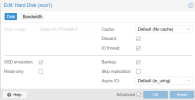
please better post contents of conf file instead screenshots, as this gives a closer picture. yes, i have switched.
Code:
agent: 1
balloon: 8192
bios: ovmf
boot: order=scsi0;ide0;ide2;net0
cores: 8
cpu: host
efidisk0: Data:vm-103-disk-0,efitype=4m,pre-enrolled-keys=1,size=1M
ide0: local:iso/virtio-win-0.1.240.iso,media=cdrom,size=612812K
ide2: local:iso/SW_DVD9_Win_Server_STD_CORE_2022__64Bit_English_DC_STD_MLF_X22-74290.ISO,media=cdrom,size=5420564K
machine: pc-q35-8.1
memory: 16384
meta: creation-qemu=8.1.2,ctime=1703680088
name: ENTFERNT
net0: virtio=BC:24:11:CE:59:76,bridge=vmbr0,firewall=1,tag=ENTFERNT
numa: 0
onboot: 1
ostype: win11
scsi0: Data:vm-103-disk-1,discard=on,iothread=1,size=120G,ssd=1
scsi1: Data:vm-103-disk-3,discard=on,iothread=1,size=500G,ssd=1
scsihw: virtio-scsi-single
smbios1: uuid=ENTFERNT
sockets: 1
startup: order=2
tpmstate0: Data:vm-103-disk-2,size=4M,version=v2.0
vmgenid: 94dd905c-49da-495e-9bfb-ae92ba2807e6
EDIT:
I have only changed the second disk configuration for the time being.
Code:
scsi1: Data:vm-103-disk-3,aio=threads,discard=on,iothread=1,size=500G,ssd=1Last edited:
If it's occuring during the backup, it's possible that is because your backup storage is too slow.
Proxmox use copy-before-write technique, that mean that if the vm need to overwrite a not yet backuped block, it must first backup the block then ack before the guest os is able to write. (for the first write on this block only).
Depending on the workload, it can impact performance.
If it's occuring during the backup, it's possible that is because your backup storage is too slow.
Proxmox use copy-before-write technique, that mean that if the vm need to overwrite a not yet backuped block, it must first backup the block then ack before the guest os is able to write. (for the first write on this block only).
Depending on the workload, it can impact performance.
Not in my case. 40Gbe link. There is powerful CPU and HW RAID with SSD disks on PBS server
CEPH datastore performance is a key limited factor (of backup speed)
And one more thing:
VM "hangs" (with different event to windows syslog + ID 129 as well) when another VM is backing up (that VM is located on another node)
P.S. This happens not every night (~10 VM in that cluster and backup is one time a day) and different VMs affected
The common this is that it always happens during and only! the backup job period
P.S.S. "Hangs" - means there are a lot error messages in windows syslog (all red) and some services (like RDS) becomes unavailable (user fails to log in) how ever login from console sometimes works
Last edited:
I have now noticed that the error only appears in the event log after the backup. The backup starts at 2:00pm and is finished at 2:00:58pm The first vioscsi errors only occur at 2:08:33pm and then almost continuously every minute until the machine crashes at 03:09pm.
I am seeing this error on one SQL Server minutes after a PBS backup finishes.
PBS backup finishes successfully at 22:05, I see SCSI device reset messages at 22:07. VM doesnt crash but SQL is unusable as the drive is in a bad state.
PBS is a bare metal server with DC SATA SSD's in a RAID 10. I recently upgraded PBS from a virtual machine and backups had successfully completed for this VM on 31-12 & 02-01. Error first seen on 04-01 & 07-01.
Code:
agent: 1
bios: ovmf
boot: order=scsi0;ide2;net0
cores: 8
cpu: Skylake-Server
description: #### Windows Server 2019%0A####
efidisk0: SSD-R10:vm-102-disk-0,efitype=4m,pre-enrolled-keys=1,size=528K
ide2: none,media=cdrom
machine: pc-q35-8.0
memory: 61440
meta: creation-qemu=7.1.0,ctime=1676025539
name: LUNA
net0: virtio=0E:AC:28:EA:A7:20,bridge=vmbr0,firewall=1,tag=25
numa: 1
onboot: 1
ostype: win10
scsi0: SSD-R10:vm-102-disk-1,discard=on,iothread=1,size=80G
scsi1: SSD-R10:vm-102-disk-2,discard=on,iothread=1,size=428G
scsi2: SSD-R10:vm-102-disk-3,discard=on,iothread=1,size=128G
scsi3: SSD-R10:vm-102-disk-4,discard=on,iothread=1,size=96G
scsihw: virtio-scsi-single
smbios1: uuid=6fd7bb99-ef24-40e6-92b9-f4e15da8fc8f
sockets: 2
tablet: 1
tags: ims;windows
vmgenid: 49f791d0-2201-45b6-81c2-2be82fa20422

Hi,
did any of you already try the workaround suggested in the linked GitHub issue, i.e. increase the miniport IoTimeOutValue registry parameter?
Otherwise, I'd suggest to reduce the number of (concurrent) backups to your PBS storage. The most likely explanation is that the IO issued by the guest has to wait too long for PBS to complete (before a guest write happens, old data needs to be written to the backup target first if it wasn't already backed up). I am able to get the same error messages by simply cutting the connection to the PBS for two minutes during backup.
> I am able to get the same error messages by simply cutting the connection to the PBS for two minutes during backup.
that's very unfortunate. i see that for now there is no other way to do bitmap based backup without slowing down io on VM when pbs is slow, but when connection to pbs is getting killed for two minutes, pbs backup path should timeout or getting invalidated more quickly then io/storage timeout in VM.
it's unfortunate enough that pbs intercepts write path of data, but even make io in VM depend on pbs availability, is a real bummer, as you need to make sure network to pbs and pbs itself is highly available when your VM should be highly available.
Last edited:
Hi,
did any of you already try the workaround suggested in the linked GitHub issue, i.e. increase the miniportIoTimeOutValueregistry parameter?Otherwise, I'd suggest to reduce the number of (concurrent) backups to your PBS storage. The most likely explanation is that the IO issued by the guest has to wait too long for PBS to complete (before a guest write happens, old data needs to be written to the backup target first if it wasn't already backed up). I am able to get the same error messages by simply cutting the connection to the PBS for two minutes during backup.
How to do that? (reduce number of concurrent backups) ? In my cluster there is only 1 backup job and if I'm not mistaken PVE sterilize backups from all nodes within cluster)
P.S. right, Vm hangs after backup (when another backup in progress). Win and Linux vm affected
the vm is not yet a productive machine. nobody is working on it. it just runs with an empty second disk. The backup is long finished according to the logs. as you can see in my post above, minutes after the backup the virtio error appears in the log. I had switched from io_uring to Native as a test. The error also occurred then. Since yesterday I changed it to threads as Roland recommended. So far no log entry in the machine.
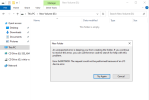
EDIT: Here is a screenshot of a VM with an empty second disk when the errors occurred every minute. No more IO is possible on the disk. I have tried to create a new folder.
Last edited:
the vm is not yet a productive machine. nobody is working on it. it just runs with an empty second disk. The backup is long finished according to the logs. as you can see in my post above, minutes after the backup the virtio error appears in the log. I had switched from io_uring to Native as a test. The error also occurred then. Since yesterday I changed it to threads as Roland recommended. So far no log entry in the machine.
EDIT: Here is a screenshot of a VM with an empty second disk when the errors occurred every minute. No more IO is possible on the disk. I have tried to create a new folder.
View attachment 61030
In my case switching to threads does not help(
Is there any way to limit read/write bandwidth of PBS client (something like bwlimit in vdump.conf) ?
there is a suggestion from virtio devs:
by vrozenfe
I would try to reduce the transfer size ("PhysicalBreaks") first to see if it helps to solve the problem.
Btw, there is a different option to adjust the transfer size without touching the Windows Registry.
Upstream and RHEL QEMU have "max_sectors" parameters for that.
"-device virtio-scsi-pci,id=scsi-vioscsi1,max_sectors=63" will have the same effect as "PhysicalBreaks = 0x3f (63)".
Unfortunately, I don't know if it works for Proxmox or not. You should probably clarify it with Proxmox support team.
How should I change my Vm config to incorporate this tune?
P.S. there is another thread: https://github.com/virtio-win/kvm-guest-drivers-windows/issues/756
Last edited:
此内容由惯性聚合(RSS阅读器)自动聚合整理,仅供阅读参考。 原文来自 — 版权归原作者所有。