惯性聚合 高效追踪和阅读你感兴趣的博客、新闻、科技资讯
阅读原文 在惯性聚合中打开

推荐订阅源

宝玉的分享
宝玉的分享
Recent Commits to openclaw:main
钛媒体:引领未来商业与生活新知
钛媒体:引领未来商业与生活新知
T
Tailwind CSS Blog
Cyber Security Advisories - MS-ISAC
罗磊的独立博客
V
Visual Studio Blog
爱范儿
爱范儿
H
Help Net Security
J
Java Code Geeks
I
InfoQ
Recent Announcements
H
Hackread – Cybersecurity News, Data Breaches, AI and More
Recorded Future
Recorded Future
Jina AI
Jina AI
Microsoft Security Blog
WordPress大学
WordPress大学
GbyAI
GbyAI
freeCodeCamp Programming Tutorials: Python, JavaScript, Git & More
CTFtime.org: upcoming CTF events
Y
Y Combinator Blog
Google DeepMind News
Scott Helme
Scott Helme
S
SegmentFault 最新的问题
S
Securelist
L
LINUX DO - 热门话题
Cyberwarzone
Cyberwarzone
C
Cisco Blogs
Simon Willison's Weblog
G
Google Developers Blog
酷 壳 – CoolShell
酷 壳 – CoolShell
博客园 - 叶小钗
T
The Blog of Author Tim Ferriss
博客园_首页
B
Blog
F
Fortinet All Blogs
AWS News Blog
AWS News Blog
V
Vulnerabilities – Threatpost
S
Secure Thoughts
cs.AI updates on arXiv.org
Forbes - Security
Forbes - Security
S
Security @ Cisco Blogs
T
Threat Research - Cisco Blogs
OSCHINA 社区最新新闻
OSCHINA 社区最新新闻
S
Schneier on Security
Project Zero
Project Zero
Martin Fowler
Martin Fowler
C
Cybersecurity and Infrastructure Security Agency CISA
N
Netflix TechBlog - Medium
N
News and Events Feed by Topic

Proxmox Support Forum

[SOLVED] - Github Auth for Mirrors-Kernel Repo? [Automation] Mass migration tool for MS Win11/Server Proxmox GUI hang - not response is it possible to reject or quarantine spam based on conditions I set ? The PVENode task list in PVE9 is partially obscured due to the terminal font being too large. About 100% error reporting due to pveproxy.service hooks Kubernetes overlay networking breaks when upgrading from PVE 9.1 to PVE 9.2.3 Zentraler Speicher No space left on device Combine datastore and direct file archival to tape Kernel panic VFS: Unable to mount root fs on unknown-block (0,0) sobald ein 7.x Kernel verwendet wird. How to migrate disk of a VM from one ZFS to another Windows Server 2025 fails to boot after PVE 9.2 / Linux 7.0 Kernel upgrade Cannot Install Proxmox on T610 Poweredge with H700 PERC card sdn Config. gateway not reachable How to safely change domain/FQDN? Welche Filterquote erreicht ihr? NFS Share status unknown on 2 of 5 nodes Can't connect to PVE9 consoles [solved] Can't connect to PVE9 consoles [solved] [SOLVED] - Use secondary network for PVE commands Created cluster, one node storage gone BUG: proxmox mail gateway FROM = null bypass spam filtering Moving existing PBS from VMWare workstation to PVE cluster Does eBGP SDN fabric support external peering? Bug: PDM 1.1 not recognizing valid license status Proxmox GUI hang - not response PVE crashes unexpectedly Proxmox Backup Server 4.2 released! Advice ceph-osd crashes with kernel 6.17.2-1-pve on Dell system [META] Links on Proxmox Forum Website Hardwarer oder Software RAID Joining a cluster with already created guests VM PDM missing backup jobs from PVE / Log retention Remove VM.Monitor from all users/roles, PVE 9.2 Proxmox Freezing (new instalation) 9.2.2 - Intel 12700T No Web gui and random connection reset by peer [SOLVED] - i40e module for X710 Intel NIC Dutch Proxmox Day 2026 How pools use the space Corosync initiiert Reboot trotz Verfügbarkeit der Systeme Opt-in Linux 7.0 Kernel for Proxmox VE 9 available After PVE 8to9 upgrade, unable to check guest fs freeze status Problem with MegaRAID SAS3508 controller proxmox-kernel-7.0.2-6-pve failing network service Auto sync guest time after rollback of VM snapshot with RAM/state Broadcom BCM57504 (100G) bnxt_en TX timeout and NIC reset on Proxmox 8.1.5 — while BCM57414 (25G) works fine on same host QEMU 11.0 available on pve-test and pve-no-subscription as of now 350 MPM Solventless Lamination Machine for High-Speed Flexible Packaging Making sense of NVMe zfs and SMART errors [SOLVED] - PVE loses network connection after kernel upgrade to proxmox-kernel-7.0.0-3-pve [SOLVED] - Remove or reset cluster configuration. Proxmox 8.4.1 Fresh Install BCM57416 10G Ethernet Adapter Not Recognized PDM 1.1.1 unable to add AD realm with anonymous search [TUTORIAL] - Developer Workstation (Proxmox-VE 9) with cinnamon (LMDE7) SDN zone shows "pending" on peer nodes after node reboot (9.2.x) Cluster not quorate - extending auth key lifetime! Proxmox not rebooting properly (SOLVED) Proxmox 9 Stuck on loading initial ramdisk With new HA-Disarm Feature is there a Documentation for NUT Setup on Clusters? Cluster networking setup LXC System images unavailable [SOLVED] - Fix: NVIDIA Drivers Failing after upgrade to Proxmox 9.2.2 (Kernel 7.0.2-6-pve) / NovaCore Conflict Install NUT directly on Proxmox VE and control guests from here driver usb for windows 7 System startup error and no network: Failed to start ifupdown2-pre.service - Helper to synchronize boot up for ifupdown. PBS backup space grow up constantly Proxmox Datacenter Manager 1.1 released! IPv4 not available in newly created VM Recommended Setup for Offsite Proxmox Backups? Hetzner Storage Box & Remote PBS Challenges duplicate, please delete this passthrought an USB device "by ID" to CT PDM Installer Freezes at 66% Tried PDM for the first time (version 1.1) - had issues PDM 1.1 automated install Suche Server-Provider für Proxmox connecting sdn to edge firewall SDN, IPAM & DHCP Migrating from read-only file system Ubuntu 26.04 installation fails for unknown reason Status Unbekannt nach Cluster Join Installing Proxmox Backup Server on Mac Mini (Late 2012) kernel 7.0 performance issue with zfs pools PVE becomes unreachable via ethernet but OS is running [SOLVED] - New 9.2 install - can't find 7.0.2-6-pve , not all the time [SOLVED] - Backup and dedupe a VM with LUKS Gibt es mit PVE 2.x ggf. Änderungen bei der RAM-Nutzung, bzw. deren Anzeige bei VMs? I need help for setting up backup solution Way more NAGware, very little functionality, bugs galore Root squashing virtiofsd with --uid-map Intel ixgbe Driver Update Fail Help to fix Proxmox access issues after power cut Passkey Login (not 2FA) Roblox VM detection - can be overcome? [TUTORIAL] - ZFS-Autosnaptshot inkl. Rollback und Daten direkt recovern (Windows/Linux) How to stop PVE Kernel upgrade [SOLVED] - very long waiting to log in to lxc debian 11 ssh [TUTORIAL] - Configuring Fusion-Io (SanDisk) ioDrive, ioDrive2, ioScale and ioScale2 cards with Proxmox Increase maximum USB devices in vm.conf
Proxmox 8.3 Installation Issue on ProLiant DL380 Gen9
invalid@exam · 2026-05-29 · via Proxmox Support Forum

Hello,
I am trying to install Proxmox 8.3 on a ProLiant DL380 Gen9. I created a USB installation media using Rufus and successfully installed the OS, but after rebooting, the OS did not start, and the installer appeared again.

In the One-time Boot menu, there was an option for Proxmox, so I selected it, but the System Utilities screen appeared immediately, and the OS did not boot.

How can I boot the installed Proxmox?

ProLiant configuration:​

  • CPU: Xeon E5-2630 v3 × 1
  • Memory: 16GB
  • Storage: 4 × 2TB SSD (RAID10)

This text was created using a translation tool...

Hello nhtossyi! Most probably the boot order in the BIOS is set to boot from the USB stick first, so the installer starts again. In your case it is probably the easiest if you simply unplug the USB stick from the system - if the installation was successful, Proxmox VE should then start correctly.

Thank you for your response.
I tried that, but the System Utilities screen still appeared.

What is configured in the boot order menu of the BIOS?

At this point, it probably either means that booting from the disk is disabled for whatever reason, or the installation has failed. But checking the boot order is important, just to be sure.

In the One-time Boot menu, there was an option for Proxmox, so I selected it, but the System Utilities screen appeared immediately, and the OS did not boot.

I thought that the "option for Proxmox" was the USB stick with the Proxmox VE installer. So you tried to boot from the disk (while the USB stick was unplugged), but it failed?

The current boot options are as follows:

  • proxmox
  • Generic USB Boot
  • Embedded FlexibleLOM 1: Port 1: HP Ethernet 1Gb 4-port 331 FLR Adapter - NIC (PXE IPv4)
  • Embedded LOM: Port 1: HP Ethernet 1Gb 4-port 331 FLR Adapter - NIC (PXE IPv4)
  • Embedded FlexibleLOM 1: Port 1: HP Ethernet 1Gb 4-port 331 FLR Adapter - NIC (PXE IPv6)
  • Embedded LOM: Port 1: HP Ethernet 1Gb 4-port 331 FLR Adapter - NIC (PXE IPv6)
  • Front USB 2: (USB with the installer)

I selected proxmox, thinking that it was the boot option for the installed OS.

What is configured in the boot order menu of the BIOS?

At this point, it probably either means that booting from the disk is disabled for whatever reason, or the installation has failed. But checking the boot order is important, just to be sure.

I thought that the "option for Proxmox" was the USB stick with the Proxmox VE installer. So you tried to boot from the disk (while the USB stick was unplugged), but it failed?

Yes, I tried operating with the USB removed, but it failed.
(I have deleted the posts that were not translated.)

Alright, thanks for the information. Yes, proxmox is the correct option to select when booting. Being the first in the boot order list means that it should theoretically boot correctly. Don't you see any other error or anything?

Could you please give us some information about:

  1. What filesystem did you select during the installation?
  2. Are you using hardware RAID? This is especially important if you use ZFS, because the documentation states that

ZFS on top of any hardware RAID is not supported and can result in dataloss.

Alright, thanks for the information. Yes, proxmox is the correct option to select when booting. Being the first in the boot order list means that it should theoretically boot correctly. Don't you see any other error or anything?

Could you please give us some information about:

  1. What filesystem did you select during the installation?
  2. Are you using hardware RAID? This is especially important if you use ZFS, because the documentation states that

Thank you for your response.

No errors are displayed, but if the USB is inserted when the server starts, the installer launches. If the USB is removed, the system attempts to boot from the LAN or DVD drive. However, since there is nothing available, the UEFI page is eventually displayed.

From there, I tried selecting Proxmox to boot, but it did not work. The file system selected during installation was EXT4.

Additionally, I am using four SSDs configured in a RAID 10 hardware array.

Could you please check if:

  1. It makes any difference whether 'Legacy boot' or CSM is enabled or disabled in the BIOS.
  2. If disabling Secure Boot in the BIOS improves the situation (note: while Proxmox VE supports Secure Boot, it can be worth trying to disable it and see if it helps).
  3. If it works to install and boot the latest version of Debian. It would be interesting for testing whether it improves the situation, but if it works, you can also install Proxmox VE on Debian - see the docs and the wiki page.

Could you please check if:

  1. It makes any difference whether 'Legacy boot' or CSM is enabled or disabled in the BIOS.
  2. If disabling Secure Boot in the BIOS improves the situation (note: while Proxmox VE supports Secure Boot, it can be worth trying to disable it and see if it helps).
  3. If it works to install and boot the latest version of Debian. It would be interesting for testing whether it improves the situation, but if it works, you can also install Proxmox VE on Debian - see the docs and the wiki page.

Currently, I am attempting to boot with Legacy Boot disabled.

Secure Boot was originally disabled. I tried enabling it and booting, but the result was the same.

Additionally, I attempted to install Debian, but I encountered the exact same situation.

Is it likely that this is an issue on the ProLiant side?

Hi, I had the same issue with a ProLiant XL170r Gen9.
My solution turned out to be pretty simple:

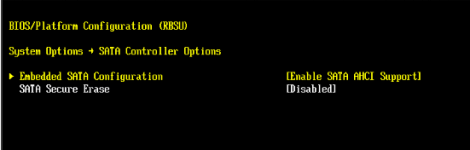
Navigate to the SATA Controller Options in BIOS and enable SATA AHCI Support.

1769090857557.png

Further update to this.....
DL380 GEN9

This assumes you got the DL380 machine /reset or without drives.

boot order does not matter, it will hit any boot medium it can boot off.
however to ensure "prox" comes up, it should be first..
but note in the DL380 , you cannot set boot order in the ilo4 until the system already posted (booted)

ZFS cannot be used reliably with the raid controller Smart Array P440ar, just don't do it in a production environment.
also you need to ensure al lyour systems are updated with firmware ESP. the SSD or hard drives

HP dropped the ball on several drives & SSD's, so badly that if you don't update the internal firmware on certain drives they become totally unrecoverable.
full spec details on HP site..

ok...
fix for non boot.

you need to go into the RAID controller card.

find this page... and there it is:
set bootable logical drive.
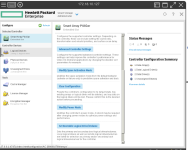
1780032628263.png

then pop right over to this sub menu.
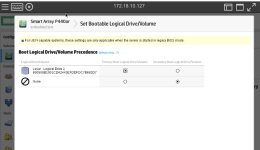
1780032684431.png

cos... if you don't the default is "NONE" and you can mess about till the cows come home with other methods and it won't work
becasue the UFI cannot see the array to boot from.

fix this up , save it and reboot and it will come right up.

and here is the proof....
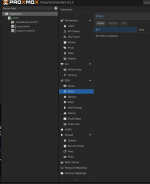
1780032865318.png

without this , it will loop at teh HP screen & other boot methods for ever...

Anyone wanting to use ZFS or CEFT..with SAS drives, you have to put your controller into HBA mode, basically this removes the RAID configs and functions and puts the card into pass thru mode.

Be aware you should only do this from cold, since it usually destroys the data on the drives due to the configs not being compatible.
RAID on say mirrored setup handles it internally, when you put it into HBA mode you loose that black box functionality.

Then you have the whole nightmare of if you have the advanced cache license & battery backup.

ZFS needs to have complete control of the drives, without any black boxes in the data-paths screwing with caching and out of order reads/writes and such like.

Really there are so many different setups , simply saying DL380 Gen9 in not enough information.
since you may have ether SATA or SAS drives and they are radically different controllers & systems.