


Migrations to cloud environments allow organizations to scale and often present a compelling business case. Over the past 20 years, more and more organizations have been looking to migrate their systems to cloud environments.
Data, applications, and business-critical systems need to move from on-premises environments to cloud platforms. Security during these transitions, however, is a critical component of successful migrations but is often overlooked.
Moving to the cloud does not make your data more secure by default. It changes where controls need to sit and who is responsible for what. A poorly planned migration carries the risk of exposing data, breaking compliance, and leaving security gaps.
So, how do you migrate with the right security controls in place? This guide covers what cloud migration security is, the main risks you will face, and the practices that keep your environment safe before, during, and after the move.
What we will cover:
Cloud migration security means protecting data, applications, and infrastructure before, during, and after the move to the cloud. Most cloud breaches come from misconfigurations, weak IAM, and misreading the shared responsibility model, not provider failures.
Cloud migration security is the practice of protecting data, applications, and infrastructure during the full lifecycle of the migration, meaning before, during, and after moving to a cloud environment.
There are three distinct phases where security matters:
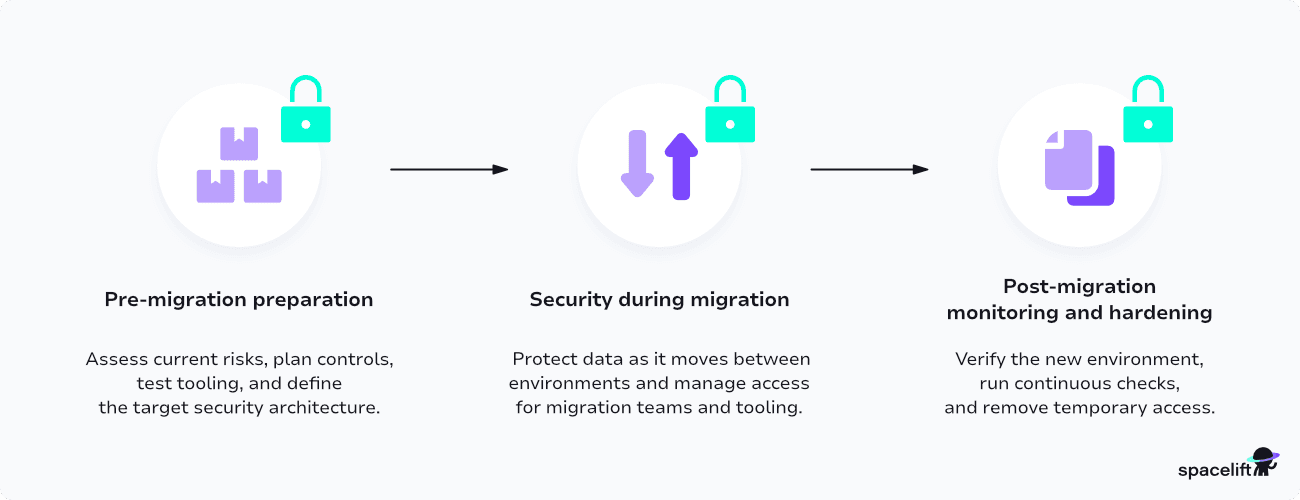
Note that security must be continuous because the environment itself keeps changing after migration. New services launch, teams deploy more resources, and configurations drift from the original state.
There is also a fundamental difference from traditional on-premises security. On-prem environments are largely static, bound by physical hardware and fixed networks. Cloud environments are dynamic, API-driven, and multi-tenant.
Every major cloud provider (AWS, Azure, GCP) operates under a shared responsibility model. The provider secures the underlying infrastructure: physical data centers, hardware, networking, and base platform services. Customers are responsible for securing their data, applications, configurations, access controls, and everything they deploy on top of that platform.
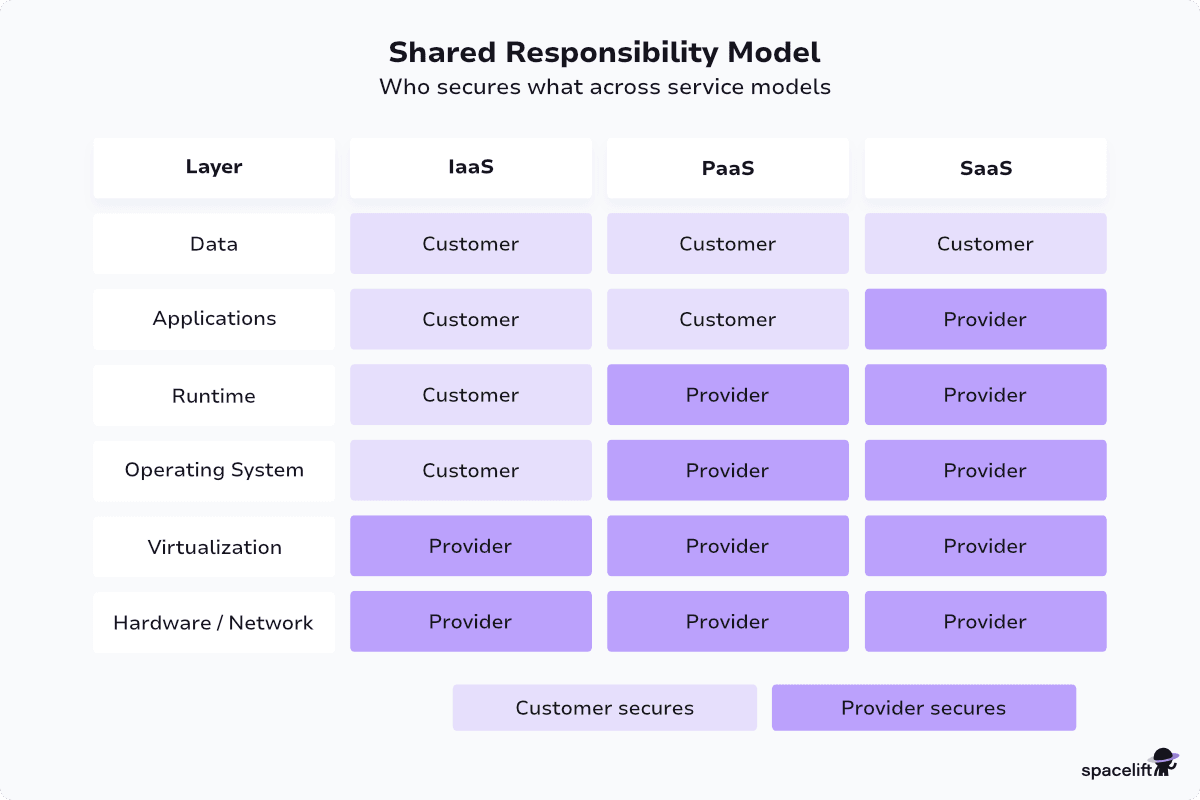
In practice, many organizations misinterpret exactly what that means and where this line of responsibility lies. The line varies depending on which service types are used. Typically, the more managed an offering is, the more security responsibility the cloud provider assumes.
Ultimately, always remember that you own the data and the applications that you migrate and deploy to cloud environments, and that you are responsible for their security.
Cloud migration opens up a set of security risks that are often different from what security teams are used to handling on-premises.
Data moving between on-premises and cloud environments can be vulnerable to interception without proper encryption in transit. Unencrypted transfers, misconfigured APIs, and weak TLS settings are things to consider.
During migration, large volumes of data move across networks that may not be fully under your control. Public internet transfers without strong encryption are an obvious risk. Consider private connections and strong TLS settings.
Cloud misconfigurations are one of the leading causes of data breaches. Security industry reports estimate that the vast majority of cloud security failures trace back to human errors and misconfigurations, not provider vulnerabilities.
Common mistakes include:
The complexity of cloud services multiplies the chance of misconfiguration. Each service has its own security settings, defaults, and behaviors.
Sloppy IAM practices such as over-provisioned permissions, static credentials, lack of multi-factor authentication, and, more recently, shared accounts between users and agents all create risk.
Migrating data across borders or environments can trigger compliance issues with GDPR, HIPAA, PCI DSS, SOC 2, and other frameworks. Data residency requirements may restrict where data can be stored or processed.
If your organization handles EU citizen data, GDPR applies regardless of where you are based. If you process payment cards, PCI DSS applies. If you work with US healthcare data, HIPAA applies. Map compliance requirements to target systems before migration.
Your observability needs moving to the cloud will probably change. You will need to observe and monitor more things, meaning that your existing traditional on-premises monitoring tools may not translate to the cloud.
Without centralized observability across both on-prem and cloud, incidents might go undetected. Cloud-native services produce their own logs, metrics, and events. Pulling these into a unified view takes planning.
Migrations often involve external vendors, tooling, and migration partners with elevated access to your environments. Every vendor connection, migration script, or agent installed for the project expands your attack surface.
A compromised partner credential, a backdoored CLI tool, or a malicious dependency in your migration tooling can give attackers a direct path into both source and target environments. Vet vendors, scope their access with time-bound credentials, and audit every tool that touches production data before the migration starts.
Each phase of a migration has its own security priorities. Let’s break them down:
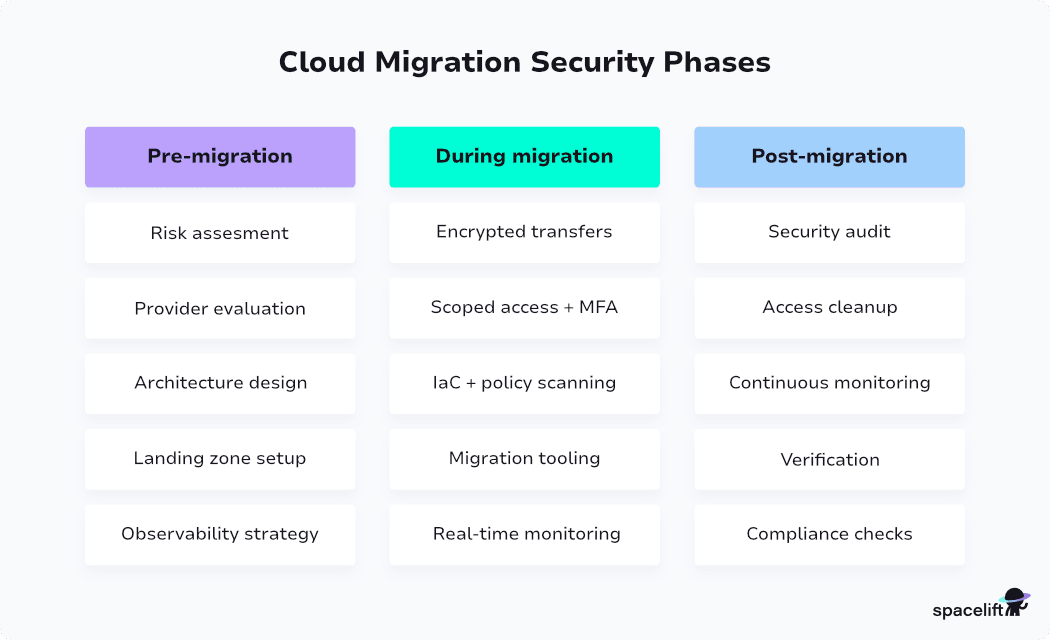
Start by auditing your current infrastructure, such as assets, data flows, dependencies, and existing vulnerabilities.
Then classify the data by sensitivity: public, internal, confidential, or restricted. Knowing what is sensitive helps you decide where to invest in controls.
Finally, map every applicable compliance framework to the data and workloads being migrated. Then conduct a gap analysis between your current security posture and what cloud security will require.
Assess the provider’s compliance certifications (e.g., SOC 2, ISO 27001, HIPAA, PCI DSS). Review their incident response SLAs and breach notification policies.
It’s also critical to understand the shared responsibility model for the specific services you plan to use.
A cloud landing zone is your foundational, pre-configured cloud environment built with security and governance in mind. It typically includes a multi-account or multi-subscription structure, baseline IAM, network architecture, centralized logging, and predefined guardrails.
A well-structured landing zone before a cloud migration helps enforce a security baseline on every new account or subscription from day one.
Each provider has its own approach:
Plan to integrate cloud vendor security services into the landing zone before workloads start migrating. For AWS, this means enabling GuardDuty, Security Hub, and Config across all accounts via a central audit account. For Azure, enable Microsoft Defender for Cloud and Sentinel across subscriptions. For GCP, turn on Security Command Center at the organization level.
Depending on the workloads and data that you need to move to the cloud, you would need to choose your preferred tooling. Most modern tools handle encryption in transit for data transfer and provide robust protection and auth mechanisms, but make sure to validate these when selecting your tooling.
Lately, we see more and more agentic AI tooling used for migration use cases. These tools can be powerful and help automate tedious and time-consuming tasks, but they also require careful guidance and supervision to avoid security issues. Migration tooling examples include:
Centralize observability and tooling. Options include cloud-native services such as AWS CloudWatch, Azure Monitor, and Google Cloud Observability services when staying within a single provider.
For multi-cloud or hybrid setups, open-source stacks like Prometheus and Grafana, or the broader OpenTelemetry ecosystem, standardize telemetry across providers. Commercial platforms such as Datadog, Dynatrace, New Relic, and Splunk are also options if you prefer a fully managed solution.
Whatever stack you pick, make sure logs, metrics, and traces flow into a single backend. Correlation across cloud and on-premises systems is what makes incident investigation easier.
Enable logging and auditing for all cloud services from day one. Do not wait until post-migration to turn on services like Google Cloud Audit Logs, or AWS CloudTrail.
Encrypt all data in transit using TLS 1.2 or higher. Use encrypted tunnels such as VPN, AWS Direct Connect, or Azure ExpressRoute for bulk transfers instead of the public internet. Validate data integrity with mechanisms such as checksums at the source and destination.
Grant temporary, scoped access for migration tasks and revoke it immediately after completion. This point becomes even more critical with the rise of agentic AI systems that can also be helpful for migrations.
Keeping migration credentials around is a common mistake. Enforce controls like MFA for all human access during migration. Use separate credentials for migration tooling and don’t reuse production credentials for automation.
Deploy infrastructure using Infrastructure as Code (IaC) to enforce consistent, auditable configurations. Scan IaC templates for misconfigurations before deployment using policy-as-code tools.
Spacelift can help you natively integrate plugins for tools such as Checkov, Terrascan, Trivy, Wiz, and TruffleHog into your IaC pipelines. Scans run as part of every change before infrastructure is deployed. You can attach plan policies to block runs that violate your security rules, or warn on findings that need attention.
Run a full security audit of the new cloud environment and compare results against your pre-migration baselines. Remove temporary access, migration-specific credentials, and any test resources. Verify encryption settings for all data at rest and in transit. Validate that network segmentation, firewall rules, and security groups match the intended design.
Centralize logging from all cloud services, applications, and identity providers. A unified view of security events reduces investigation time.
The choice of tooling here might be different if you are using a single or multiple providers.
Set up alerts for anomalous behavior: unusual API calls, privilege escalation, and unexpected data transfers. Implement drift detection to catch configuration changes that deviate from IaC baselines.
Run compliance benchmarks (CIS, NIST, PCI DSS, SOC 2) against the new environment. Schedule regular audits as compliance needs to match how your environment evolves. Document controls, procedures, and evidence for audit trails.
Here is a practical checklist organized by phase. Use it as a starting point and adapt it to your environment.
The core security practices below are relevant across all the migration phases. Make sure to integrate them into your migration planning properly:
Plan and centralize your IAM processes with single sign-on (SSO) and federated identity providers. Follow best practices such as applying the principle of least privilege, granting users only the permissions they need for their role.
Use IAM roles and temporary credentials instead of static, long-lived keys. Separate credentials for humans, machines, and agents. Enforce MFA everywhere, especially for privileged accounts. Review and audit permissions regularly, and have a process for removing unused accounts and roles.
Your migrated data should be kept secure at all times. Encrypt data at rest using cloud-native key management services such as AWS KMS, Azure Key Vault, or GCP Cloud KMS. These services handle key rotation and access control. Encrypt data in transit with TLS and enforce modern cipher suites, and disable legacy protocols.
For high-sensitivity data, consider client-side encryption. This blocks the cloud provider from accessing your data entirely.
Segment your cloud network into isolated subnets based on workload sensitivity. Public-facing web tiers should not share subnets with backend systems or databases. Use security groups and network ACLs as layered defenses.
Deploy private endpoints to access cloud provider services, such as S3 interface endpoints, to reduce exposure to the public internet.
Implement front-door defenses like a web application firewall (WAF), DDoS protection with services, such as AWS Shield, and Content Delivery Network (CDN) tooling for public-facing services.
Define all your infrastructure in code. This makes configurations repeatable, version-controlled, and auditable. Use a modern infrastructure orchestration platform like Spacelift to manage and deploy your infrastructure changes with GitOps practices.
Scan IaC templates for security issues before deployment.
Use policy-as-code frameworks like Open Policy Agent (OPA) to enforce guardrails. Good examples of security policies include requiring encryption, enforcing tagging, and blocking public access by default.
In traditional on-premises environments, operators assumed that anything inside a network perimeter is safe by default. This notion has been changed with the move to the cloud with zero-trust principles gaining traction.
For cloud migrations, this means verifying identity for every session. Assume that any user, device, or network could be compromised and design controls accordingly.
Evaluate native cloud security services during migration planning. AWS Security Hub, Microsoft Defender for Cloud, and Google Security Command Center collect alerts from across services into a unified view. They also map findings to compliance benchmarks like CIS, PCI DSS, and NIST.
Threat detection services such as AWS GuardDuty, Microsoft Defender for Cloud, and Google Security Command Center analyze logs, network traffic, and API activity.
For vulnerability scanning, services like AWS Inspector and Microsoft Defender for Cloud scan workloads and container images for known issues. Runtime protection adds another layer with services like Microsoft Defender for Containers and Google Container Threat Detection.
On the network and application side, web application firewalls protect public-facing applications from common web exploits. AWS WAF, Azure Web Application Firewall, and Google Cloud Armor are the cloud-native options. AWS Shield, Azure DDoS Protection, and Cloud Armor handle DDoS protection.
The right combination depends on your cloud platform and existing security investments. For multi-cloud security setups, evaluate third-party solutions for unified visibility across providers.
Use dedicated vaults such as HashiCorp Vault or cloud-native secret managers to store credentials, API keys, and certificates. Define a process to rotate secrets and enforce access policies.
A platform like Spacelift can help your organization manage cloud infrastructure more efficiently.
Spacelift is the infrastructure orchestration platform built for the AI-accelerated software era. It manages the full lifecycle for both traditional infrastructure as code and AI-provisioned infrastructure, supporting tools like OpenTofu, Terraform, Ansible, Pulumi, Kubernetes, and CloudFormation.
Security is one of Spacelift’s top priorities, with features such as policy as code, encryption, Single Sign-On (SSO), MFA, and private worker pools built into the product. Spacelift is SOC 2 Type II audited and provides compliance and security artifacts, including GDPR resources and its DPA, through the Spacelift Trust Center.
It is also the first IaC orchestration platform to receive FedRAMP authorization, delivering flexible, policy-driven automation to federal agencies and contractors seeking secure, compliant infrastructure workflows.
The power of Spacelift lies in its fully automated approach. Once you’ve created a Spacelift stack for your project, changes to the infrastructure as code files in your repository are automatically applied to your infrastructure.
For non-critical workloads like tests, POCs, and demos, Spacelift Intelligence adds an AI-powered layer that enables natural language provisioning, diagnostics, and operational insight, so developers can request infrastructure without writing configuration code while platform teams retain full governance and visibility.
Spacelift’s pull request integrations keep everyone informed of what will change by displaying which resources are going to be affected by new merges. Spacelift also allows you to enforce policies and automated compliance checks that prevent dangerous oversights from occurring.
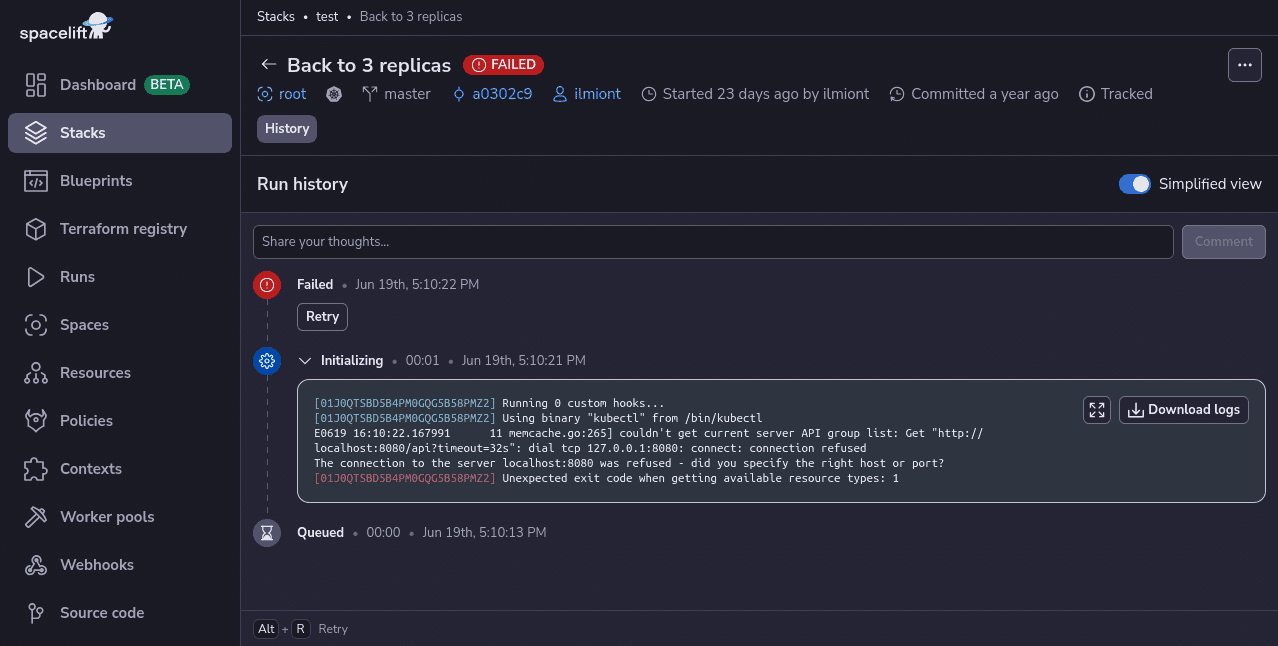
Spacelift includes drift detection capabilities that periodically check your infrastructure for discrepancies compared to your repository’s state. It can then launch reconciliation jobs to restore the correct state, ensuring your infrastructure operates predictably and reliably.
With Spacelift, you get:
If you want to learn more about Spacelift, create a free account today or book a demo with one of our engineers.
A migration to the cloud expands on the typical on-premises security controls and makes accountability more nuanced. Organizations need to understand the shared responsibility model for every service they choose. An overall mental model to follow; the cloud provider secures the platform, and you secure everything you put on it.
Think about security at every phase of the migration: before, during, and after. Security in the cloud continues for as long as your workloads run there.
The seven steps are assessment, isolating dependencies, mapping the existing environment, re-architecting applications for cloud compatibility, leveraging native cloud features, testing the migration, and iterating to optimize performance and cost.
Common pitfalls include misunderstanding the shared responsibility model, leaving misconfigured storage or IAM roles, weak encryption for data in transit, unsecured APIs, and lacking real-time visibility into workloads during cutover.
Apply “never trust, always verify” by enforcing strong identity-based authentication, least-privilege IAM, micro-segmentation between workloads, just-in-time access, continuous verification of every request, and end-to-end encryption across all migrated services and APIs.
The largest risks involve data exposure during transfer, misconfigured cloud resources, identity and access management gaps, insecure APIs, compliance drift, and reduced visibility across hybrid environments where legacy controls fail to translate cleanly into cloud-native architectures.
It defines the split between the cloud provider, which secures the underlying infrastructure (hardware, network, hypervisor), and the customer, who secures data, identities, configurations, and applications running on top. Responsibility boundaries shift depending on whether you use IaaS, PaaS, or SaaS.
It defines the split between the cloud provider, which secures the underlying infrastructure (hardware, network, hypervisor), and the customer, who secures data, identities, configurations, and applications running on top. Responsibility boundaries shift depending on whether you use IaaS, PaaS, or SaaS.
此内容由惯性聚合(RSS阅读器)自动聚合整理,仅供阅读参考。 原文来自 — 版权归原作者所有。