


Long time no see friends! Despite this break period ended up not being as long as I hoped for / needed, it’s been nevertheless refreshing both from a personal standpoint (i can read and write music now!!!!! that’s so freaking awesomeeeeee … anyways) and from a creative one. I’ve been back to coding and publishing a couple of new tools, but it’s of the third and simplest of them all I want to blog about today :D
(sound of viking horns) introducing … project ShieldWall!
 Credits: i have no idea how this works
Say that you need to host some personal / sensitive service of yours, in such a way that it is always easily accessible by any of your devices (including mobile) without configuration (no VPN, SSH tunnel, etc), and to those devices only (at the packet level, so that shodan && friends can’t index the port(s)) as they change their IP addresses? (The last part is clearly what adds complexity to the task.)
While you think about how you would do it (or maybe how you do it already), let me provide some more context with my usecase.
You might be familiar with my other project, Arc, if not go check it out now because it’s pretty useful and it replaces all you password managers, evernotes and todos. Me and the early adopters started using Arc to store all sorts of things. We have instances with passwords, other for 2FA, for documents, notes, reminders, video, audio, and the list keeps going. Since its first version it has improved a lot and now both the API and the frontend live in one single binary compiled for any OS (Golang FTW), but it always had and still has one major usability issue: where do I host that thing?
I mean, as long as you run it and use it just on your laptop, it’s done. And while you’re at home you only need a raspberry pi (or to open the port on your laptop) for other devices like your smartphone to use it. But what how do you do when you’re away from home? Sure the data is end-to-end encrypted so even if you host it on a public server and somebody somehow hacks into it, they just get AES256 enrypted crap. But what if they inject some javascript in the UI that grabs your access and encryption keys next time you use it? Yeah … i am that paranoid … bear with me.

This can be generalized to other usecases. For instance, red team operators might want to keep hidden their infrastructure while still being able to connect for setup and mainteinance. Or really any type of service that needs to be on the public internet for ease of access but that contains data that’s for your eyes only.
My first terrible attempt to make that stuff usable wherever I go was based on Bluetooth (of course this approach doesn’t apply to anything other than my Arc usecase). The idea was to host Arc on a small Raspberry Pi 0 with a battery pack and have the service responding via BTNAP assigned IP address. Not only it was as complex to configure as it sounds, but it was also unstable as f.
Bluetooth based solution
The second approach was slightly better in terms of usability. Arc was running on a Raspberry Pi at home and published as a Tor hidden service that I started only when leaving home and then accessed with Tor browser using the .onion url I saved each time on some cloud note. That is sloooooooooooow, unreliable as it depends on your home internet connectivity and it still exposes the service to whoever is crawling and indexing hidden services. Not to mention that Tor traffic is blocked in many networks.
Tor based solution
As Marco Acorte suggested SSH tunneling is a partial solution. You can make the service bind to localhost on the server, then authenticate to it via SSH from the device you need to use, starting an authenticated and encrypted tunnel to the server bound to localhost. It works, but it exposes the ssh port of the server (with its fingerprint, that can be used in many ways) and it’s not the simplest solution when you are on a rush and need to authenticate to something from your mobile device.
SSH tunnel based solution
VPN is another option but additionally to having the same limitations of the SSH tunnel approach, it also adds setup&configuration complexity. As @NGiollaEaspaig suggested there are several cloud specific options for this. But not everybody wants to or knows how to setup Azure Conditional Access Policies :D There’s the ngrok based solution too, but it works proxying the traffic to your app, meaning it’s their servers that will receive it and route it to the real server, similarly to what also CloudFlare offers. Both cases you’d be handing over control of your most sensitive traffic to another entity. You see where I am going with this … I’m quite difficult to satisty! :’D
CLOUD & Other Paid Friends
I do believe that the simpler solution is always the best one, and I like the idea of controlling this access mechanism myself via iptables. It is trivial to block all traffic and only allow certain IP addresses on certain ports. Another reason why IMO it’s the best tool for this job is that it works at the packet level, meaning it is protocol agnostic and it doesn’t only work for HTTP based applications. The only (usability) issue in this case is that freaking IP address that changes. You can’t whitelist beforehand something you don’t know yet.

So I thought, woudln’t it be so nice and clean having a stupid-simple agent running on this server (normal server on the dangerous public internet), using iptables to block everything by default and periodically polling a public API (hosted elsewhere) that’ll return the list of IP addresses to whitelist. I could then just log in to this public service with my device with a normal browser and just push a rule with my IP. I KNOW RIGHT?!
So yeah I coded this thing.
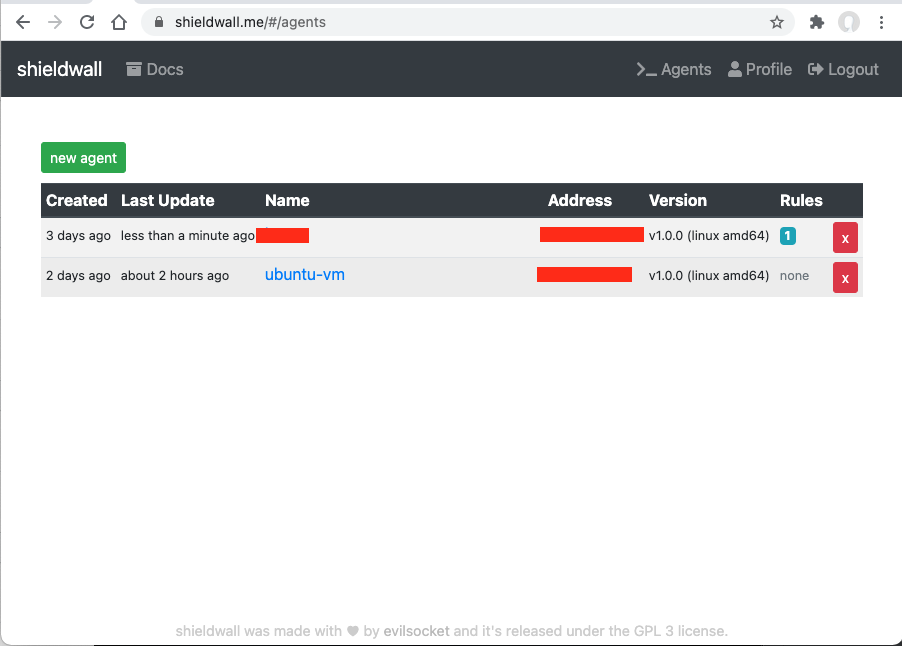
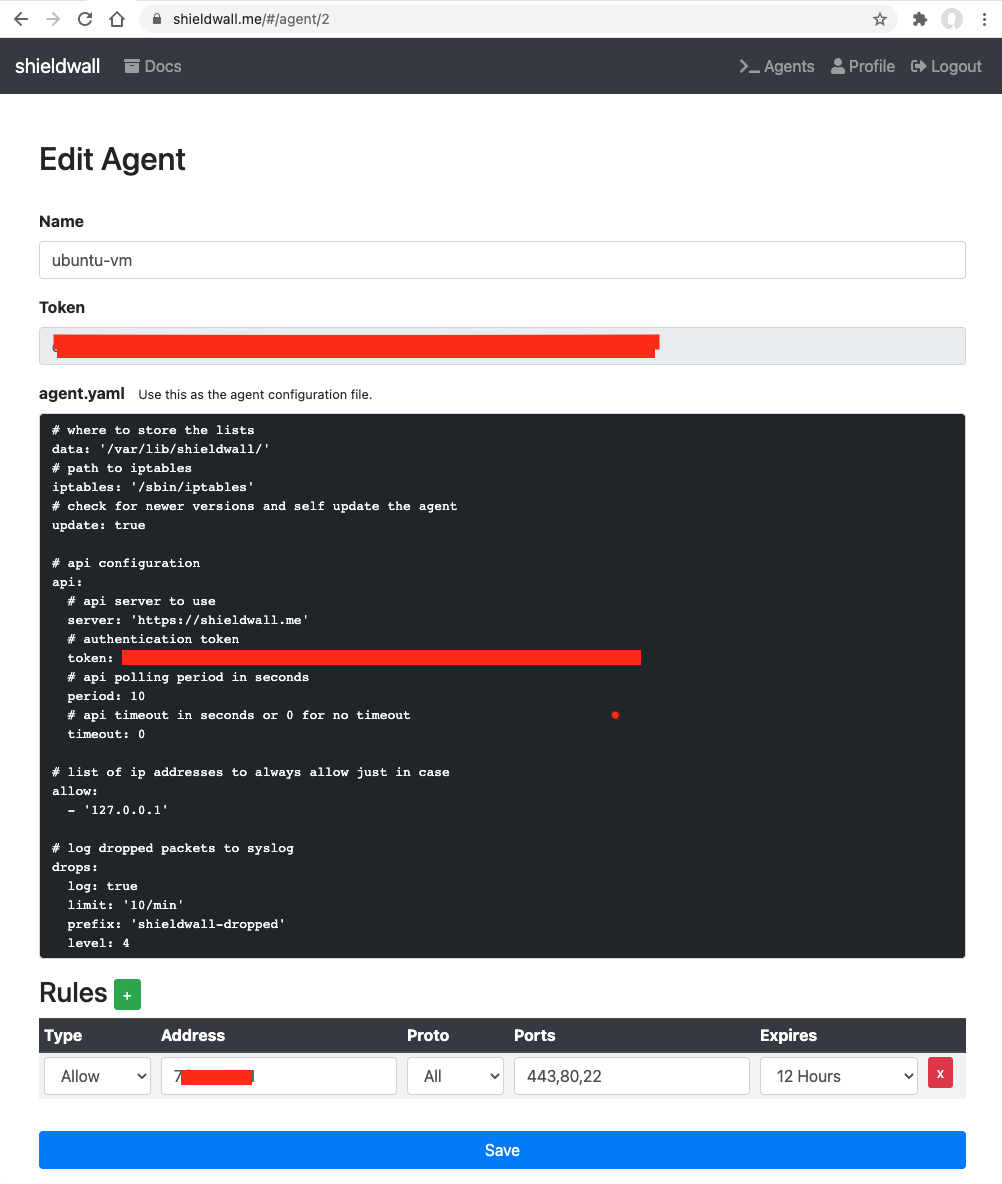
The service is free and you’re welcome to sign up, use it and report any bugs :D Alternatively you can host the API and frontend yourself and have your own infrastructure.
The installation process once you registered an account is pretty simple (Golang FTW again):
1 | mkdir /tmp/sw |
The agent is now installed as a systemd service, but it is not yet started nor enabled for autostart. You will first need to register an account on https://shieldwall.me/ and then edit the /etc/shieldwall/config.yaml configuration file, making sure it matches what you see on the agent page.
It is very important that you double check the configuration before the next step, if the agent can’t authenticate because of a wrong token, you will be locked out by the firewall and unable to log back.
You can now enable the service and start it. If configured so, it will automatically download and install its updates from github:
1 | sudo systemctl enable shieldwall-agent |
That’s it … now you can use your shieldwall.me account to instrument this agent and only open ports to your IP from a given amount of time (or permantently, but i stronlgy suggest you always set an expire time for the rules so that the agent will block everything again after a while … just in case).
ShieldWall is a very simple concept that can nevertheless offer a strong layer of security. But that’s what it is, just one layer. It is not intended to replace a proper authentication mechanism in your service, or strong passwords or generally speaking good practices in security. But damn if it works well in what it does :D
Right now it only supports iptables and even tho it’s relatively trivial to implement the support for other firewalls I’m not planning to do it unless I’ll see some major interest in the project. Other ideas include the use of an intermediary S3 bucket, let me explain this.
Your agents will be talking to the shieldwall.me server, meaning that I (or whoever is controlling the infrastructure if you hosted it elsewhere) can potentially know the IP addresses of your servers. I really don’t care to be honest, but in order to add an additional level of privacy what I could do is giving you the option to specify the connection details to an S3 bucket in your control in your shieldwall.me profile page. If configured so, the server would be only pushing the JSON of the rules to that bucket for your agents to consume. That way my server and the agents would never see each other and there wouldn’t be any way for the server administrator to even know their IP addresses.
In this case as well, not planning on implementing it any time soon unless I see registrations going up, as the tool already works great as it is for my usecase :D
I hope you enjoyed the post and most importantly that you’ll find the service useful, cheers! ^_^
此内容由惯性聚合(RSS阅读器)自动聚合整理,仅供阅读参考。 原文来自 — 版权归原作者所有。