







The >>> we see when the Python interactive shell starts, is called the Prompt String. Usually, the prompt string suggests that the interactive shell is now ready to take new commands.
Python 2.7.10 (default, Feb 22 2019, 21:55:15)
[GCC 4.2.1 Compatible Apple LLVM 10.0.1 (clang-1001.0.37.14)] on darwin
Type "help", "copyright", "credits" or "license" for more information.
>>>
Python has 2 prompt strings, one primary >>> and one secondary ... which we usually see when an execution unit (statement) spans multiline, for example: while defining a function
>>> def foo(a, b):
...     return a + b
...
>>>The prompt strings are defined in the sys module as ps1 and ps2 and just like any other attribute we can change the values of sys.ps1 and sys.ps2 and the changes take effect immediately and as a result, the prompt we see in the shell changes to the new value.
>>> import sys
>>> sys.ps1 = '::: '
:::
From the example above we see that changing the value of sys.ps1 to ::: changes the prompt to ::: .
As the interactive shell runs in a terminal, we can color and format it using bash color format as shown below
import sys
sys.ps1 = "\033[1;33m>>>\033[0m "
sys.ps2 = "\033[1;34m...\033[0m "
The code snippet above makes our primary prompt string yellow and secondary prompt string blue. Here’s how it looks
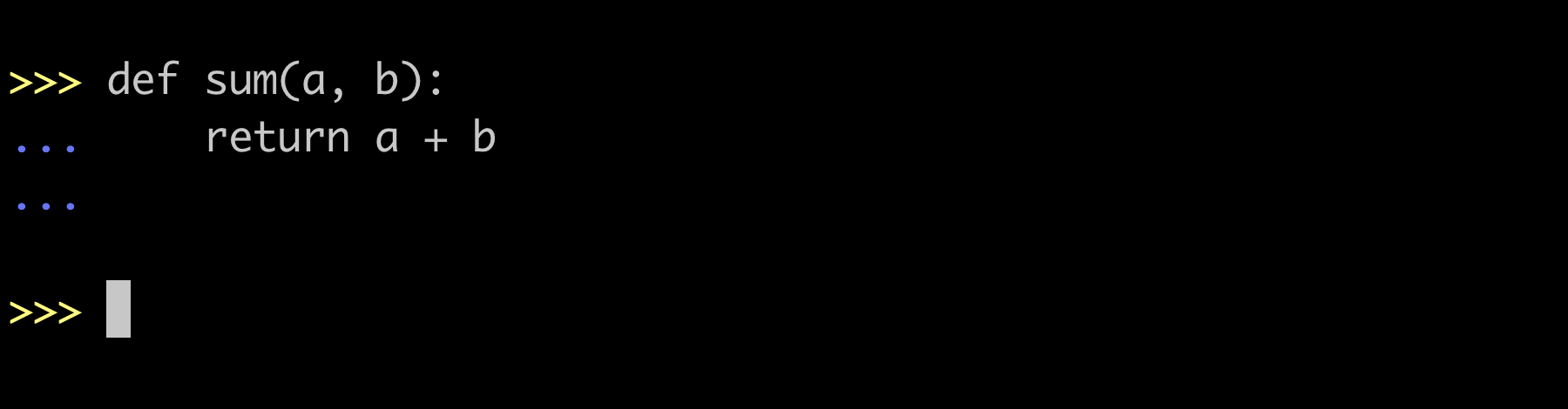
The documentation states that if we assign a non-string object to ps1 or ps2 then Python prompts by calling str() on the object every time a prompt is shown. Now we create some stateful and dynamic prompt by defining a class and overriding the __str__ method.
Below we implement IPython like prompt where execution statement number is stored in member line of the class and is incremented every time the primary prompt renders.
# -*- coding: utf-8 -*-
import sys

class IPythonPromptPS1(object):
  def __init__(self):
    self.line = 0

  def __str__(self):
    self.line += 1
    return "\033[92mIn [%d]:\033[0m " % (self.line)

sys.ps1 = IPythonPromptPS1()
sys.ps2 = "    \033[91m...\033[0m "
The above code snippet makes prompt look like this

We would not want to run this code snippet every time we start the shell and hence we use an environment variable PYTHONSTARTUP which holds the path of a readable file and is executed before the first prompt is displayed in interactive mode.
So we dump the code snippet in a file, say ipython.py and export PYTHONSTARTUP as
export PYTHONSTARTUP="$HOME/ipython.py"Now every time, we start our Python interactive shell, it will execute the file ipython.py and set the required prompt strings.
Combining everything mentioned above I have created a utility called py-prompts. Here is a glimpse of the themes that the package holds.

I hope you found this piece interesting. Python being an exhaustively extensible language made it super-easy for us to change the prompt strings and be creative with it. If you have a theme idea or have already personalized your prompt, share it with me @arpit_bhayani, I will be thrilled to learn more about it.
此内容由惯性聚合(RSS阅读器)自动聚合整理,仅供阅读参考。 原文来自 — 版权归原作者所有。