


One of my goals for the new year was publishing more frequently. I had a few qualifications:
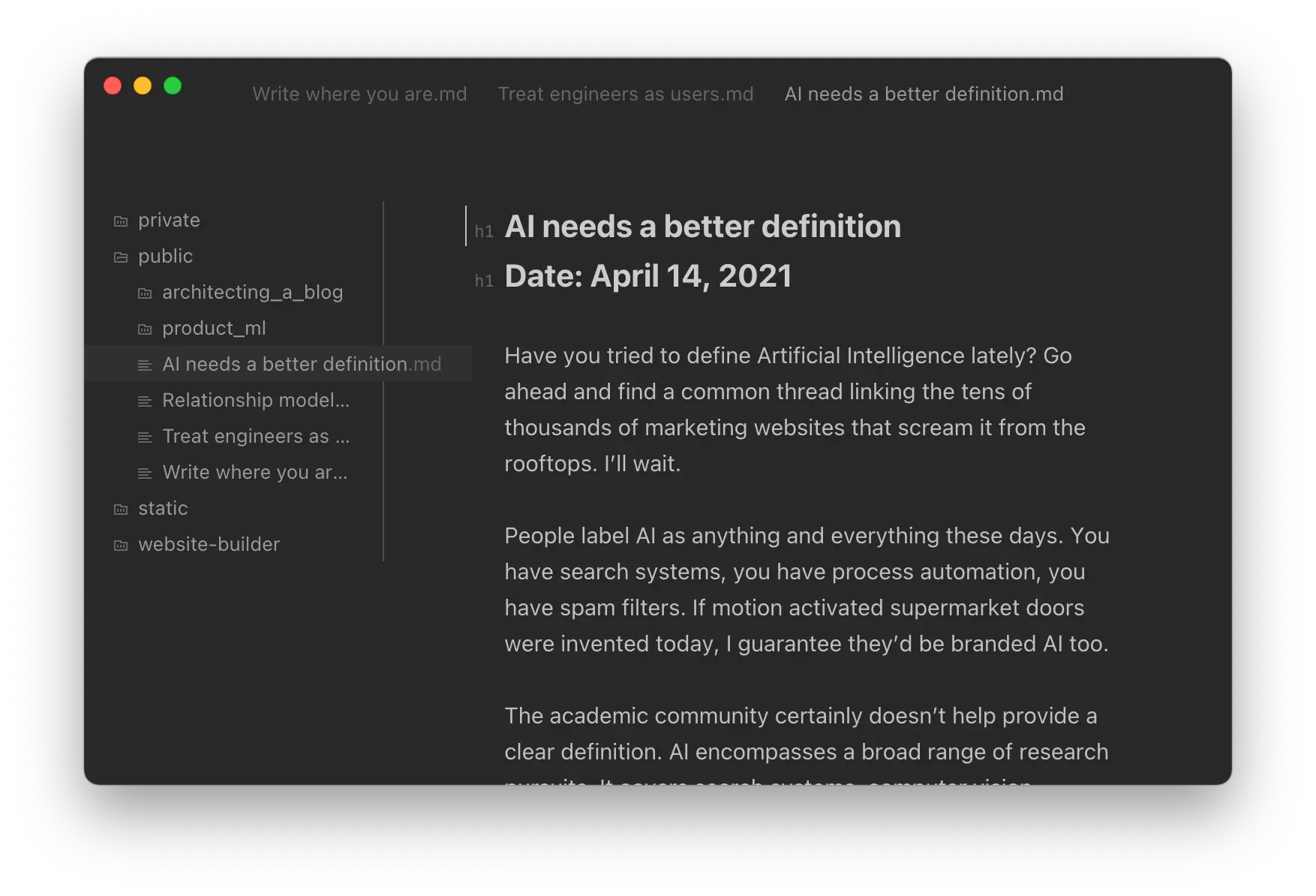
I started with my ideal experience when writing pieces, since this is where I'm going to be spending the most time. The technical backend can be a bit more complicated if it means allowing me to be most productive at the keyboard. I wanted to dedicate a few weeks tweaking the workflow so it became as habitual as possible, before investing in the supportive tooling.
I converged on a completely file-based workflow. Markdown was the natural choice for a file format. It's what I've been using for my personal notes over the last few years, with some combination of Bear and Carot for editing. Files can be flat or nested in folders. Images are supplied in-folder to link them logically closely to the content & still render in a markdown preview while editing locally.
Importantly, published notes can be interspersed with draft notes. I didn't want to worry about a separate organizational scheme when I'm finally ready to push the button. I settled on including a "# publish" tag that's contained within the file. A downstream compiler should recognize this tag and only publish once it's ready.
Before a line of code, I felt focused while at the keyboard. The next step was building an easy way to ship.
I decided pretty early on to build a site with vanilla tooling. The best way to make a fast site is to minimize complexity from the offset.
The most vanilla of vanilla tools is raw html. It's fast over the wire and can be resolved in milliseconds even during high server load. And if there is ever a hug of death, it will also allow for much easier caching if we really need an edge-CDN for distribution. Since we have dynamic content, we'll have to compile posts as html files before they're shipped to the remote box.
There's no shortage of static site generators, but none of them quite fit with the writing experience I had converged upon. Their extensive feature sets are also somewhat overkill for this deployment. So: I built my own. It revolves around the idea of Notes and Assets. Notes are an atomic piece of writing, a single blog post. They can connect to other notes via markdown links. Assets are static files, either media that is hosted alongside notes or templatized to include dynamic content from published posts. At compile time, we populate our styled template files with the dynamic content and resolve the differences in file path links that bridge the local to the remote.
There were a few challenges here. If you want to follow along, the whole thing is on GitHub.
Each article should have a title, date, and tags. Markdown doesn't support these natively, so we need some way to specify structured metadata. Metadata of the post is specified as a yml dictionary somewhere in the file. I usually put it at the top for standardization. It looks something like this:
# Post Title

meta :
    date: January 1, 2022
    status: publish
There's a pydantic object coupled with validators that serializes these text attributes into their data objects (datetime, enums, etc). It also throws an error if one is specified that we don't support, which helps identify formatting errors early on. We then remove these lines from the page body since they aren't actual post content. Everything on an article page is derived from these fields - the SEO tags, the URL, etc.
Drafts are free to omit these metadata fields. However if published articles don't contain these flags, we will throw an error.
When writing, it was useful to link to other pages by their names instead of their relative paths. Andy Matuschak refers to these as backlinks, since they're specified in the format [[Page Title]] instead of the literal location on disk. I similarly wanted to support linking to assets via this syntax, so we can embed media files without having to know their location on the remote website.
I solved for this by building up an index of all the files that are found on disk and assigning them to deterministic remote paths.
/Write where you are.md --> /notes/write-where-you-are
/architecting/architecting.md --> /notes/architecting-a-blog
/architecting/editing.png --> /notes/architecting-a-blog-editing.png
Every time our compiler sees a markdown link definition \[text](url) we will check the URL against our index. We assume that media files will always be in the same folder as their referencing notes, but notes are free to link to notes across the filesystem. The compiler then replaces matched instances with their remote paths.
In the interest of treating myself as a user, this logic lives as a installable CLI package. So all I need to do when I'm writing is run:
$ start-writing
And it'll take care of the rest: validating post format, launching a development server, automatic note compiling, linking articles, and formatting assets. It's discoverable and it's hard to forget even if you're away from the keyboard for a few weeks. But since I am trying to write a sentence a day, let's hope that isn't too frequent.
The site performs great locally and there's little friction in the writing workflow. Now the last mile problem of getting it fully online.
I've been using git for a long time to backup my notes. While mainly intended as an open source syncing solution, it also has a nice benefit of being able to show the change in articles over time. As I refine my thoughts, git shows the evolution. A local daemon syncs my notes periodically throughout the day, so I can rest easy knowing my data is backed up.
Up until now these notes have only lived on my computer. Mobile syncing was absent from my workflow, which violated one of my key principles of easily publishing. I tried a bunch of different options. I tried mobile git editing: too focused on pull requests and code editing. I tried Bear and exporting the notes as markdown files: workable but prefer the UX of other writing apps.
I finally settled on moving my notes.git folder to iCloud Drive. Opening the files for editing sessions when you’re on the go is as as easy as opening them in 1Writer, which has a native Drive plugin. They’re synced back to my desktop and then up into the git repo. It gave me a bit of pause to have two separate syncing solutions, but so far it’s been seamless. The key is that git ends up being uni-directional in this workflow whereas iCloud is full-fledged two way sync. There’s little chance for conflicts when git is just the backup and deployment medium.
Mobile <-> Mac -> GitHub
By a twist of fate I’m actually finishing this article on the bus.
Since I already had a git workflow configured, it seemed like a logical start for automation. I wanted to trigger publishing from each commit to main. Github Actions was the simplest way to get up and running. At work we use a combination of Circle CI and Harness so this was my first time using Actions; I came away really impressed at the ease of setup. Just add a yml file and you're running.
It starts with the test stage, which will fail if any pages are invalid. If it succeeds, then it moves to the deployment stage. My secrets key contains a private generated rsa key that's been granted limited scope on the server. The pipeline leverages this key to run rsync and transfer the static files up to remote. The total configuration file is just 24 lines. And the time from merging to main to publishing the static artifacts takes about 20 seconds.
name: Deploy Notes
on:
  push:
    branches:
      - master
jobs:
  build:
    runs-on: ubuntu-latest
    steps:
      - uses: actions/checkout@v2

      - name: Test
        run: |
          cd website-builder
          pip install -e .
          pip install pytest
          pytest website_builder
      - name: Deploy
        env:
          SERVER_KEY: ${{ secrets.SERVER_KEY }}
          SERVER_IP: ${{ secrets.SERVER_IP }}
        run: |
          build-notes --notes public
          echo ${SERVER_KEY} > ~/.ssh/rsa.pub
          rsync -r static/ root@${SERVER_IP}:/srv/freeman.vc/www
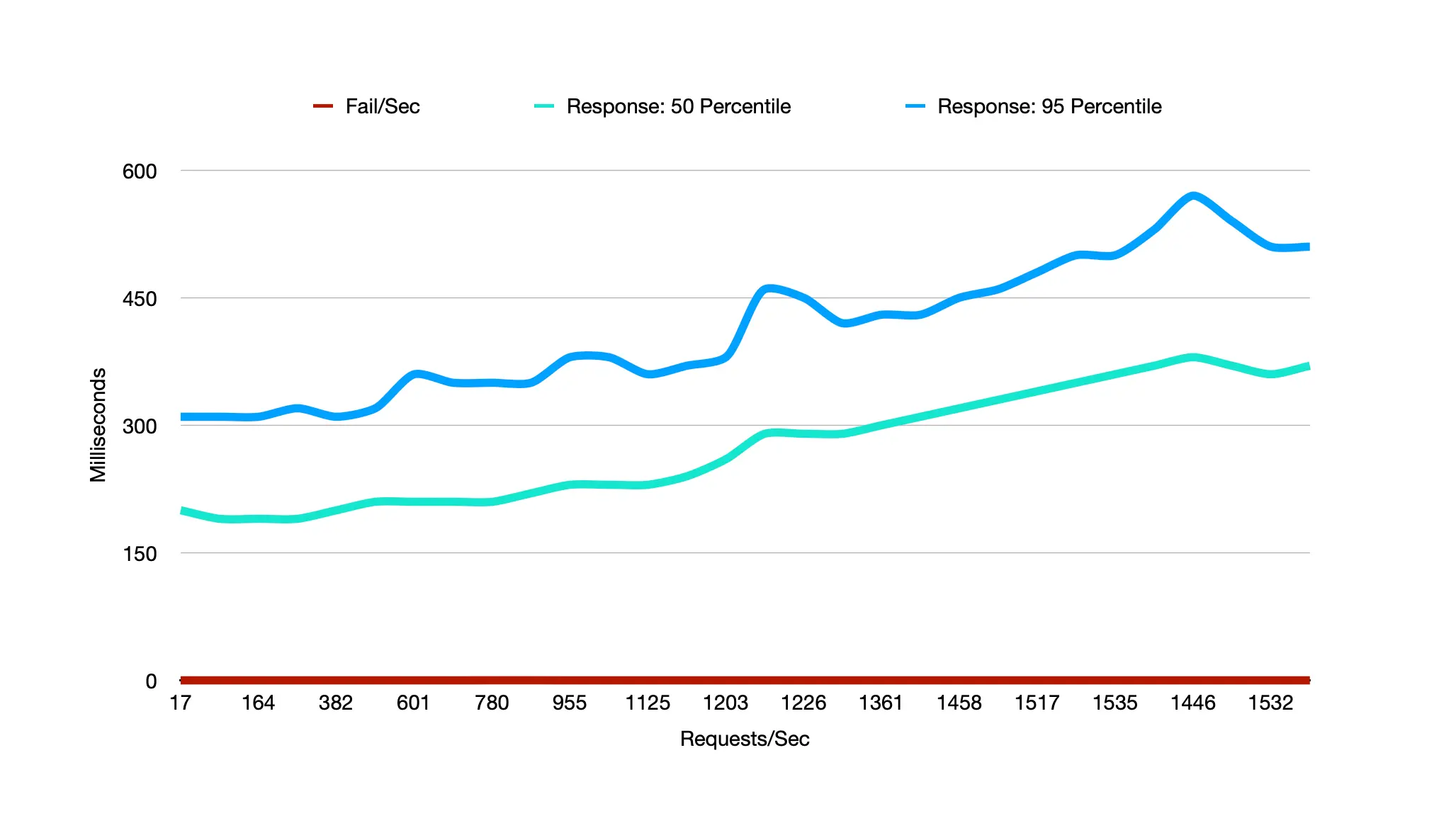
The final check was to see how this architecture would stand up to load once deployed. To do the testing I used locust, a pretty flexible and well documented load testing tool in python. It comes with a management console and also lets you export results as a csv so you can create custom graphs.
$ locust --master

[2022-08-09 16:51:36,228] Pierces-MacBook-Pro.local/INFO/locust.main: Starting web interface at http://0.0.0.0:8089 (accepting connections from all network interfaces)
...
[2022-08-09 16:52:19,331] Pierces-MacBook-Pro.local/INFO/locust.runners: Client 'Pierces-MacBook-Pro.local_d047d217aee646c48ff505f543658970' reported as ready. Currently 4 clients ready to swarm.
My goal was for 1000 users, 5 spawned a second. This seemed like a reasonable peak load to handle even with a front page effect. It was also where I started to saturate my local network connection and spinning up a remote cluster of servers to hammer my $10 personal server seemed slightly like overkill.
Testing finished in around three minutes. Since I was testing multiple URLs browsed by each user, the total requests goes up past the thousand ceiling. Average response times go from a baseline of 160ms to 400ms with 1500 concurrent requests, and worst case 95% performance peaking around 600ms. Overall a reasonable performance metric out of the box.
My favorite part of this tech stack is it gets out of the way. I intend on adding a few more features - RSS is a key one - but fully intend on this pipeline sitting in the background in perpetuity. There's little risk of dependency conflicts, no sitting around for docker builds, and no admin console with an overly powered editor. It feels good because it focuses on the words.
Now let's get back to why we're really here: writing.
此内容由惯性聚合(RSS阅读器)自动聚合整理,仅供阅读参考。 原文来自 — 版权归原作者所有。