





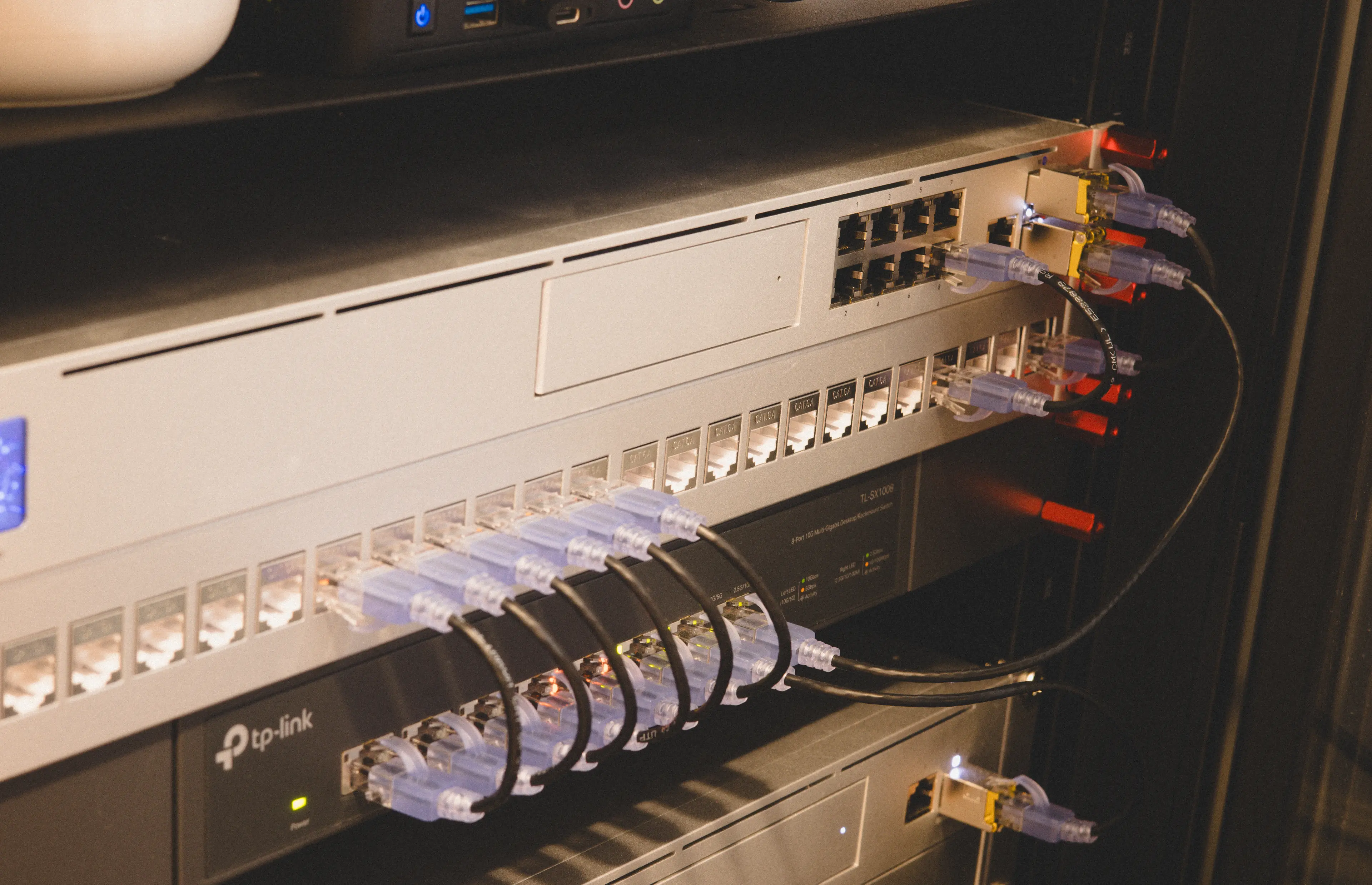
I set up our homelab early this year to replace my old external drive with way more storage. I was happy enough with the initial setup but as I started stress testing it with my daily flow1, some pretty clear areas of improvement kept nagging at me.
As they say - a homelab is never finished, only abandoned.
Here's some rationale about why I'm singlehandedly pumping Ubiquiti's stock, alongside some lessons learned about homelab ergonomics.
The most popular consumer NAS systems all come from one of two companies: Synology and QNAP. Synology has gotten into some hot water with their move to requiring validated drives. I went with QNAP originally which felt more open by default and was a bit cheaper.
I gave it a good crack but the QNAP had to go back. Despite having a 10gbps network connection and spinning Red Pro disks that should theoretically hit 200-300MB/s per drive, I was stuck at embarrassingly slow transfer rates. We're talking sub-50MB/s for sequential writes, which is slower than even most USB 3.0 external drives.
I spent a good few weeks going back and forth with QNAP support. I found their reps were actually super technical, which was a nice surprise. They had me dump some iperf logs and did some remote debugging on my device. They measured that the actual device hardware seemed fine (~350mb/s writes, 420mb/s reads) but something over the network was capping the overall drive transfer rate.
But even after tweaking the network interface settings and adjusting the file system parameters, the throughput was still stubbornly capped at the original measured speed. The hardware should have been capable of much more, but something in the software stack was clearly limiting performance.
After returning the QNAP, I decided to try Unifi's UNAS, their relatively new entry into network-attached storage. This thing is designed to just be storage over the network. No bundled VMs, no app ecosystem, no Docker containers.2
I'll be honest here: I've never really understood the fundamental benefit of these NAS-as-a-server hosts. If you only have a NAS and no other server on your network, totally get that. But if you're already building a homelab with some logical server that you're hacking on anyway, it's almost guaranteed to have a better CPU/memory than your NAS ever will. The only rationale I could see is actually having the HDDs attached via a physical medium (versus having to do transcoding over the network) but as network transfers have gotten way faster than hard drives can spin at, it's less of an issue.
So the UNAS fits into my mental model a lot clearer. It's just storage, they have a nice online interface that you can hide behind your tailscale VPC (to use when you're traveling or share with extended family). It still has a 10gbps connection into the network and it was cheaper than the QNAP model.
My original UNAS order was a dud. On transferring my ~5TB of past storage it kept bricking itself during the transfer, computer would lose the connection, and it required a hard reboot to restart the NAS. Not even the on-device screen was responsive. Recognizing that this is a first gen product, I had the foresight to buy the UI Care package that Unifi offers. I sent them some debug logs and within a day they had overnighted me a new device. After setting that one up, it's still going strong. I'm not typically one for an extended warranty but in this case damn it was worth every penny.
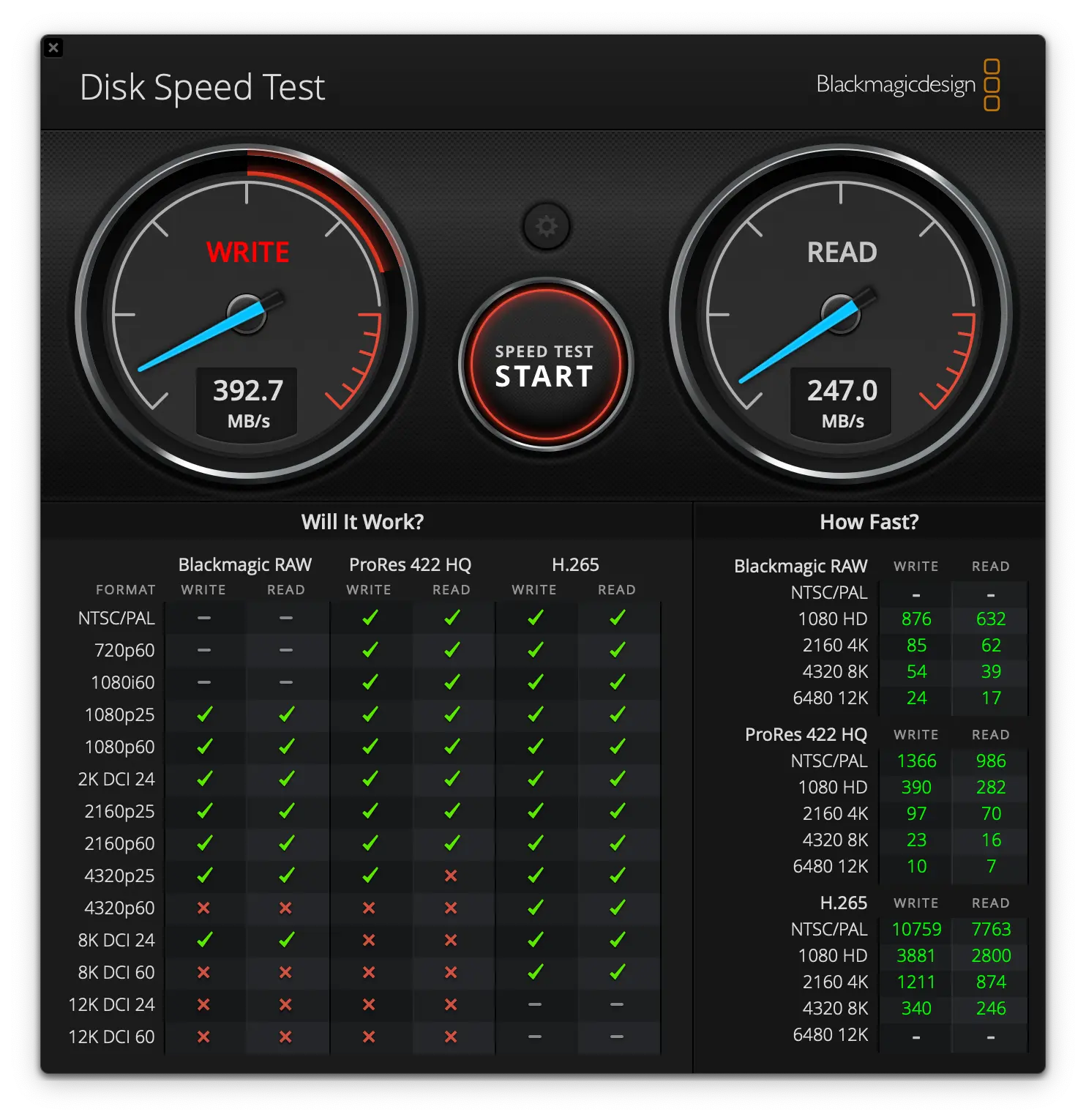
Benchmarking showed it was meaningfully faster than the QNAP even with the same hard-drive config. Who knows what the limiting factor on my old NAS was, but clearly the hard drives were not the problem.
These speeds are fast enough that I don't hesitate to put almost everything on the external. When I profile my local disk it's really just build caches, dockerfiles, and a local clone of all my engineering projects. All the media and company documents are on the network.
A patch panel is literally just a dumb 1U piece of plastic in your rack that has ethernet passthrough. You connect a row of cables behind the panel, and the panel exposes a female connector that you can connect other cables into. It's one of the ultimate "nice to haves."
Patches are most useful when you're feeding cables from your whole house or data center into the panel. Since the cables end up disappearing to who-knows-what in your roof, the patch panel is used to label the termination point. Then you never adjust the patch panel. You just change where the patch panel ends are connected into if you need to change your topology.
Most of my loops are actually just going from network hardware to network hardware so this case doesn't apply. That said, I still found it convenient to have one central point to label all of the network attachments: wifi, server, laptop, etc.
I have noticed that patch panels (and indeed the patch cords themselves) only really work when you're able to connect them to the box that's directly above or directly below them. If even one cable is stretching from the patch panel further down the rack it ruins a lot of the organizational gains you have from getting a patch panel in the first place.
The specific model I went with is a standard 24-port Cat6A patch panel. Yes, one of Ubiquiti's. Nothing fancy, but it gives me plenty of room to grow. The key bit here is that the visual organization is almost as important as the functional organization.
Conventional rack mounts suck. They're almost adversarial. They're apt to pinch you, jiggle out of the rack sliders, and generally make every modification of your equipment more frustrating than it needs to be.
I talked about this a bit last time but there's really an art to adding mounts. If you're adding them one at a time and keeping your rack in the same orientation, it's fine to bite that bullet. But as I was reorganizing my rack and having to slide the patch panel in and out repeatedly, it was becoming pretty annoying.
I heard good things about /dev/mount3. You slide the back units together, clip them in, then can just screw in the attachments on the front. They make it super easy to attach the skeleton of your layout and then put your equipment into place without having to hold both simultaneously. Red's the only color, which seemed a bit jarring, but it ends up being a nice splash of color in an otherwise monotone rack.
One interesting learning in doing this4 was seeing that my mounting holes were slightly off-centered from standard. They're still just about 1U apart, but some of them are just different enough that the inflexible /dev/mount couldn't lock to them. When I moved the whole array down by a unit, it worked perfectly.
Swapped out my vertical UPS power backup for a horizontal UPS with a marginally larger battery.
New: CyberPower CP1500PFCRM2U (1500VA/1000W)
Old: CyberPower CP1500AVRLCD3 (1500VA/900W)
These model names are giving major laptop vibes from 2005.
It's basically exactly the same unit but you're paying the rack premium of ~$100 for the horizontal format.5 I made this upgrade begrudgingly because the new NAS is also horizontal rack mounted, so there wasn't enough vertical clearance in the cage anymore.
The power calculation is actually more interesting than the form factor change. With the new NAS, switch, and server all running simultaneously, I'm drawing about 107W at idle. My NUT server will shutdown all but the most necessary hardware (wifi & fiber switch) when we lose power for anything longer than 5 minutes, so we should be able to keep running for a while during a blackout.
I'm actually really happy with this new setup.6 The combination of reliable storage, clean cable management, and proper mounting hardware makes the whole thing feel a bit more put together and maintainable.
Mostly, I'm just happy to use it. Any hardware hacking that I do is typically in the cloud anyway. I'm not usually debugging Kubernetes locally. So the best pro of this layout is it's reliable. You'd be surprised how many people ask to come over whenever PG&E is doing some maintenance and the power goes out.
My usage is pretty spiky, but generally it's heavy content editing early in the week (podcast audio, video) then just reading documents, datasets, and a few dumps of raw photos later in the week. ↩
Technically speaking this is just a Linux box like any of them, so you can ssh into it and run things as you'd like. But that internal state can be wiped at any time by a firmware update, and plus most modifications can void your warranty. So I'm inclined not to mess with it until it's out of coverage. ↩
Such a cheeky name. Bad to type into your Google search bar but a great wink to the community. ↩
I'm not sure how generalizable this is to anything other than the Tech Mojo rack. ↩
Plus $100 for 100 more watts. smh. ↩
Famous words, I know. ↩
此内容由惯性聚合(RSS阅读器)自动聚合整理,仅供阅读参考。 原文来自 — 版权归原作者所有。