








I've considered myself a strong kubernetes skeptic in the past. Bare metal is always my first choice both for projects and startups. That includes the stack that runs this blog. Calling it a stack might even be an exaggeration. It's a CI toolchain with an nginx configuration on the host. But it does its job, can handle surprising concurrent load, and is cheap to host. It costs just $10 a month and can likely go side by side with corporate blogging platforms that cost two orders of magnitude more to host. Premature optimization might be the root of all evil but so is premature scale.
I'm convinced that companies over complicate their architecture prematurely, which leads to headaches for engineers and instability for users. A monorepo with a simple server should be the default place to start. Run a basic docker instance to minimize dependency hell and make sure your remote configuration is reproducible on your local development machines. Run a few daemons either in Docker or with cron scripts. Set and forget your iptables and firewall to something reasonable. If you need to grow your traffic rent a more powerful server. When that really doesn't cut it, deploy a simple load balancer that routes to a few backend boxes. In the early days that can and should be it.
But recently I've grown out of static servers behind a load balancer for a few side projects. The specific friction came from needing to spin up and spin down a data processing cluster. It would be idle for the majority of its lifespan but needs to burst to tens of VMs with attached GPUs. This forced my hand to adopt a more complicated server management solution. And after a couple months of building for kubernetes, I must admit I'm falling for it more every day.
I already had a fully functioning backend application on bare metal. Was I really going to re-architect my stack with something different? Especially an over-powered solution like k8? Not if I had anything to say about it.
I instead tried to setup a cluster using instance templates and managed groups, Google's equivalent to Amazon's ECS. Spinning up a basic cluster from the console was relatively straightforward, but I needed some custom logic to handle the spinning up and spinning down while updating shas. I switched this to a Github Actions pipeline written as a python library. After grueling over the GCP documentation, I got a solution working but it definitely had some quirks.
The lion-share of the necessary deployment code could be implemented with standard google client library functions. This was nice for the parameter type checking and object orientation. However there were some commands that were unsupported in the pypi library. For these I proxied to the direct REST webservice that GCP exposes. Why this mismatch exists, I'm not sure. But confusing during development to juggle between two similar yet different API formats. Still not a crazy compromise to make.
This deployment needed to serve docker images on boot-up, which instance templates do support. However they don't support them via API, only in the web console or the CLI. Implementing container services through REST calls required inspecting the gcloud network traffic and copying a yaml file that's included in the instance creation payload. It came with a comment warning that this yaml should not be copied since changes are not semantically versioned and can change at any time. A bit risky but probably okay.
It started feeling like I was re-implementing core server logic. Someone has definitely solved this before. Probably a thousand times. I was able to shrug that off given the relatively simple scope but it kept nagging at me.
The dealbreaker was the price tag. I needed to deploy two of these clusters with different containers, which needed to be fronted by internal load balancers. This allowed the main backend server to communicate with a static API endpoint and distribute load. These two load balancers were in addition to the existing load balancer that routes the backend traffic. Storage costs also started multiplying since I needed to leave some buffer on top of the default provisioned hard-drive. Run rate during the testing of this infrastructure spiked to $28 a day even with zero active data processing machines running. Trivial for a company with funding to burn, unsustainable for my wallet.
Clearly, the Google bare metal approach wasn't looking promising. It required too much manual glue and was too expensive for this particular project. I started looking at other hosted offerings.
If I refactored the compute heavy portion of this separate data management cluster, I could probably separate the data processing from the ML. However, all offerings I looked at only offered reserved GPUs. You select the hardware configuration and they spawn a VM or dedicated server. There was no notion of dynamic scaling when you have requests pending. They had better chips per dollar than Google does but otherwise it's the same structure of dedicated compute. For this deployment there would be more idleness than utilization, so that was a non-starter.
I reluctantly dove into the kubernetes stack, starting with the docs and then building out a POC cluster with the core elements of the scaling logic. I didn't even focus on getting the actual applications deployed; I was only prioritizing the infrastructure configuration. This was a great way to get my hands dirty with the design decisions that k8 makes.
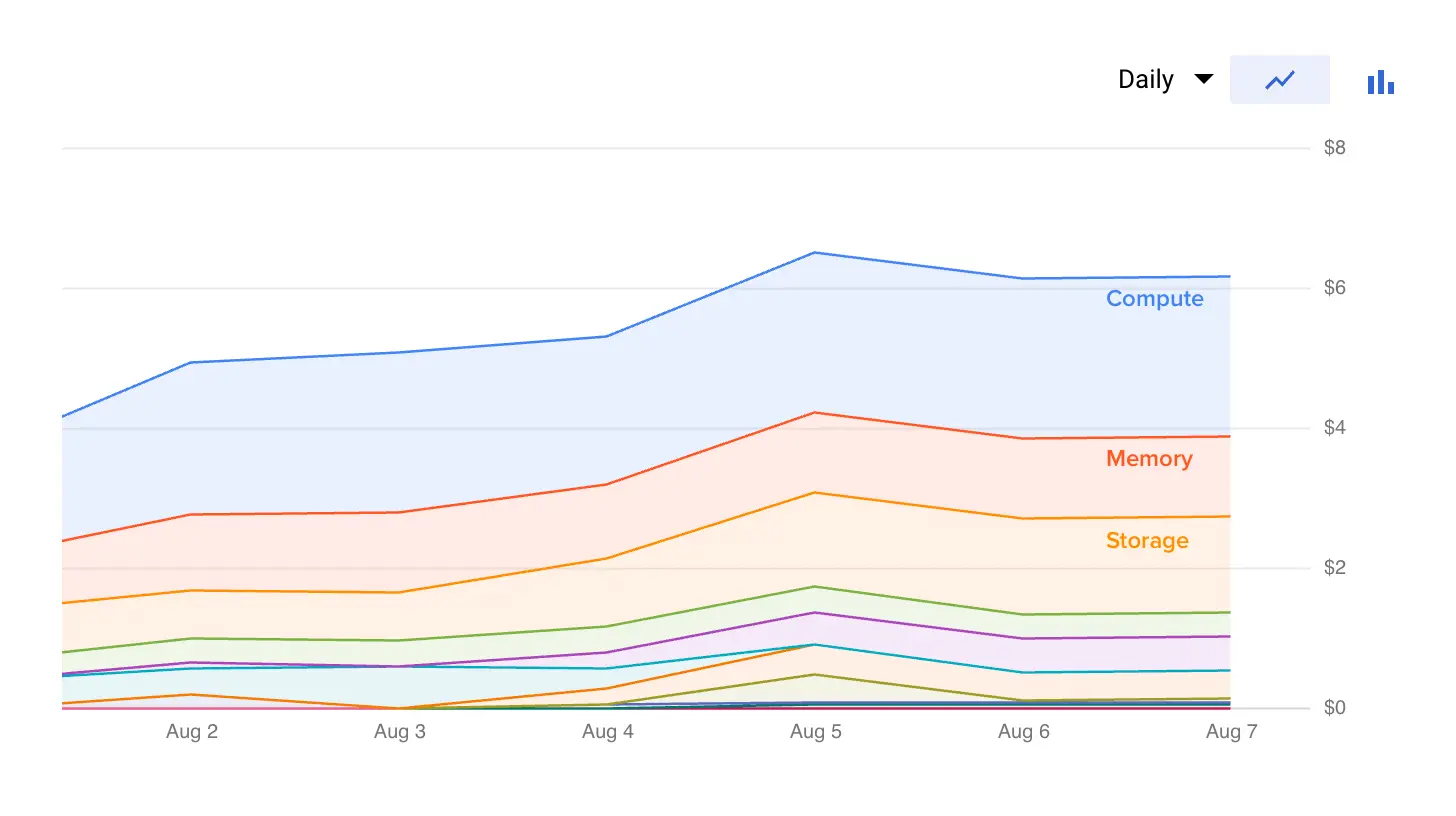
Both GCP and AWS charge around $70 a month for the kubernetes control panel. Each managed kubernetes cluster bundles a control panel, so it sets a floor on the cost of doing business even before compute. This caused an uproar when GCP added this paid management fee, since many organizations spun up separate clusters for staging, testing, etc. and the costs multiplied accordingly. Azure is the only major provider that still has free control panels but I found its managed offering to have fewer features than the other two. Also, cartels being what they are, I wouldn't count on their control panels staying free forever.
GCP still offers one free control panel in a single zone. You don't have the redundancy of multi-zone fallback so it's advertised mainly for beta testing. That said - this single zonal support is the same as dedicated servers. With bare metal you're hosted out of whatever zone hosts your box. If that zone has an issue (or if your underlying server does), you're out of luck. The second you need multiple region load balancing on bare metal because of user or client commitments to reliability, you're looking at doubling your hardware costs. In this setting a management fee is likely a small overall piece of your spend.
Even with the management fees, setting up a managed cluster can still be meaningfully less expensive than rolling your own cluster with cloud specific offerings. An internal load balancer on GCP will cost $18 a month, and rolled out to 4 services to create an internal DNS mesh will already beat the cost of the control panel. I got close to that with my from-scratch prototype just using a simple combination of google offerings.
I've started hosting all of my projects in this free zonal cluster and adding namespaces where I want to compartmentalize between them. So far it's been fully reliable with no downtime. Costs average around $6 a day without ML compute. The bulk of this (85%) is compute, memory, and storage for a 3x CPU, 11.25GB memory cluster. The remainder is bucket storage and docker image artifact hosting. Once it hits the sustained use threshold, this should be comparable to a dedicated box from a host like linode.
I found a helpful mental model for kubernetes is thinking of container orchestration as actions placed on different primitives. Some primitives:
And some actions:
Everything resolves around these logical objects. Most of these entities have the same CLI behavior associated with them:
$ kubectl get pod
NAME                                           READY   STATUS    RESTARTS   AGE
backend-deployment-6d985b8854-45wfr            1/1     Running   0          18h
backend-deployment-6d985b8854-g7cph            1/1     Running   0          18h
backend-deployment-6d985b8854-mqtdc            1/1     Running   0          18h
frontend-deployment-5576fb487-7xj5r            1/1     Running   0          27h
frontend-deployment-5576fb487-8dkvx            1/1     Running   0          27h
frontend-deployment-5576fb487-q6b2s            1/1     Running   0          27h

$ kubectl get service
NAME               TYPE        CLUSTER-IP       EXTERNAL-IP   PORT(S)    AGE
backend            ClusterIP   10.171.351.3     <none>        80/TCP     34h
frontend           ClusterIP   10.171.334.28    <none>        80/TCP     34h
kubernetes         ClusterIP   10.171.310.1     <none>        443/TCP    4d23h
Naturally each command will show different metadata depending on the logical object. Inspecting pods will show the running docker container version and the healthcheck result. Deployments will show the current redundancy of images and the health of the cluster. Services will provide the DNS address for other services to access the internal load balancer. The advantage of this logical object approach is that it makes API discovery accessible. You can avoid the combinatoric explosion by memorizing the actions (get, describe) and the objects (pods, services) and combine them to access the data you want.
The primitives that kubernetes provides have some opinionation as to how servers typically operate. There's a separate notion of pods and services, for instance, since services provide some built in load balancing across multiple pods. You could easily write this logic yourself with a separate pod and sniffing the local kubernetes API for the IP addresses of pods within the same group. But services are commonly used enough that kubernetes refactors this into a separate object type. In general, the abstractions are small shims on top of the most common of server functionalities: running processes, accepting inbound connections, running daemons. This makes it easy to do what you're already doing within the new tooling. There's a leaning curve to the terms but not the core concepts.
My strongest appreciation for kubernetes is it abstracts server concepts across cloud hosts. Whether you host with GCP, AWS, or Azure, you're going to have raw compute (nodes) where you want to run containers (pods) and occasionally one-off scripts (jobs). Especially with managed kubernetes configurations, a cloud provider takes care of writing the translation layer between the kubernetes logical objects and the physical hardware. If you want a new box spun up, you can push a helm configuration for a new node in your cluster and the cloud provider will take care of the rest. While it doesn't make cloud migrations completely seamless, it certainly treats cloud hosting as a more commoditized utility and avoids some vendor lock-in of writing custom cloud integration code.
Everything comes down to the kubernetes API. From my experience, this interface layer is at the perfect level of abstraction regardless of your size. You don't have to worry about the underlying management utilities that are themselves bootstrapping the disk or machine. The APIs follow a clear deprecation schedule so you can reliably integrate business logic within a larger pipeline. Push deployment changes in CI, spin up nodes via cron jobs, etc. All has the same conventional API behind it.
Everything is programatic. Even kubectl (the local cluster management utility) is just an abstraction layer on top of the APIs that are hosted within the cluster. This means that you can program anything you can do manually, and if you can program it, you can automate it. Most of the servers that I've managed before have been ~95% automated. There's a primary bash script that does most of the environment setup. But there's still some manual work you need to do: updating nginx filesystem configurations, configuring iptables, etc. Since every linux version is a bit different you also end up changing this script when you periodically upgrade the underlying OS.
The API lets your runbooks become completely programatic. Instead of writing documentation to triage well-known issues or run commands with the cluster, you can walk on-call/SRE engineers through a programatic guide. One common need is checking whether git branches have been successfully deployed. If you tag your docker images with the sha, the easy way is checking whether the shas are identical. Normally, this would require some remote ssh/docker wrangling or exposing the hosted sha within some API endpoint. Automatable? Sure. Trivial? Not so much. And if it's not trivial it's probably going to end up buried in a confluence doc.
Instead, the kubernetes API makes it much easier to write logic like this and bundle these into an installable package. This makes on-call common triage actions discoverable and walks users through the commands themselves. Here's an example from my utilities:
$ on-call

Usage: on-call [OPTIONS] COMMAND [ARGS]...

Options:
  --help  Show this message and exit.

Commands:
  check-health                      Check service health
  bootstrap-database                Run initial database setup
  ...
$ on-call check-health --app frontend

1. Checking uptime (`yes` to confirm):
> yes
\x1b[32mThe application has been stable for 465 minutes.\u001b[0m

2. Checking sha matches (`yes` to confirm):
> yes
Latest github sha: 86597fa
Latest deployed sha: 8d3f42e
\x1b[31mMismatching shas...\u001b[0m
Most organizations don't have a strong programatic culture with internal tools. This is typically more about the friction of solving the problem than the cultural commitment or technical skill itself. Kubernetes' intuitive and well documented APIs decrease this friction to the point where it is realistic to automate much of the repetitive deployment and triage processes.
Architecturally, I still think monolith architectures are the ways to go. But that's a topic for another day. Even microservice fanatics would cede the point that sometimes you need services to be bound to the underlying compute. This is especially true in ML distributions that are hardware accelerated on a GPU. You can typically only mount one cluster of GPUs per hardware box, so the constraint is at the node level not for the pod.
With the combination of taints and tolerances, it's easy enough to assign a pod to an independent hardware instance. By default, pods will be placed wherever there is appropriate memory and CPU space. Taints and tolerances customize this behavior. I think of taints as oil and water because they repel default pod assignments. Tolerances are more like oil and oil where they can permit pods to launch on those nodes with taints. Configuring taints and tolerances in the right way can bijectively lock 1 pod to 1 node.
This returns us fully to the paradigm that bare metal hosts one service and that's it. This is a useful mental model when you're designing for containers that should use the full resources of the box that they're running on. At the extreme it allows us to only use kubernetes as the load balancing layer that connects services and for the abstraction layers for the management APIs. You can keep the monoliths and delegate other tasks more easily.
I remain bullish on monoliths on bare metal, powerful servers. But after this initial dive into k8, I'm tempted to say that whenever you need multiple servers working in tandem, you should use kubernetes. Keep it managed since that legitimately becomes a reliability headache. But fears of kubernetes being overkill seem overblown. Concerns instead seems tied to a more fundamental concern with writing microservice architectures.
There I agree. But by separating the two, you can get the best of both worlds. A simple codebase to prioritize feature delivery. A flexible yet programmatically controllable hardware architecture. Kubernetes can fade into the background more easily than I expected. That lets us focus on delivering the primary value: our application.
此内容由惯性聚合(RSS阅读器)自动聚合整理,仅供阅读参考。 原文来自 — 版权归原作者所有。