












Unlike my previous QNAP, my new Unifi NAS doesn't provide backups to AWS or GCP.1 So I had to hand-roll something. A simple cron job to sync to S3 would probably have sufficed, but since we're at the drawing board anyway - I really wanted three things out of this backup solution:
I implemented all of these as a continuously running Python app that is managed by Docker. This is all hosted on an old permanent server I have wired up via 1gbps connection to the network. Not ideal for speed but fine enough for periodic differential syncs.
I have a love-hate relationship with cloud services but it's mostly love.3 So I end up having a lot of content up in the sky.
Most backup solutions are one-directional: local storage to cloud. But I ideally want one source of truth for all my stuff. If I mostly save family photos in iCloud, I still want that locally on my NAS. And from there I still want some additional redundancy.
The flow looks like this:
Step 1 is the trickier one. iCloud Photos doesn't even have a proper API. We need to emulate the browser connections that you get when you're browsing iCloud. Thankfully icloud-photos-downloader is both written in Python and continuously maintained. It made for a pretty easy integration point.
The browser service in particular requires 2FA codes. These challenges happen periodically and rather randomly. We need to read some stdin on our remote docker image to respond to the challenge. This bidirectional communication actually motivated our Slack integration in the first place4. It was the most convenient way to handle the authorization regardless of where I am.
When it comes to data storage, the three major cloud storage options are basically interchangeable. So it came down to cost as far as I was concerned.
My general rule of thumb these days is B2 is better for backup scenarios with infrequent reads and R2 for heavier read workloads where you need frequent data access. B2 has much cheaper storage at rest than the other options, so it was the obvious choice for my ~5TB backup use case.
I have two redundancy zones: one in Sacramento and one in Amsterdam. Backblaze requires you to associate each account with a region, so I end up having two separate B2 accounts5.
The sync happens sequentially to each region. If Sacramento fails, Amsterdam should still complete successfully. We get Slack notifications for each region so we know immediately if there's a problem with either destination.
Why reinvent the wheel when we have amazing options out there?
For cloud transfers, rclone is the gold standard. It supports basically every cloud storage provider, has built-in encryption, and can resume interrupted transfers. The crypt provider in rclone handles all the encryption/decryption transparently - files are encrypted before they leave the local network and only decrypted when we explicitly retrieve them.
There's a decent amount of boilerplate within the official rclone syntax to provide all this functionality. I chose instead to make a minimal implementation on top of it that's validated with pydantic. It lives on the host and mounted into the docker container with a volume.
When the docker image starts up, we parse this configuration file, and create the associated rsync file on disk.
[[endpoints.b2]]
  nickname = "b2-us"
  key_id = "my_key_us"
  application_key = "my_app_us"

[[endpoints.b2]]
  nickname = "b2-eu"
  key_id = "my_key_eu"
  application_key = "my_app_eu"
San Francisco thankfully has pretty reliable power. But you never know when some moron is going to hit a pole, or PG&E intentionally takes down the power for maintenance work on the wires.
I knew from early on I wanted a UPS to provide backup power during outages. But often outages are longer than the battery will power, which means we still risk the drawbacks of hard powering off all the network hardware (especially the NAS).
bungalo has a sub-service that monitors our power levels via USB. CyberPower does offer network monitoring options, but they charge ~$200 extra for a hardware plugin to support this. Definitely not worth it when you already have a server on the network that can handle USB monitoring.
When the UPS battery drops below 20%, bungalo will:
When power returns, everything boots back up automatically and resumes where it left off. The only case where this auto-boot won't work is if we shutdown the devices and power comes back before the UPS is fully drained. In this case the units were always receiving some continuous power, and were never power cycled, so the wake-on-power won't kick in.
The lingering fear with backups is you'll set them up and when you actually need them, you'll realize they have been backing up the wrong thing the whole time6. I prefer overly in-your-face backup pipelines for this reason. Programmatic safeguards can only get you so far but really doing a manual double check always gives me a lot more comfort.
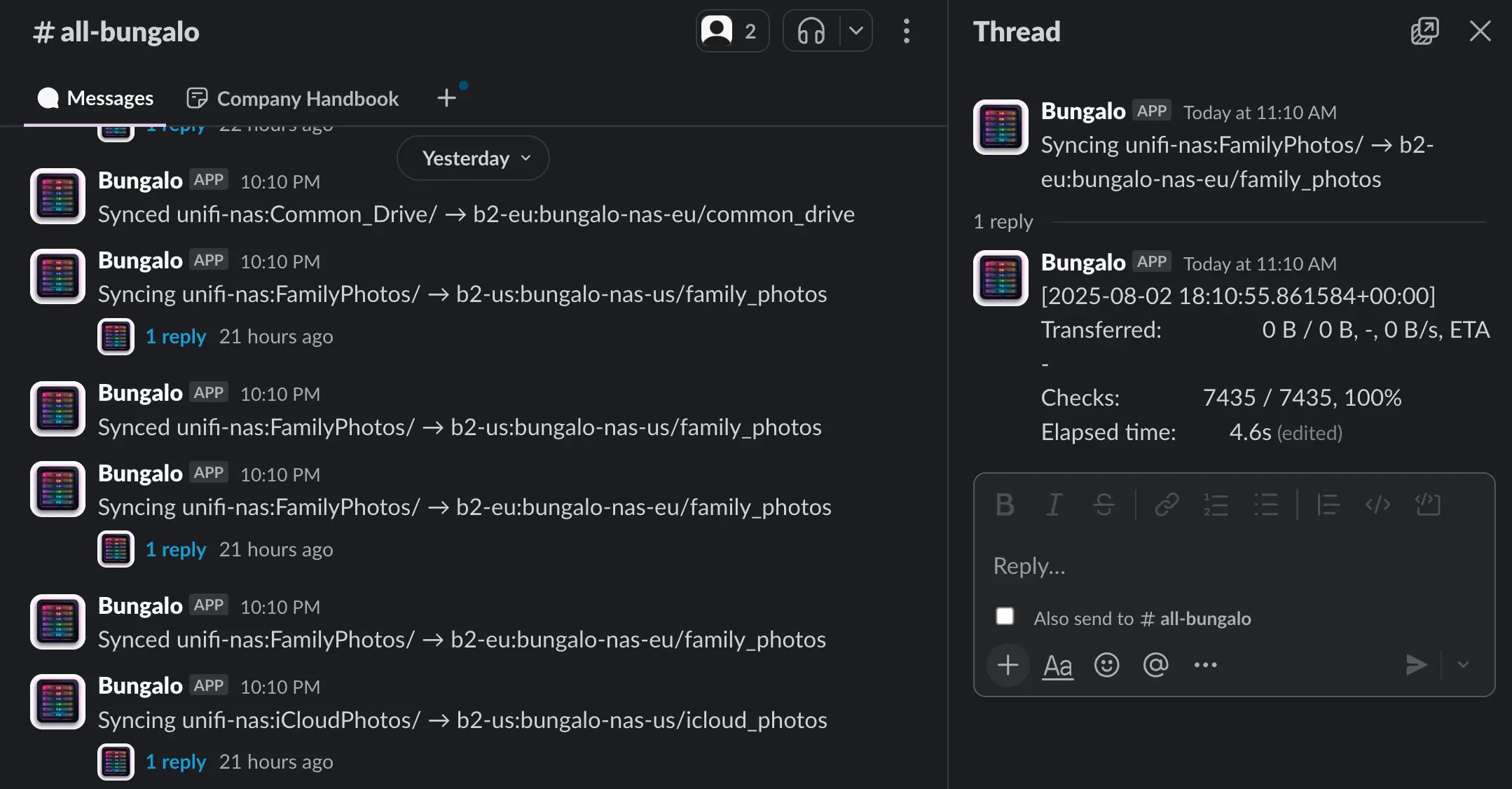
It's pretty hilarious to have a Slack account for your house, but here we are. The Slack bot sends notifications for:
The threaded status updates show the progress of each sync operation in real-time, so I can see if something gets stuck or is taking longer than expected.
A few reflections on this experience. No huge surprises here:
USB permissions are finicky. Getting the UPS monitoring to work inside Docker required a lot of trial and error with device permissions and USB mounting. The --privileged flag is necessary but feels a bit heavy-handed.
NUT is annoying. Network UPS Tools is the de facto standard for UPS monitoring, but it's a pain to configure. The config files are cryptic, the documentation is sparse, and getting the right permissions for USB device access took way longer than it should have.
Config formats are a mess. When you're working in higher-level programming languages all day, it's easy to forget that most system configs have proprietary formats. Some use something that looks like yml, but isn't. It would be so nice if more tools adopted something like TOML or YAML instead of their own custom DSLs. Wouldn't hold my breath.
They claim this is changing in an update later this year, but I wasn't willing to wait around for that promise to materialize. ↩
This is always good practice but especially, especially after the whole Firebase/Tea scandal I get really nervous with any bucket only having its public permissions controlled by one global privacy flag. ↩
Shout out Figma IPO. ↩
The Slack integration is surprisingly useful here. When iCloud needs a 2FA code, bungalo sends a message to our private channel and waits for us to respond with the code. ↩
I use the gmail suffix trick for this: {email}[email protected] and {email}[email protected]. ↩
Or the backups are corrupted or something else that ruins your recovery plans. ↩
此内容由惯性聚合(RSS阅读器)自动聚合整理,仅供阅读参考。 原文来自 — 版权归原作者所有。