


Container orchestration in Kubernetes offers multiple patterns for deploying applications, each serving specific architectural needs. Understanding when and how to use init containers, sidecar containers, and co-located containers is essential for building robust, maintainable applications.
This guide explores these three patterns, their use cases, and implementation strategies.
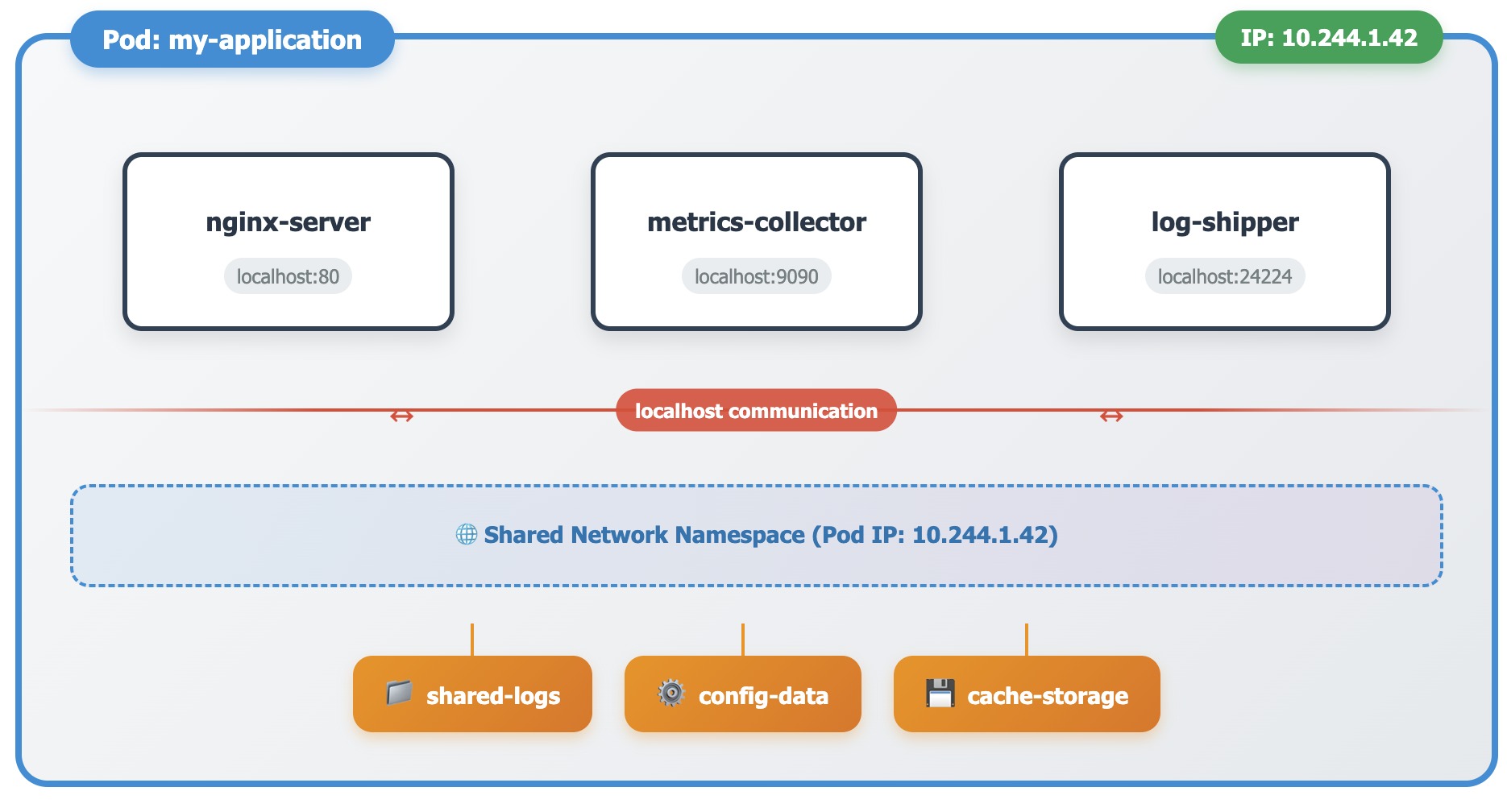
Before examining specific container patterns, it's crucial to understand that a Pod represents the smallest deployable unit in Kubernetes. A Pod can contain one or multiple containers that share the same network namespace, storage volumes, and lifecycle. This shared environment enables different container patterns to work together effectively.
All containers within a Pod communicate through localhost, share the same IP address, and can access shared volumes. This design principle forms the foundation for the container patterns we'll explore.
Init containers run to completion before the main application containers start. They handle initialization tasks such as database migrations, configuration setup, or dependency downloads. Unlike regular containers, init containers run sequentially and must be completed successfully before the Pod proceeds to start its main containers.
Database schema initialization and migration scripts represent a typical init container scenario. Configuration file generation from external sources, dependency downloading, and security credential setup also benefit from this pattern.
apiVersion: v1
kind: Pod
metadata:
  name: web-app-with-init
spec:
  initContainers:
  - name: database-setup
    image: postgres:13
    command: ['sh', '-c', 'psql -h db-host -U admin -c "CREATE TABLE IF NOT EXISTS users (id SERIAL PRIMARY KEY);"']
    env:
    - name: PGPASSWORD
      valueFrom:
        secretKeyRef:
          name: database-credentials
          key: password
  - name: config-generator
    image: busybox
    command: ['sh', '-c', 'echo "server_name=prod" > /shared/config.properties']
    volumeMounts:
    - name: config-volume
      mountPath: /shared
  containers:
  - name: web-server
    image: nginx:latest
    volumeMounts:
    - name: config-volume
      mountPath: /etc/config
  volumes:
  - name: config-volume
    emptyDir: {}
This example demonstrates sequential initialization where the database setup completes before configuration generation, and both finish before the web server starts.
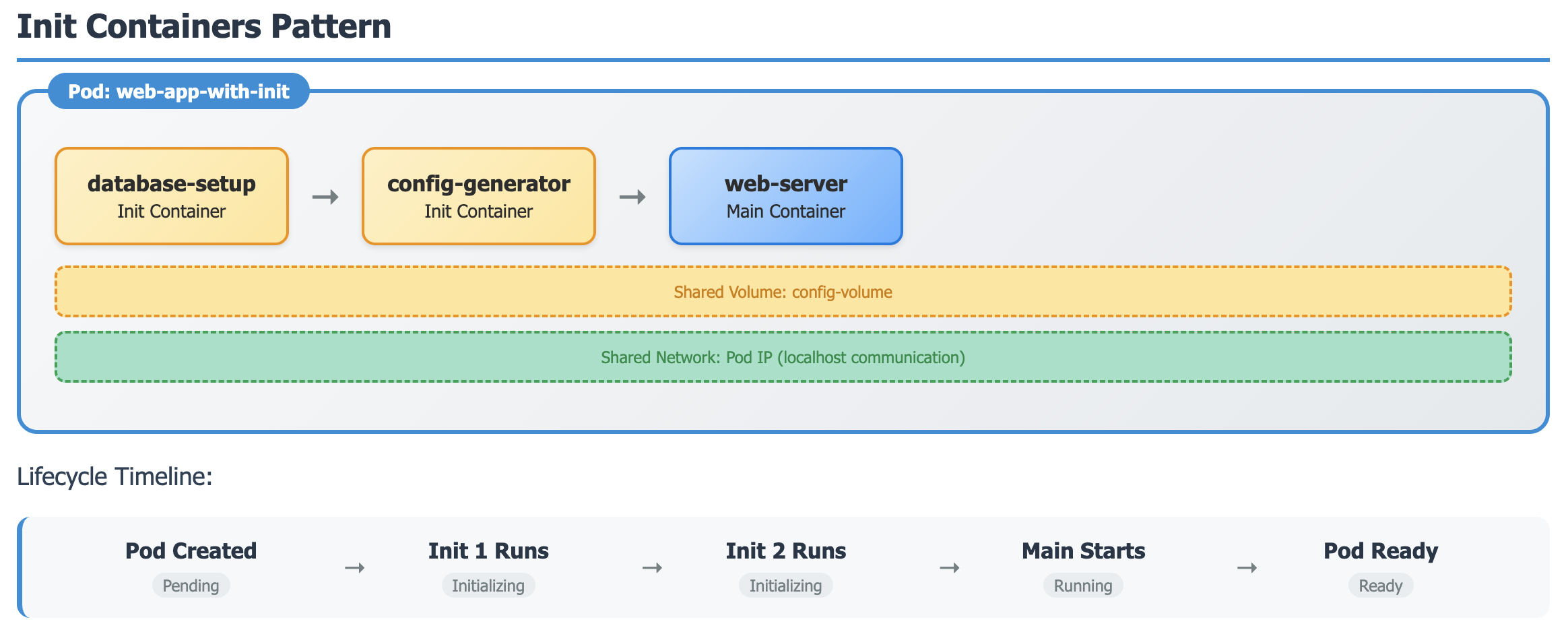
Init containers run sequentially and must be completed successfully before the main containers start. Perfect for setup tasks, database migrations, and dependency preparation.
Sidecar containers extend the functionality of main applications without modifying the application code. These containers run alongside the main application throughout the Pod's lifecycle, providing services such as logging, monitoring, security proxying, or data synchronization.
Kubernetes v1.29 introduced native sidecar support by implementing them as restartable init containers with restartPolicy: Always. This ensures proper startup order while maintaining continuous operation.
apiVersion: v1
kind: Pod
metadata:
  name: app-with-monitoring-sidecar
spec:
  volumes:
  - name: shared-data
    emptyDir: {}
  - name: metrics-data
    emptyDir: {}

  initContainers:
  - name: metrics-collector
    image: prom/node-exporter:latest
    restartPolicy: Always
    ports:
    - containerPort: 9100
    volumeMounts:
    - name: metrics-data
      mountPath: /metrics
    command: ['/bin/node_exporter', '--path.rootfs=/host']

  - name: log-shipper
    image: fluent/fluent-bit:latest
    restartPolicy: Always
    volumeMounts:
    - name: shared-data
      mountPath: /var/log
    command: ['/fluent-bit/bin/fluent-bit', '-c', '/fluent-bit/etc/fluent-bit.conf']

  containers:
  - name: main-application
    image: my-app:latest
    volumeMounts:
    - name: shared-data
      mountPath: /app/logs
    - name: metrics-data
      mountPath: /app/metrics
Sidecar containers enhance main application functionality without code changes. They start first, run continuously, and can restart independently. Common for logging, monitoring, and proxying.
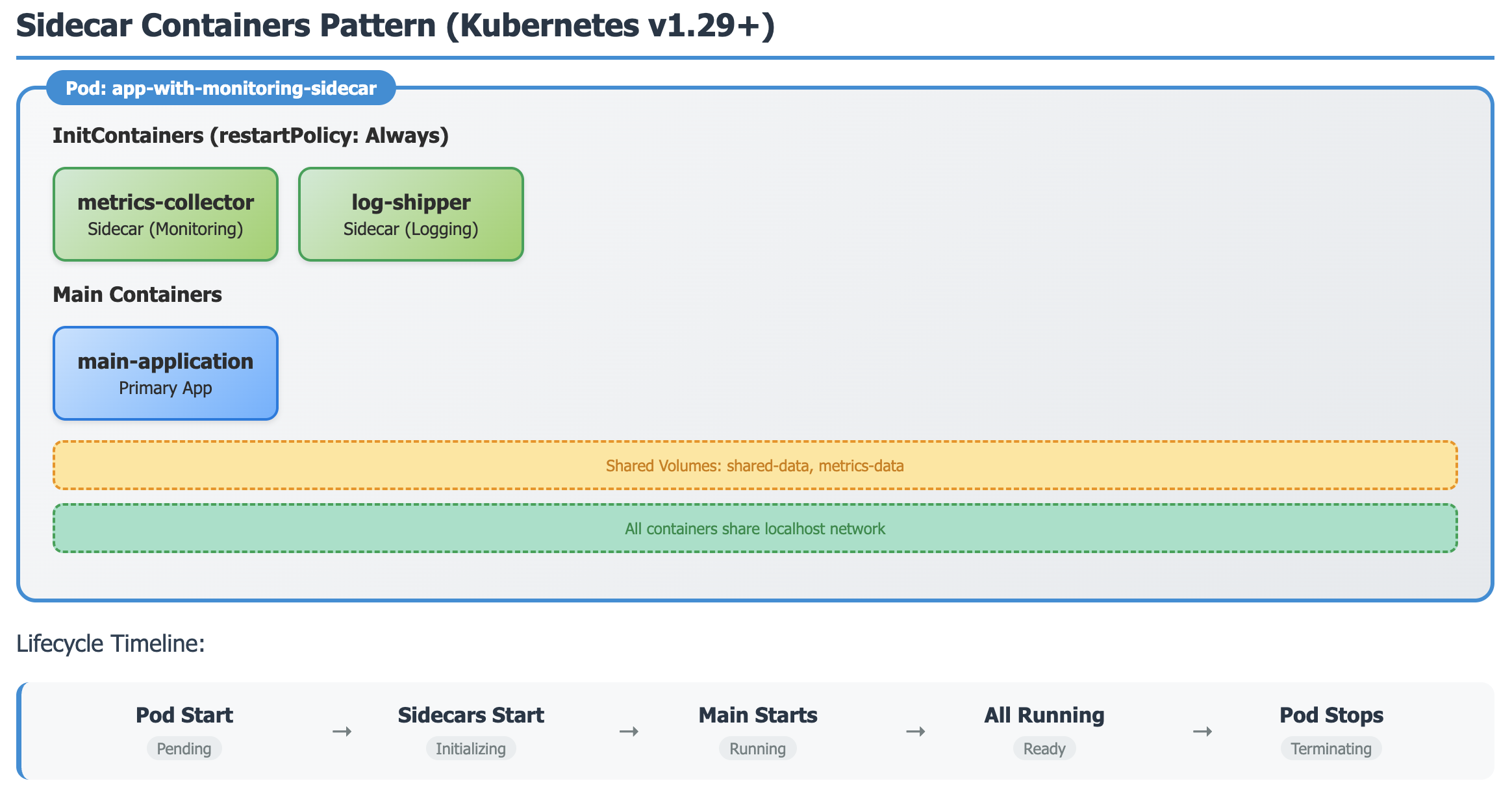
The sidecar pattern provides several advantages including separation of concerns, independent scaling of auxiliary services, and standardized operational tooling across different applications.
Co-located containers work together as equal partners within the same Pod to deliver application functionality. Unlike sidecars that enhance a primary application, co-located containers share responsibility for the overall application behavior. This pattern suits multi-process applications, microservice communication, and helper service scenarios.
apiVersion: v1
kind: Pod
metadata:
  name: content-management-system
spec:
  volumes:
  - name: shared-content
    emptyDir: {}
  - name: shared-cache
    emptyDir: {}

  containers:
  - name: content-api
    image: content-api:v1.2
    ports:
    - containerPort: 8080
    volumeMounts:
    - name: shared-content
      mountPath: /data/content
    - name: shared-cache
      mountPath: /cache
    env:
    - name: CACHE_DIR
      value: "/cache"

  - name: content-processor
    image: content-processor:v1.2
    volumeMounts:
    - name: shared-content
      mountPath: /data/content
    - name: shared-cache
      mountPath: /cache
    env:
    - name: CONTENT_DIR
      value: "/data/content"

  - name: cache-manager
    image: redis:6-alpine
    ports:
    - containerPort: 6379
    volumeMounts:
    - name: shared-cache
      mountPath: /data
    command: ['redis-server', '--dir', '/data']
In this example, three containers collaborate to provide a content management system. The content API serves requests, the content processor handles background tasks, and the cache manager provides shared caching services.

Co-located containers work as equal partners with no defined startup order. They collaborate to provide application functionality through shared resources and direct communication.
| Feature | Init Containers | Sidecar Containers | Co-located Containers |
|---|---|---|---|
| Primary Role | Setup & Preparation | Enhance Main App | Equal Collaboration |
| Startup Order | Sequential | Before Main | No Order |
| Lifecycle | Run to Completion | Continuous | Independent |
| Common Use Cases | DB Migration, Setup | Logging, Monitoring | Multi-process Apps |
| Restart Behavior | Pod Restart | Independent Restart | Per Container |
Container patterns in Kubernetes provide powerful architectural options for building scalable, maintainable applications. Init containers handle preparation tasks, sidecar containers extend functionality, and co-located containers enable collaborative applications.
The introduction of native sidecar support in Kubernetes v1.29 simplifies implementation while providing better lifecycle control. Choosing the appropriate pattern depends on your specific use case, architectural requirements, and operational needs.
Success with these patterns requires careful planning of resource allocation, security contexts, and health monitoring. By understanding the strengths and limitations of each approach, you can build robust Kubernetes applications that scale effectively and maintain operational excellence.
Ref: https://kubernetes.io/docs/concepts/workloads/pods/sidecar-containers/
此内容由惯性聚合(RSS阅读器)自动聚合整理,仅供阅读参考。 原文来自 — 版权归原作者所有。