






AWS just dropped something pretty interesting for the serverless development community - the open-source AWS Serverless Model Context Protocol (MCP) Server. If you've been working with serverless architectures or considering making the jump, this new tool might be worth your attention.
In this article, there is also a section on how to add this MCP Server to the Claude Code.
The AWS Serverless MCP Server is essentially an AI assistant specifically trained for serverless development in AWS.
The MCP Server integrates with popular AI coding assistants like Amazon Q Developer, Cline, and Cursor, giving them deep knowledge about AWS serverless services, best practices, and implementation patterns. The result? Your AI assistant knows what it's talking about when you ask serverless-specific questions.
Before we get into the serverless specifics, let's discuss what MCP is. Model Context Protocol is an open standard that allows AI assistants to interact with external tools and data sources. Instead of being limited to their training data, AI models can now access real-time information and execute specific tasks through standardized interfaces.
MCP servers implement this protocol by providing tools, resources, and contextual information that AI assistants can consume. This creates a bridge between AI models and specialized knowledge domains - in this case, serverless computing on AWS.
AWS already offers the AWS Lambda Tool MCP Server, which lets AI models interact directly with existing Lambda functions. The new Serverless MCP Server takes this concept further by providing comprehensive serverless development guidance rather than just function invocation.
The Serverless MCP Server covers four main areas of serverless development:
Serverless application lifecycle. The server helps with the entire AWS SAM (Serverless Application Model) workflow. It can initialize new projects with the right templates, build applications, handle deployments, retrieve logs, and run local testing. This means you can ask your AI assistant to set up a new serverless project, and it'll know exactly which runtime to choose and how to structure everything properly.
Web application deployment and management: One standout feature is the specialized support for web applications. The server can deploy backend, frontend, or full-stack applications using the AWS Lambda Web Adapter framework. It also handles custom domain configuration, frontend asset updates, and CloudFront cache invalidation. This is particularly useful if you're working with standard web frameworks like Express or Next.js - you can deploy them to Lambda without additional adapters.
Observability: The server provides tools for retrieving logs and fetching metrics from deployed applications. Your AI assistant can analyze CloudWatch logs and application performance metrics to help identify issues and suggest optimizations.
Guidance, IaC templates, and deployment help: Perhaps most valuable is the contextual guidance system. The server can recommend the right Infrastructure as Code tools for your use case, provide Lambda-specific best practices, supply event schemas for different AWS service integrations, and provide example SAM templates from Serverless Land.
Here are all the features organized by category:
sam_init_tool - Initialize new AWS SAM projectssam_build_tool - Build serverless applications and prepare deployment artifactssam_deploy_tool - Deploy applications to AWS CloudFormationsam_logs_tool - Retrieve CloudWatch logs for debuggingsam_local_invoke_tool - Test Lambda functions locally with Dockerdeploy_webapp_tool - Deploy backend/frontend/fullstack apps using Lambda Web Adapterupdate_webapp_frontend_tool - Update frontend assets and invalidate CloudFront cacheconfigure_domain_tool - Set up custom domains with certificates and DNSwebapp_deployment_help_tool - Get deployment guidance and helpsam_logs_tool - Retrieve logs with filtering and time range selectionget_metrics_tool - Fetch CloudWatch metrics for performance monitoringget_iac_guidance_tool - Get recommendations for IaC platform selectionget_lambda_guidance_tool - Assess if Lambda is suitable for specific use casesget_lambda_event_schemas_tool - Get event schemas for different Lambda sourcesget_serverless_templates_tool - Access example SAM templates from Serverless Landdeploy_serverless_app_help_tool - Get instructions for deploying serverless appswebapp_deployment_help_tool - Get web application deployment guidancelist_registries - List available schema registriessearch_schema - Search for schemas using keywordsdescribe_schema - Get complete schema definitions for type-safe developmentAWS built some solid guardrails into this tool. By default, the Serverless MCP Server operates in read-only mode, allowing exploration and architectural guidance without making any changes to your actual infrastructure. It also restricts access to CloudWatch Logs by default to protect sensitive operational data.
When you need to enable write operations or access sensitive data for debugging, you can use specific flags (--allow-write and --allow-sensitive-data-access). This approach means you can safely let AI assistants explore your serverless architecture without worrying about accidental changes.
You can install the server from GitHub or Python Package Index (PyPi) and configure it with your preferred AI coding assistant. Here's a basic configuration example:
Clone the MCP Server:
git clone https://github.com/awslabs/mcp.git

cd mcp/src/aws-serverless-mcp-serve

pip install -e .
You can add this configuration:
{
  "mcpServers": {
    "awslabs.aws-serverless-mcp": {
      "command": "uvx",
      "args": ["awslabs.aws-serverless-mcp-server@latest"],
      "env": {
        "AWS_PROFILE": "your-aws-profile",
        "AWS_REGION": "us-east-1"
      }
    }
  }
}
The server uses your default AWS profile and can be configured for different regions as needed. For development workflows, you'll typically want to start with the default read-only configuration and enable write permissions only when necessary.
For instance, in Claude Desktop, you can add it in Settings > Developer and then configure the file.
You will then get the available features in the list (Don't forget to restart the Claude Desktop client):
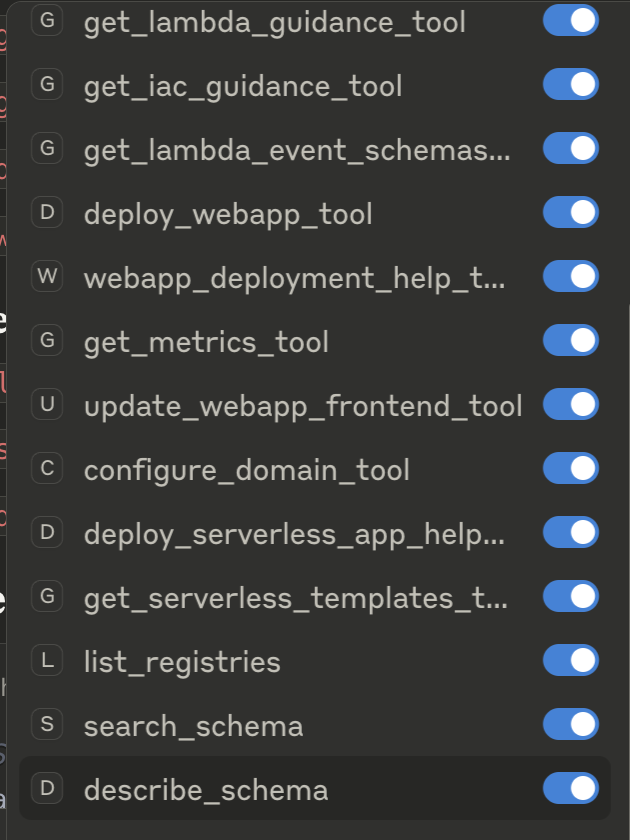
❗Be aware that you need to have an IAM user for this with the appropriate role and policy.
If you are using Claude Code by Anthropic, you could add the MCP Server with the following command:
# Add with explicit environment variables
claude mcp add awslabs-serverless \
  -e AWS_PROFILE=claude-agent \
  -e AWS_REGION=us-east-1 \
  -- uvx awslabs.aws-serverless-mcp-server@latest --allow-write --allow-sensitive-data-access


Output:
Added stdio MCP server awslabs-serverless with command: uvx awslabs.aws-serverless-mcp-server@latest --allow-write --allow-sensitive-data-access to local config
Verify by listing the MCP servers:
 claude mcp list

awslabs-serverless: uvx awslabs.aws-serverless-mcp-server@latest --allow-write --allow-sensitive-data-access
Now you could simply ask the agent to create a lambda function, like the following:
> create a simple AWS Lambda function that returns Hello World

⏺ I'll help you create a simple AWS Lambda function that returns "Hello World". Let me start by planning this task.

⏺ Update Todos
  ⎿  ☐ Check current directory structure and existing files
     ☐ Initialize AWS SAM project for Lambda function
     ☐ Create simple Hello World Lambda function
Along the way, we can see that it uses the MCP server to interact with AWS:
⏺ awslabs-serverless:sam_init_tool (MCP)(project_name: "hello-world-lambda", runtime: "python3.13", ...)
⏺ awslabs-serverless:sam_build_tool (MCP)(project_directory: "/Users/alma/dev-projects/...")
⏺ awslabs-serverless:sam_deploy_tool (MCP)(application_name: "hello-world-lambda", ...)
It will now be deployed with CloudFormation:
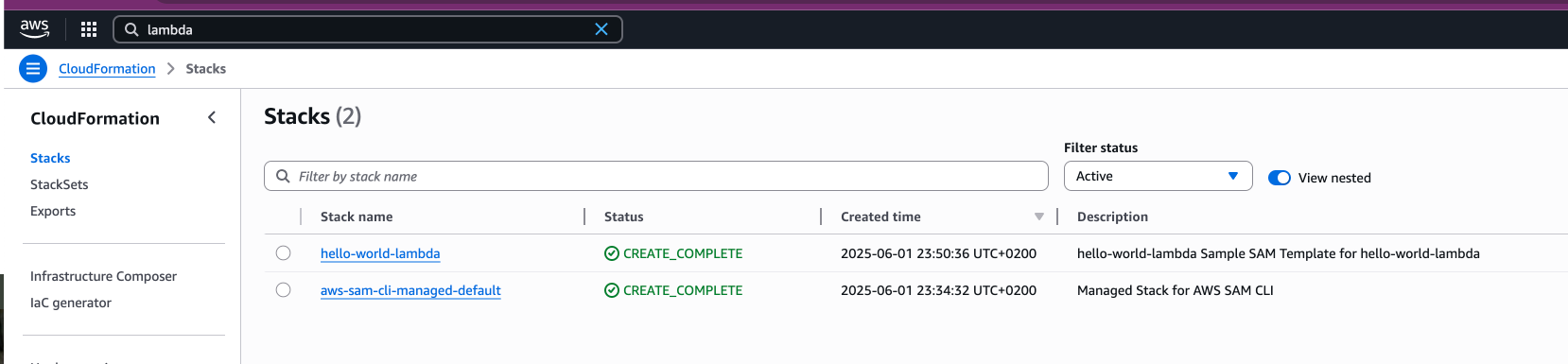
The result is:

If we invoke the Lambda, the result is the following:
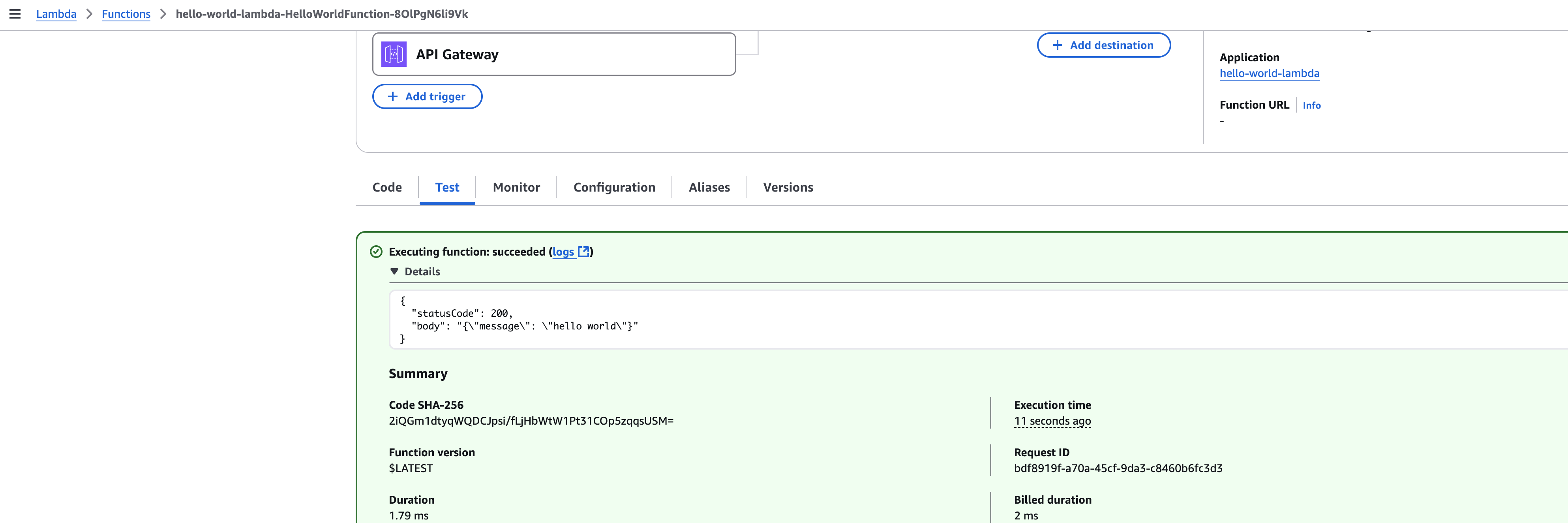
Claude AI Agent managed to create the lambda function correctly!
Based on the AWS Lambda above, we might want to get some logs from CloudWatch. One of the features is called sam_logs_toolwhich does just that.
Here I simply asked the Claude AI Agent to get the logs for the Lambda we created and ran:
> provide the cloudwatch logs for the hello world lambda

Output:

 awslabs-serverless:sam_logs_tool (MCP)(stack_name: "hello-world-lambda", resource_name: "HelloWorldFunction")…
  ⎿ {
      "success": true,
      "message": "Successfully fetched logs for resource 'HelloWorldFunction'",
      "output": "You can now use 'sam logs' without --name parameter, which will pull the logs from all supported resources in your stack.\n2025/06/01/[$LATEST]9150d36185a745c4bb7e49cb43a56233
    2025-06-01T22:04:43.072000 INIT_START Runtime Version: python:3.13.v43\tRuntime Version ARN:
    arn:aws:lambda:us-east-1::runtime:df8faab1a4e36a929b5b10ecff95891dfa72d84ddc1402efb6a66f373fa0c7af\n2025/06/01/[$LATEST]9150d36185a745c4bb7e49cb43a56233 2025-06-01T22:04:43.162000 START RequestId:
     bdf8919f-a70a-45cf-9da3-c8460b6fc3d3 Version: $LATEST\n2025/06/01/[$LATEST]9150d36185a745c4bb7e49cb43a56233 2025-06-01T22:04:43.165000 END RequestId:
    bdf8919f-a70a-45cf-9da3-c8460b6fc3d3\n2025/06/01/[$LATEST]9150d36185a745c4bb7e49cb43a56233 2025-06-01T22:04:43.165000 REPORT RequestId: bdf8919f-a70a-45cf-9da3-c8460b6fc3d3\tDuration: 1.79
    ms\tBilled Duration: 2 ms\tMemory Size: 128 MB\tMax Memory Used: 35 MB\tInit Duration: 86.75 ms\t\n"
    }

⏺ Here are the CloudWatch logs for your Lambda function. The logs show:

  - Function initialized with Python 3.13 runtime
  - Successfully handled a request in 1.79ms
  - Used only 35MB of the allocated 128MB memory
  - Cold start initialization took 86.75ms

The function appears to be running successfully!For teams already working with serverless architectures, this tool addresses some common pain points. Serverless development often involves navigating multiple AWS services, understanding event patterns, and implementing proper monitoring - areas where having an AI assistant with deep serverless knowledge can significantly speed up development.
Current Reality: Start Small, Think Security
Today's development teams probably won't use this for production changes or critical deployments right away - and that's the smart approach. However, there are compelling opportunities to experiment safely:
Low-Risk, High-Value Starting Points:
While the announcement is promising, there are some practical considerations. The tool is currently focused on AWS serverless services, so if you're working in a multi-cloud environment, you'll need additional tools for other platforms.
The effectiveness also depends heavily on the quality of your AI coding assistant integration. The MCP Server provides the knowledge, but the AI assistant needs to know how to use it effectively.
Security-wise, while the default read-only mode is a good start, teams will need to carefully consider when and how to enable write permissions, especially in production environments.
The teams should also think about security, like:
The AWS Serverless MCP Server represents a practical step forward in AI-assisted development for serverless applications.
For teams already invested in AWS serverless technologies, it's worth experimenting with. The open-source nature means you can try it without significant commitment, and the security guardrails make it relatively safe to explore.
The real test will be how well it performs in day-to-day development workflows, but the initial feature set suggests AWS has thought carefully about the practical needs of serverless developers. If you're building serverless applications on AWS, this tool deserves a spot on your evaluation list.
https://awslabs.github.io/mcp/servers/aws-serverless-mcp-server/
此内容由惯性聚合(RSS阅读器)自动聚合整理,仅供阅读参考。 原文来自 — 版权归原作者所有。