





惯性聚合 高效追踪和阅读你感兴趣的博客、新闻、科技资讯
阅读原文 在惯性聚合中打开

推荐订阅源

钛媒体:引领未来商业与生活新知
钛媒体:引领未来商业与生活新知
Application and Cybersecurity Blog
H
Help Net Security
罗磊的独立博客
博客园 - Franky
小众软件
小众软件
博客园 - 三生石上(FineUI控件)
博客园 - 叶小钗
爱范儿
爱范儿
月光博客
月光博客
博客园 - 聂微东
奇客Solidot–传递最新科技情报
奇客Solidot–传递最新科技情报
量子位
GbyAI
GbyAI
freeCodeCamp Programming Tutorials: Python, JavaScript, Git & More
大猫的无限游戏
大猫的无限游戏
Y
Y Combinator Blog
Martin Fowler
Martin Fowler
Hugging Face - Blog
Hugging Face - Blog
The GitHub Blog
The GitHub Blog
T
Threat Research - Cisco Blogs
Spread Privacy
Spread Privacy
Hacker News: Ask HN
Hacker News: Ask HN
B
Blog RSS Feed
Know Your Adversary
Know Your Adversary
T
Troy Hunt's Blog
I
InfoQ
L
Lohrmann on Cybersecurity
Recent Announcements
H
Hacker News: Front Page
Scott Helme
Scott Helme
Jina AI
Jina AI
云风的 BLOG
云风的 BLOG
Engineering at Meta
Engineering at Meta
The Register - Security
C
CERT Recently Published Vulnerability Notes
MongoDB | Blog
MongoDB | Blog
Help Net Security
Help Net Security
MyScale Blog
MyScale Blog
F
Fortinet All Blogs
Project Zero
Project Zero
cs.CV updates on arXiv.org
J
Java Code Geeks
AWS News Blog
AWS News Blog
阮一峰的网络日志
阮一峰的网络日志
T
Threatpost
D
Darknet – Hacking Tools, Hacker News & Cyber Security
Apple Machine Learning Research
B
Blog
Cloudbric
Cloudbric

VictoriaMetrics: Simple & Reliable Monitoring for Everyone on VictoriaMetrics

Operator now has Long-Term Support (LTS) version Multi-tiered Observability: A Practical Way to Handle Diverse Workloads VictoriaMetrics April 2026 Ecosystem Updates Not All Telemetry Requires Premium Pricing VictoriaMetrics at KubeCon Amsterdam: Community Highlights What's new in VictoriaMetrics Anomaly Detection (Q1 2026) What's New in VictoriaMetrics Cloud Q1 2026? Logs, MCP Server, Better Alerting, and... a Secret Project VictoriaMetrics at KubeCon: Optimizing Tail Sampling in OpenTelemetry with Retroactive Sampling VictoriaMetrics March 2026 Ecosystem Updates Observability Lessons From OpenAI Benchmarking Kubernetes Log Collectors: vlagent, Vector, Fluent Bit, OpenTelemetry Collector, and more VictoriaMetrics February 2026 Ecosystem Updates VictoriaMetrics at FOSDEM, Cloud Native Days France, and CfgMgmtCamp Ghent VictoriaLogs in VictoriaMetrics Cloud: Fast, Cost-Effective Log Management is Here What’s new in VictoriaMetrics Anomaly Detection (2025) VictoriaMetrics January 2026 Ecosystem Updates VictoriaLogs Basics: What You Need to Know, with Examples & Visuals What's New in VictoriaMetrics Cloud Q4 2025? New tiers, more deployment options, IaC and alerting rules. Vibe coding tools observability with VictoriaMetrics Stack and OpenTelemetry How a US Software Provider Improved Traffic Alerting with VictoriaMetrics Anomaly Detection VictoriaMetrics 2025 Developer Experience: A Year in Review Spotify’s performance & control across large monitoring environments with VictoriaMetrics VictoriaMetrics Achieves Red Hat OpenShift Operator Certification Our latest updates across the VictoriaMetrics Observability ecosystem New Capacity Tiers in VictoriaMetrics Cloud Announcing 1B+ Downloads & Product Development With Logs, Traces, Metrics AI Agents Observability with OpenTelemetry and the VictoriaMetrics Stack Discarding gRPC-Go: The Story Behind OTLP/gRPC Support in VictoriaTraces What's New in VictoriaMetrics Cloud Q3 2025? From new region in Asia to proactive alerts How DreamHost Slashed Memory Usage by 80% and Scaled to 76 Million Time Series Upcoming Conferences & Meetups: Where to Meet Our Team VictoriaMetrics Long-Term Support (LTS): H2 2025 Update Creating a Sustainable Open Source Business Model - Introduction Full-Stack Observability with VictoriaMetrics in the OTel Demo Alerting Best Practices vmanomaly Deep Dive: Smarter Alerting with AI (Tech Talk Companion) VictoriaLogs Practical Ingestion Guide for Message, Time and Streams Monotonic and Wall Clock Time in the Go time package Hello Singapore! VictoriaMetrics Cloud Expands to Asia Pacific MCP Server Integration & Much More: What's New in VictoriaMetrics Cloud Q2 2025 FIPS 140-3 Compatible Builds for VictoriaMetrics Enterprise Components VictoriaLogs Unleashed: Cluster Version Now Available for Exceptional, Linear Scaling Integrations made easy with VictoriaMetrics Cloud Developer's Note: Research on Distributed Tracing, Comparing With Tempo and ClickHouse vmagent: Key Features Explained in Under 15 Minutes Go synctest: Solving Flaky Tests vmalert: Maximize Your Monitoring (Tech Talk Companion) Celebrating 14K Stars on GitHub: Spring Update vmalert: Maximize Your Monitoring VictoriaMetrics Connects with the Open Source Community at LinuxFest Northwest 2025 Graceful Shutdown in Go: Practical Patterns VictoriaLogs: Gaps, Gains & Growth Prometheus Monitoring: Functions, Subqueries, Operators, and Modifiers VictoriaMetrics Cloud: What's New in Q1 2025? Don’t default to microservices: You’ll thank us later! Container CPU Requests & Limits Explained with GOMAXPROCS Tuning gRPC in Go: Streaming RPCs, Interceptors, and Metadata From Chaos to Clarity with VictoriaLogs Prometheus Alerting 101: Rules, Recording Rules, and Alertmanager Heading to London: Meet Our Team at KubeCon Europe 2025 Inside vmselect: The Query Processing Engine of VictoriaMetrics Meet Our Team at Scale 22x Practical Protobuf - From Basic to Best Practices VictoriaLogs Status Update: Heading Towards the Cluster Version 24th of February 2025 Statement: VictoriaMetrics Stands with Ukraine! Prometheus Metrics Explained: Counters, Gauges, Histograms & Summaries Prometheus Monitoring: Instant Queries and Range Queries Explained 300%+ Growth in 2024: Join Our Team in 2025! FOSDEM 2025 recap How Protobuf Works—The Art of Data Encoding OpenTelemetry, Prometheus, and More: Which Is Better for Metrics Collection and Propagation? How vmstorage Handles Query Requests From vmselect How vmstorage's IndexDB Works VictoriaMetrics Tech Talk Stream: A Deep Dive into Blackbox Monitoring How HTTP/2 Works and How to Enable It in Go VictoriaMetrics Cloud: What's New in Q4 2024? How vmstorage Processes Data: Retention, Merging, Deduplication,... How vmstorage Handles Data Ingestion From vminsert When Metrics Meet vminsert: A Data-Delivery Story From net/rpc to gRPC in Go Applications Piros | VictoriaMetrics Partner Allenta | VictoriaMetrics Partner CloudRaft | VictoriaMetrics Partner Sensedia & VictoriaMetrics: API-compatible Efficient Storage Scalable Prometheus: Why DSV Chose VictoriaMetrics Sensor Factory | VictoriaMetrics Partner Erythix | VictoriaMetrics Partner Groove X & VictoriaMetrics: Faster Device Health Monitoring Scaled & Performant Monitoring at Spotify with VictoriaMetrics Grammarly & VictoriaMetrics: 10× Lower Costs & Direct Access Zelarsoft | VictoriaMetrics Partner DFKI & VictoriaMetrics: Efficient Long-Term Metric Storage Niubits | VictoriaMetrics Partner Megazone Cloud | VictoriaMetrics Partner Cogito Software | VictoriaMetrics Partner Bajau | VictoriaMetrics Partner Find Out Why Dig Security Chose VictoriaMetrics! Ness | VictoriaMetrics Partner Alpha Data | VictoriaMetrics Partner SIOS Technology | VictoriaMetrics Partner
Latest updates about backup components of VictoriaMetrics
Zakhar Bessarab · 2023-01-09 · via VictoriaMetrics: Simple & Reliable Monitoring for Everyone on VictoriaMetrics

VictoriaMetrics is proud to announce that we consider vmbackup and vmbackupmanager to be feature-complete solutions as of release 1.85.3. These backup components are essential for ensuring the safety and integrity of your data, and we have made a number of improvements in recent releases to make them even more reliable and user-friendly.

Some key updates in the last few releases include:

We hope these updates will help you make the most of these powerful backup solutions and keep your data safe and secure.

Support of Azure Blob Storage

#

Supporting Azure Blob Storage was a final piece to support all 3 major cloud providers. Azure storage backend is available for both vmbackup and vmbackupmanager.

In order to use newly supported storage backend provide credentials and URL for backup location in form azblob://<container>/<path/to/backup>. Credentials for Azure Blob must be provided as environment variables. You can either use AZURE_STORAGE_ACCOUNT_NAME and AZURE_STORAGE_ACCOUNT_KEY, or AZURE_STORAGE_ACCOUNT_CONNECTION_STRING.

vmbackupmanager simplifies and streamlines the process of regularly creating backups. It runs as a separate service alongside the single-node or vmstorage node of a cluster setup, and uses command-line flags to define the types of backups to be created and retention policies to be applied.

vmbackupmanager also employs a smart upload strategy to save bandwidth when creating multiple backups. This is achieved by first uploading changed partitions to the latest backup, and then using server-side copy to create a full backup from already-uploaded partitions.

Improved Kubernetes automation for vmbackupmanager

#

Previously, vmbackupmanager was only responsible for creating backups. In order to restore from the backup, it was required to use vmrestore with its own configuration flags (even though they’re similar). Starting from 1.83.0 it is possible to use vmbackupmanager for full backup lifecycle.

Before this feature was added, in order to restore backup data in k8s it was required to do a quite complex and error-prone process which required:

  • To scale down existing storage nodes
  • To attach PVCs to pods with vmrestore and perform restore
  • Scale storage nodes to previous state

Or an easier option such as:

  • To add vmrestore as an init container (this step triggers pods restart and restores the data)
  • To remove init container (otherwise after pod restart vmrestore will restore backup again)

In order to improve this process we have added CLI mode for vmbackupmanager which will allow:

  • To see all backups available for restore at the current storage node
  • To configure which backup should be restored on the next pod restart

Now in order to restore from the backup, assuming vmbackupmanager is already used for creating the backup, follow the procedure below:

  • Add an init container for vmstorage or single-node pod.
    • For the VM Operator you just need to add the following:
      vmBackup:
        restore:
          onStart:
            enabled: true
      
    • For official Helm charts users:
      vmbackupmanager:
        restore:
          onStart:
            enabled: true
      
  • Exec into the pod
  • Run /vmbackupmanager backup list and pick a backup you need to restore
    $ /vmbackupmanager backup list
    ["daily/2022-10-06","daily/2022-10-10","hourly/2022-10-04:13","hourly/2022-10-06:12","hourly/2022-10-06:13","hourly/2022-10-10:14","hourly/2022-10-10:16","monthly/2022-10","weekly/2022-40","weekly/2022-41"]
    
  • Run /vmbackupmanager restore create {backup_name}
    $ /vmbackupmanager restore create daily/2022-10-10
    
  • Restart pod

The whole process now seems much easier and less error-prone.

By using CLI it is also easy to restore backup into a separate cluster, read more about this in our documentation.

But that’s not all - the CLI commands for vmbackupmanager actually use the vmbackupmanager API to perform operations. This means that you can use the vmbackupmanager APIs to build custom workflows for more specialized use cases. You can find more info about using API here.

Improved observability

#

The last step was to add better observability for the backup process. Release 1.85.3 added metrics that made it possible to get more information about vmbackupmanager status. Having new data in place allowed us to build an official dashboard for vmbackupmanager. You can find it on Grafana website and Github.
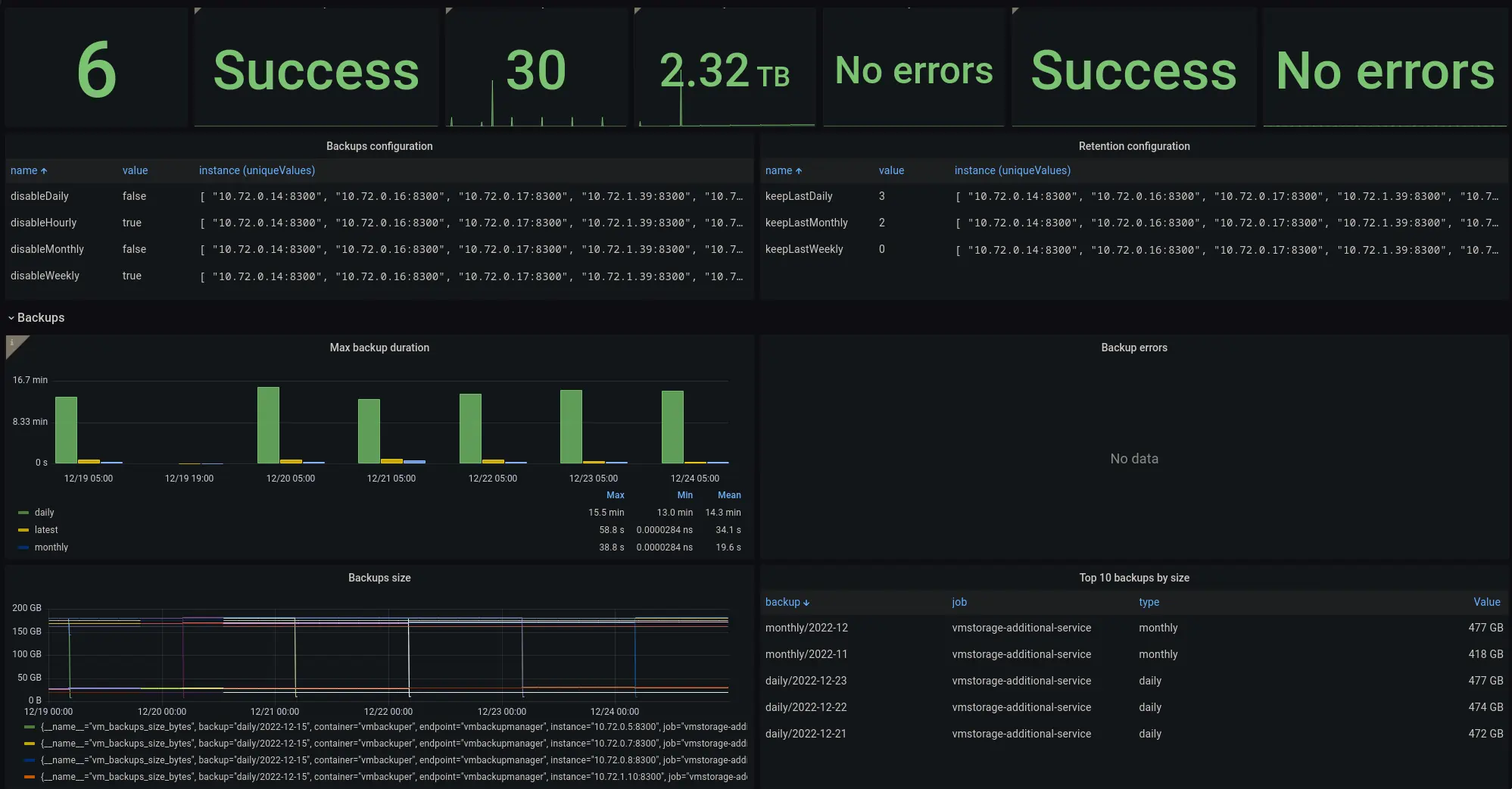
Grafana dashboard for vmbackupmanager Grafana dashboard for vmbackupmanager

Make sure to configure monitoring of vmbackupmanager to see the status of backups.