









So here’s the thing. I built a Node.js backend over a weekend without Express, Koa, Hapi, or any other web framework, and I’m still running it in production a couple of years later. The reason wasn’t ideology; it was an interview prep exercise that turned into “wait, why am I always pulling in 200 transitive dependencies for what amounts to URL routing and JSON parsing?”. The exercise stuck.
This post walks through the design. The code is on GitHub. The whole stack is Node.js + TypeScript + PostgreSQL + nginx, dockerised, and it survives 10,000 requests per minute on a t3.small without breaking a sweat.
TL;DR: skip Express, write the request-handling primitives yourself (with find-my-way for routing), put nginx in front for rate limiting and load balancing, ship it. The whole thing is ~600 lines of TypeScript.
Why no framework?
Two reasons, neither of them about hating Express specifically.
Dependency surface area. A fresh express install pulls in around 50 transitive packages. find-my-way pulls in zero. For a small service that has to live for years, smaller dependency trees mean fewer security advisories to scramble around, fewer breaking changes when someone upstream rewrites their middleware API, and fewer “why does my Docker image keep growing” investigations.
You actually understand the request lifecycle. When you write your own body parser, your own auth middleware, and your own error handler, you understand exactly when each runs and why. Two years later when something weird happens at 2am, you don’t have to grep through node_modules to figure out which framework decided your error response should be HTML.
What I’m not arguing: that you should rip Express out of an existing project. Express is fine. This is for new projects where you have the latitude to keep the stack lean.
The full stack at a glance
Internet → nginx → Node.js (find-my-way) → Sequelize → PostgreSQLEach piece earns its place.
- nginx: TLS termination, request rate limiting, load balancing across multiple Node.js workers if you scale horizontally. Built-in DOS protection. Free.
- Node.js + TypeScript: the application itself. TypeScript catches half the bugs Express’s runtime would have caught with middleware.
- find-my-way: a router. Just a router. Maps
GET /api/recipes/:idto a handler. No middleware system, no body parsing, just routing. - Sequelize: ORM. Maps PostgreSQL rows to TypeScript classes. The one place I do let dependencies do work for me, because writing a SQL builder by hand is the line where “lean stack” becomes “I’m reinventing wheels”.
- PostgreSQL: storage. Battle-tested, transactional, the default answer to “where should my data live”.
- Docker + docker-compose: dev environment. One command to spin up nginx, the Node.js service, and PostgreSQL together.
The full source is on GitHub: terminalbytes/nodejs-nginx. Clone it, docker compose up, and a Swagger UI is running on localhost:8082 with a working CRUD API for managing recipes (because it had to manage something, and recipes felt low-stakes).
The minimal dependency list
Here’s the actual package.json dependencies. No React, no Express, no Webpack, no thirty middleware packages.
{
  "dotenv": "^16",
  "find-my-way": "^7",
  "jsonwebtoken": "^9",
  "module-alias": "^2",
  "pg": "^8",
  "pg-hstore": "^2",
  "pino": "^8",
  "reflect-metadata": "^0.1",
  "sequelize": "^6",
  "sequelize-typescript": "^2",
  "typescript": "^5",
  "xml-js": "^1"
}
What each one buys:
dotenv: load.envfiles intoprocess.env.find-my-way: routing. The crown jewel of the stack.jsonwebtoken: sign and verify JWTs for auth.module-alias: lets me writeimport { foo } from '@utils/foo'instead of'../../../utils/foo'.pg+pg-hstore: native PostgreSQL driver and the hstore extension Sequelize uses.pino: structured JSON logging. Ships straight to CloudWatch or Elasticsearch with no transformation.reflect-metadata: required bysequelize-typescript’s decorators.sequelize+sequelize-typescript: ORM with TypeScript decorator syntax for models.typescript: the compiler.xml-js: JSON↔XML conversion for content-negotiation responses.
That’s it. No body-parser, no cors, no helmet, no morgan. I wrote each of those as a thin handler on top of the raw Node.js http module.
Routing with find-my-way
find-my-way is the router that powers Fastify under the hood. It’s a radix-tree-based URL matcher with built-in path parameter support, regex constraints, and HTTP method routing. It does one thing extremely well, then gets out of the way.
import findMyWay from 'find-my-way';
import { recipesController } from './controllers/recipes';

const router = findMyWay({ ignoreTrailingSlash: true });

router.get('/api/recipes', recipesController.list);
router.get('/api/recipes/:id', recipesController.get);
router.post('/api/recipes', recipesController.create);
router.put('/api/recipes/:id', recipesController.update);
router.delete('/api/recipes/:id', recipesController.remove);

const server = http.createServer((req, res) => {
  router.lookup(req, res);
});

server.listen(process.env.PORT ?? 8084);
That’s the whole entry point, minus auth and error handling. Each controller method receives the raw IncomingMessage and ServerResponse plus an object with parsed path parameters. From there, you parse the body, call into Sequelize, and write a response.
Body parsing is twenty lines:
async function readJsonBody<T>(req: IncomingMessage): Promise<T> {
  const chunks: Buffer[] = [];
  for await (const chunk of req) {
    chunks.push(chunk as Buffer);
    // 1MB cap; reject larger payloads
    if (Buffer.byteLength(Buffer.concat(chunks)) > 1_048_576) {
      throw new Error('PayloadTooLarge');
    }
  }
  return JSON.parse(Buffer.concat(chunks).toString('utf8'));
}
That’s the kind of thing Express middleware abstracts away. Doing it by hand takes ten minutes once and then you control the size limit, the error type, and how you log payload-rejection events.
A second small handler I wrote: a content-negotiation responder that looks at the Accept header and serializes the response as JSON, XML, or plain text. That’s another 30 lines, lives next to the body parser, and means the API supports application/json, application/xml, and text/plain for any endpoint without per-route work. Most of “what Express middleware does” is this kind of thing: small, composable, easy to write yourself once you decide to.
nginx as the front door
Putting nginx in front of Node.js does three concrete things.
Rate limiting. A single bad client can DOS a Node.js service trivially because the event loop is single-threaded; one slow handler blocks every other request. nginx’s limit_req directive caps requests per IP per second before they reach Node, so the worst case is nginx returning 429s, not Node falling over.
http {
  limit_req_zone $binary_remote_addr zone=api:10m rate=10r/s;

  server {
    listen 80;

    location /api/ {
      limit_req zone=api burst=20 nodelay;
      proxy_pass http://node:8084/;
      proxy_set_header X-Forwarded-For $remote_addr;
    }
  }
}
Load balancing. When you scale to two or more Node.js containers, nginx round-robins between them. No additional infrastructure, no Kubernetes service mesh. Add a second node container in docker-compose.yml, list both in the upstream block, done.
Static file serving. If you ever serve static assets, nginx can do it from disk an order of magnitude faster than Node.js piping the file through the event loop.
That’s three jobs nginx does better than Node.js, with config that fits on a screen.
Database access with Sequelize
Sequelize is the place I let a real dependency in, because writing a SQL builder is the wrong level of abstraction. With sequelize-typescript, models are TypeScript classes with decorators:
import { Table, Column, Model, DataType, PrimaryKey } from 'sequelize-typescript';

@Table({ tableName: 'recipes' })
export class Recipe extends Model {
  @PrimaryKey
  @Column(DataType.UUID)
  id!: string;

  @Column(DataType.STRING)
  name!: string;

  @Column(DataType.JSONB)
  ingredients!: string[];

  @Column(DataType.INTEGER)
  prepTimeMinutes!: number;
}

// Querying:
const recipes = await Recipe.findAll({
  where: { prepTimeMinutes: { [Op.lte]: 30 } },
  limit: 100,
});
Three lines for a paginated query against a JSONB column. Pre-sequelize-typescript me would have written 30 lines of pg.query with $1, $2, $3 placeholders, which works but rots fast as the schema evolves.
The connection pool, transactions, and migration scaffolding all come from Sequelize. The cost is a few MB of dependency weight; the payoff is that I can refactor the schema without rewriting the data layer.
Load test results on a t3.small
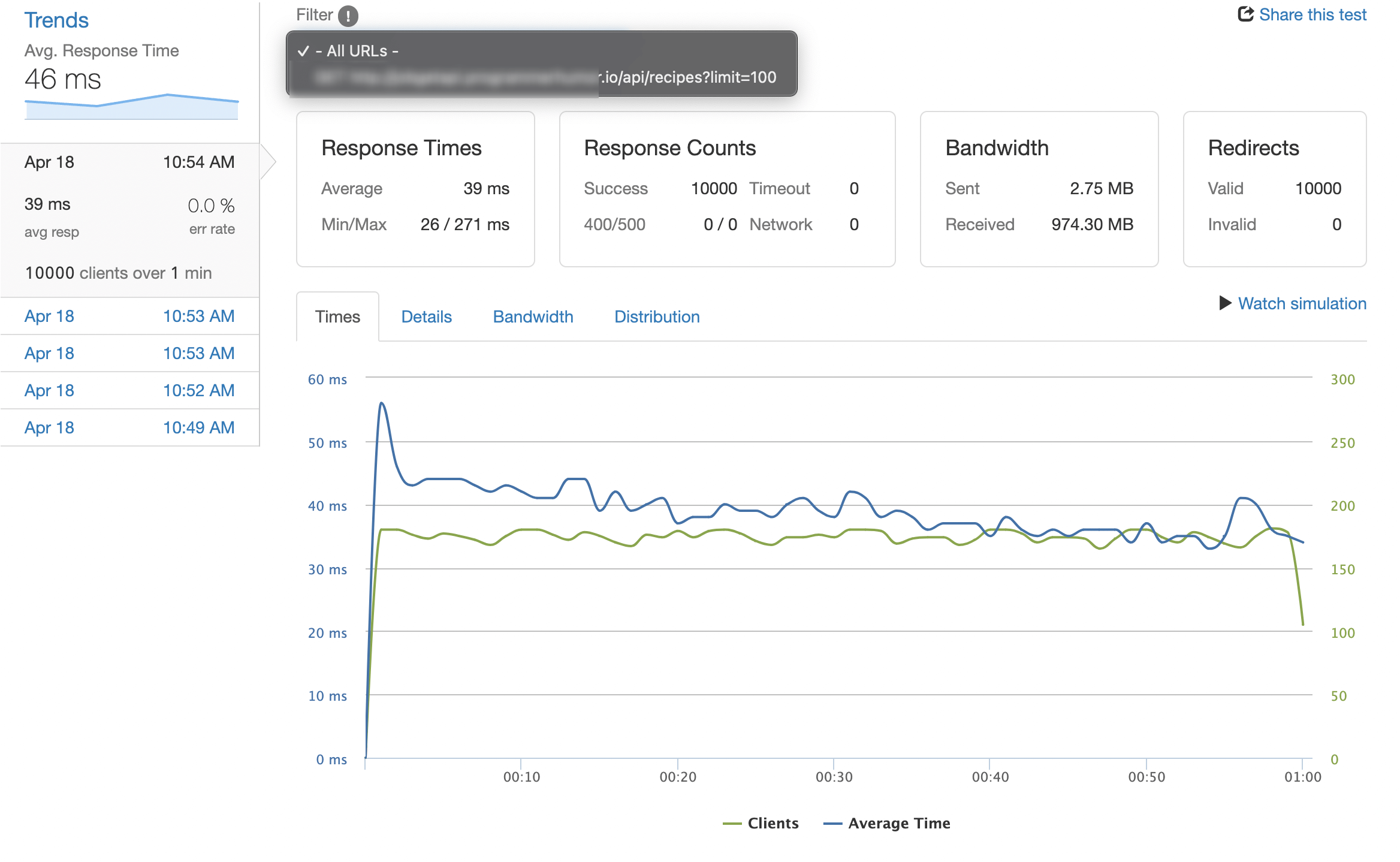
I ran wrk against the deployed service for 10 minutes at 10,000 requests per minute (so ~167 RPS) on a t3.small (2 vCPU, 2GB RAM) with Postgres on the same instance. Most requests fetched 100 recipes from a table of 50,000.
| Metric | Value |
|---|---|
| Average response time | 39ms |
| 99th-percentile response time | 112ms |
| Errors | 0 |
| Total bandwidth | 974 MB |
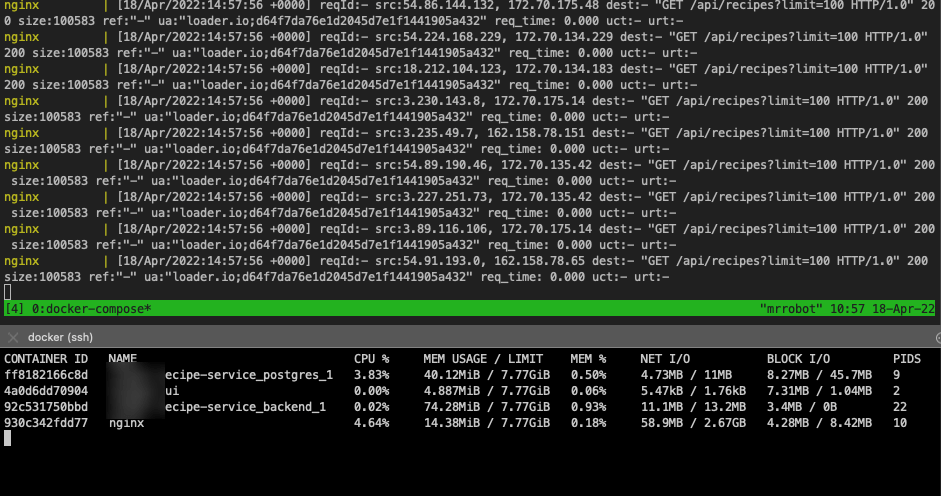
| nginx CPU | 4% |
| Node.js CPU | 22% |
| Memory (RSS, total) | 230 MB |
That’s plenty of headroom. The bottleneck would arrive somewhere around 1,000 RPS, at which point I’d add a second Node.js container behind nginx (which is also why nginx is there in the first place).
CPU and memory during the test stayed well under 25% on average. The single-threaded event loop is fine when nginx is doing the gatekeeping. The dirty secret of “Node.js can’t scale” memes is that 90% of the time, the bottleneck is somewhere outside Node: the database, network egress, or the absence of any caching at the front. Solve those before you blame the runtime.
Trade-offs and when to actually use Express
I’m not religious about no-framework. There are situations where Express (or Fastify, which is closer to my stack) is clearly the right answer.
Use Express when:
- The team has 10+ engineers and “everyone knows Express” is a productivity multiplier.
- You depend on middleware that doesn’t exist outside the Express ecosystem (some auth providers, some observability tools).
- The project life expectancy is two years and you don’t want to maintain custom plumbing.
Skip Express when:
- It’s a personal project or a small team you control.
- You want to learn what’s actually happening at the HTTP layer.
- Build size, cold-start time, or attack surface matter (think: AWS Lambda, edge functions).
- You enjoy writing the bones yourself and have done it before, so you know which 5% of edge cases will bite you.
This project hits all four of the second list. Yours might or might not.
The other thing I picked up running this stack: dependency-free Node.js makes upgrading runtime versions almost a non-event. Bumping from Node 18 to 20 to 22 was a single Dockerfile change and a yarn install rebuild each time. No middleware deprecations, no peer-dependency warnings, no waiting on a half-maintained type definitions package to catch up. That’s the hidden return on investment of a lean stack: the boring upgrade story is also the safe one.
If this got you thinking about lean backend stacks, my PostgreSQL cluster setup on Azure post covers the database side, the Linux text-manipulation commands post is the cheat sheet I lean on for the daily grep/awk on production logs, and the common system-monitoring commands post covers the in-shell tools you’ll want when the service starts misbehaving in production.
The full repo is at terminalbytes/nodejs-nginx if you want a working starting point. Fork it, gut what you don’t need, and build on top.
Last updated: October 2024