









In the last article we looked at how Komposition automatically classifies moving and still segments in imported video media, how I went from ineffective testing by eye to finding curious bugs using property-based testing (PBT). If you haven’t read it, or its preceding posts, I encourage you to check them out first:
This is the final case study in the “Property-Based Testing in a Screencast Editor” series. It covers property-based integration testing and its value during aggressive refactoring work within Komposition.
In Komposition, a project’s state is represented using an in-memory data structure. It contains the hierarchical timeline, the focus, import and render settings, project storage file paths, and more. To let users navigate backwards and forwards in their history of project edits, for example when they have made a mistake, Komposition supplies undo and redo commands.
The undo/redo history was previously implemented as a data structure recording project states, compromised of:
The undo/redo history data structure held entire project state values. Each undoable and redoable user action created a new state value. Let’s look a bit closer at how this worked.
When a user performed an undoable/redoable action, the undo/redo history would:
This can be visualized as in the following diagram, where the state d is being replaced with a new state h, and d being pushed onto the undo stack. The undo/redo history to the left of the dividing line is the original, and the one to the right is the resulting history.

Again, note that performing new actions discarded all states in the redo stack.
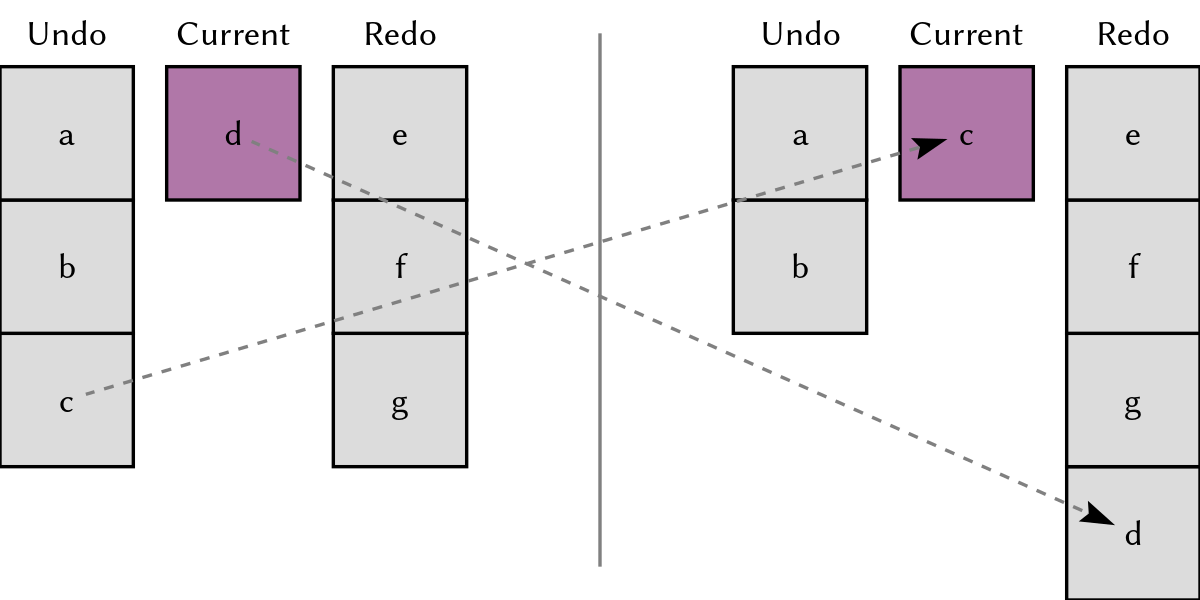
When the user chose to undo an action, the undo/redo history would:
The following diagram shows how undoing the last performed action’s resulting state, d, pushes d onto the redo stack, and pops c from the undo stack to use that as the current state.
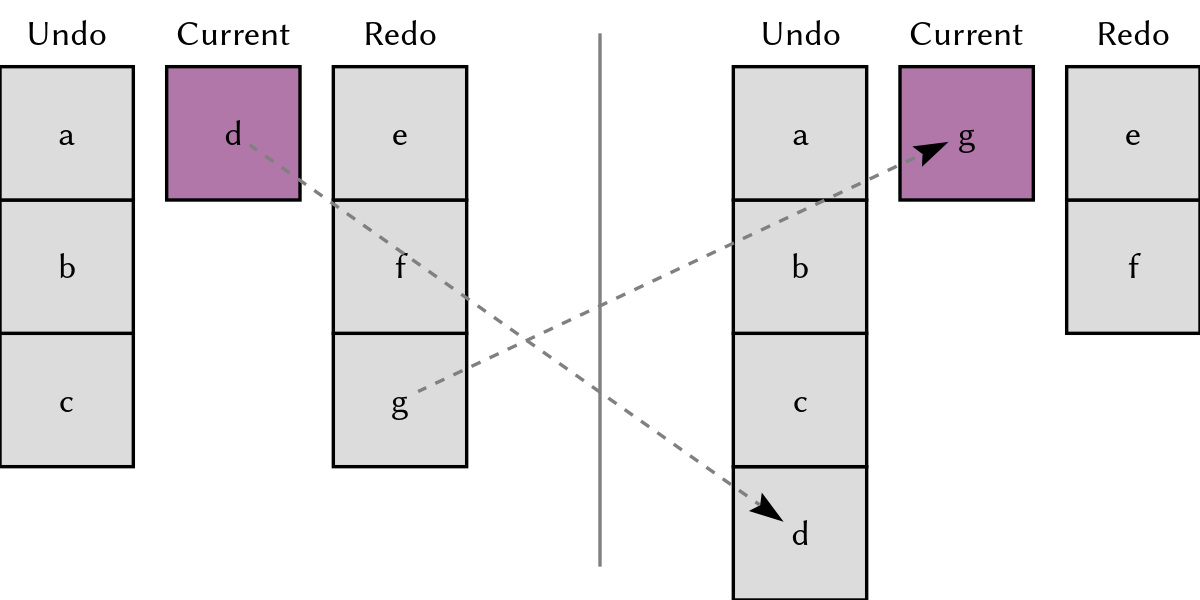
When the user chose to redo an action, the undo/redo history would:
The last diagram shows how redoing, recovering a previously undone state, pops g from the redo stack to use that as the current state, and pushes the previous state d onto the undo stack.
Note that not all user actions in Komposition are undoable/redoable. Actions like navigating the focus or zooming are not recorded in the history.
While the “two stacks of states” algorithm was easy to understand and implement, it failed to meet my non-functional requirements. A screencast project compromised of hundreds or thousands of small edits would consume gigabytes of disk space when stored, take tens of seconds to load from disk, and consume many gigabytes of RAM when in memory.
Now, you might think that my implementation was incredibly naive, and that the performance problems could be fixed with careful profiling and optimization. And you’d probably be right! I did consider going down that route, optimizing the code, time-windowing edits to compact history on the fly, and capping the history at some fixed size. Those would all be interesting pursuits, but in the end I decided to try something else.
Instead of optimizing the current stack-based implementation, I decided to implement the undo/redo history in terms of inverse actions. In this model, actions not only modify the project state, they also return another action, its inverse, that reverses the effects of the original action. Instead of recording a new project state data structure for each edit, the history only records descriptions of the actions themselves.
I realized early that introducing the new undo/redo history implementation in Komposition was not going to be a small task. It would touch the majority of command implementation code, large parts of the main application logic, and the project binary serialization format. What it wouldn’t affect, though, was the module describing user commands in abstract.
To provide a safety net for the refactoring, I decided to cover the undo/redo functionality with tests. As the user commands would stay the same throughout my modifications, I chose to test at that level, which can be characterized as integration-level testing. The tests run Komposition, including its top-level application control flow, but with the user interface and some other effects stubbed out. Making your application testable at this level is hard work, but the payoff can be huge.
With Komposition featuring close to twenty types of user commands, combined with a complex hierarchical timeline and navigation model, the combinatory explosion of possible states was daunting. Relying on example-based tests to safeguard my work was not satisfactory. While PBT couldn’t cover the entire state space either, I was confident it would improve my chances of finding actual bugs.
Before I began refactoring, I added tests for the inverse property of undoable/redoable actions. The first test focuses on undoing actions, and is structured as follows:
Let’s look at the Haskell Hedgehog property test:
hprop_undo_actions_are_undoable = property $ do

  -- 1. Generate initial timeline and focus
  timelineAndFocus <- forAllWith showTimelineAndFocus $
    Gen.timelineWithFocus (Range.linear 0 10) Gen.parallel

  -- ... and initial application state
  initialState <- forAll (initializeState timelineAndFocus)

  -- 2. Generate a sequence of undoable/redoable commands
  events <- forAll $
    Gen.list (Range.exponential 1 100) genUndoableTimelineEvent

  -- 3. Run 'events' on the original state
  beforeUndos <- runTimelineStubbedWithExit events initialState

  -- 4. Run as many undo commands as undoable commands
  afterUndos <- runTimelineStubbedWithExit (undoEvent <$ events) beforeUndos

  -- 5. That should result in a timeline equal to the one we started
  -- with
  timelineToTree (initialState ^. currentTimeline)
    === timelineToTree (afterUndos ^. currentTimeline)
The second test, focusing on redoing actions, is structured very similarly to the previous test:
The test code is also very similar:
hprop_undo_actions_are_redoable = property $ do

  -- 1. Generate the initial timeline and focus
  timelineAndFocus <- forAllWith showTimelineAndFocus $
    Gen.timelineWithFocus (Range.linear 0 10) Gen.parallel

  -- ... and the initial application state
  initialState <- forAll (initializeState timelineAndFocus)

  -- 2. Generate a sequence of undoable/redoable commands
  events <- forAll $
    Gen.list (Range.exponential 1 100) genUndoableTimelineEvent

  -- 3. Run 'events' on the original state
  beforeUndos <- runTimelineStubbedWithExit events initialState

  -- 4. Run undo commands corresponding to all original commands
  afterRedos  <-
    runTimelineStubbedWithExit (undoEvent <$ events) beforeUndos
    -- 5. Run redo commands corresponding to all original commands
    >>= runTimelineStubbedWithExit (redoEvent <$ events)

  -- 6. That should result in a timeline equal to the one we had
  -- before undoing actions
  timelineToTree (beforeUndos ^. currentTimeline)
    === timelineToTree (afterRedos ^. currentTimeline)
Note that these tests only assert on the equality of timelines, not entire project states, as undoable commands only operate on the timeline.
The undo/redo tests were written and run on the original stack-based implementation, kept around during a refactoring that took me two weeks of hacking during late nights and weekends, and finally run and passing with the new implementation based on inverse actions. Except for a few minimal adjustments to data types, these tests stayed untouched during the entire process.
The confidence I had when refactoring felt like a super power. Two simple property tests made the undertaking possible. They found numerous bugs, including:
After all tests passed, I ran the application with its GUI, edited a screencast project, and it all worked flawlessly. It’s almost too good to be true, right?
Property testing is not a silver bullet, and there might still be bugs lurking in my undo/redo history implementation. The tests I run are never going to be exhaustive and my generators might be flawed. That being said, they gave me a confidence in refactoring that I’ve never had before. Or maybe I just haven’t hit that disastrous edge case yet?
This was the last case study in the “Property-Based Testing in a Screencast Editor” series. I’ve had a great time writing these articles and giving talks on the subject. Before I wrap up, I’ll summarize my thoughts on PBT in general and my experience with it in Komposition.
Property-based testing is not only for pure functions; you can use it to test effectful actions. It is not only for unit testing; you can write integration tests using properties. It’s not only for functional programming languages; there are good frameworks for most popular programming languages.
Properties describe the general behavior of the system under test, and verify its correctness using a variety of inputs. Not only is this an effective way of finding errors, it’s also a concise way of documenting the system.
The iterative process in property-based testing, in my experience, comes down to the following steps:
Using PBT within Komposition has made it possible to confidently refactor large parts of the application. It has found errors in my thinking, my generators, my tests, and in my implementation code. Testing video scene classification went from a time consuming, repetitive, and manual verification process to a fast, effective, and automated task.
In short, it’s been a joy, and I look forward to continue using PBT in my work and in my own projects. I hope I’ve convinced you of its value, and inspired you to try it out, no matter what kind of project you’re working on and what programming language you are using. Involve your colleagues, practice writing property tests together, and enjoy finding complicated bugs before your users do!
This series is now available as an ebook on Leanpub. While the content is mostly the same, there are few changes bringing it up-to-date. Also, if you’ve already enjoyed the articles, you might want support my work by purchasing this book. Finally, you might enjoy a nicely typeset PDF, or an EPUB book, over a web page.
此内容由惯性聚合(RSS阅读器)自动聚合整理,仅供阅读参考。 原文来自 — 版权归原作者所有。