




February 2026
TL;DR: Kubernetes has a built-in rollback mechanism.
There are several strategies when it comes to deploying apps into production.
In Kubernetes, rolling updates are the default strategy to update the running version of your app.
The rolling update cycles the previous Pods out and brings newer Pods in incrementally.
Let's have a look at an example:
Zero-downtime deployment is convenient when you wish not to interrupt your live traffic.
You can deploy as many times as you want, and your user will not notice the difference.
Of course, you can only do this, if the API provided by the new version of the microservice is API compatible with the previous version. In our case, we just upgraded from version 1 to 1.1, so we are fine.
However, even if you use techniques such as Rolling updates, there's still a risk that your application will not work as expected, using the new version of the image.
Rolling back a change
When you introduce a change that breaks production, you should have a plan to roll back that change.
Kubernetes and kubectl offer a simple mechanism to roll back changes to resources such as Deployments, StatefulSets and DaemonSets.
But before talking about rollbacks, you should learn a few crucial details about deployments.
You learned how Deployments are responsible for gradually rolling out new versions of your Pods without causing any downtime.
You are also familiar with Kubernetes watching over the number of replicas in your deployment.
If you asked for 5 Pods but have only 4, Kubernetes creates one more.
If you asked for 4 Pods but have 5, Kubernetes deletes one of the running Pods.
Since the replicas is a field in the Deployment, you might be tempted to conclude that it is the Deployment's job to count the number of Pods and create or delete them.
This is not the case, interestingly.
Deployments delegate counting Pods to another component: the ReplicaSet
Every time you create a Deployment, the deployment creates a ReplicaSet and delegates creating (and deleting) the Pods.
But why isn't the Deployment creating the Pods?
Why does it have to delegate that task to someone else?
Let's consider the following scenario.
You have a Deployment with a container on version 1 and three replicas.
You change the spec for your template and upgrade your container from version 1 to version 2.
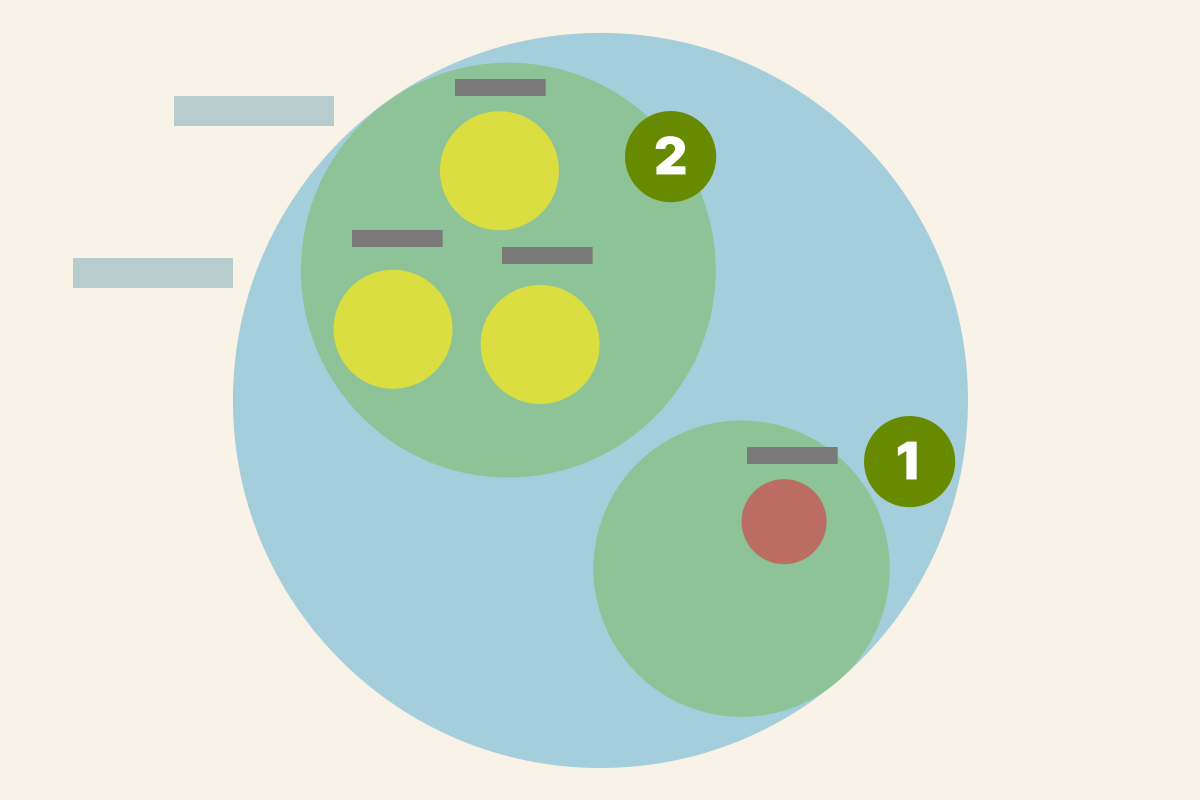
A ReplicaSet holds one type of a Pod
If there were no ReplicaSet, then during this upgrade, the Deployment would have to work with both version 1 and version 2 Pods.
In that design, the current state of the rolling update would not be explicitly represented, which would make debugging more difficult.
So, in Kubernetes there is a rule, one ReplicaSet can only have one type of a pod, so you can't have version 1 and version 2 of the Pods in the same ReplicaSet.
The Deployment knows that the two Pods can't coexist in the same ReplicaSet, so it creates a second ReplicaSet to hold version 2.
Then, gradually, it decreases the number of replicas in the old ReplicaSet and increases the count in the new one until the new ReplicaSet has all the Pods.
In other words, the sole responsibility of ReplicaSet is to count pods.
The Deployment orchestrates the rolling update by managing ReplicaSets.
But what if you don't care about rolling updates and only wish for your Pods to be recreated when deleted?
Could you create a ReplicaSet without a Deployment?
Of course, you can.
Here's an example of a ReplicaSet.
replicaset.yaml
apiVersion: apps/v1
kind: ReplicaSet
metadata:
  name: example-replicaset
spec:
  replicas: 3
  selector:
    matchLabels:
      name: app
  template:
    metadata:
      labels:
        name: app
    spec:
      containers:
      - name: app
        image: learnk8s/app:1.0.0
For reference, this is a Deployment that creates the ReplicaSet above:
deployment.yaml
apiVersion: apps/v1
kind: Deployment
metadata:
  name: example-deployment
spec:
  replicas: 3
  selector:
    matchLabels:
      name: app
  template:
    metadata:
      labels:
        name: app
    spec:
      containers:
      - name: app
        image: learnk8s/app:1.0.0
Aren't those the same?
They are in this example.
However, in a Deployment, you can define properties such as how many Pods to create and destroy during a rolling update (the field is strategy).
The exact property isn't available in the ReplicaSet.
How do you know which properties are available? You can consult the official API.
In general, the YAML for the Deployment contains the ReplicaSet plus some additional details.
You can create the ReplicaSet with:
bash
kubectl create -f replicaset.yamlPlease remember, that in practice, we don't create ReplicaSets by hand.
The go-to default object type for stateless workloads, is the Deployment.
If you were to use a ReplicaSet directly, you would lose the ability to do rolling update, and we always have to be ready to upgrade apps.
There's something else worth noting about the ReplicaSets and Deployments.
When you upgrade your Pods from version 1 to version 2, the Deployment creates a new ReplicaSet and increases the number of replicas while the previous count goes to zero.
After the rolling update, the previous ReplicaSet is not deleted — not immediately, at least.
Instead, it is kept around with a replica count of 0.
If you try to execute another rolling update from version 2 to version 3, you might notice that you have two ReplicaSets with a count of 0 at the end of the upgrade.
Why were the previous ReplicaSets not deleted or garbage collected?
Imagine that the current version of the container introduces a regression.
You probably don't want to serve unhealthy responses to your users, so you should roll back to a previous version of your app.
If you still have an old ReplicaSet, you could scale the current replicas to zero and increment the previous ReplicaSet count.
In other words, keeping the previous ReplicaSets around is a convenient mechanism to roll back to a previously working version of your app.
By default, Kubernetes stores the last 10 ReplicaSets and lets you roll back to any of them.
However, you can change how many ReplicaSets should be retained by changing the spec.revisionHistoryLimit in your Deployment.
deployment.yaml
apiVersion: apps/v1
kind: Deployment
metadata:
  name: example-deployment
spec:
  replicas: 3
  revisionHistoryLimit: 0
  selector:
    matchLabels:
      name: app
  template:
    metadata:
      labels:
        name: app
    spec:
      containers:
      - name: app
        image: learnk8s/app:1.0.0
In this example, we changed this value to zero, which means that no previous ReplicaSet will be kept around, this is common practice with GitOps.
What about the previous ReplicaSets?
Could you list all the previous Replicasets that belong to a Deployment?
You can use the following command to inspect the history of your Deployment:
bash
kubectl rollout history deployment/appAnd you can rollback to a specific version with:
bash
kubectl rollout undo deployment/app --to-revision=2But how does the Deployment know their ReplicaSets?
Does it store the order in which ReplicaSets are created?
The ReplicaSets have random names with IDs such as app-6ff88c4474, so you should expect the Deployment to store a reference.
Let's inspect the Deployment with:
bash
kubectl get deployment app -o yamlNothing looks like a list of the previous 10 ReplicaSets.
Deployments don't hold a reference to their ReplicaSets.
Instead ReplicaSets hold a back reference to their Deployment:
bash
kubectl get replicaset app-6ff88c4474 -o yamlYou can find the back reference under ownerReferences.
Also, the ID that we previously called random, is actually a hash of the template section in the YAML.
This makes it so in Kubernetes, that if you apply the same YAML that you already had before, a previous ReplicaSet (Deployment revision) will be reused.
What about the order?
How do you know which one was the last ReplicaSet used? Or the third?
Kubernetes stores the revision in the ReplicaSet.metadata.annotations.
You can inspect the revision with the following command:
bash
kubectl get replicaset app-6ff88c4474 -o yamlIn the case below, the revision is 3:
replicaset.yaml
apiVersion: apps/v1
kind: ReplicaSet
metadata:
  name: example-replicaset
  annotations:
    deployment.kubernetes.io/revision: "3"
spec:
  replicas: 3
  selector:
    matchLabels:
      name: app
  template:
    metadata:
      labels:
        name: app
    spec:
      containers:
      - name: app
        image: learnk8s/app:1.0.0
So, what happens when you find a regression in the current release and decide to rollback to version 2 like so:
bash
kubectl rollout undo deployment/app --to-revision=2- Kubectl finds the ReplicaSets that belong to the Deployment
- Each ReplicaSet has a revision number. Revision 2 is selected
- The current replicas count is decreased, and the count is gradually increased in the ReplicaSet belonging to revision 2
- The
deployment.kubernetes.io/revisionannotation is updated. The current ReplicaSet changes from revision 2 to 4
If before the undo, you had three ReplicaSets with revisions 1, 2, and 3, now you should have 1, 3, and 4.
There's a missing entry in the history: revision 2 promoted to 4.
There's also something else that looks useful but doesn't work quite right.
The history command displays two columns: Revision and Change-Cause.
bash
kubectl rollout history deployment/app
REVISION  CHANGE-CAUSE
1         <none>
2         <none>
3         <none>
While you're now familiar with the Revision column, you might be wondering what Change-Cause is used for — and why it's always set to <none>.
The Change-Cause column is populated from the kubernetes.io/change-cause annotation on the Deployment.
If you set this annotation, it will appear in the rollout history:
bash
kubectl annotate deployment/app kubernetes.io/change-cause="Upgraded to version 1.1.0"The Deployment now has the following metadata section:
deployment.yaml
apiVersion: apps/v1
kind: Deployment
metadata:
  name: example-deployment
  annotations:
    kubernetes.io/change-cause: "Upgraded to version 1.1.0"
spec:
  replicas: 3
  selector:
    matchLabels:
      name: app
  template:
    metadata:
      labels:
        name: app
    spec:
      containers:
      - name: app
        image: learnk8s/app:1.1.0
Now, if you try to display the history again, you might notice that the annotation is used in the rollout history command:
bash
kubectl rollout history deployment/app
REVISION  CHANGE-CAUSE
1         <none>
2         Upgraded to version 1.1.0
But you should remember:
- The
kubernetes.io/change-causeannotation can be changed at any time - The rollout history command uses the value of this annotation to populate the Change-Cause table
- The annotation contains only the last value set. If you update the annotation again, the previous value is overwritten
In older versions of Kubernetes (before 1.25), there was a
--recordflag that automatically set this annotation. This flag has been deprecated and later removed, so you should set the annotation manually if you wish to track what triggered a rollout.
Restarting Pods without changing the image
What if your Pods need to be restarted, but you haven't changed the image?
This is a common scenario: you updated a ConfigMap or a Secret, and you need the Pods to pick up the new values.
Or perhaps a Pod is stuck in a bad state and you want to cycle all replicas.
You can trigger a rolling restart with:
bash
kubectl rollout restart deployment/appUnder the hood, Kubernetes patches a kubectl.kubernetes.io/restartedAt annotation on the Pod template with the current timestamp.
Since the Pod template changed, this triggers a new rolling update — even though the image is the same.
The Deployment creates a new ReplicaSet, and the usual rolling update process kicks in: new Pods are created, readiness probes are checked, and old Pods are gradually removed.
This also means a new entry appears in the rollout history:
bash
kubectl rollout history deployment/app
REVISION  CHANGE-CAUSE
1         <none>
2         <none>
3         <none>
The restart created revision 3, even though the container image didn't change.
kubectl rollout restart also works with StatefulSets and DaemonSets.
Detecting failed rollouts
You now know how to roll back a Deployment, but how do you know that a rollout is failing in the first place?
Imagine you deploy a new version of your app, but the container crashes on startup.
Kubernetes will keep trying to create the new Pod, but it will never become Ready.
The rolling update is stuck: the new Pod isn't healthy, so Kubernetes won't remove the old Pods, but it also can't make progress.
By default, Kubernetes gives a Deployment 10 minutes to make progress before marking it as failed.
This is controlled by the progressDeadlineSeconds field in the Deployment spec:
deployment.yaml
apiVersion: apps/v1
kind: Deployment
metadata:
  name: example-deployment
spec:
  replicas: 3
  progressDeadlineSeconds: 600
  selector:
    matchLabels:
      name: app
  template:
    metadata:
      labels:
        name: app
    spec:
      containers:
      - name: app
        image: learnk8s/app:1.0.0
"Progress" means that at least one new Pod has become available. If the Deployment doesn't make progress within this window, Kubernetes adds a ProgressDeadlineExceeded condition to the Deployment.
You can monitor a rollout in real time with:
bash
kubectl rollout status deployment/appThis command watches the Deployment and prints updates as new Pods are created.
If the rollout completes successfully, it exits with code 0.
If the progress deadline is exceeded, it exits with a non-zero code, which makes it convenient to use in scripts and CI/CD pipelines.
It's worth noting that Kubernetes does not automatically roll back a failed Deployment.
After the deadline is exceeded, the Deployment is marked as failed, but the broken ReplicaSet is left in place.
It's up to you to decide what to do next: roll back with kubectl rollout undo, fix the issue and push a new version, or investigate further.
Should you use kubectl rollout undo to fix a regression in production?
Just because Kubernetes offers an option to roll back deployments doesn't mean it is a good idea.
Let's consider the following scenario:
- You deploy an application to production by changing the image in the
deployment.yaml. - You commit the changes to version control and push the changes.
- As soon as you deploy, you notice that the app contains a regression.
- You use
kubectl rollout undoto revert to the previous version.
If a colleague comes along, is it safe for them to deploy all the changes stored in version control?
Probably not.
The state of the cluster and the resources stored in version control drifted.
A better alternative is to "roll forward" by amending the deployment.yaml (e.g. with a revert in your version control) and triggering a new deployment.
If your automated deployment process takes too long in an emergency, you can still kubectl apply -f the reverted YAML file into your cluster by hand.
You should consider these kubectl rollout features deprecated and shouldn't depend on them.
Our recommendation is also to set the revisionHistoryLimit to zero, as discussed before, to ensure, that this drift between the version control and the production can't happen with usage of kubectl rollout commands.