






May 2024
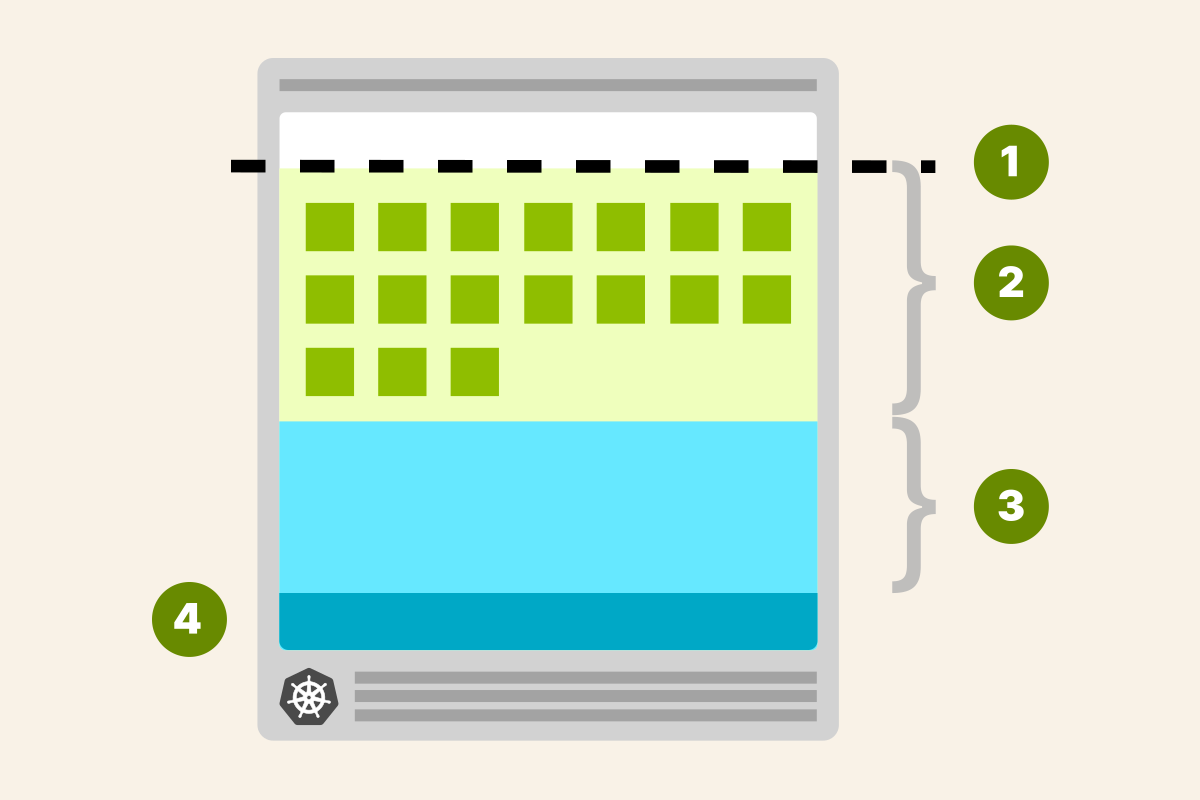
TL;DR: Not all CPU and memory in your Kubernetes nodes can be used to run Pods.
How resources are allocated in cluster nodes
Pods deployed in your Kubernetes cluster consume memory, CPU and storage resources.
However, not all resources in a Node can be used to run Pods.
The operating system and the kubelet require memory and CPU, too, and you should cater for those extra resources.
If you look closely at a single Node, you can divide the available resources into:
- Resources needed to run the operating system and system daemons such as SSH, systemd, etc.
- Resources necessary to run Kubernetes agents such as the Kubelet, the container runtime, node problem detector, etc.
- Resources available to Pods.
- Resources reserved to the eviction threshold.
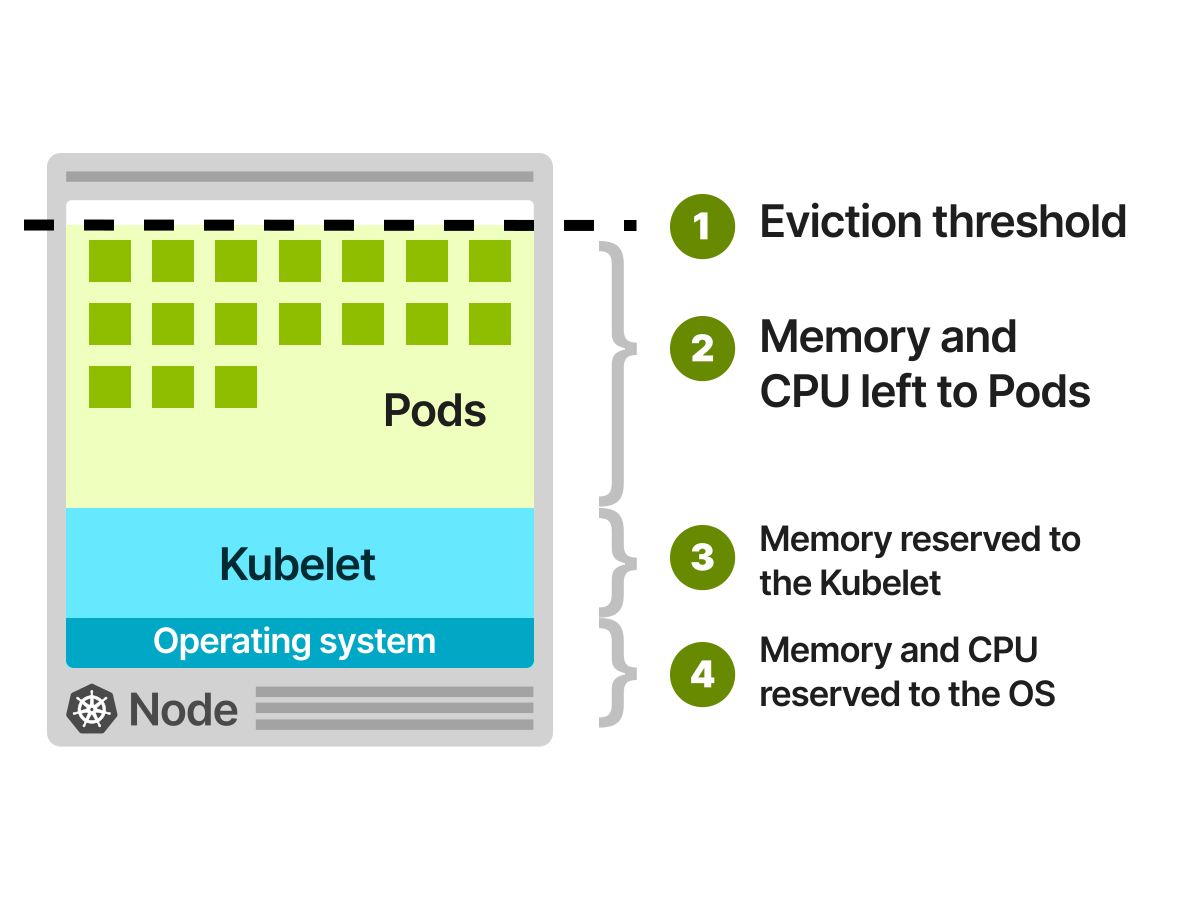
As you can guess, all of those quotas are customisable.
However, please note that reserving 100MB of memory for the operating system doesn't mean that the OS is limited to using only that amount.
It could use more (or less) resources—you're just allocating and estimating memory and CPU usage to the best of your ability.
But how do you decide how to assign resources?
Unfortunately, there isn't a fixed answer, as it depends on your cluster.
However, there's consensus in the major managed Kubernetes services Google Kubernetes Engine (GKE), Azure Kubernetes Service (AKS), and Elastic Kubernetes Service (EKS), and it's worth discussing how they partition the available resources.
Google Kubernetes Engine (GKE)
Google Kubernetes Engine (GKE) has a well-defined list of rules to assign memory and CPU to a Node.
For memory resources, GKE reserves the following:
- 255 MiB of memory for machines with less than 1 GiB of memory
- 25% of the first 4GiB of memory
- 20% of the next 4GiB of memory (up to 8GiB)
- 10% of the next 8GiB of memory (up to 16GiB)
- 6% of the next 112GiB of memory (up to 128GiB)
- 2% of any memory above 128GiB
For CPU resources, GKE reserves the following:
- 6% of the first core
- 1% of the following core (up to 2 cores)
- 0.5% of the following 2 cores (up to 4 cores)
- 0.25% of any cores above 4 cores
Let's look at an example.
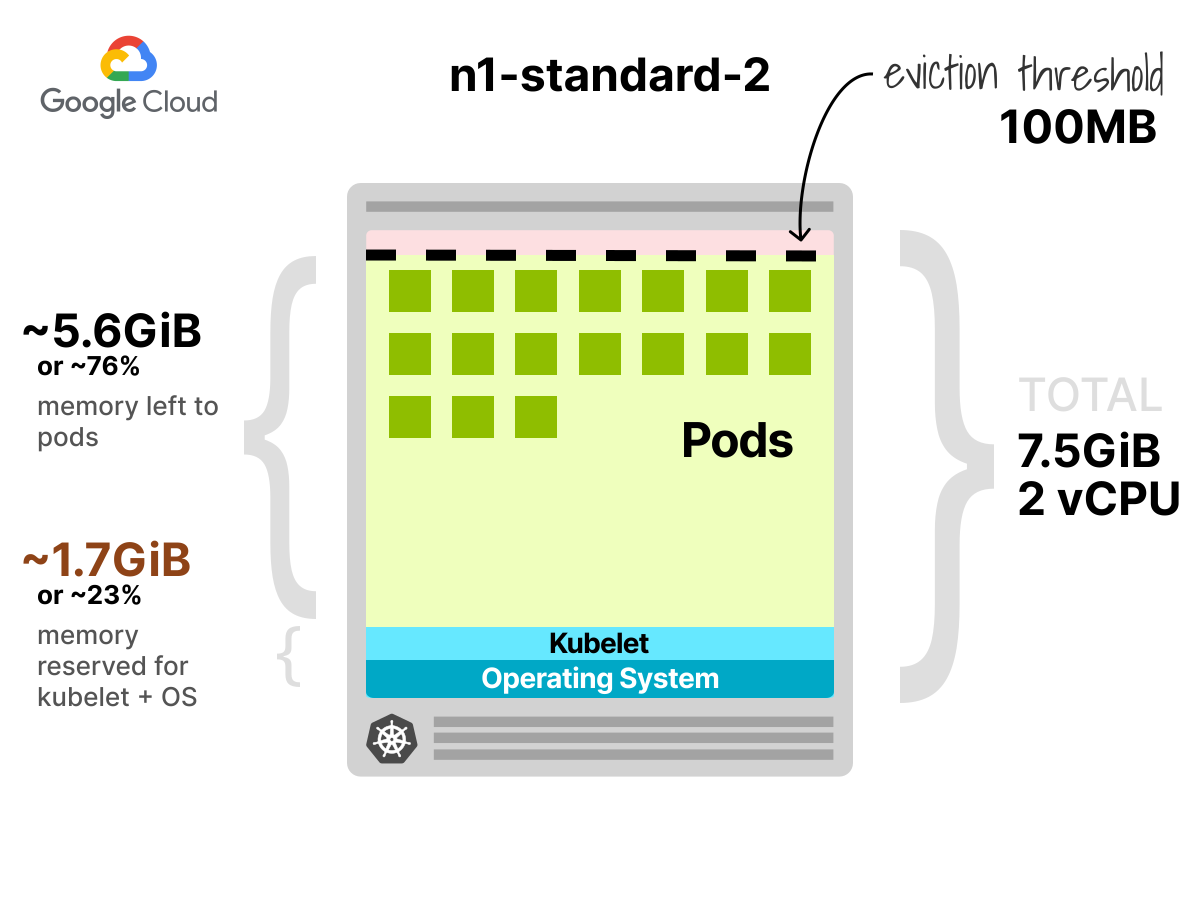
A virtual machine of type n1-standard-2 has 2 vCPU and 7.5GiB of memory.
According to the above rules, the CPU reserved is:
Allocatable CPU = 0.06 * 1 (first core) + 0.01 * 1 (second core)That totals 70 millicores or 3.5% — a modest amount.
The allocatable memory is more interesting:
Allocatable memory = 0.25 * 4 (first 4GB) + 0.2 * 3.5 (remaining 3.5GB)The total is 1.7GB of memory reserved for the kubelet.
At this point, you might think that the remaining memory 7.5GB - 1.7GB = 5.8GB is something you can use for your Pods.
Not really.
The kubelet reserves an extra 100MB for the eviction threshold.
In other words, you started with a virtual machine with 7.5GiB of memory, but you can only use 5.7GB for your Pods.
That's close to ~75% of the overall capacity.
You can be more efficient if you decide to use larger instances.
The instance type n1-standard-96 has 96 vCPU and 360GiB of memory.
If you do the maths, that amounts to:
- 405 millicores are reserved for Kubelet and operating system
- 14.26GB of memory are reserved for Operating System, kubernetes agent and eviction threshold.
In this extreme case, only 4% of memory is not allocatable.
Elastic Kubernetes Service (EKS)
Let's explore Elastic Kubernetes Service (EKS) allocations.
Unfortunately, Elastic Kubernetes Service (EKS) doesn't offer documentation for allocatable resources. You can rely on their code implementation to extract the values.
EKS reserves the following memory for each Node:
Reserved memory = 255MiB + 11MiB * MAX_POD_PER_INSTANCEWhat's MAX_POD_PER_INSTANCE?
In Amazon Web Service, each instance type has a different upper limit on how many Pods it can run.
For example, an m5.large instance can only run 29 Pods, but an m5.4xlarge can run up to 234.
The reason is that each EC2 instance can only have a limited number of IP addresses assigned to it (in AWS lingo, those are called Elastic Network Interfaces (ENIs)).
The Container Network Interface (CNI) uses and assigns those IP addresses to Pods.
However, this limit doesn't apply if you use EC2 prefix delegation via the AWS-CNI or any other CNI that supports it (e.g. Cilium).
So, figuring out the limit for your EC2 instances isn't exactly obvious.
For this, AWS offers a script you can execute to estimate the maximum number of pods per instance.
Let's have a look at an example.
If you run the script against an m5.large instance, you will see this:
bash
./max-pods-calculator.sh --instance-type m5.large --cni-version 1.9.0-eksbuild.1
29
You can only run 29 pods.
Let's enable prefix delegation and see what's the estimated number of pods for the same instance:
bash
./max-pods-calculator.sh --instance-type m5.large --cni-version 1.9.0-eksbuild.1 --cni-prefix-delegation-enabled
110
Remember that bigger instances can host up to 250 pods with prefix delegation.
The Kubernetes project has a page dedicated to considerations for running large clusters, and it suggests 110 pods per node as the recommended standard.
However, all major Kubernetes managed services set this limit to 250 pods.
With that in mind, let's look at the two memory reservations for the m5.large instance.
Reserved memory (29 pods) = 255Mi + 11MiB * 29 = 574MiB
Reserved memory (110 pods) = 255Mi + 11MiB * 110 = 1.5GiB
For CPU resources, EKS follows the GKE implementation and reserves:
- 6% of the first core
- 1% of the following core (up to 2 cores)
- 0.5% of the following 2 cores (up to 4 cores)
- 0.25% of any cores above 4 cores
Let's look at an example.
An m5.large instance has 2 vCPU and 8GiB of memory:
- from the calculation above, you know that 574MiB (or 1.5GiB for 110 pods) of memory is reserved for the kubelet.
- An extra 100MB of memory is reserved for the eviction threshold.
- The reserved allocation for the CPU is the same 70 millicores (same as the
n1-standard-2since they are both 2 vCPU and the quota is calculated similarly).
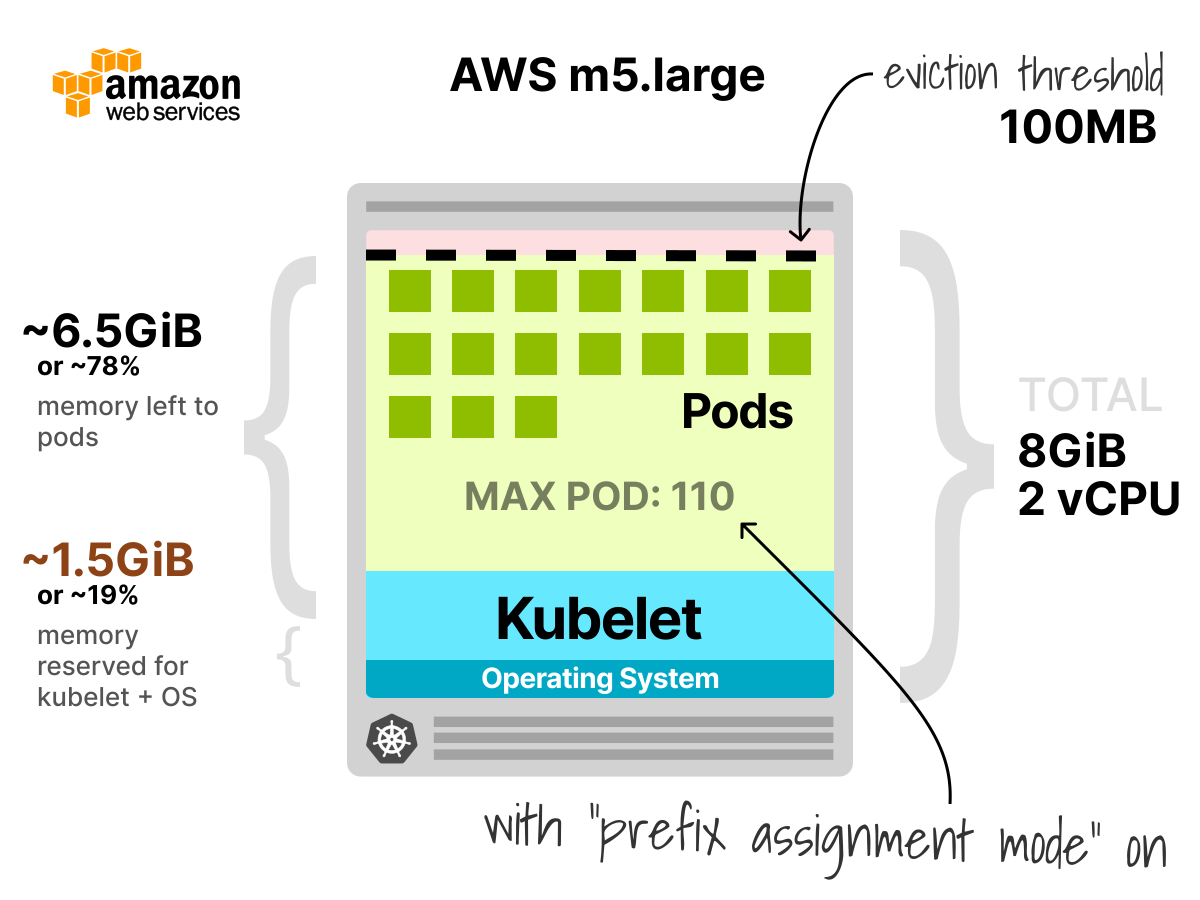
It's interesting to note that the memory allocatable to Pods is 90% when prefix delegation is disabled and drops to 80.5% when enabled.
Azure Kubernetes Service
Azure offers a detailed explanation of their resource allocations.
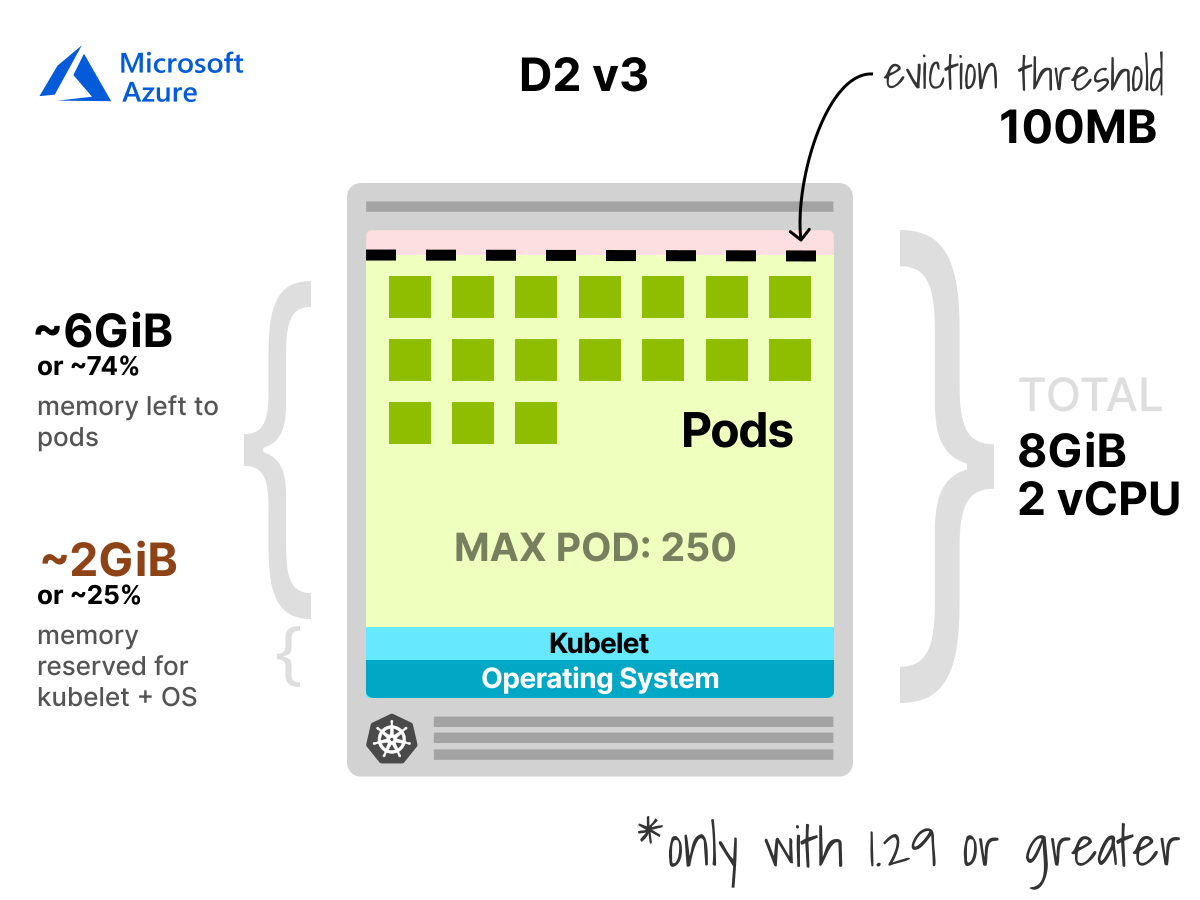
The memory reserved for AKS with Kubernetes 1.29 and above is:
- 20MB for each pod supported on the node plus a fixed 50MB. Or
- 25% of the total system memory resources.
AKS will select the lower value between the two.
Let's have a look at an example.
For an 8GB memory instance with a maximum of 110 pods, the two values are:
20MB * 110 = 2.2GB8GB * 0.25 = 2GB
Since option 2 is lower, AKS will select the one that has the reserved memory.
The CPU reserved for the Kubelet follows the following table:
| CPU CORES | CPU Reserved (in millicores) |
|---|---|
| 1 | 60 |
| 2 | 100 |
| 4 | 140 |
| 8 | 180 |
| 16 | 260 |
| 32 | 420 |
| 64 | 740 |
The values are slightly higher than their counterparts but still modest.
Overall, the CPU and memory reserved for AKS are remarkably similar to Google Kubernetes Engine (GKE).
AKS will reserve a further 100MB for the eviction threshold — just like GKE and EKS.
Summary
You might be tempted to conclude that larger instances are the way to go as you maximise the allocable memory and CPU.
Unfortunately, cost is only one factor when designing your cluster.
If you're running large nodes, you should also consider:
- The overhead on the Kubernetes agents that run on the node — such as the container runtime (e.g. Docker), the kubelet, and cAdvisor.
- Your high-availability (HA) strategy. Pods can be deployed to a selected number of Nodes
- Blast radius. If you have only a few nodes, then the impact of a failing node is bigger than if you have many nodes.
- Autoscaling is less cost-effective as the next increment is a (very) large Node.
Smaller nodes aren't a silver bullet either.
You should architect your cluster for the type of workloads you run rather than following the most common option.
To explore the pros and cons of different instance types, check out this blog post Architecting Kubernetes clusters — choosing a worker node size.