












I will show how we can implement a durable, distributed, and highly available log using S3. This post is the third part in the series:
- Disaggregated Storage - a brief introduction
- Zero Disk Architecture
- Building a distributed log using S3
tl;dr The code is open source, comes with tests and open issues to contribute: s3-log
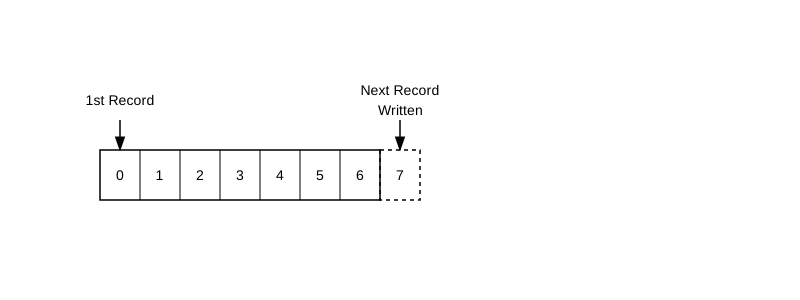
I love logs. The log is the heart of data and event streaming systems. A database is a log. Kafka is a log. Simply put, it’s an ordered collection of records. The log is append-only, and once records are written, they are immutable. Each inserted record gets a unique, sequentially increasing identifier.
Log is a powerful storage abstraction. Using a log, you can build a database, message queue, or an event streaming system. If you would like to learn more, read this excellent blog post by Jay Kreps, the creator of Kafka: The Log: What every software engineer should know about real-time data’s unifying abstraction.
Why S3?
In my previous post, I explained the benefits of Zero Disk Architecture. A log on S3 is attractive for several reasons:
- No disks, so it is elastic and scalable.
- We don’t have to roll our own distributed storage server. We get durability, availability, and replication for free just by using S3.
- No operational overhead.
- Cost. Systems like WarpStream and BufStream claim to be 10x cheaper than Kafka.
- Customers and enterprises love BYOC! You make $$$
The Log Interface
type Record struct {
	Offset uint64
	Data   []byte
}

type WAL interface {
	Append(ctx context.Context, data []byte) (uint64, error)
	Read(ctx context.Context, offset uint64) (Record, error)
}
We will write each payload as an object in S3 and ensure it gets a unique offset in the log. We need to make sure that record numbers are unique and sequentially increasing.
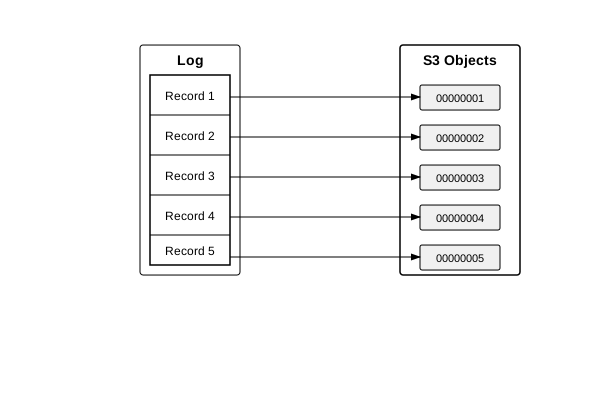
Append
The only ‘write’ operation we can do on a log is Append. Append takes a bunch of bytes and writes them to the end of the log. It returns the offset, which is the position of this record in the log.
Let’s define a struct that maintains a counter length. Every time we insert, we will increment this counter by one.
type S3WAL struct {
	client     *s3.Client
	bucketName string
	length     uint64
}
The very first record will have offset 0000000001. For every new object we insert in the S3 bucket, we will increment it by one. Once a record is inserted, we will return its offset to the caller.
func (w *S3WAL) Append(ctx context.Context, data []byte) (uint64, error) {
	nextOffset := w.length + 1

	input := &s3.PutObjectInput{
		Bucket:      aws.String(w.bucketName),
		Key:         aws.String(fmt.Sprintf("%020d", nextOffset)),
		Body:        bytes.NewReader(data),
		IfNoneMatch: aws.String("*"),
	}

	if _, err := w.client.PutObject(ctx, input); err != nil {
		return 0, fmt.Errorf("failed to put object to S3: %w", err)
	}
	w.length = nextOffset
	return nextOffset, nil
}
How do we prevent two writers appending records with same offset? This is one of the crucial property of a log. Using S3 Conditional Write it is very simple. That’s why we have added IfNoneMatch: aws.String("*") in the request. If an object already exists with the same record offset, the request will be rejected. Let’s write a basic test to confirm this:
func TestSameOffset(t *testing.T) {
	wal, cleanup := getWAL(t)
	defer cleanup()
	ctx := context.Background()
	data := []byte("threads are evil")
	_, err := wal.Append(ctx, data)
	if err != nil {
		t.Fatalf("failed to append first record: %v", err)
	}

	// reset the WAL counter so that it uses the same offset
	wal.length = 0
	_, err = wal.Append(ctx, data)
	if err == nil {
		t.Error("expected error when appending at same offset, got nil")
	}
}
You might be thinking, “Why not use S3’s latest append feature and write to the same object?” We can certainly do that, but it’s tricky to get right since a zombie writer might come back and append to an old object while a new leader is writing to a new file. Unlike typical Raft-based storage systems, S3 does not have a concept of fencing tokens. I’ve left this optimization to tackle later.
I’ve also kept the sequencing simpler by considering no gaps. If we allow gaps, it might be possible for a zombie writer to write to an old sequence number. There are ways to prevent this, but that’s a problem for another day! (Note to self: I should probably write another blog post about these problems.)
Checksums
S3 provides 99.99999999% durability. But like any sane man, I would never trust an external system for data integrity. Most databases don’t do checksums, but we can do better. For now, let’s use SHA-256 for checksums (Go std lib has it). We’ll store the offset, the data, and the checksum.
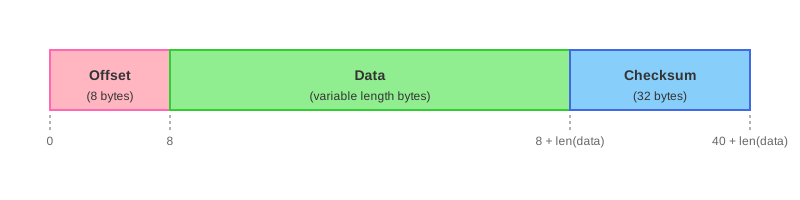
By storing offset we make the record self contained. For e.g. if we do compaction tomorrow and change file names, the record’s offset remains same.
func calculateChecksum(buf *bytes.Buffer) [32]byte {
	return sha256.Sum256(buf.Bytes())
}

func prepareBody(offset uint64, data []byte) ([]byte, error) {
	// 8 bytes for offset, len(data) bytes for data, 32 bytes for checksum
	bufferLen := 8 + len(data) + 32
	buf := bytes.NewBuffer(make([]byte, 0, bufferLen))
	binary.Write(buf, binary.BigEndian, offset)
	buf.Write(data)
	checksum := calculateChecksum(buf)
	_, err := buf.Write(checksum[:])
	return buf.Bytes(), err
}
Read
Our log is coming along nicely! Let’s implement the read. It’s straightforward. Given an offset, we will construct the appropriate S3 object name and fetch it:
func (w *S3WAL) Read(ctx context.Context, offset uint64) (Record, error) {
	key := w.getObjectKey(offset)
	input := &s3.GetObjectInput{
		Bucket: aws.String(w.bucketName),
		Key:    aws.String(key),
	}
	result, _ := w.client.GetObject(ctx, input)
	defer result.Body.Close()

	data, _ := io.ReadAll(result.Body)
	if len(data) < 40 {
		return Record{}, fmt.Errorf("invalid record: data too short")
	}
	if !validateOffset(data, offset) {
		return Record{}, fmt.Errorf("offset mismatch")
	}
	if !validateChecksum(data) {
		return Record{}, fmt.Errorf("checksum mismatch")
	}
	return Record{
		Offset: offset,
		Data:   data[8 : len(data)-32],
	}, nil
}
We will do a couple of validations:
- The record has to be minimum 40 bytes
- The offset in the request should match the one with request
- The checksums should match
Failover / Crash Recovery
Now that we have our basic operations working, let’s handle failure scenarios. What if our node crashes? How do we recover it? We always initialize our WAL with length 0. Subsequently, new writes will try to write at 0000000001 offset. This is not a catastrophic bug! S3 conditional writes protect us and reject the writes. However, we will not be able to proceed with new writes. Let’s fix this. Let’s add a method which goes through the list of keys, finds the last inserted object. There are a couple of ways to optimize this, but let’s iterate through all the keys:
type WAL interface {
	LastRecord(ctx context.Context) (Record, error)
}

func (w *S3WAL) LastRecord(ctx context.Context) (Record, error) {
	input := &s3.ListObjectsV2Input{
		Bucket: aws.String(w.bucketName),
	}
	paginator := s3.NewListObjectsV2Paginator(w.client, input)

	var maxOffset uint64 = 0
	for paginator.HasMorePages() {
		output, _ := paginator.NextPage(ctx)
		for _, obj := range output.Contents {
			key := *obj.Key
			offset, _ := w.getOffsetFromKey(key)
			if offset > maxOffset {
				maxOffset = offset
			}
		}
	}
	if maxOffset == 0 {
		return Record{}, fmt.Errorf("WAL is empty")
	}
	w.length = maxOffset
	return w.Read(ctx, maxOffset)
}
That’s it! The project is open source: s3-log. You can check the code and some tests here. There are a couple of open issues if you’d like to contribute!
open issues: improving LastRecord, cache, batch write, buffered write.
1. Any object store would work. But I like S3.
2. Yes, a database is a log.
3. I’m not surprised that Jay Kreps ended up loving logs so much he wrote a book I Heart Logs.
4. Threads are evil
5. My fren read this post and asked me, instead of S3, can I use Kafka and store my records there? You definitely can. But running Kafka is not easy. Hosted Kafka is way more expensive than S3. Moreover, you build Kafka-like systems using a log. Going the other way around is recursive.