


Using the NetworkPolicy resource, you can control the traffic flow for your applications in the cluster, at the IP address level or port level (OSI layer 3 or 4).
Note
Open Systems Interconnection model (OSI model) is a conceptual model that characterises and standardizes the communication functions, regardless of the underlying technology. For more information, see the OCI model.
With the NetworkPolicy you can define how your Pod can communicate with various network entities in the cluster. There are three parts to defining a NetworkPolicy:
app=hello applies the policy to all Pods with that label.Here is a sample NetworkPolicy:
apiVersion: networking.k8s.io/v1
kind: NetworkPolicy
metadata:
  name: my-network-policy
  namespace: default
spec:
  podSelector:
    matchLabels:
      app: hello
  policyTypes:
    - Ingress
    - Egress
  ingress:
    - from:
        - ipBlock:
            cidr: 172.17.0.0/16
            except:
              - 172.17.1.0/24
        - namespaceSelector:
            matchLabels:
              owner: ricky
        - podSelector:
            matchLabels:
              version: v2
      ports:
        - protocol: TCP
          port: 8080
  egress:
    - to:
        - ipBlock:
            cidr: 10.0.0.0/24
      ports:
        - protocol: TCP
          port: 500
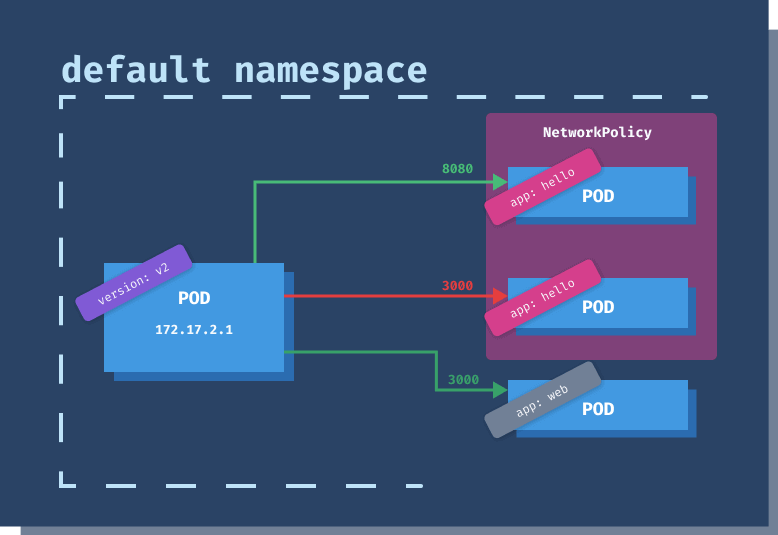
Let's break down the above YAML. The podSelector tells us that the policy applies to all Pods in the default namespace that have the app: hello label set. We are defining policy for both ingress and egress traffic.
The calls to the Pods policy applies to can be made from any IP within the CIDR block 172.17.0.0/16 (that's 65536 IP addresses, from 172.17.0.0 to 172.17.255.255), except for Pods whose IP falls within the CIDR block 172.17.1.0/24 (256 IP addresses, from 172.17.1.0 to 172.17.1.255) to the port 8080. Additionally, the calls to the Pods policy applies to can be coming from any Pod in the namespace(s) with the label owner: ricky and any Pod from the default namespace, labeled version: v2.
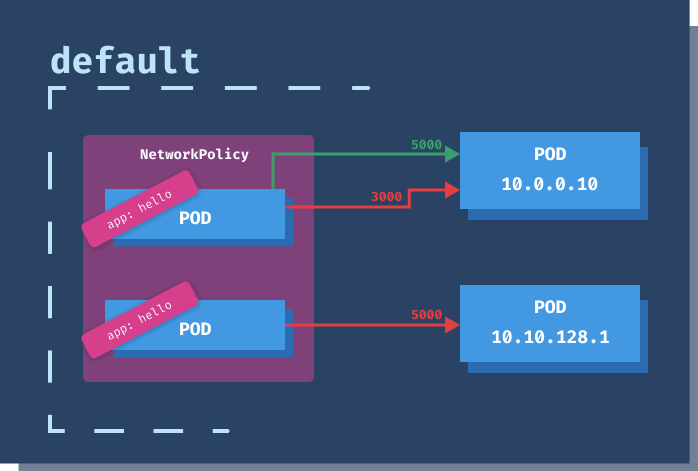
The egress policy specifies that Pods with the label app: hello in the default namespace can make calls to any IP within 10.0.0.0/24 (256 IP addresses, from 10.0.0.0, 10.0.0.255), but only to the port 5000.
The Pod and namespace selectors support and and or semantics. Let's consider the following snippet:
  ...
  ingress:
  - from:
    - namespaceSelector:
        matchLabels:
          user: ricky
      podSelector:
        matchLabels:
          app: website
  ...
The above snippet with a single element in the from array, includes all Pods with labels app: website from the namespace labeled user: ricky. This is the equivalent of and operator.
If you change the podSelector to be a separate element in the from array by adding -, you are using the or operator.
  ...
  ingress:
  - from:
    - namespaceSelector:
        matchLabels:
          user: ricky
    - podSelector:
        matchLabels:
          app: website
  ...
The above snippet includes all Pods labeled app: website or all Pods from the namespace with the label user: ricky.
Network policies are implemented (and rules enforced) through network plugins. If you don't install a network plugin, the policies won't have any effect.
I will use the Cilium plugin and install it on top of Minikube. You could also use a different plugin, such as Calico.
If you already have Minikube running, you will have to stop and delete the cluster (or create a new one). You will have to start Minikube with the cni flag for the Cilium to work correctly:
$ minikube start --network-plugin=cni
Once Minikube starts, you can install Cilium.
$ kubectl create -f https://raw.githubusercontent.com/cilium/cilium/1.8.3/install/kubernetes/quick-install.yaml
all/kubernetes/quick-install.yaml
serviceaccount/cilium created
serviceaccount/cilium-operator created
configmap/cilium-config created
clusterrole.rbac.authorization.k8s.io/cilium created
clusterrole.rbac.authorization.k8s.io/cilium-operator created
clusterrolebinding.rbac.authorization.k8s.io/cilium created
clusterrolebinding.rbac.authorization.k8s.io/cilium-operator created
daemonset.apps/cilium created
deployment.apps/cilium-operator created
Cilium is installed in kube-system namespace, so you can run kubectl get po -n kube-system and wait until the Cilium Pods are up and running.
Let's look at an example that demonstrates how to disable egress traffic from the Pods.
apiVersion: v1
kind: Pod
metadata:
  name: no-egress-pod
  labels:
    app.kubernetes.io/name: hello
spec:
  containers:
    - name: container
      image: radial/busyboxplus:curl
      command: ['sh', '-c', 'sleep 3600']
Save the above YAML to no-egress-pod.yaml and create the Pod using kubectl apply -f no-egress-pod.yaml.
Once the Pod is running, let's try calling google.com using curl:
$ kubectl exec -it no-egress-pod -- curl -I -L google.com
HTTP/1.1 301 Moved Permanently
Location: http://www.google.com/
Content-Type: text/html; charset=UTF-8
Date: Thu, 24 Sep 2020 16:30:59 GMT
Expires: Sat, 24 Oct 2020 16:30:59 GMT
Cache-Control: public, max-age=2592000
Server: gws
Content-Length: 219
X-XSS-Protection: 0
X-Frame-Options: SAMEORIGIN

HTTP/1.1 200 OK
...
The call completes successfully. Let's define a network policy that will prevent egress for Pods with the label app.kubernetes.io/name: hello:
apiVersion: networking.k8s.io/v1
kind: NetworkPolicy
metadata:
  name: deny-egress
spec:
  podSelector:
    matchLabels:
      app.kubernetes.io/name: hello
  policyTypes:
    - Egress
If you run the same command this time, curl won't be able to resolve the host:
$ kubectl exec -it no-egress-pod -- curl -I -L google.com
curl: (6) Couldn't resolve host 'google.com'
Try running kubectl edit pod no-egress-pod and change the label value to hello123. Save the changes and then re-run the curl command. This time, the command works fine because we changed the Pod label, and the network policy does not apply to it anymore.
Let's look at a couple of scenarios and corresponding network policies.
Denies all egress traffic from the Pods in the namespace, so Pods cannot make any outgoing requests.
apiVersion: networking.k8s.io/v1
kind: NetworkPolicy
metadata:
  name: deny-all-egress
spec:
  podSelector: {}
  policyTypes:
    - Egress
Denies all ingress traffic, and Pods cannot receive any requests.
apiVersion: networking.k8s.io/v1
kind: NetworkPolicy
metadata:
  name: deny-all-ingress
spec:
  podSelector: {}
  policyTypes:
    - Ingress
Allow ingress to specific Pods, identified by the label app: my-app.
kind: NetworkPolicy
apiVersion: networking.k8s.io/v1
metadata:
  name: pods-allow-all
spec:
  podSelector:
    matchLabels:
      app: my-app
  ingress:
    - {}
Denies ingress to specific Pods, identified by the label app: my-app.
kind: NetworkPolicy
apiVersion: networking.k8s.io/v1
metadata:
  name: pods-deny-all
spec:
  podSelector:
    matchLabels:
      app: my-app
  ingress: []
Allows traffic from certain Pods only. Allow traffic from app: customers to any frontend Pods (role: frontend) that are part of the same app (app: customers).
kind: NetworkPolicy
apiVersion: networking.k8s.io/v1
metadata:
  name: frontend-allow
spec:
  podSelector:
    matchLabels:
      app: customers
      role: frontend
  ingress:
    - from:
        - podSelector:
            matchLabels:
              app: customers
Denies all incoming traffic (no ingress rules defined) to all Pods (empty podSelector) in the prod namespace. Any calls from outside of the default namespace will be blocked and any calls between Pods in the same namespace.
kind: NetworkPolicy
apiVersion: networking.k8s.io/v1
metadata:
  name: prod-deny-all
  namespace: prod
spec:
  podSelector: {}
  ingress: []
Denies all traffic from other namespaces, coming to the Pods in the prod namespace. It matches all pods (empty podSelector) in the prod namespace and allows ingress from all Pods in the prod namespace, as the ingress podSelector is empty as well.
kind: NetworkPolicy
apiVersion: networking.k8s.io/v1
metadata:
  name: deny-other-namespaces
  namespace: prod
spec:
  podSelector: {}
  ingress:
    - from:
        - podSelector: {}
Denies Pods labeled with app: api from making any external calls.
apiVersion: networking.k8s.io/v1
kind: NetworkPolicy
metadata:
  name: api-deny-egress
spec:
  podSelector:
    matchLabels:
      app: api
  policyTypes:
    - Egress
  egress: []
此内容由惯性聚合(RSS阅读器)自动聚合整理,仅供阅读参考。 原文来自 — 版权归原作者所有。