


Share this post & I'll send you some rewards for the referrals.
I have a huge huge huge announcement for everyone…
INTRODUCING: DevOps Mastermind
This newsletter series will help you become a fast-growing and high-paying engineer.
If you’ve ever thought:
“I use Docker & Kubernetes, but I still don’t fully understand how they work.”
“I want to master DevOps fundamentals instead of just memorizing commands.”
“I should learn how modern infrastructure & real-world systems actually work.”
Then this is for you.
Here’s what you’ll get inside DevOps Mastermind:
Architecture breakdown of core DevOps systems.
Deep dives into Docker, Kubernetes, Terraform, and so on.
Practical insights into how real-world systems achieve scalability, automation, and reliability.
Onward.
Your laptop is already running an operating system.
Now imagine starting another one on the same machine. A completely separate system with its own files, memory, and processes. You can run Linux inside Windows, or Windows inside a Mac. It boots independently, runs programs, and behaves as if it has full control over the hardware.
But it doesn’t.
Underneath, there is still only one physical machine. One CPU, one pool of memory, one disk. Yet multiple such systems can run at the same time, each isolated from the others and each functioning as if it were the only system present.
This idea changed computing…
Instead of buying a new server each time, you could split one powerful machine into many smaller ones. Each workload gets its own space. Nothing interferes with anything else.
That shift is what made cloud computing possible…
When you run an app on Amazon Web Services, Microsoft Azure, or Google Cloud Platform, it runs inside a virtual machine. The entire cloud infrastructure is built on this foundation.
But how does it actually work? How can one machine present itself as many? How are resources shared without breaking isolation?

AI experiments are easy.
But building trusted AI systems that scale across an enterprise is hard. That’s exactly what leaders from Mercedes-Benz, Yahoo, Regeneron, and AWS discuss in this on-demand virtual panel on agentic AI.
Here’s what you’ll learn inside:
Practical strategies from enterprise leaders: See how teams move from isolated AI experiments to production-scale systems.
Real-world guidance on governance and architecture: Learn how industry experts approach analytics, unified governance, and continuous learning.
Frameworks for scaling intelligent systems: Discover how to build AI systems that drive business value.
Pragmatic infrastructure decisions: Learn how to select the right databases and data foundations for AI-based applications.
Watch the AWS panel and see how enterprise teams are building trusted AI systems with speed, governance, and control.
(Thanks to AWS for partnering on this post.)
I want to introduce Ayaan as a guest author.

He’s a self-taught DevOps engineer focused on Kubernetes & cloud infrastructure. He builds in public and writes about cloud-native systems, sharing daily technical tips and projects.
Check out his work and socials:
Here’s what’s inside this newsletter:
The difference between emulation and virtualization, and why one simulates hardware while the other shares it.
What a virtual machine actually is, how it presents itself as a full computer, and why the guest operating system believes it owns the hardware.
How the hypervisor works, the different types it comes in, and how it controls access to CPU, memory, storage, and networking.
What happens under the hood when a virtual machine boots, from resource allocation and virtual hardware setup to kernel startup and runtime execution.
How features like live migration, isolation, and resource controls make virtual machines practical for modern infrastructure.
Where virtual machines fit today, why cloud platforms depend on them, and how they differ from containers.
Before we get into how virtual machines work, there is one distinction worth getting clear early.
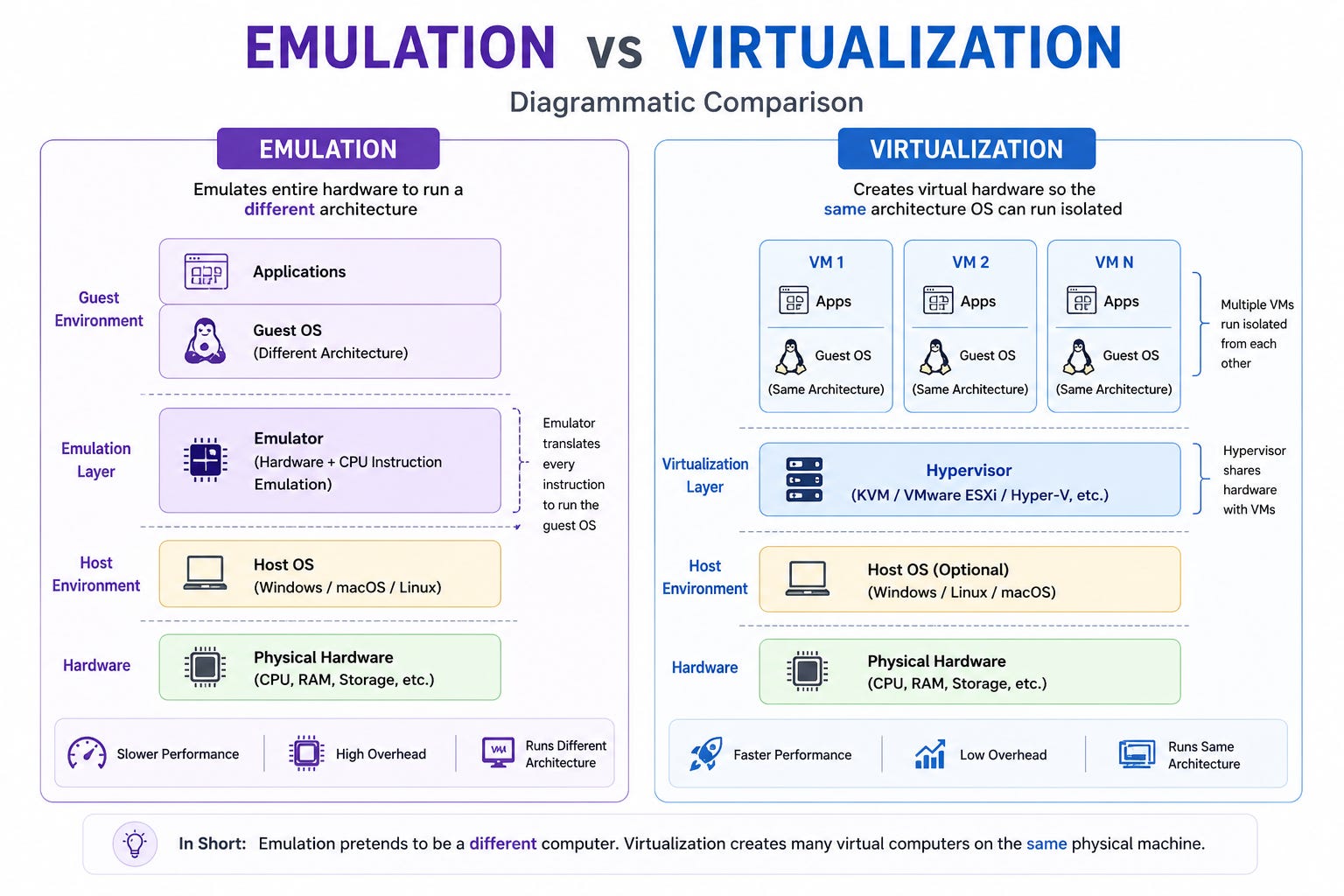
Emulation is when software pretends to be completely different hardware. Retro gaming emulators work this way. Your laptop takes each instruction from the old console and turns it into something your modern chip understands.
It works, but it is slow…
Virtualization is different. Instead of pretending to be different hardware, it creates a version of the same hardware your machine already has. Most instructions run directly on the real processor with no translation needed.
The result is near-native speed.
Think of it this way:
Emulation is like hiring a translator for every sentence in a conversation.
Virtualization is like realizing that both people already speak the same language.
This distinction matters because speed is what made virtualization practical at scale. You cannot run thousands of emulated systems on a single server. With virtualization, you can.
And that is exactly what cloud providers do…
A virtual machine is a complete computer abstraction built on top of a physical machine.
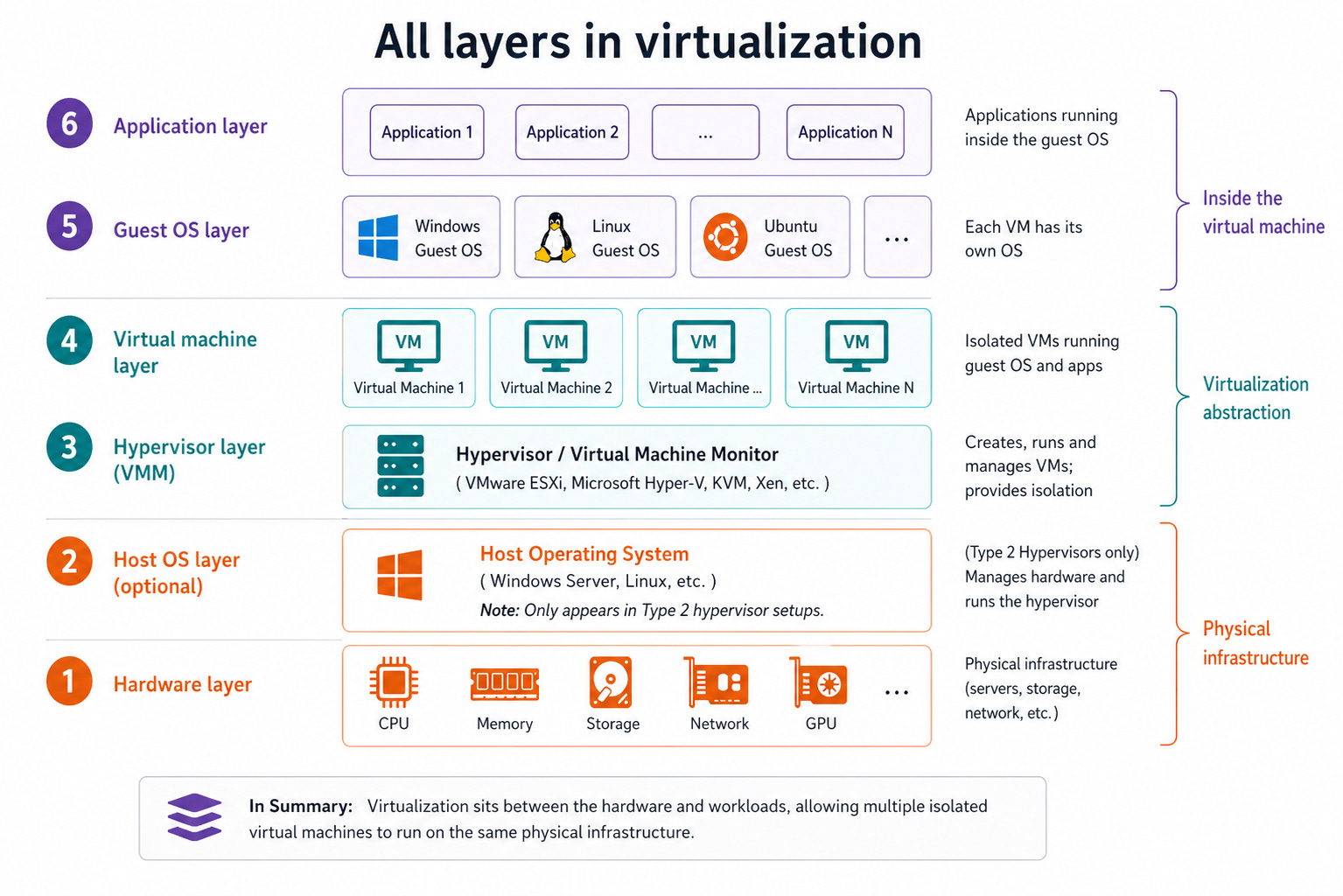
It’s presented with a CPU, memory, storage, and a network interface, just like a physical system. The operating system inside it interacts with these components as if they were real hardware. It has no awareness that it is sharing the underlying machine with anything else.
From its perspective, it owns the system.
This behavior is made possible by a layered design.
At the bottom is the physical hardware, which provides the actual compute, memory, and storage resources. Above it sits the hypervisor, which controls how those resources are allocated and accessed. On top of that, each virtual machine runs its own operating system in isolation.
The hypervisor is the layer that makes the illusion possible.
Because the operating system never interacts with the hardware directly.
Instead, every request for CPU time, memory access, disk I/O, or network communication is handled through the hypervisor. It decides how resources are shared and ensures that each virtual machine remains isolated from the others.
This abstraction enables three key capabilities:
Isolation: Each virtual machine runs independently, so a failure in one doesn’t affect others.
Portability: Virtual machines can move between physical systems with minimal changes.
Efficient resource use: Multiple workloads share the same hardware instead of leaving it idle.
These properties are what made modern infrastructure possible.
Next, let’s look at the hypervisor: what it is, the different types, and how it powers virtual machines…
The hypervisor is the software layer that enables virtualization.
It sits between the physical hardware and the virtual machines running above it. Every request a virtual machine makes, whether for CPU time, memory, or storage, goes through the hypervisor. It’s responsible for mapping those requests to the underlying hardware resources.
This layer controls all access to the hardware.
Not all hypervisors follow the same structure. The main difference comes from where they run.
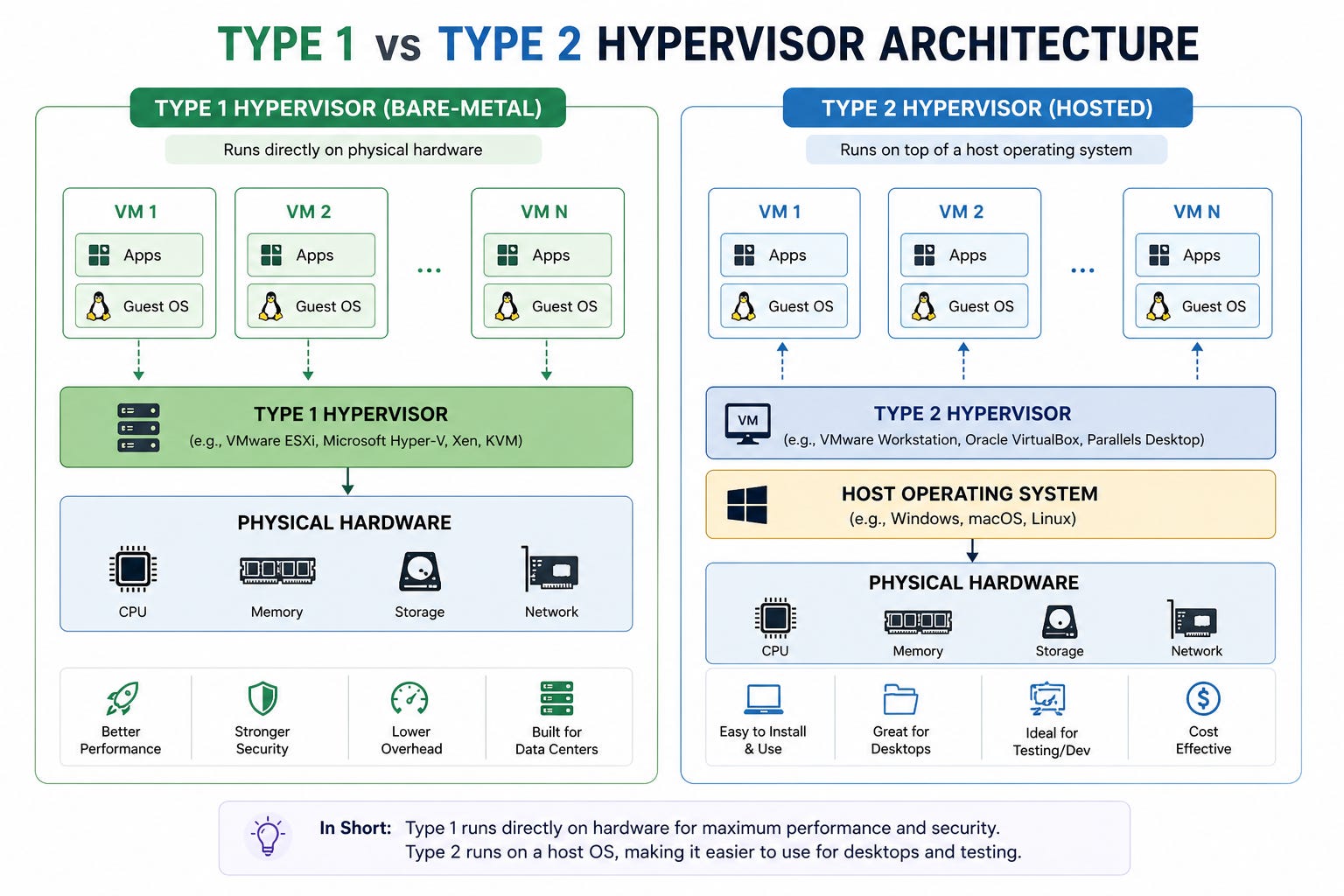
Type 1 (bare-metal): It runs on the physical hardware, with no host operating system in between. Examples include VMware ESXi, Microsoft Hyper-V, and Kernel-based Virtual Machine (KVM). Cloud environments and data centers use these because they provide direct hardware access and minimal overhead.
Type 2 (hosted): Runs on top of an existing operating system, like a regular application. Tools such as VirtualBox and VMware Workstation fall into this category. They are easier to use but introduce additional overhead.
The difference lies in how the hypervisor accesses hardware and the number of extra layers it adds…
There are also different ways a hypervisor presents hardware to a virtual machine.
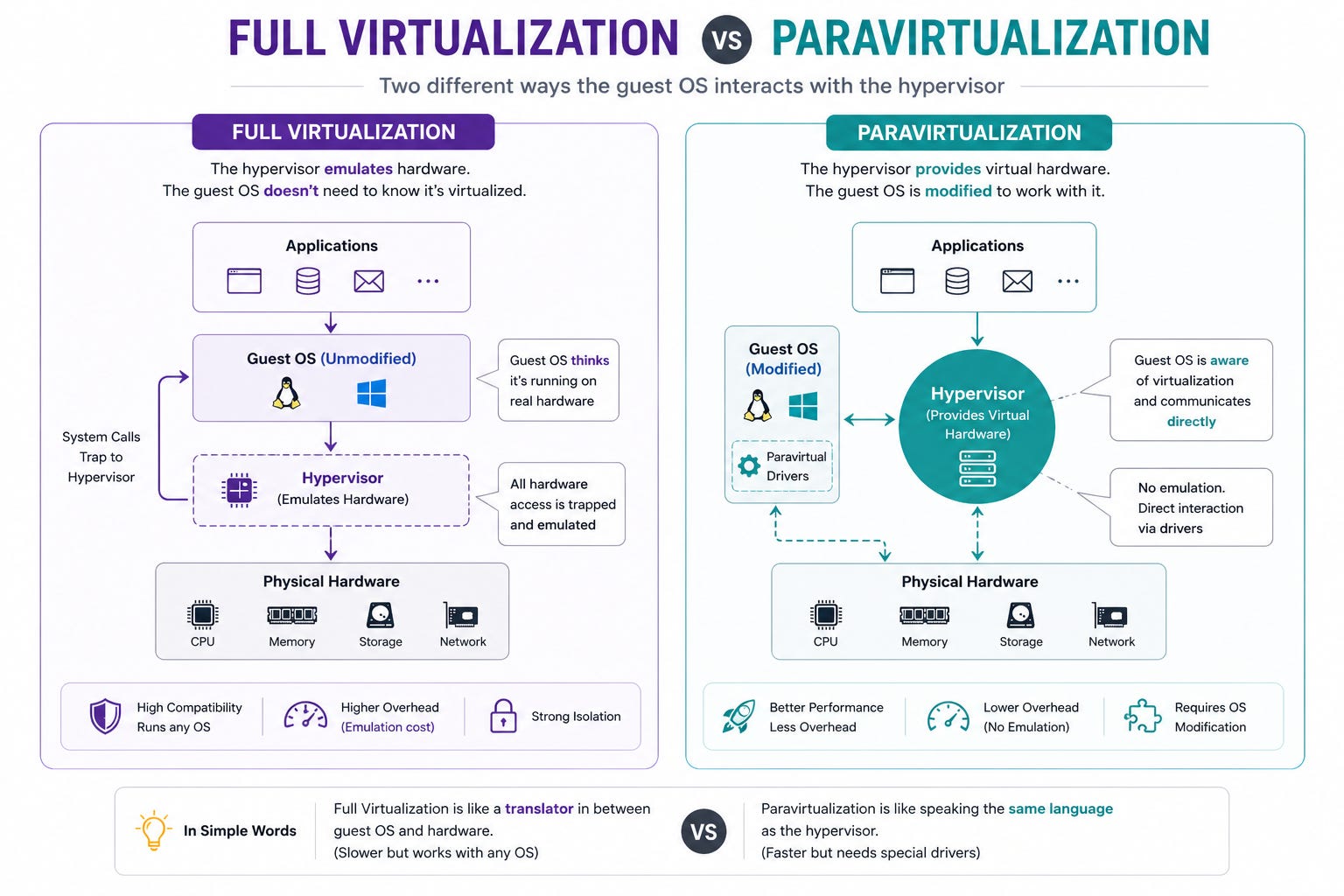
In full virtualization, guest operating system runs without modification and behaves as if it were on real hardware. The hypervisor handles all the work required to maintain that abstraction.
In paravirtualization, the guest operating system is aware that it is running in a virtual environment. Instead of relying only on emulated hardware, it asks the hypervisor to handle some tasks, which reduces overhead.
The trade-off is between compatibility and performance.
Full virtualization runs any unmodified operating system. Paravirtualization is faster because the guest works with the hypervisor.
Early hypervisors relied on software, making virtualization complex and inefficient. This changed when processor manufacturers introduced hardware support such as Intel VT-x (Intel Virtualization Technology for x86) and AMD-V (AMD Virtualization).
With these features, CPU itself can differentiate between virtual machines and the hypervisor. Sensitive operations pass control to the hypervisor when needed. It manages access and keeps everything secure.
This made virtualization practical at scale.
It is also possible to run a virtual machine inside another virtual machine, a setup known as nested virtualization. You use this for testing, development, and running tools like Kubernetes locally in virtual machines (VMs).
But each additional layer introduces overhead and increases complexity. As you add more virtualization layers, performance drops. This makes the approach unsuitable for most production workloads.
It is useful in controlled scenarios, but not a general-purpose design.
Now you know what the hypervisor does. The next question is how it shares the CPU across multiple virtual machines. The answer is CPU virtualization.
Let’s look at how it works…
The CPU is the brain of any computer.
Every instruction, process, and calculation goes through the CPU. So when you create a virtual machine, the question becomes: how do different operating systems share one CPU without getting in each other’s way?
That is what CPU virtualization solves…
Operating systems are designed to be in charge.
When your OS needs to access hardware, manage memory, or control processes, it does so with full authority. The processor has a concept called privilege levels to enforce this.
Think of it like levels of trust, where the most trusted software gets the most access.
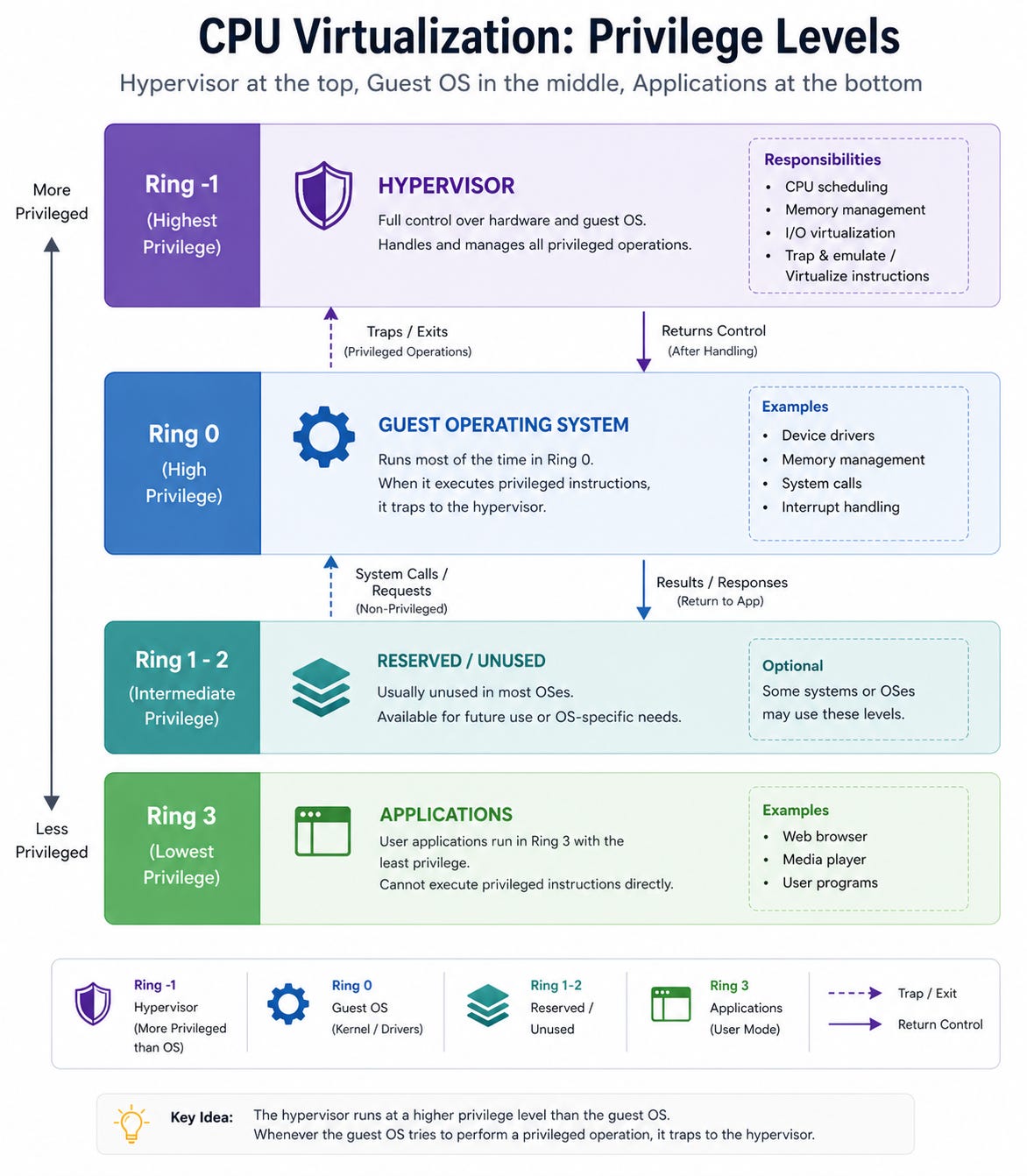
In a normal system, the operating system sits at the highest privilege level.
But in a virtual environment, the hypervisor needs to sit above the operating system. It needs to intercept certain instructions and control what the guest OS can and cannot do. So the guest OS gets moved down to a lower privilege level, even though it still believes it is fully in charge.
The guest OS never knows the hypervisor demoted it.
This is the fundamental trick behind CPU virtualization. The guest OS continues to behave as if it owns the processor. But when it tries to do something that needs high-level access, the processor steps in and hands control to the hypervisor.
Everything continues smoothly, just one level deeper…
When you create a virtual machine, you assign it CPUs, but these are not physical cores. They’re virtual CPUs (vCPUs) that represent processing capacity managed by the hypervisor.
The hypervisor schedules vCPUs onto physical cores in the same way an operating system schedules processes.
At any given moment, a physical core can execute only one thread of work. The hypervisor switches between virtual machines, giving each one a slice of CPU time. This switching happens fast enough that each virtual machine appears to have continuous access to the processor.
Modern CPUs may expose multiple logical threads per core through technologies like Intel Hyper-Threading or AMD SMT (Simultaneous Multithreading), but CPU time is still shared and scheduled across workloads.
In reality, all virtual machines share it.
This is called time-slicing. It’s the same idea your operating system uses to run multiple applications at once.
Hypervisors can also assign more vCPUs than there are physical cores, a practice known as CPU overcommit. For example, a machine with 16 cores might run virtual machines totaling 32 or more vCPUs.
This works as long as not all virtual machines are busy at the same time.
When demand rises across multiple VMs, they compete for CPU time. This causes contention and reduces performance.
Overcommit is a useful tool, but it depends on workload behavior.
Let’s go one level deeper into what actually happens when a guest OS tries to do something it is not allowed to do on its own.
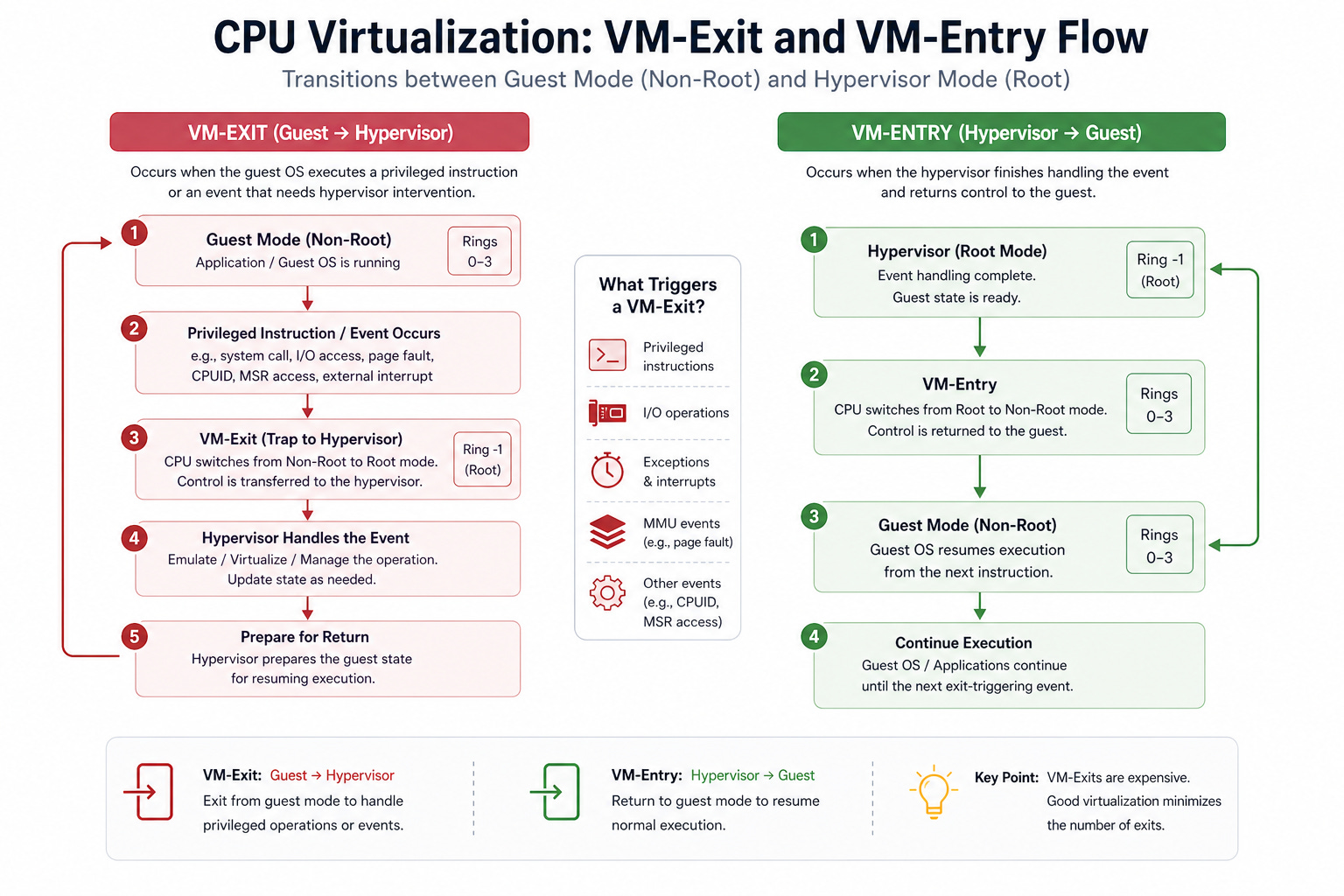
When a virtual machine tries to run a privileged instruction, the processor stops it. Control is immediately transferred to the hypervisor. This event is called a VM-exit.
The hypervisor then figures out what the guest was trying to do and handles it safely.
Once the hypervisor has dealt with the request, it hands control back to the virtual machine exactly where it left off. This is called a VM-entry. From the guest OS’s perspective, nothing unusual happened. The CPU executed the instruction and continued running.
The entire handoff takes microseconds.
This mechanism is what makes isolation possible. The guest OS cannot access hardware it shouldn’t. Every sensitive operation triggers a VM-exit, which the hypervisor controls. But it also introduces overhead. Every VM-exit and VM-entry takes time, and if they happen too frequently, performance suffers.
Keeping VM exits to a minimum is one of the core challenges of CPU virtualization.
This matters more in large systems and performance-sensitive workloads, but it’s still worth understanding at a high level…
Modern servers often have more than one physical processor. Each processor has its own local memory. Accessing memory that belongs to a different processor is slower than accessing your own. This architecture is called Non-Uniform Memory Access (NUMA).
The name describes the problem exactly. Not all memory accesses are equal.
In a virtual environment, this creates a subtle issue. A virtual machine might run on cores from one processor but end up accessing memory that belongs to another. The guest OS does not know this is happening. But the performance hit is real.
The solution is NUMA-aware scheduling.
The hypervisor tries to keep a virtual machine’s vCPUs and its memory on the same NUMA node. When it succeeds, the VM runs faster. When workloads grow and resources get spread across nodes, the performance gap becomes noticeable.
For most small deployments, this never comes up. For high-performance databases or real-time systems running on large servers, it matters a lot.
Putting it together, CPU virtualization is not a single mechanism but a combination of coordinated techniques.
The privilege model restricts direct hardware access. vCPU scheduling creates the illusion of dedicated processing power. VM-exits and VM-entries enforce safe boundaries for sensitive operations. NUMA awareness ensures that physical hardware layout does not introduce hidden performance penalties.
Each part addresses a specific challenge.
Together, they allow multiple virtual machines to share a single physical CPU while operating independently and efficiently.
Next, let’s look at how memory is virtualized and how virtual machines manage their view of system memory…
Reminder: this is a teaser of the subscriber-only newsletter, exclusive to my golden members.
When you upgrade, you’ll get:
Architecture breakdown of core DevOps systems.
Deep dives into Docker, Kubernetes, Terraform, and so on.
Practical insights into how real-world systems achieve scalability, automation, and reliability.
Let’s keep going!
此内容由惯性聚合(RSS阅读器)自动聚合整理,仅供阅读参考。 原文来自 — 版权归原作者所有。