








Preface
After spending too much time on boring & dry docs describing Kafka Streams concepts, I want to explain it my own way. As concisely and clearly as possible while being technically acurate 👌
This should help you get an understanding of Kafka Streams in under 5 minutes.
Kafka Streams is a stream-processing library you embed in your apps.
import org.apache.kafka.streams.KafkaStreams;It gives you a high level API to read data from Kafka, process it, and then write it back - it’s basically an abstraction above the regular KafkaProducer and KafkaConsumer classes, with a TON of extra processing, orchestration and stateful logic on top.
Streams lets you do lots of complex stuff. A simple example - count the last minute’s number of views per page in real time and filter out cases where it’s too high.
builder.stream("page-views")
       .filter((page, pageView) -> !isBot(pageView))
       .windowedBy(Duration.ofMinutes(1))
       .count()
       .toStream()
.to("page-traffic-sums");This code continuously counts the sum of human page views over the last minute and produces it to a new topic.
Here’s how the data would look like: 👇
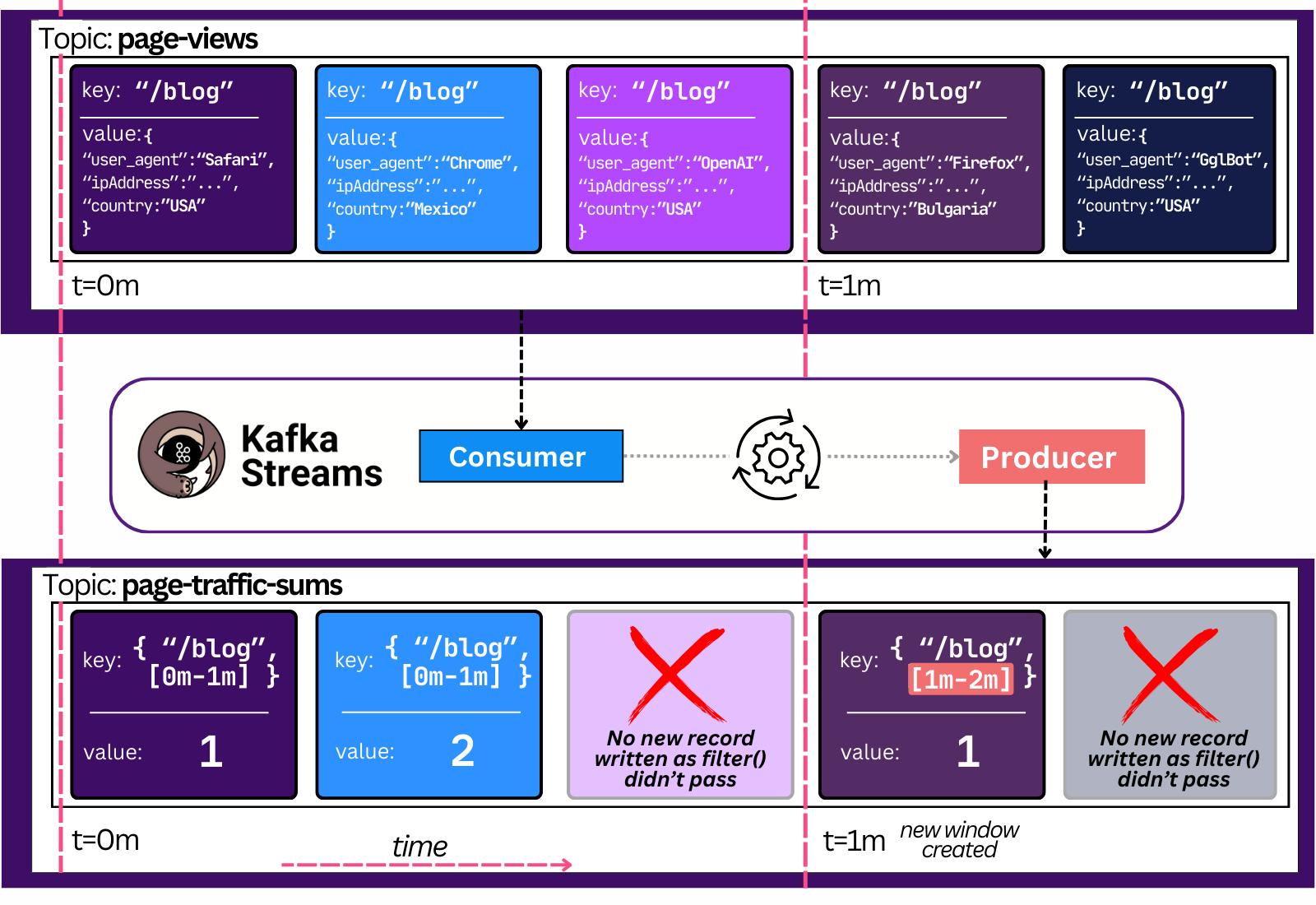
Any consumer that reads the `page-traffic-sums` topic will now know, in real-time (milliseconds), the latest sum of traffic in the last minute.
To stretch this example further, one could create a separate handler that reacts to high view load by creating an incident and triggering auto-scaling.
Instead of using the regular Consumer API - one could again simply use Streams!
 builder.stream("page-traffic-sums")
        .filter((page, viewCount) -> viewCount > 10_000)
        .foreach((page, alert) -> handleCriticalAlert(page, viewCount));

 private static void handleCriticalAlert(String page, Integer viewCount) {
        System.out.println("CRITICAL: " + page + " exceeded 10,000 views in the last minute!");
        sendSlackMessage(page, viewCount);
        updateLoadBalancer(page, viewCount);
        triggerAutoScaling(page, viewCount);
        createIncident(page, viewCount);
    }
The fact KStreams is a simple library makes it stand out. It’s much easier to write such stream processing apps that way - e.g simply import the library in your `autoscaler` app.
There are a few basic concepts one has to know about when discussing Kafka Streams:
Topology - any stream job we create consists of multiple steps, like reading data from the topic, filtering out results that match our predicate, summing the value, emitting the value to a Kafka topic.
The series of these steps is called a topology, and it’s a directed acyclic graph (DAG) → it only goes one way.
Processor - a step in the topology.
e.g the `stream(“page-views”)` method creates a Source Processor - one that reads data from the page-views Kafka topic and sends it to the next processor; the `filter()` method creates a Filter Processor, etc.
every Processor sends its output to another processor, besides the Sink Processor - which sends its output to a Kafka topic
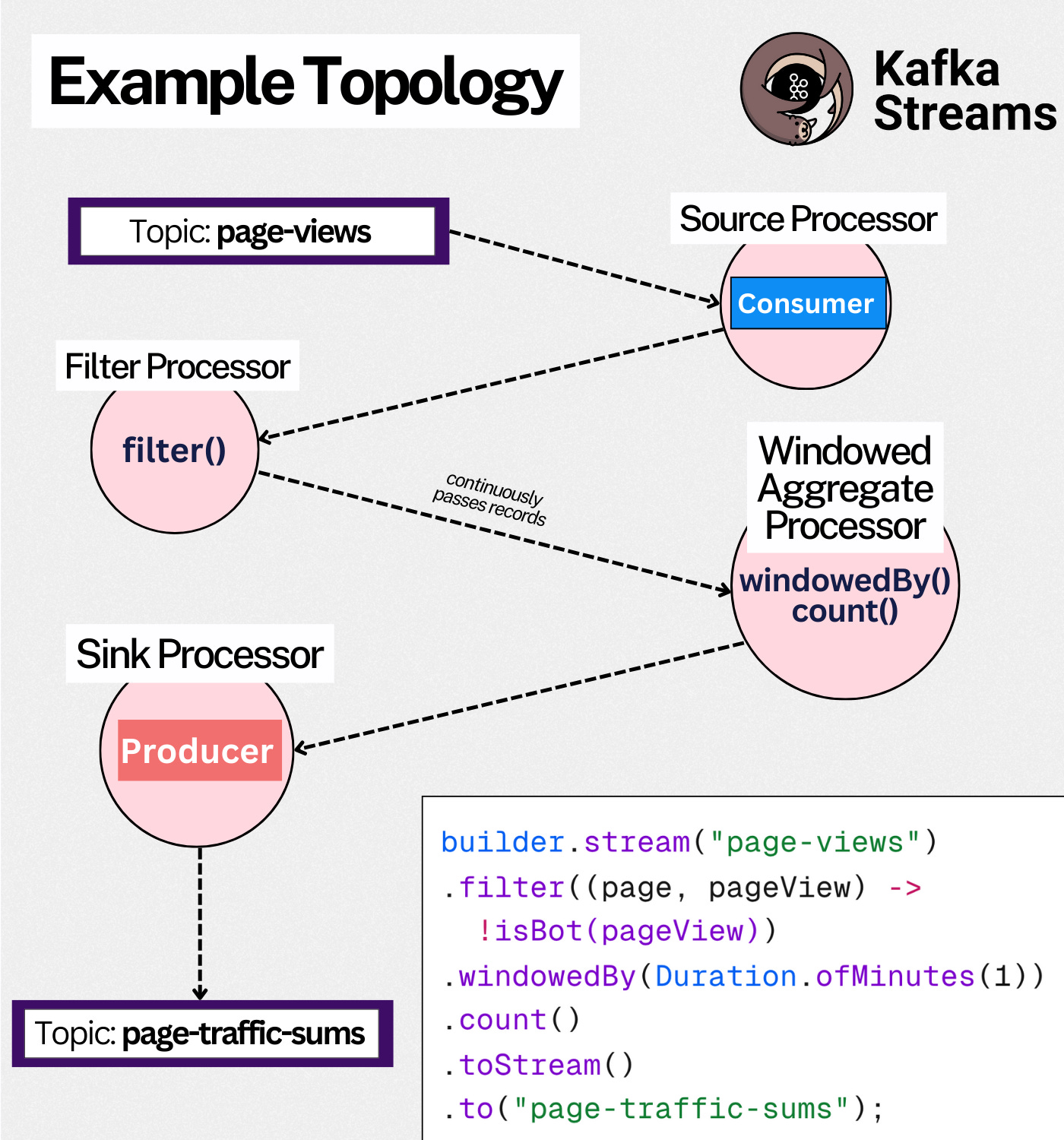
The topology is the logical definition of the job.
The physical definition is a Stream Task.
Stream Task - a job executing a topology.
1 Partition == 1 Stream Task - a stream task always works on one Kafka partition.2
Since Kafka topics are divided into partitions3, the unit of parallelism in Kafka Streams is the partition. The execution of stream processing logic on that partition is called a stream task.
Two Stream Tasks share nothing between each other - they’re independent.
e.g you can’t have two tasks executing on the same partition.
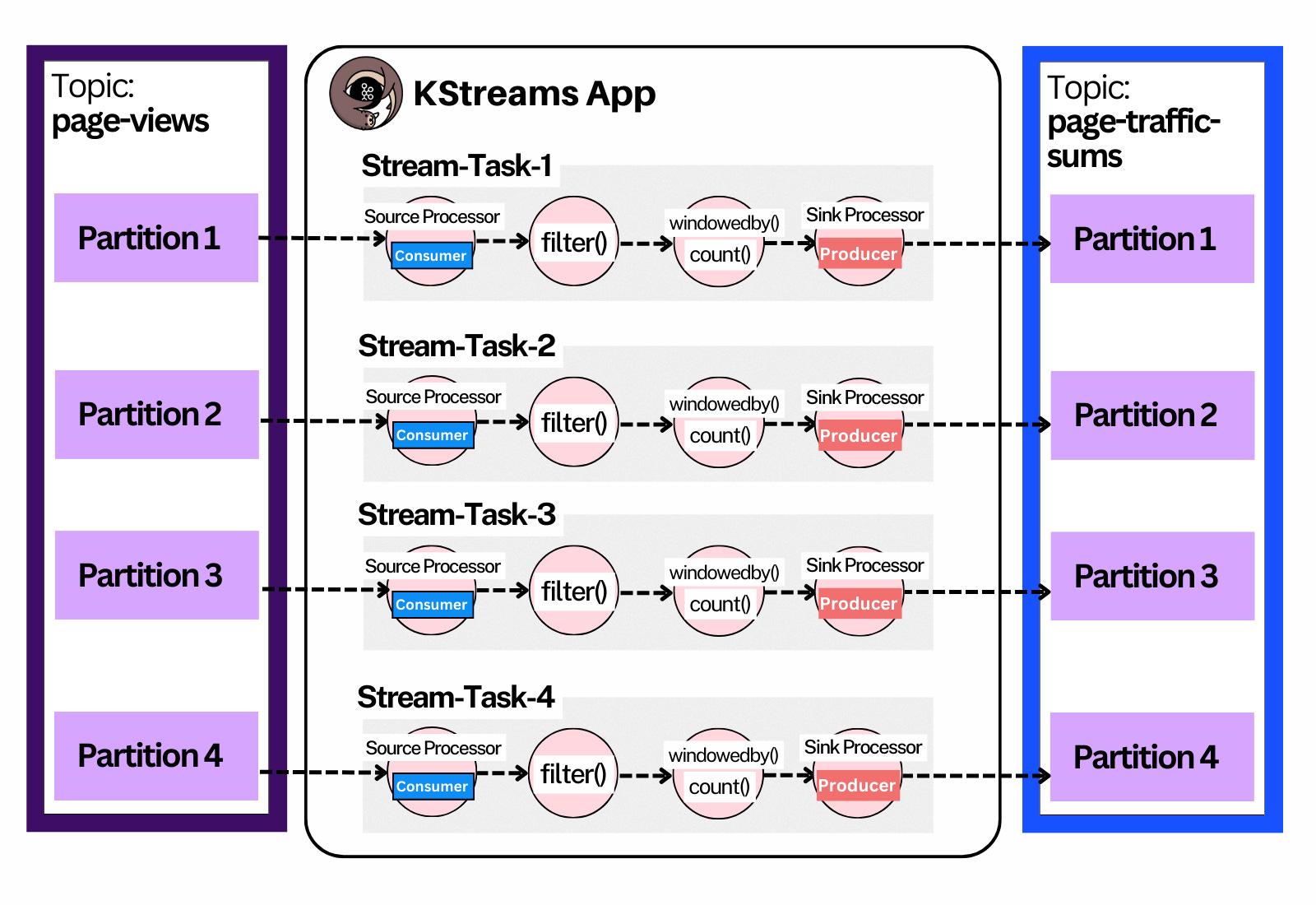
A Kafka Streams app creates as many Stream Tasks as there are partitions.4
This happens internally and is transparent to the user code.
Stream Tasks are CPU-heavy since a lot of data is being deserialized, crunched and serialized again.
A single CPU core can’t process two partitions truly in parallel, so we need… multi-threading!
Stream Thread - a thread on which Stream Tasks are run.
A Stream Thread can run many Stream Tasks.
One thread has a single consumer and producer client. Stream tasks within the thread share these Kafka clients.
For maximum performance, you want to have at least one thread per CPU core.
In cases where your stream-tasks are IO-bound - you want to have more threads than cores (calling external APIs)
Enough about threads - let’s not forget we’re talking about Big Data and Distributed Systems! Kafka was created because its data could not comfortably fit in a single machine, hence the need to shard data into partitions.
The same should apply doubly-so to Kafka Streams, since processing is a lot more work than simply storing data on disk. Let’s create a distributed system:
Stream App (Node) - an instance of the `KafkaStreams()` class. Practically speaking, you’d run one of these per node (VM)5.
These apps coordinate their work through Kafka.
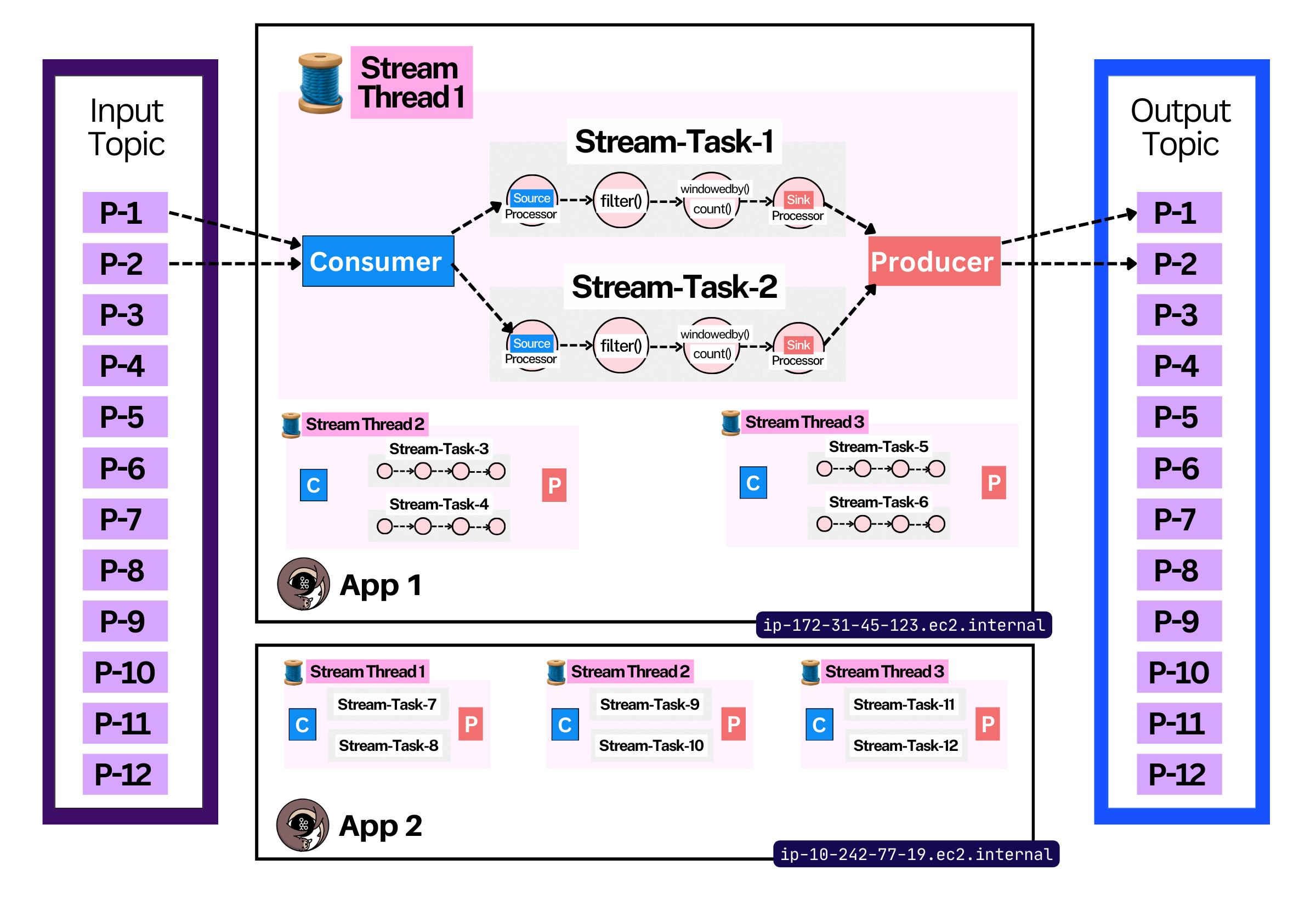
With any distributed system come a thousand problems:
what happens if a stream node dies? who takes the tasks and how?
what happens if a new stream node comes online? which tasks does it take over, from who and how?
what if you want another node to warm up (build up the same state), so as to allow for future failover?
how do you smoothly handle upgrades that change the coordination protocol’s schema?
how is partition progress persisted across nodes? if a new stream node takes over anothers’ work, how does it know from which offset to start?
There’s an elegant solution to this you may be familiar with - Kafka’s Consumer Group protocol! Every consumer in a Streams App uses the same consumer group id6, and together they form the overall Kafka Streams Consumer Group.
Within a group rebalance, stream tasks (partitions) are assigned to stream threads (consumer instances). This is how a distributed Kafka Streams application, with many nodes and threads, distributes work throughout the system.
In just ~4 minutes of read time, we covered:
The KafkaStreams library
Core concepts like a Topology, Processor and Stream Task
How the framework distributes work between tasks, threads and apps (nodes)
Here’s a reference-able table to serve as a reminder:
TIP: Send to your team on Slack
KStreams gets more complex the more you dig into it. Here are a few concepts we haven’t yet diven into:
Sub-Topologies
KTables
RocksDB
Changelog Topic
KTables
Global KTables
Standby Tasks
Repartitioning
Different types of windowing
Exactly Once
Interactive Queries
此内容由惯性聚合(RSS阅读器)自动聚合整理,仅供阅读参考。 原文来自 — 版权归原作者所有。